
vue-自定义pc端软键盘
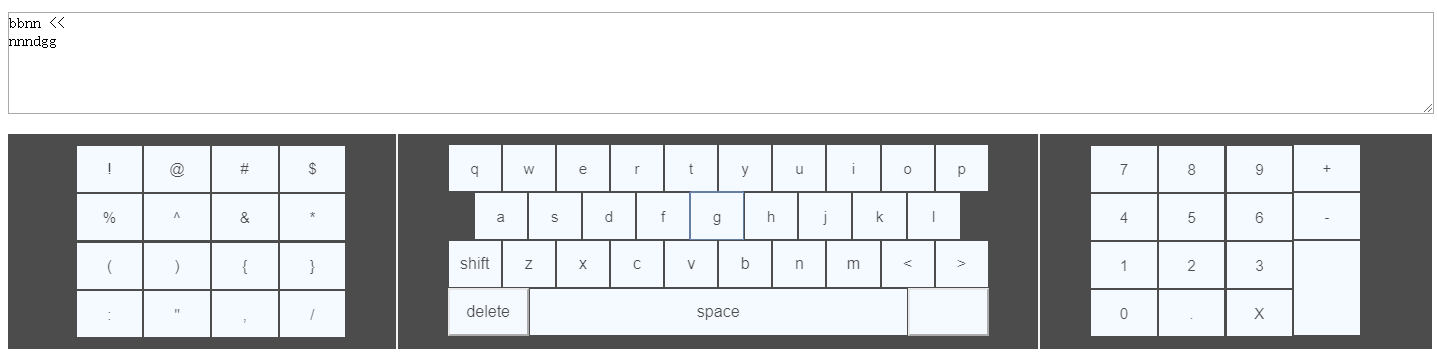
<template>

   <div>

    <el-input v-model="money" type="textarea" placeholder="请输入内容"></el-input>

    <div class="keyboard">

     <div class="keyboard_key">

        <div class="keyboard_character" @click="_chraClick">

            <button type="button" class="pad-num1 specialkey" data-num='!'>!</button>

            <button type="button" class="pad-num1 specialkey" data-num='@'>@</button>

            <button type="button" class="pad-num1 specialkey" data-num='#'>#</button>

            <button type="button" class="pad-num1 specialkey" data-num='$'>$</button>

            <button type="button" class="pad-num1 specialkey" data-num='%'>%</button>

            <button type="button" class="pad-num1 specialkey" data-num='^'>^</button>

            <button type="button" class="pad-num1 specialkey" data-num='&'>&</button>

            <button type="button" class="pad-num1 specialkey" data-num='*'>*</button>

            <button type="button" class="pad-num1 specialkey" data-num='('>(</button>

            <button type="button" class="pad-num1 specialkey" data-num=')'>)</button>

            <button type="button" class="pad-num1 specialkey" data-num='{'>{</button>

            <button type="button" class="pad-num1 specialkey" data-num='}'>}</button>

            <button type="button" class="pad-num1 specialkey" data-num=':'>:</button>

            <button type="button" class="pad-num1 specialkey" data-num='"'>"</button>

            <button type="button" class="pad-num1 specialkey" data-num=','>,</button>

            <button type="button" class="pad-num1 specialkey" data-num='/'>/</button>

        </div>

       <div class="centerdiv"></div>

        <div class="keyboard_Letter">

         <div class="group1">

            <button v-for="(item,index) in keylist" :key="index" type="button" class="pad-num1" @click="upClick1(item)">{{item}}</button>

         </div>

         <div class="group2">

            <button v-for="(item,index) in keylist2" :key="index" type="button" class="pad-num1" @click="upClick2(item)">{{item}}</button>

         </div>

         <div class="group3">

           <button v-for="(item,index) in keylist3" :key="index" type="button" class="pad-num1" @click="upClick3(item)" >{{item}}</button>

         </div>

         <div class="group4" @click="_letterClick">

            <button type="button" class="pad-num1 specialkey" data-num='delete'>delete</button>

            <button type="button" class="pad-num2 specialkey" data-num='space'>space</button>

            <button type="button" class="pad-num1 specialkey" data-num='enter'>

              <i class="fa fa-mail-reply" data-num='enter'></i>

              </button>

         </div>

        </div>

      <div class="centerdiv"></div>

        <div class="keyboard_number" @click="_handleKeyPress">

          <div class="pos-right-pad-num">

            <button type="button" class="pad-num specialkey" data-num=''></button>

            <button type="button" class="pad-num specialkey" data-num=''></button>

            <button type="button" class="pad-num specialkey" data-num=''></button>

            <button type="button" class="pad-num specialkey" data-num=''></button>

            <button type="button" class="pad-num specialkey" data-num=''></button>

            <button type="button" class="pad-num specialkey" data-num=''></button>

            <button type="button" class="pad-num specialkey" data-num=''></button>

            <button type="button" class="pad-num specialkey" data-num=''></button>

            <button type="button" class="pad-num specialkey" data-num=''></button>

            <button type="button" class="pad-num specialkey" data-num=''></button>

            <button type="button" class="pad-num specialkey" data-num='.'>.</button>

            <button type="button" class="pad-num specialkey" data-num='D'>X</button>

          </div>

          <div class="pos-right-pad-act">

            <button type="button" class="pad-num specialkey border-right" style="width:100%" data-num='+'>+</button>

            <button type="button" class="pad-num specialkey border-right" style="width:100%" data-num='-'>-<br></button>

            <button type="button" class="pad-num2 specialkey border-right" data-num='enter'><i class="fa fa-mail-reply" aria-hidden="true"></i></button>

          </div>

        </div>

     </div>

    </div>

  </div>

</template>

<script>

export default {

  data() {

    return {

      money: "",

      keylist: [],

      keylist2: [],

      keylist3: [],

      bigkeys1:[],

      bigkeys2:[],

      bigkeys3:[],

      smallkeys1:[],

      smallkeys2:[],

      smallkeys3:[],

      selected:false

    };

  },

  created() {

    this.readle();

  },

  methods: {

    readle() {

      let smallkey1 = ["q", "w", "e", "r", "t", "y", "u", "i", "o", "p"];

      let bigkey1 = ["Q", "W", "E", "R", "T", "Y", "U", "I", "O", "P"];

      let smallkey2 = ["a", "s", "d", "f", "g", "h", "j", "k", "l"];

      let bigkey2 = ["A", "S", "D", "F", "G", "H", "J", "K", "L"];

      let smallkey3 = ["shift", "z", "x", "c", "v", "b", "n", "m", "<", ">"];

      let bigkey3 = ["SHIFT","Z", "X", "C", "V", "B", "N", "M", "<", ">"];

      this.keylist = smallkey1;

      this.keylist2 = smallkey2;

      this.keylist3 = smallkey3;

      this.bigkeys1=bigkey1;

      this.bigkeys2=bigkey2;

      this.bigkeys3=bigkey3;

      this.smallkeys1=smallkey1;

      this.smallkeys2=smallkey2;

      this.smallkeys3=smallkey3;

    },

    _chraClick(e) {

      let num = e.target.dataset.num;

      this.money += num;

      this.$emit("updatekey",this.money);

    },

    _handleKeyPress(e) {

      let num = e.target.dataset.num;

      switch (String(num)) {

        case "D":

          this.deletekey();

          break;

        case "enter":

          this.money+="\n";

          break;

        default:

          this.Addnum(num);

          break;

      }

      this.$emit("updatekey",this.money)

    },

    deletekey() {

      let values = this.money;

      if (!values.length) {

        return false;

      } else {

        this.money = values.substring(, values.length - );

          this.$emit("updatekey",this.money)

      }

    },

    Addnum(num) {

      let value = this.money;

      this.money = value + num;

    },

    upClick1(key){

      this.money+=key;

        this.$emit("updatekey",this.money)

    },

    upClick2(key){

      this.money+=key;

        this.$emit("updatekey",this.money)

    },

    upClick3(key){

      switch(String(key))

      {

        case "shift":

        this.keylist=this.bigkeys1;

        this.keylist2=this.bigkeys2;

        this.keylist3=this.bigkeys3;

        break;

        case "SHIFT":

       this.keylist = this.smallkeys1;

       this.keylist2 = this.smallkeys2;

       this.keylist3 = this.smallkeys3;

       break;

       default:

       this.money+=key;

       break;

      }

        this.$emit("updatekey",this.money)

    },

    _letterClick(e){

        let num = e.target.dataset.num;

        switch(String(num))

        {

          case "delete":

          this.deletekey();

          break;

          case "space":

          this.money +=" ";

          break;

          case "enter":

          this.money +="\n";

          break;

        }

    },

  }

};

</script>

<style lang="scss" scoped>

.keyboard {

  width: %;

  height: 215px;

  background: #;

  opacity: 0.7;

  overflow: hidden;

}

.keyboard_key {

  padding-top: 10px;

  width: %;

  display: flex;

  flex-direction: row;

  justify-content: space-between;

}

button {

  background-color: aliceblue;

}

// ----数字键盘-----

.keyboard_number {

  display: flex;

  width: %;

  margin: ;

  padding: ;

  vertical-align: bottom;

  flex-direction: row;

  justify-content: space-between;

  flex-wrap: wrap;

  align-items: center;

}

.pos-right-pad-num {

  display: flex;

  width: %;

  flex-direction: row;

  justify-content: space-between;

  flex-wrap: wrap;

  align-items: center;

}

.pos-right-pad-act {

  width: %;

}

.pad-num {

  margin:  !important;

  width: 33.3333333%;

  height: 48px;

  border: ;

  border: 1px solid #;

  font-size: 15px;

  cursor: pointer;

  &:hover {

    position: relative;

    cursor: pointer;

  }

  &:active {

    top: 1px;

    left: 1px;

    background-color: #201a1a;

  }

}

.pad-num2 {

  margin:  !important;

  width: %;

  height: 96px;

  border: ;

  border: 1px solid #;

  font-size: 15px;

  cursor: pointer;

  &:hover {

    position: relative;

    cursor: pointer;

  }

  &:active {

    top: 1px;

    left: 1px;

    background-color: #201a1a;

  }

}

// 字符键盘

.keyboard_character {

  width: %;

  margin: ;

  padding: ;

  display: flex;

  flex-direction: row;

  justify-content: space-between;

  flex-wrap: wrap;

  align-items: center;

  margin-left: %;

  .pad-num1 {

    width: %;

    height: 48px;

    border: 1px solid #;

    font-size: 15px;

    cursor: pointer;

    &:hover {

      position: relative;

      cursor: pointer;

    }

    &:active {

      top: 1px;

      left: 1px;

      background-color: #201a1a;

    }

  }

}

//字母键盘

.keyboard_Letter {

  width: %;

  margin: ;

  padding: ;

  .group1 {

    display: flex;

    flex-direction: row;

    .pad-num1 {

      width: %;

      height: 48px;

      border: 1px solid #;

      font-size: 15px;

      cursor: pointer;

      &:hover {

        position: relative;

        cursor: pointer;

      }

      &:active {

        top: 1px;

        left: 1px;

        background-color: #201a1a;

      }

    }

  }

  .group2 {

    display: flex;

    flex-direction: row;

    width: %;

    margin-left: 26px;

    .pad-num1 {

      width: %;

      height: 48px;

      border: 1px solid #;

      font-size: 15px;

      cursor: pointer;

      &:hover {

        position: relative;

        cursor: pointer;

      }

      &:active {

        top: 1px;

        left: 1px;

        background-color: #201a1a;

      }

    }

  }

  .group3 {

    display: flex;

    flex-direction: row;

    .pad-num1 {

      width: %;

      height: 48px;

      border: 1px solid #;

      font-size: 16px;

      cursor: pointer;

      &:hover {

        position: relative;

        cursor: pointer;

      }

      &:active {

        top: 1px;

        left: 1px;

        background-color: #201a1a;

      }

    }

  }

  .group4 {

    display: flex;

    flex-direction: row;

    .pad-num1 {

      width: %;

      height: 48px;

      font-size: 16px;

      cursor: pointer;

      &:hover {

        position: relative;

        cursor: pointer;

      }

      &:active {

        top: 1px;

        left: 1px;

        background-color: #201a1a;

      }

    }

    .pad-num2 {

      width: %;

      height: 48px;

      border: 1px solid #;

      font-size: 16px;

      cursor: pointer;

      &:hover {

        position: relative;

        cursor: pointer;

      }

      &:active {

        top: 1px;

        left: 1px;

        background-color: #201a1a;

      }

    }

  }

}

.centerdiv {

  border-right: 2px solid rgb(, , );

  padding-bottom: 1800px; /*关键*/

  margin-bottom: -1800px; /*关键*/

  padding-top: 1800px; /*关键*/

  margin-top: -1800px; /*关键*/

}

.input-box {

  font-size: 35px;

  font-weight: bold;

  height: 40px;

  border-bottom: 1px solid #aaa;

  padding: 10px 15px;

  text-align: right;

  width: %;

}

</style>
<template>

    <div>

        <h1>父组件</h1>

        <textarea type="text" v-model="keyboards"></textarea>

        <keyboard  v-on:updatekey="GetKeyVal"></keyboard>

    </div>

</template>

<script>

import Keyboard from './Keyboard'

export default {

    data() {

        return {

            keyboards:""

        }

    },

    components: {

        Keyboard

    },

    methods:{

       GetKeyVal(val){

           this.keyboards=val;

       }

    },

}

</script>

<style lang="scss" scoped>

    #app {

        width: 680px;

        margin: 20px auto;

        font-family: Verdana, Sans-Serif;

        h1 {

            color: #42b983;

            font-weight: bold;

        }

        textarea {

            display: block;

            width: %;

            min-height: 100px;

            padding: ;

            margin: 20px ;

            font-size: 16px;

        }

    }

</style>
vue-自定义pc端软键盘的更多相关文章
- 自定义View 实现软键盘实现搜索
1. xml文件中加入自定义 搜索view <com.etoury.etoury.ui.view.IconCenterEditText android:id="@+id/search_ ...
- Ionic3学习笔记(九)关于 Android 端软键盘弹出后界面被压缩的问题
本文为原创文章,转载请标明出处 今天做了一个如下图所示的页面. iOS 端毫无 bug,Android 端却出现了问题.当软键盘弹出后,Android 端的 tabs 移到了软键盘的上面,再仔细一看, ...
- vue实现PC端分辨率适配
lib-flexible + px2rem Loader lib-flexible 阿里伸缩布局方案 px2rem-loader:px转rem: 依赖 首先需要安装 vue-cli 脚手架,这里我安装 ...
- web中ios移动端软键盘收起后,页面内容留白不下滑
微信里面打开web页面,在ios软键盘收起时,页面键盘位置的内容留白,如下图 这个问题纠结了很久,然后请教了老大(威哥),看到页面老大给出的方案就是代码改变滚动条的位置. 这里就监听键盘收起的事件,来 ...
- 可编辑DIV与移动端软键盘兼容性问题汇总
此文复现的所有兼容性问题均为以下情况: 1. 腾讯X5内核 2. 全屏webview 问题如下: 1. IOS12 中软键盘弹出导致页面顶部截断,并且无法恢复. 解决方法:添加交互事件,调用本地方法, ...
- vue实现PC端调用摄像头拍照人脸录入、移动端调用手机前置摄像头人脸录入、及图片旋转矫正、压缩上传base64格式/文件格式
进入正题 1. PC端调用摄像头拍照上传base64格式到后台,这个没什么花里胡哨的骚操作,直接看代码 (canvas + video) <template> <div> &l ...
- vue实现pc端无限加载功能
主要思路通过自定义指令,在视图初始化完成后,绑定scroll事件.当scrollTop + clientHeight >= scrollHeight时(此时滚定条到了底部)触发loadMore事 ...
- IOS微信端软键盘收起后界面按钮失效问题
问题描述: 1.在vue里封装了一个confirm的弹窗(即如下一个弹窗) 2.发现在IOS微信客户端中打开后,当需要在表单中输入内容的时候,很自然的点击了键盘右上角的[完成]按钮 3.啊~~~,惊人 ...
- vue 自定义 移动端筛选条件
1.创建组件 components/FilterBar/FilterBar.vue <template> <div class="filterbar" :styl ...
随机推荐
- N76E003 工程创建教程
一.准备工作: 1.下载编译工具keil c51 2.下载N76E003提供的板级支持包(BSP),可到nuvoton上下载 二.开发环境搭建 1.安装keil c51,然后和谐...不能随便发链 ...
- nodejs小问题拾遗
1.npm WARN saveError ENOENT: no such file or directory, open 'C:\Users\Root\package.json' cd 切换到D:\n ...
- 如何用VBA实现格式刷的功能?
1. http://club.excelhome.net/thread-373686-1-1.html 复制1格式Selection.CopyFormat粘贴格式Selection.PasteForm ...
- 【vue】如何在 Vue-cli 创建的项目中引入 iView
根据vue项目的搭建教程,以下记录如何在Vue-cli创建的项目中引入iView. 1)iView的安装,在项目下使用 npm 安装iView cnpm install iview --save ...
- python 中 打印及格式化字符串的相关方法
原文 将值转换为字符串 Python 有多种方式将任何值转为字符串: 将它传给 repr() 或 str() 函数. repr() 和 str() 的区别,看几个例子: >>> pr ...
- Android必学-异步加载+Android自定义View源码【申明:来源于网络】
Android必学-异步加载+Android自定义View源码[申明:来源于网络] 异步加载地址:http://download.csdn.net/detail/u013792369/8867609 ...
- day6 六、元组、字典、集合的基本操作和内置方法
一.元组 1.定义 # 元组tuple # 记录多个值,当值没有改的需求是,建议用元组更好 # 定义:在()内用逗号分开任意类型的值 # name = (, , 300.5]) # print(nam ...
- jenkins编辑报错Exception when publishing, exception message的解决办法
jenkins编辑报错Exception when publishing, exception message的解决办法 查看目标主机的磁盘空间是否占满,清理磁盘空间即可
- 证书文件(pfx)读取时报 “指定的网络密码不正确”
实际情况: 1.本地测试正确,发布到windows server 2003 iis6 可以正常运行 发布到 windows server 2008 上 II7就报 “指定的网络密码不正确” 日志报错为 ...
- 打造研发效率核心竞争力!第40届MPD软件工作坊北京站议题公开
同样是做研发,为什么你的效率总是提不上来?都在寻找创新的技术领域,为何别人总能抢占先机?提升自己的研发竞争力,你都有什么方法? 研发效能已经成为软件企业发展非常核心的竞争力.身处在高速发展的软件研发行 ...