
sqlalchemy学习-- 重要参数
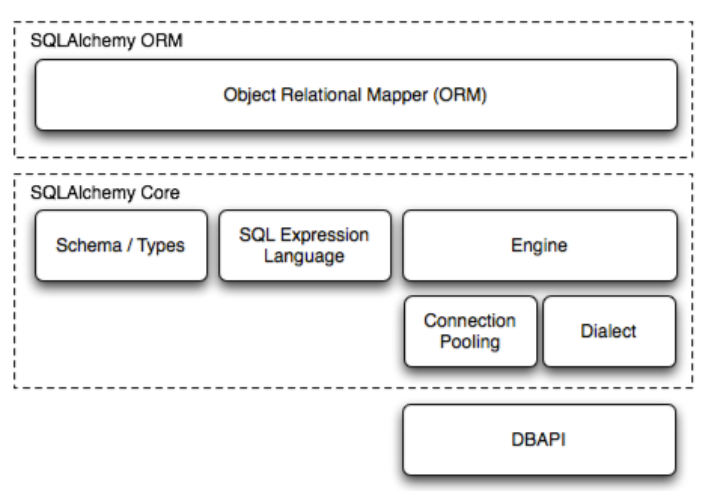
Base = declarative_base
基类:
1.存储表
2.建立class-Table 的映射关系
engine = create_engine('mysql://root:root@localhost:3307/test', echo=False)
连接数据库
Session = sessionmaker(bind=engine)

sess = Session()
会话
1.保存上下文信息
2.容器,存储对对象的操作。
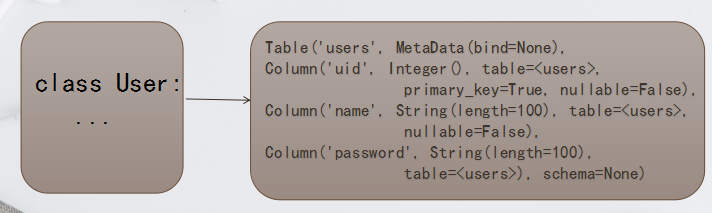
metadata
所有Base的子类,共享这个metadata
1.所有Table存储在此metadata中

2.共享此metadata的属性和方法。
mapper
将class -- Table 进行映射
Column 重要参数

1.name  字段名(可选,该参数优先级高于变量名)

2.type_ 字段类型,注意:MySQL中,String类型必须指定长度

3.primary_key 如该参数为True,那么该字段为主键(False)

4.unique 如该参数如果为True,相应字段具有唯一性(False)

5.index 如该参数为True,相应字段为索引字段(False)

6.nullable 如该参数为False,该字段不允为空(True)

7.ForeignKey 通过该参数指定外键

8.default 指定该字段的默认值
engine 特性及重要参数

1.Engine是数据库核心接口

2.Lazy Connecting,此时并未真正建立其和数据库的连接,直到:engine.execute(),engine.connect()等方法被调用才会真正建立连接

3.pool_size = 5; 连接池的大小,默认为 5

4.max_overflow = 10; 连接池可溢出最大数量 默认为10 [不放入连接池]

5.echo = False;  打印SQL语句,调用logging模块,默认为False

6.encoding = 'utf-8'; 编码方式,默认为 utf8

7.pool_recycle = -1 连接回收时间 -1,永不回收(推荐设置3600即1h)

	注意: MySQL连接的默认断开时间是 8小时

8.pool_timeout=30 尝试从连接池中获取连接的超时时间
反向映射(即将数据库中的表映射成程序中的表对象)
Base.metadata.reflect(engine)

print(Base.metadata.tables)
print(Student.__table__)    # 查看类对应的表

print(Student.__mapper__)  # 查看类对应的mapper函数
engine = create_engine("...")

Session = sessionmaker(bind=engine)

# new session.   no connections are in use.

session = Session()

try:

    # first query.  a Connection is acquired

    # from the Engine, and a Transaction

    # started.

    item1 = session.query(Item).get(1)

    # second query.  the same Connection/Transaction

    # are used.

    item2 = session.query(Item).get(2)

    # pending changes are created.

    item1.foo = 'bar'

    item2.bar = 'foo'

    # commit.  The pending changes above

    # are flushed via flush(), the Transaction

    # is committed, the Connection object closed

    # and discarded, the underlying DBAPI connection

    # returned to the connection pool.

    session.commit()

except:

    # on rollback, the same closure of state

    # as that of commit proceeds.

    session.rollback()

    raise

finally:

    # close the Session.  This will expunge any remaining

    # objects as well as reset any existing SessionTransaction

    # state.  Neither of these steps are usually essential.

    # However, if the commit() or rollback() itself experienced

    # an unanticipated internal failure (such as due to a mis-behaved

    # user-defined event handler), .close() will ensure that

    # invalid state is removed.

    session.close()
关于数据库 字段为时间戳问题的探究:
/*create_time 自动保存创建时间;modify_time 自动保存修改时间*/

create table teacher(id int not null auto_increment primary key, name varchar(30),create_time TIMESTAMP default CURRENT_TIMESTAMP not null,modify_time TIMESTAMP default CURRENT_TIMESTAMP on update CURRENT_TIMESTAMP not null)ENGINE=InnoDB DEFAULT CHARSET=utf8;
show create table students; # 查看创建数据表的命令
import datetime

import time

from sqlalchemy import create_engine, Column, Integer, String, TIMESTAMP, text

from sqlalchemy.ext.declarative import declarative_base

from sqlalchemy.orm import sessionmaker

Base = declarative_base()

engine = create_engine("mysql+pymysql://root:root@localhost/sqla?charset=utf8")

class Student(Base):

    __tablename__ = "students"

    __table_args__ = {

        # "mysql_engine":"MyISAM",

        "mysql_charset":"utf8"

    }  # show create table students 可以查看建表语句;默认是Innodb,lating-1.如果想显示中文需要修改指定建表的类型,同时,engine也要指定编码格式

    id = Column(Integer,primary_key=True)

    name = Column(String(30))

    # first  update_time 必须在上面,

    update_time = Column(TIMESTAMP,nullable=False)

    create_time = Column(TIMESTAMP,nullable=False,server_default=text("current_timestamp"))

    # create_time = Column(TIMESTAMP(True),nullable=False,server_default=text("now()"))

    # create_time = Column(TIMESTAMP(True),default=datetime.datetime.now()) # show create table students 会发现create_time 字段默认是null而不是current_timestamp,虽然可以正常使用,但是不推荐

    # second 颠倒 update_time 和 create_time 两个字段的顺序

    # create_time = Column(TIMESTAMP(True),nullable=False,server_default=text("current_timestamp"))

    # create_time = Column(TIMESTAMP(True),nullable=False,server_default=text("now()"))

    # create_time = Column(TIMESTAMP(True),nullable=False,default=datetime.datetime.now())   # error 会有 on update current_timestamp语句

    # update_time = Column(TIMESTAMP(True),nullable=False,server_default=text("current_timestamp on update current_timestamp"))

    # update_time = Column(TIMESTAMP(True),nullable=False,server_default=text("now() on update current_timestamp"))

    # third error  # 该例证明了直接颠倒两个字段会失败的.

    # create_time = Column(TIMESTAMP(True),nullable=False,server_default=text("current_timestamp"))

    # update_time = Column(TIMESTAMP(True),nullable=False)

Base.metadata.drop_all(engine)

Base.metadata.create_all(engine)

Session = sessionmaker(bind=engine)

sess = Session()

zhangsan = Student(name='张三')

sess.add(zhangsan)

sess.commit()

time.sleep(10)

zhangsan_1 = sess.query(Student).get(1)

zhangsan_1.name = 'lisi'

sess.commit()

wangwu = Student(name='wangwu')

sess.add(wangwu)

sess.commit()
sqlalchemy学习-- 重要参数的更多相关文章
- SQLAlchemy 学习笔记(二):ORM
照例先看层次图 一.声明映射关系 使用 ORM 时,我们首先需要定义要操作的表(通过 Table),然后再定义该表对应的 Python class,并声明两者之间的映射关系(通过 Mapper). 方 ...
- 学习JVM参数前必须了解的
JVM参数是什么 大家照相通常使用手机就够用了,但是针对发烧友来说会使用更专业的设备,比如单反相机,在单反里有好几个模式,P/A/S/M,其中P是傻瓜模式,程序会自动根据环境设置快门速度和光圈大小,以 ...
- sqlAlchemy学习 001
研究学习主题 sqlAlchemy架构图 测试练习代码编写 连接数据库 看代码 db_config = { 'host': 'xxx.xxx.xxx.xx', 'user': 'root', 'pas ...
- SQLAlchemy 学习笔记(一):Engine 与 SQL 表达式语言
个人笔记,如有错误烦请指正. SQLAlchemy 是一个用 Python 实现的 ORM (Object Relational Mapping)框架,它由多个组件构成,这些组件可以单独使用,也能独立 ...
- sqlalchemy学习
sqlalchemy官网API参考 原文作为一个Pythoner,不会SQLAlchemy都不好意思跟同行打招呼! #作者:笑虎 #链接:https://zhuanlan.zhihu.com/p/23 ...
- TypeScript 学习一 参数,函数,析构表达式
1,TypeScript是由谷歌开发的,并且新出的Angular2框架就是谷歌公司由TypeScript语言编写的,所以现在TypeScript是有微软和谷歌一起支持的: 2,TypeScript在j ...
- shell脚本学习- 传递参数
跟着RUNOOB网站的教程学习的笔记 我们可以在执行shell脚本时,向脚本传递参数,脚本内获取参数的格式为:$n.n代表一个数字,1为执行脚本的第一参数,2为执行脚本的第二个参数,以此类推... 实 ...
- 深度学习:参数(parameters)和超参数(hyperparameters)
1. 参数(parameters)/模型参数 由模型通过学习得到的变量,比如权重和偏置 2. 超参数(hyperparameters)/算法参数 根据经验进行设定,影响到权重和偏置的大小,比如迭代次数 ...
- SQLAlchemy 学习笔记(三):ORM 中的关系构建
个人笔记,不保证正确. 关系构建:ForeignKey 与 relationship 关系构建的重点,在于搞清楚这两个函数的用法.ForeignKey 的用法已经在 SQL表达式语言 - 表定义中的约 ...
随机推荐
- json - 内容中需处理的特殊字符(转)
转 http://blog.csdn.net/icewizardry/article/details/17265267 protected string RemoveIllegalCharacterF ...
- tp5生成小程序推广二维码
//获取用户经销商信息 及生成推广二维码 public function qrcode() { //拿到openid 查找用户表内是否有该用户 没有则拒绝生成二维码 有则查看是否已生成二维码 有生成则 ...
- Android 接入X5WebView,让WebView加载更快;
X5内核,微信和QQ浏览器都在用的WebView: 官网地址:https://x5.tencent.com,详细的信息进官网了解: 这是官方的宣传语: 1) 速度快:相比系统webview的网页打开速 ...
- 求计算两个时间的差(DateTime类和TimeSpan类)
日期时间数据是项目设计过程中经常需要处理的信息,C#提供了DateTime类和TimeSpan类来处理日期时间数据.下面介绍说明Datetime类和TimeSpan类的使用 //初始化DateTime ...
- 一、Html5基础讲解以及五个标签
什么是html?html是用来描述网页的一种语言html指超文本标记语言html不是编程语言,是一种标记语言 HTML基础标签 Head.body html标题 <h1>…<h6&g ...
- 关于{get;set;}访问器
/// <summary> /// 此视频更新时间/创建时间 [生成时间,不手填] /// </summary> public System.String CreateTime ...
- 使用bootstrap3.0搭建一个具有自定义风格的侧边导航栏
由于工作变动,新的项目组,可能会涉及到更多的类似于后台管理系统这一类的项目,而且开发可能更加偏向于传统型的开发,希望今后能够在新的项目中能够用得上vuejs吧! 接手项目的时候,就是一个后台管理系统, ...
- android 开发 实现一个带图片Image的ListView
注意:这种实现方法不是实现ListView的最优方法,只是希望通过练习了解ListView的实现原理 思维路线: 1.创建drawable文件夹将要使用的图片导入进去 2.写一个类,用于存放图片ID数 ...
- Java网络通信 TCP网络,ServerSocket类
package rom; import java.io.BufferedReader; import java.io.IOException; import java.io.InputStreamRe ...
- 设置nginx中文件上传的大小限制度
通过设置nginx的client_max_body_size解决nginx+php上传大文件的问题: 用nginx来做webserver的时,上传大文件时需要特别注意client_max_body_s ...