
How To Install Development Tools In Linux
In this brief tutorial, we will be discussing how to install development tools in popular Linux distributions like Arch Linux, CentOS, RHEL, Fedora, Debian, Ubuntu, and openSUSE etc. These development tools includes all necessary applications, such as GNU GCC C/C++ compilers, make, debuggers, man pages and others which are needed to compile and build new softwares, packages.
Install Development Tools In Linux
The developer tools can be installed either individually one by one or all at once. We are going to install all at once to make things much easier.
1. Install Development Tools In Arch Linux and derivatives
To install development tools in Arch Linux and its derivatives like Antergos, Manjaro Linux, just run:
sudo pacman -Syyu
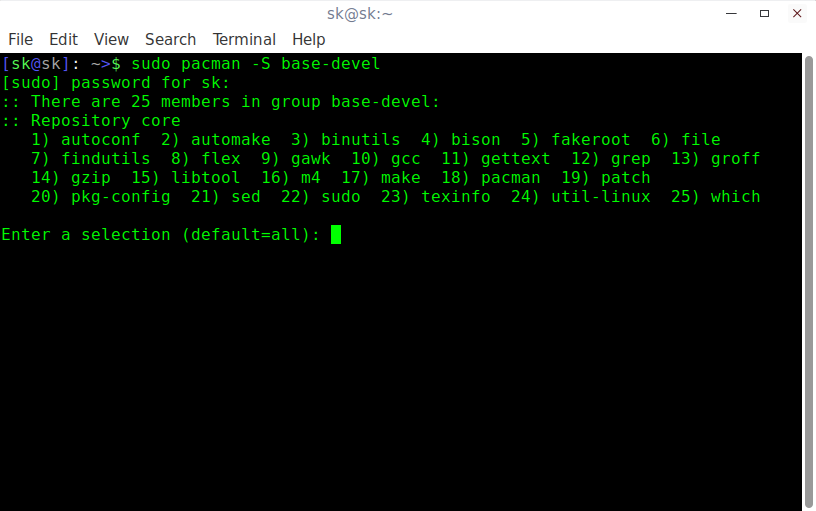
sudo pacman -S base-devel
There are 25 members in the Arch Linux development tools group, such as,
- autoconf
- automake
- binutils
- bison
- fakeroot
- file
- findutils
- flex
- gawk
- gcc
- gettext
- grep
- groff
- gzip
- libtool
- m4
- make
- pacman
- patch
- pkg-config
- sed
- sudo
- texinfo
- util-linux
- which
Just hit ENTER to install all of them.
2. Install Development Tools In RHEL, CentOS, Scientific Linux, Fedora
To install development tools in Fedora, RHEL and its clones such as CentOS, Scientific Linux, run the following commands as root user.
yum update
yum groupinstall "Development Tools"
The above command is going to install all necessary developer tools, such as:
- autoconf
- automake
- bison
- byacc
- cscope
- ctags
- diffstat
- doxygen
- elfutils
- flex
- gcc/gcc-c++/gcc-gfortran
- git
- indent
- intltool
- libtool
- patch
- patchutils
- rcs
- subversion
- swig

3. Install Development Tools In Debian, Ubuntu and derivatives
To install required developer tools in DEB based systems, run:
sudo apt-get update
sudo apt-get install build-essential
This command will all necessary packages to setup the development environment in Debian, Ubuntu and its derivatives.
- binutils
- cpp
- gcc-5-locales
- g++-multilib
- g++-5-multilib
- gcc-5-doc
- gcc-multilib
- autoconf
- automake
- libtool
- flex
- bison
- gdb
- gcc-doc
- gcc-5-multilib
- and many.
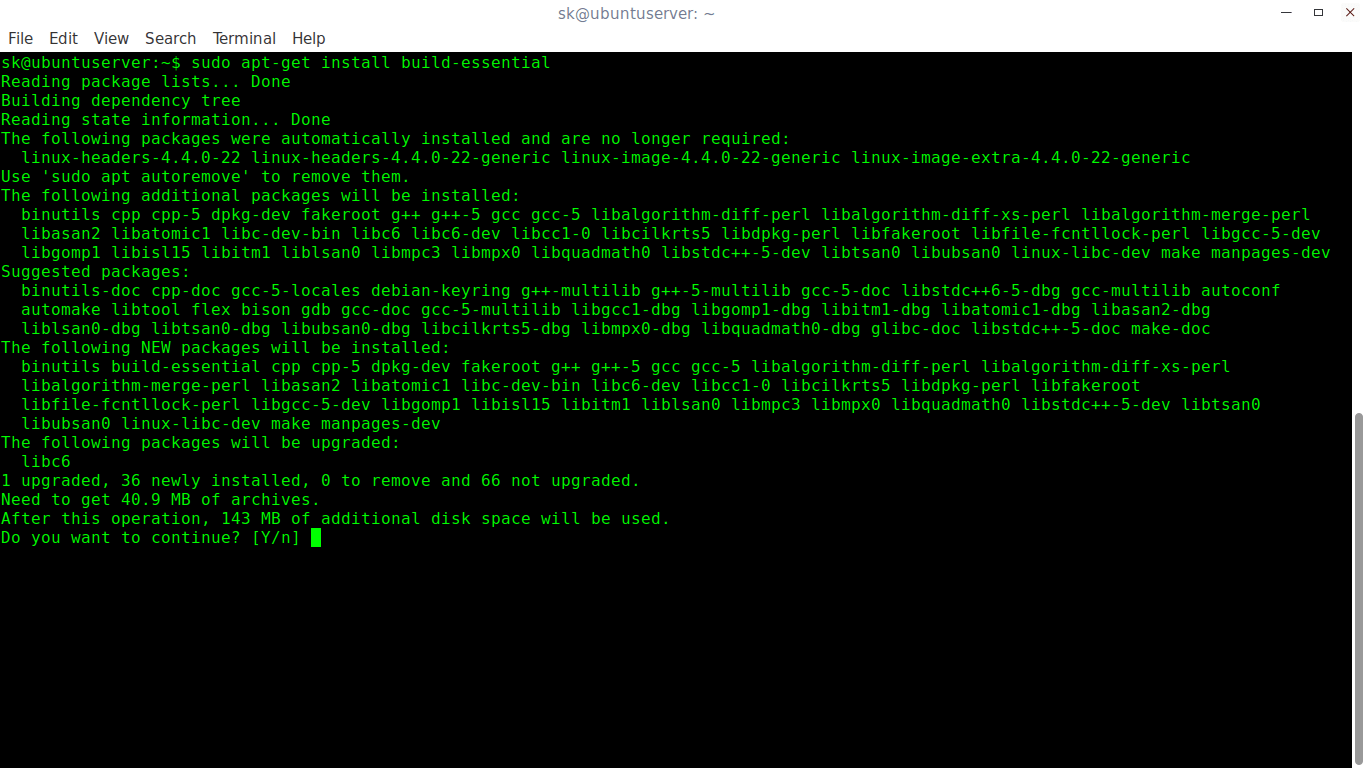
You now have the necessary development tools to develop a software in your Linux box.
4. Install Development Tools In openSUSE/SUSE
To setup development environment in openSUSE and SUSE enterprise, run the following commands as root user:
zypper refresh
zypper update
zypper install -t pattern devel_C_C++
Verifying Installation
Now, Let us verify the develop tools have been installed or not. To do so, run:
gcc -v
make -v

As you see in the above output, the development tools have been successfully installed. Start developing your applications!
That’s all for today! On behalf of OSTechNix, I wish you a very Happy New Year 2017. May the new year bring new hopes and opportunities for you!
Cheers!!
How To Install Development Tools In Linux的更多相关文章
- RHEL / CentOS Linux Install Core Development Tools Automake, Gcc (C/C++), Perl, Python & Debuggers
how do I install all developer tools such as GNU GCC C/C++ compilers, make and others, after install ...
- Linux小记 -- apt-get install build-essential和yum groupinstall "Development Tools"
Ubuntu的apt install build-essential 作用:配置Debian系统编译环境,就是下载安装支持编译Debian包的依赖/包,比如gcc等. 直接执行 #apt instal ...
- How to install JDK (Java Development Kit) on Linux
This tutorial will guide you on how to install JDK (Java Development Kit) on Linux. Since I use Cent ...
- 转 How to install XenServer Tools – Linux(forward)
本文转自: http://blog.csdn.net/zhongguoren666/article/details/7088798 比较懒....大家看图说话就行了.... 说句实在话…还是老外写的地 ...
- How-to Install VMware Tools on Debian Stretch 9 32/64bit Linux+GNU
在虚拟机VMWARE上安装debian9 安装vmwaretools时候遇到问题 询问我IFCONFIG安装在哪里? 新版的debian不知道是用户权限问题还是使用了其他网络配置工具 vmwareto ...
- 环境初始化 Build and Install the Apache Thrift IDL Compiler Install the Platform Development Tools
Apache Thrift - Centos 6.5 Install http://thrift.apache.org/docs/install/centos Building Apache Thri ...
- Linux之一次性安装开发工具:yum groupinstall Development tools
[spark@sparksinglenode ~]$ yum grouplist | moreLoaded plugins: fastestmirror, refresh-packagekit, se ...
- How to install Node.js on Linux
How to install Node.js on Linux Posted on November 13, 2015 by Dan Nanni Leave a comment Question: H ...
- yum groupinstall "Development Tools" 批量安装软件
注:可以通过 yum grouplist 来查看可能批量安装哪些列表 从Windows转到Linux下面,一个不习惯的地方就是在图形界面下安装和删除软件的时候非常缓慢.但是如果你掌握了用yum的命令行 ...
随机推荐
- 负载均衡SESSION同步总结
1.redis/分布式文件存储系统/数据库 存储session,解决负载均衡集群中session不一致问题 http://www.cnblogs.com/painsOnline/p/5194851.h ...
- [效果]JS折叠菜单-使用方法 (Moo.Fx)
(从已经死了一次又一次终于挂掉的百度空间人工抢救出来的,发表日期2014-06-24) 用法: 1.添加JS库 CODE:<script src="prototype.lite.js& ...
- ie7下z-index失效问题解决方法(详细分析)
(从已经死了一次又一次终于挂掉的百度空间人工抢救出来的,发表日期2014-04-03) 点评:绝对定位元素的“有定位属性(relative或absolute)的父元素”在渲染层次时起到了主要作用,前面 ...
- windows apache vhost 403 error
<Directory D:\workspace\ecshop> Options FollowSymLinks AllowOverride None Order deny,allow all ...
- Animated Scroll to Top
Due to a number of requests, I'm writing a detail tutorial on how to create an animated scroll to to ...
- OSG 实现跟随节点的相机(转)
本章教程将继续使用回调和节点路径(NodePath)来检索节点的世界坐标. 本章目标: 在一个典型的仿真过程中,用户可能需要从场景中的各种车辆和人物里选择一个进行跟随.本章将介绍一种将摄像机“依附 ...
- C语言阶乘和求闰年
#include<stdio.h> void main(){ int i,a,s=1; scanf("%d",&a); for(i=1;i<=a;i++) ...
- little's law(律特法则)
参考:https://en.wikipedia.org/wiki/Little%27s_law(周末看一下) 最近在做性能压力测试,开始时,压力压不上去,参考: N = X * E[T] ,N就是你的 ...
- [程序猿入行必备]CSS样式之优先级
专业玩家请移步:http://www.w3.org/TR/CSS2/cascade.html 使用CSS控制页面样式时,常常出现设定的样式被"覆盖",不能生效的情况. 浏览器是根据 ...
- iOS开发——UI篇Swift篇&UISwitch/UIStepper
UISwitch/UIStepper override func viewDidLoad() { super.viewDidLoad() titleLabel.text = titleString / ...