
pytest五:fixture_autouse=True
平常写自动化用例会写一些前置的 fixture 操作,用例需要用到就直接传该函数的参数名称就行了。当用例很多的时候,每次都传返个参数,会比较麻烦。
fixture 里面有个参数 autouse,默讣是 Fasle 没开启的,可以设置为True 开启自动使用 fixture 功能,返样用例就丌用每次都去传参了
调用 fixture 三种方法
1.函数或类里面方法直接传 fixture 的函数参数名称
2.使用装饰器@pytest.mark.usefixtures()修饰
3.autouse=True 自动使用
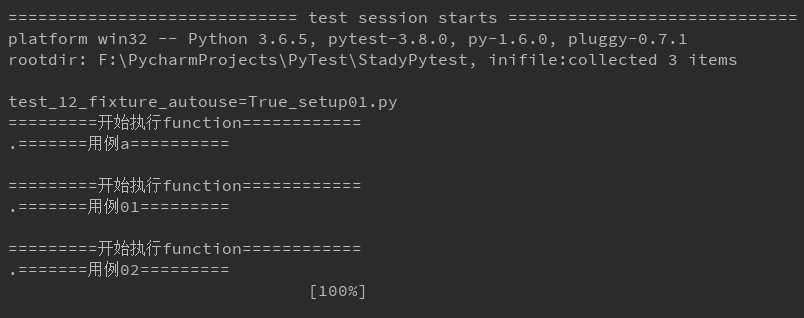
方法一:先定义 start 功能,用例全部传 start 参数,调用该功能
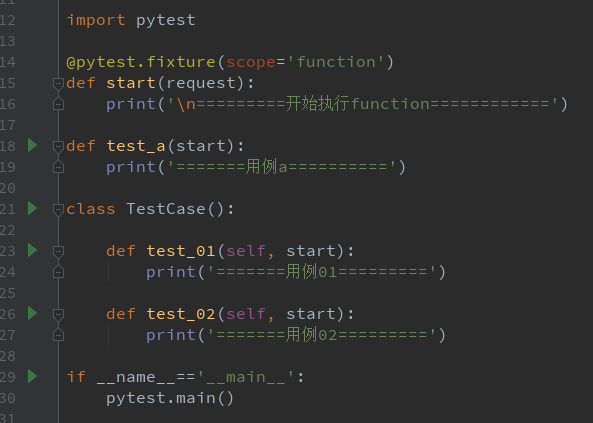
 import pytest
@pytest.fixture(scope='function')
def start(request):
    print('\n=========开始执行function============')

def test_a(start):
    print('=======用例a==========')

class TestCase():

    def test_01(self, start):
        print('=======用例01=========')

    def test_02(self, start):
        print('=======用例02=========')

if __name__=='__main__':
    pytest.main()

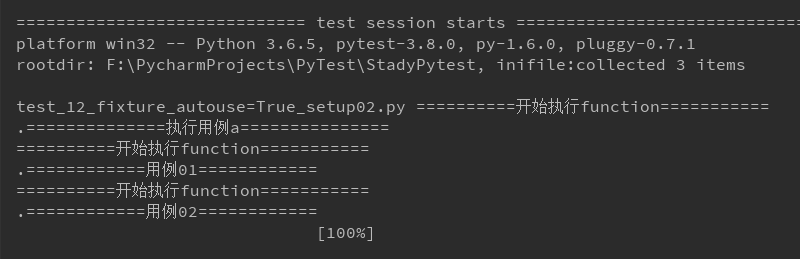
方法二:使用装饰器@pytest.mark.usefixtures()修饰需要运行的用例
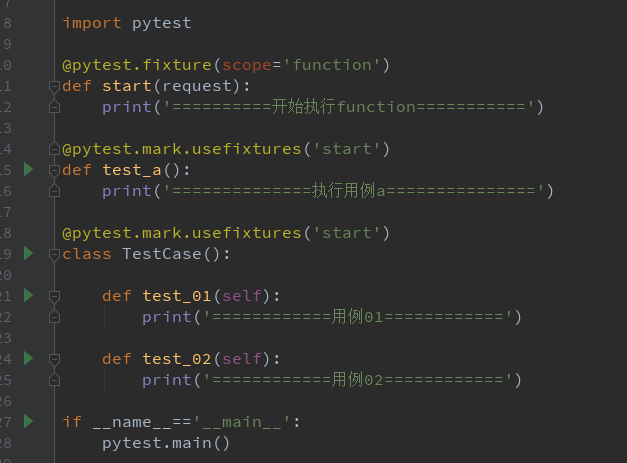
import pytest

@pytest.fixture(scope='function')
def start(request):
    print('==========开始执行function===========')

@pytest.mark.usefixtures('start')
def test_a():
    print('==============执行用例a===============')

@pytest.mark.usefixtures('start')
class TestCase():

    def test_01(self):
        print('============用例01============')

    def test_02(self):
        print('============用例02============')

if __name__=='__main__':
    pytest.main()
方法三:autouse 设置为 True,自动调用 fixture 功能
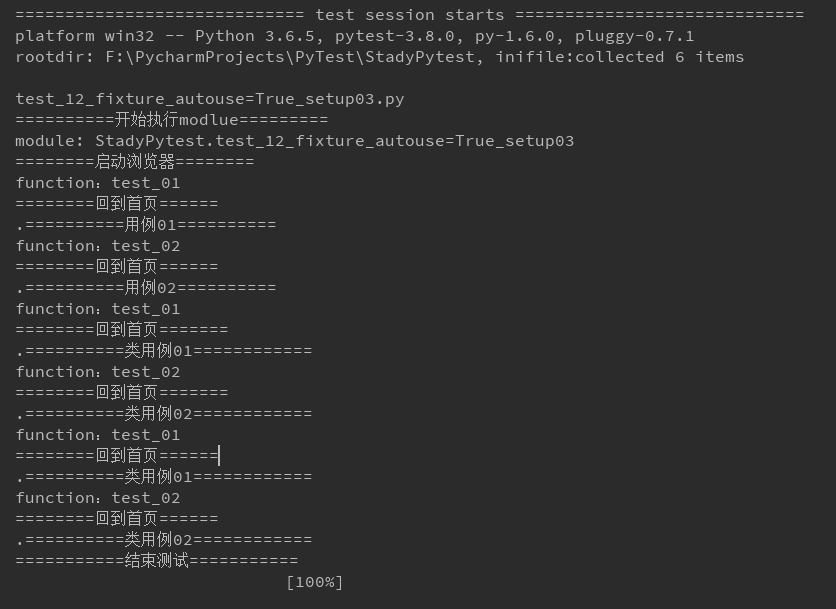
1.start 设置 scope 为 module 级别,在当前.py 用例模块只执行一次,autouse=True 自动使用
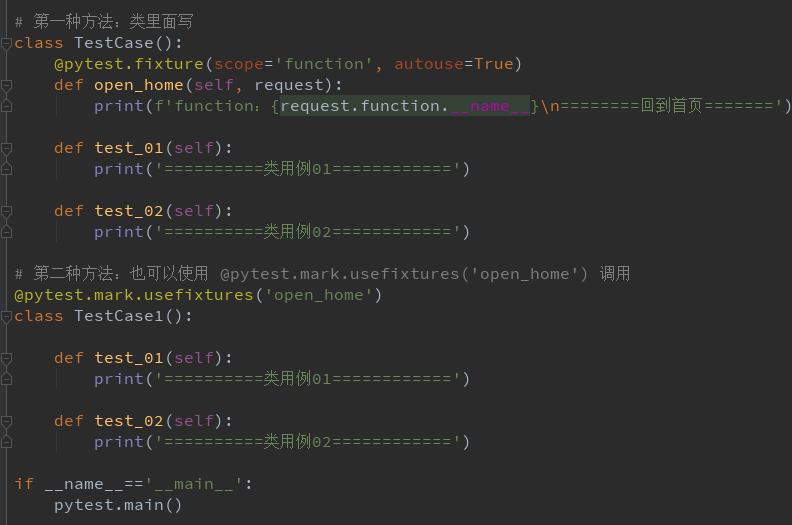
2.open_home 设置 scope 为 function 级别,每个用例前都调用一次,自动使用

import time
import pytest

@pytest.fixture(scope='module', autouse=True)
def start(request):
    print('\n==========开始执行modlue=========')
    print(f'module: {request.module.__name__}')
    print('========启动浏览器========')
    yield
    print('===========结束测试===========')

@pytest.fixture(scope='function', autouse=True)
def open_home(request):
    print(f'function:{request.function.__name__}\n========回到首页======')

def test_01():
    print('==========用例01==========')

def test_02():
    print('==========用例02==========')

# 第一种方法:类里面写
class TestCase():
    @pytest.fixture(scope='function', autouse=True)
    def open_home(self, request):
        print(f'function:{request.function.__name__}\n========回到首页=======')

    def test_01(self):
        print('==========类用例01============')

    def test_02(self):
        print('==========类用例02============')

# 第二种方法:也可以使用 @pytest.mark.usefixtures('open_home') 调用
@pytest.mark.usefixtures('open_home')
class TestCase1():

    def test_01(self):
        print('==========类用例01============')

    def test_02(self):
        print('==========类用例02============')

if __name__=='__main__':
    pytest.main()
pytest五:fixture_autouse=True的更多相关文章
- 学习-Pytest(五)yield操作
1.fixture的teardown操作并不是独立的函数,用yield关键字呼唤teardown操作 2.scope="module" 1.fixture参数scope=”modu ...
- Pytest系列(7) - skip、skipif跳过用例
如果你还想从头学起Pytest,可以看看这个系列的文章哦! https://www.cnblogs.com/poloyy/category/1690628.html 前言 pytest.mark.sk ...
- pytest测试框架 -- assert断言和fixture固件
一.断言 (1)使用assert语句进行断言 # test_run.py @pytest.mark.assert def test_assert(self): r = requests.get(&qu ...
- 2.pytest前后置(固件、夹具)处理
一.setup/teardown/setup_calss/teardown_class 为什么需要这些功能? 比如:我们执行用例之前,需要做的哪些操作,我们用例执行之后,需要做哪些操作 # 在所有用例 ...
- flask-sqlalchemy、pytest 的单元测试和事务自动回滚
flask-sqlalchemy.pytest 的单元测试和事务自动回滚 使用 flask-sqlalchemy 做数据库时,单元测试可以帮助发现一些可能意想不到的问题,像 delete-cascad ...
- pytest进阶之fixture
前言 学pytest就不得不说fixture,fixture是pytest的精髓所在,就像unittest中的setup和teardown一样,如果不学fixture那么使用pytest和使用unit ...
- 【Python】【自动化测试】【pytest】
https://docs.pytest.org/en/latest/getting-started.html#create-your-first-test http://www.testclass.n ...
- pytest 学习笔记一:参数化与组织分层
组织分层: 1.普通方式,和unittest分层类似: setup_module() # 通常放在类外 setup_class(cls) setup(self) teardown(self) tea ...
- pytest的参数化测试
感觉在单元测试当中可能有用, 但在django这种框架中,用途另一说. import pytest import tasks from tasks import Task def test_add_1 ...
随机推荐
- 【Python】统计个人新浪微博词频并给出相应的柱状图
Python爬虫视频教程零基础小白到scrapy爬虫高手-轻松入门 https://item.taobao.com/item.htm?spm=a1z38n.10677092.0.0.482434a6E ...
- CM记录-升级Spark版本到2.x(转载)
①csd包:http://archive.cloudera.com/spark2/csd/ 下载SPARK2_ON_YARN-2.2.0.cloudera1.jar ②parcel包:http: ...
- JAVA-大白话探索JVM-类加载器(一)
JVM??? Java语言的一个非常重要的特点就是与平台的无关性.而使用Java虚拟机是实现这一特点的关键.JVM是Java Virtual Machine(Java虚拟机)的缩写,Java程序编译后 ...
- Linux 命令详解(五)cp 命令两个高效的用法
cp 命令两个高效的用法http://mp.weixin.qq.com/s/j7h-MayR0kCxfufWx0FtrA
- JS简史
一.产生背景 1)在JavaScript问世之前,必须把表单数据发送到服务器端才能确定用户是否没有填写某个必填域,是否输入了无效的值: 2)为完成简单的表单验证而频繁地与服务器交换数据只会加重用户的负 ...
- 20155334 2016-2017-2 《Java程序设计》第九周学习总结
20155334 2016-2017-2 <Java程序设计>第九周学习总结 教材学习内容总结 第十六章:整合数据库 16.1 JDBC入门 JDBC(Java DataBase Conn ...
- 实现一个string类
实现要实现:构造,析构,拷贝构造,赋值的功能 1. 提供构造函数 string(), string(const string & str),string(const char * str), ...
- assistant文档
资料 https://blog.csdn.net/La_vie_est_belle/article/details/82662937 contents 内容 signals 信号 Detai ...
- NodeJs进击,新建一个Node Server
直接新建一个server.js 然后 输入以下代码 var http = require('http') http.createServer(function(req,res){ res.writeH ...
- MGR架构~MGR+proxysql(1)
一 简介:今天咱们来探讨下方案2的实现方式,同时也推荐方案2 二 环境部署 1 proxysql 环境 2 mgr 环境 三 进行配置 1 创建用户 1 添加监控用户并授权 ...