
Python图形编程探索系列-07-程序登录界面设计
设计任务
初步设计程序登录界面,详细分析设计步骤。
程序详细分析
基本框架设计
```
import tkinter as tk
import tkinter.messagebox
root = tk.Tk() # 创建应用程序窗口
root.title("用户登录界面设计")
root.geometry("230x100")
# --------功能块代码开始-------
--------功能块代码结束------
root.mainloop()
<h2 style="color:cyan;">设计标签用于提示用户</h2>
labelName = tk.Label(root, text='用户姓名:', justify=tk.RIGHT, width=80)
labelPwd = tk.Label(root, text='用户密码:', justify=tk.RIGHT, width=80)
<h2 style="color:cyan;">设计输入框</h2>
entryName = tk.Entry(root, width=80, textvariable=varName)
entryPwd = tk.Entry(root, show='*', width=80, textvariable=varPwd)
<h2 style="color:cyan;">设计按钮</h2>
buttonOk = tk.Button(root, text='登录', relief=tk.RAISED, command=login)
buttonCancel = tk.Button(root, text='重置', relief=tk.RAISED, command=cancel)
buttonquit = tk.Button(root, text='退出', relief=tk.RAISED, command=_quit)
<h2 style="color:cyan;">设计功能函数</h2>

**关联变量**
varName = tk.StringVar()
varName.set('')
varPwd = tk.StringVar()
varPwd.set('')
**登录按钮处理函数**
def login():
# 获取用户名和密码
name = entryName.get()
pwd = entryPwd.get()
if name == 'admin' and pwd == '123456':
tk.messagebox.showinfo(title='Python tkinter', message='OK')
else:
tk.messagebox.showerror('Python tkinter', message='Error')
**重新输入按钮处理函数**
def cancel():
# 清空用户输入的用户名和密码
varName.set('')
varPwd.set('')
**退出按钮处理函数**
def _quit():
root.quit()
root.destroy()
<h2 style="color:cyan;">各个组件排兵布阵</h2>
labelName.place(x=10, y=5, width=80, height=20)
labelPwd.place(x=10, y=30, width=80, height=20)
entryName.place(x=100, y=5, width=80, height=20)
entryPwd.place(x=100, y=30, width=80, height=20)
buttonOk.place(x=30, y=70, width=50, height=20)
buttonCancel.place(x=90, y=70, width=50, height=20)
buttonquit.place(x=150, y=70, width=50, height=20)
<h1 style="background:cyan;">完整程序组装</h1>
import tkinter as tk
import tkinter.messagebox
root = tk.Tk() # 创建应用程序窗口
root.title("用户登录界面设计")
root.geometry("230x100")
--------功能块代码开始-------
功能函数设计
varName = tk.StringVar()
varName.set('')
varPwd = tk.StringVar()
varPwd.set('')
def login():
# 获取用户名和密码
name = entryName.get()
pwd = entryPwd.get()
if name == 'admin' and pwd == '123456':
tk.messagebox.showinfo(title='Python tkinter', message='OK')
else:
tk.messagebox.showerror('Python tkinter', message='Error')
def cancel():
# 清空用户输入的用户名和密码
varName.set('')
varPwd.set('')
def _quit():
root.quit()
root.destroy()
主窗口中的各个组件设计
labelName = tk.Label(root, text='用户姓名:', justify=tk.RIGHT, width=80)
labelPwd = tk.Label(root, text='用户密码:', justify=tk.RIGHT, width=80)
entryName = tk.Entry(root, width=80, textvariable=varName)
entryPwd = tk.Entry(root, show='*', width=80, textvariable=varPwd)
buttonOk = tk.Button(root, text='登录', relief=tk.RAISED, command=login)
buttonCancel = tk.Button(root, text='重置', relief=tk.RAISED, command=cancel)
buttonquit = tk.Button(root, text='退出', relief=tk.RAISED, command=_quit)
主窗口中各个组件的排放位置 = 排兵布阵
labelName.place(x=10, y=5, width=80, height=20)
labelPwd.place(x=10, y=30, width=80, height=20)
entryName.place(x=100, y=5, width=80, height=20)
entryPwd.place(x=100, y=30, width=80, height=20)
buttonOk.place(x=30, y=70, width=50, height=20)
buttonCancel.place(x=90, y=70, width=50, height=20)
buttonquit.place(x=150, y=70, width=50, height=20)
--------功能块代码结束------
root.mainloop() # 窗口运行循环
<h1 style="background:cyan;">最终效果</h1>
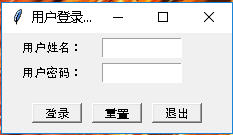
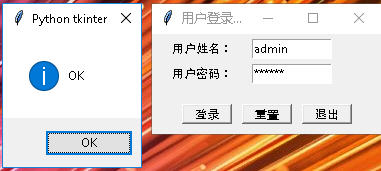
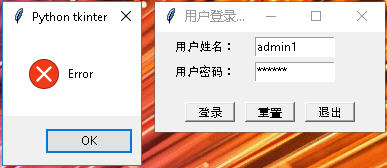Python图形编程探索系列-07-程序登录界面设计的更多相关文章
- Python图形编程探索系列-05-用控制变量构建对话程序
跳转到自己的博客 控制变量 变量 符号 意义 默认值 1 var = tk.BooleanVar() 布尔型 0 2 var = tk.StringVar() 字符串控制变量 空字符串 3 var = ...
- Python图形编程探索系列-09-tkinter与matplotlib结合案例
案例1 案例来自于:https://bbs.csdn.net/topics/390326088 代码示例: import matplotlib matplotlib.use('TkAgg') from ...
- Python图形编程探索系列-08-再次认识标签
标签的各种属性 代码展示: import tkinter as tk root = tk.Tk() root.geometry = '500x300' label1 = tk.Label(root, ...
- Python图形编程探索系列-06-按钮批量生产函数
设计任务 初步设计一个批量生产按钮的函数,根据需要的按钮数量,自动生成多少按钮. 函数设计 import tkinter as tk # 导入tkinter库 root = tk.Tk() # 建立程 ...
- Python图形编程探索系列-04-网上图片与标签组件的结合
跳转到自己的博客 任务设定 任务:从网上找到一张图片,然后将其显示在标签上? 网上图片网站:http://pic.58pic.com/58pic/17/56/38/52w58PICtER_1024.j ...
- Python图形编程探索系列-03-标签组件(Label)
跳转到自己的博客 tkinter.Label介绍 什么是标签? 通俗的将就相当于word的功能,能够进行显示不可修改的文字.图片或者图文混排. 直观体会一下 图1 背景图构成:内容区(黑色),填充区( ...
- Python图形编程探索系列-02-框架设计
跳转到我的博客 设计任务 在主窗口root中放置三个容器用于容纳组件,容器采用框架设计. 代码初步设计 import tkinter as tk root = tk.Tk() root.geometr ...
- Python图形编程探索系列-01-初级任务
设计任务 设计一个主窗口,在其中添加三个标签和三个按钮,当点击按钮时,对标签的内容和色彩进行修改. 代码初步设计 import tkinter as tk root = tk.Tk() def f1( ...
- Python Socket 编程——聊天室示例程序
上一篇 我们学习了简单的 Python TCP Socket 编程,通过分别写服务端和客户端的代码了解基本的 Python Socket 编程模型.本文再通过一个例子来加强一下对 Socket 编程的 ...
随机推荐
- 嵌入式系统C编程之堆栈回溯
前言 在嵌入式系统C语言开发调试过程中,常会遇到各类异常情况.一般可按需添加打印信息,以便观察程序执行流或变量值是否异常.然而,打印操作会占用CPU时间,而且代码中添加过多打印信息时会显得很凌乱.此外 ...
- manjaro 的配置
一.更新源的配置: 1).自动方法: 在 终端 执行下面的命令从官方的源列表中对中国源进行测速和设置 sudo pacman-mirrors -c China 2).手动方法 自动方法(上面的方法1, ...
- @PathVariable和@RequestParam
@PathVariable 当使用@RequestMapping URI template 样式映射时, 即 someUrl/{paramId}, 这时的paramId可通过 @Pathvariabl ...
- makefile 字符串处理函数
截取自<跟我一起写Makefile> (1) $(subst <from>, <to>, <text>) 名称: 字符串替换函数 subst 功能: ...
- 企业内部在centos7.2系统中必杀技NTP时间服务器及内网服务器时间同步(windows和linux客户端同步)
网络时间协议NTP(Network Time Protocol)是用于互联网中时间同步的标准互联网协议.NTP的用途是把计算机的时间同步到某些时间标准.目前采用的时间标准是世界协调时UTC(Unive ...
- 使用rpm包安装lamp环境
前提: 是你的centos能联网,或者有本地的yum仓库 或者配置通过代理上网 vim /etc/yum.conf 加入如下内容 proxy=http://192.168.11.82:808 1.通过 ...
- Jenkins构建次数设置
Build after other projects are built:在其他项目触发的时候触发,里面有分为三种情况,也就是其他项目构建成功.失败.或者不稳定的时候触发项目: Poll SCM:定时 ...
- Python-2d形变 动画 表格
一.形变 /*1.形变参考点: 三轴交界点*/ transform-origin: x轴坐标 y轴坐标; /*2.旋转 rotate deg*/ transform: rotate(720deg); ...
- Android app 在线更新那点事儿(适配Android6.0、7.0、8.0)
一.前言 app在线更新是一个比较常见需求,新版本发布时,用户进入我们的app,就会弹出更新提示框,第一时间更新新版本app.在线更新分为以下几个步骤: 1, 通过接口获取线上版本号,versionC ...
- Windows Server 2003 R2标准版 SP2 64位 (简体中文)官方原版ISO镜像
Windows Server 2003 R2标准版 SP2 64位 (简体中文)官方原版ISO镜像迅雷下载 软件简介 Windows Server 2003 R2标准版是继Windows Serv ...