
Unity3D 通用提示窗口实现分析(Inventory Pro学习总结)
背景
游戏中的UI系统或者叫做GUI窗口系统主要有:主要装备窗口(背包,角色窗口也是一种特殊窗口)、确实提示窗口(如购买确认)、信息提示窗口(一遍没有按钮,ContexntMenu)和特殊窗口(聊天记录或者技能树),前篇已经介绍分析了Inventory Pro确认提示窗口的设计和实现方式,这篇主要讲一下信息提示窗口的实现。本以为提示窗口是比较简单的,毕竟没有按钮事件交互的问题,但是分析了下源代码还是让我有些惊讶,插件作者在提示窗口中考虑到了性能问题,由于本人一直在PC端开发程序没有移动端的经验,所以在移动端对于性能优化还是比较关注的。
声明:本文首发于蛮牛,次发博客园,本人原创。 原文链接1,原文链接2
插件效果及使用
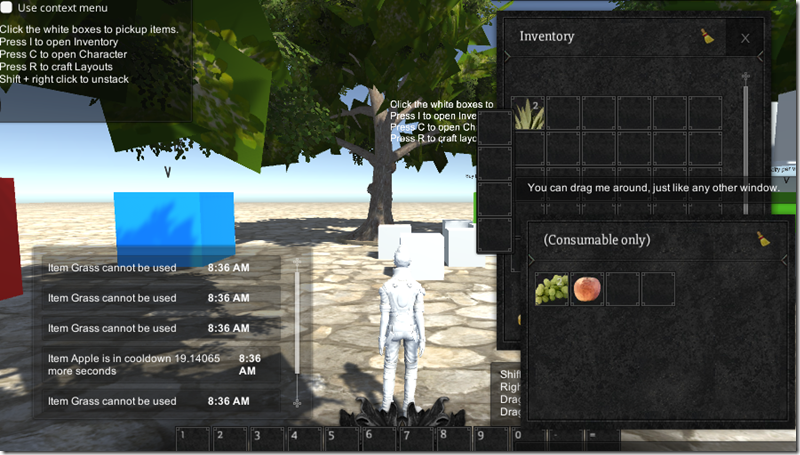
左下角即为信息提示窗口NoticeUI,当信息提示比较多时,具有滚动条和超出自动隐藏的功能,是通过对象池技术实现,提高性能和效率
通过拖拽的方式创建好UI界面,红框中我们看到了组件树的结构和类型
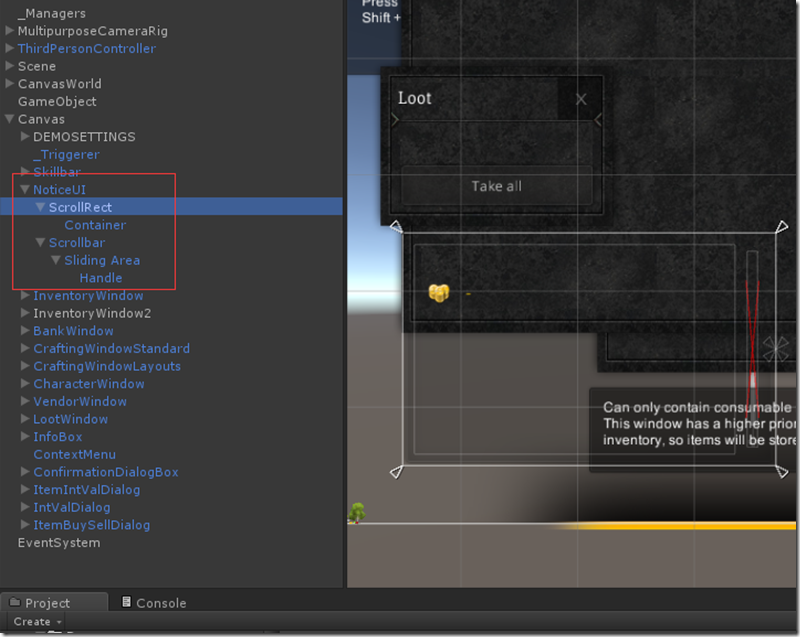
在NoticeUI上绑定NoticeUI脚本,设置好每一行显示的预设NoticeMessageUI,ScrollRect等相关属性,基本就已经完成了关于信息提示窗口的实现了

源代码分析
老规矩上类图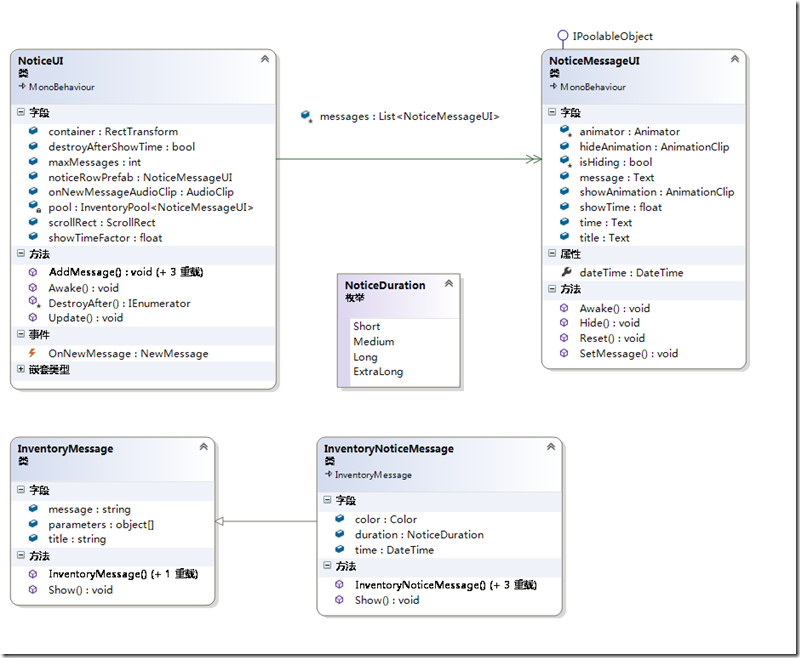
类图分析
经过这段时间的学习,我真的慢慢爱上了VS的类图分析了,希望新手同学也能习惯这点。VS的类图很强大能自动生成关联关系和继承接口等信息,是特别舒心的类图工具。
A、先看下Message模型(Model)类,InventoryNoticeMessage继承了InventoryMessage,继承后拥有的字段有,消息,标题,颜色,消失延时,时间看到这些字段我们大致也可以猜到信息提示窗口有哪些功能了吧(其实是可以扩展的),这里需要重点关注下Show方法(后面源码分析再表述)
B、NoticeUI和NoticeMessageUI都是MonoBehavior的子类,也就是说他们都是组件,分析其字段有具有ScrollRect和Text说明他们都是需要和UI进行绑定的。这里特变关注下VS使用双箭头表示组合关联,所以NoticeUI组合关联NoticeMessageUI,而继承了IPoolableObject接口顾名思义它具有入对象池的能力,也就是可以加入对象池,我们也看到了NoticeUI有一个InventoryPool<NoticeMessageUI>,我们大概可以猜到NoticeUI中List<NoticMessageUI>和InevntoryPool<NoticeMessageUI>猥琐的关系。
调用流程分析
调用的流程其实可以画一个流程图,这里只是简单的描述一下
1、InventoryNoticeMessage.Show() –>2、 全局NoticeUI.AddMessage()->3、InventoryPool池对象NoticeMessageUI.SetMessage()->4、NoticMessageUI通过setAictive(true)进行显示->5、NoticeUI.Update,通过循环调用NoticMessageUI的showTime.deltaTime做控制隐藏
1、InventoryNoticeMessage.Show()
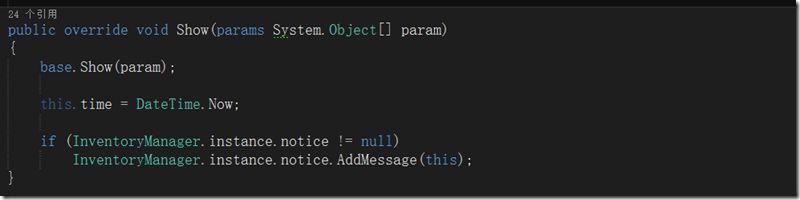
通过以上代码我们看的出来其实notice也是一个全局的UI,所以才可以通过单例来访问,应该是有固定区域的。
2、 全局NoticeUI.AddMessage()
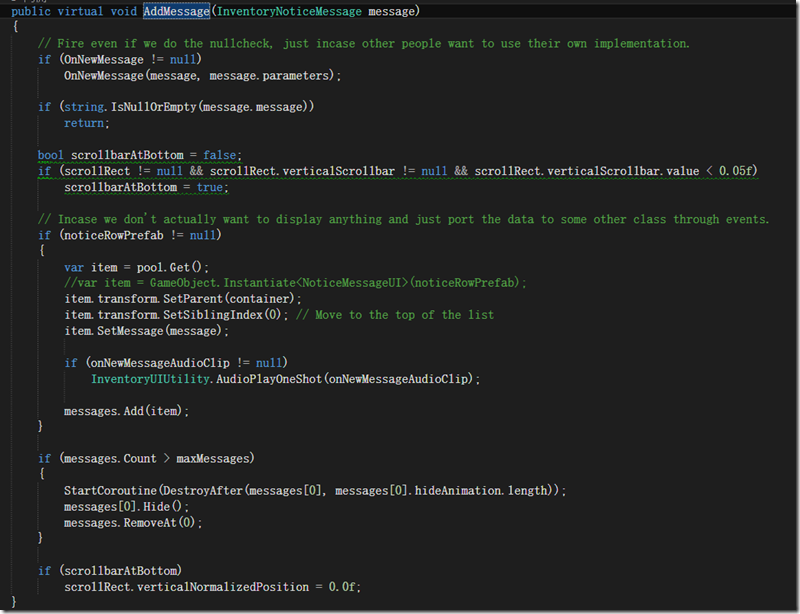
NoticeUI中的AddMessage就比较复杂了,主要要处理几个事情A、事件触发;B、滚动处理;C、对象池获取NoticeMessageUI并激活显示D、List<NoticeMessageUI>和InventoryPool<NoticeMessageUI>好基友的处理(对象池的回收及引用数组的移除)
3、InventoryPool池对象NoticeMessageUI.SetMessage()
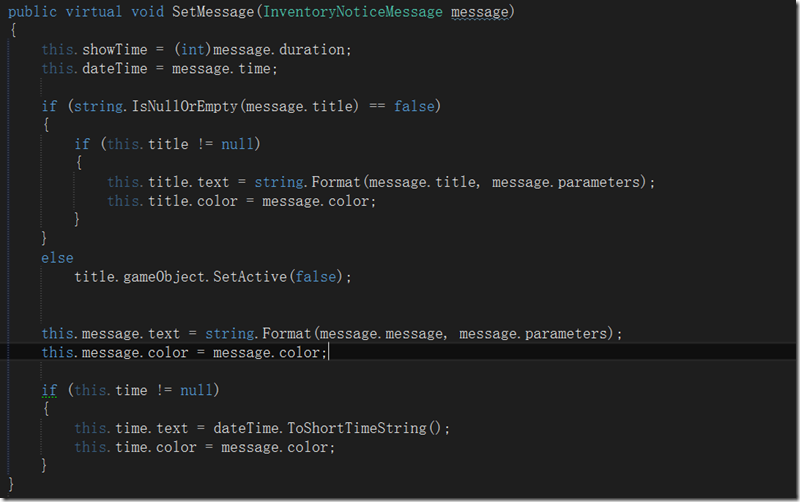
SetMessage() 就像它的方法名一样好像什么也没有做的样子,只是设置了一些简单字段的内容以及显示时间,实际的显示激活却是在4对象池获取的时候置位的。
4、NoticMessageUI通过setAictive(true)进行显示
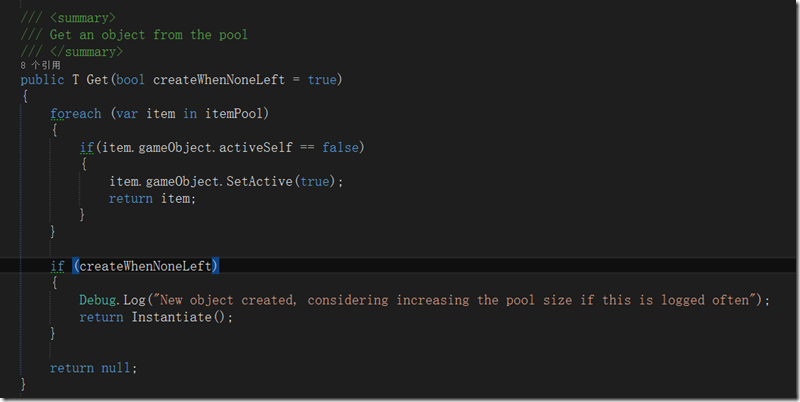
对象池的使用和回收是通过池对象的activeSelf属性来确定的,这个开关有一箭双雕的意思,既通过它来控制对象池的使用和回收,又用于控制UI对象的演示与否。
5、NoticeUI.Update,通过循环调用NoticMessageUI的showTime.deltaTime控制隐藏
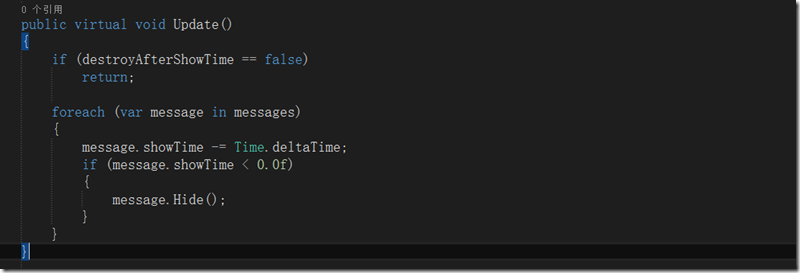
通过显示时间来控制信息的隐藏
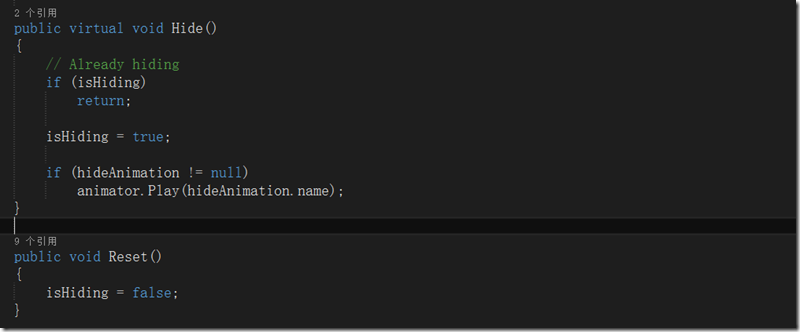
隐藏函数使用了动画效果,由于动画是有显示时间的,所以通过一个字段isHiding做为状态判断。
核心源码
NoticeUI
using UnityEngine;

using UnityEngine.EventSystems;

using System;

using System.Collections;

using System.Collections.Generic;

using Devdog.InventorySystem.Models;

using Devdog.InventorySystem.UI.Models;

using UnityEngine.UI;

namespace Devdog.InventorySystem

{

    /// <summary>

    /// How long a message should last.

    /// Parse to int to get time in seconds.

    /// </summary>

    public enum NoticeDuration

    {

        Short = ,

        Medium = ,

        Long = ,

        ExtraLong =

    }

    [AddComponentMenu("InventorySystem/Windows/Notice")]

    public partial class NoticeUI : MonoBehaviour

    {

        #region Events

        /// <summary>

        /// Note that it also fired when message == null or empty, even though the system won't process the message.

        /// This is because someone might want to implement their own system and just use the event as a link to connect the 2 systems.

        /// </summary>

        /// <param name="title"></param>

        /// <param name="message"></param>

        /// <param name="duration"></param>

        /// <param name="parameters"></param>

        public delegate void NewMessage(InventoryNoticeMessage message, params System.Object[] parameters);

        public event NewMessage OnNewMessage;

        #endregion

        [Header("General")]

        public NoticeMessageUI noticeRowPrefab;

        [InventoryRequired]

        public RectTransform container;

        public ScrollRect scrollRect;

        public AudioClip onNewMessageAudioClip;

        /// <summary>

        /// When more messages come in the last items will be removed.

        /// </summary>

        [Header("Messages")]

        public int maxMessages = ;

        /// <summary>

        /// Remove the item after the show time has passed, if false, the item will continue to exist.

        /// </summary>

        public bool destroyAfterShowTime = true;

        /// <summary>

        /// All show times are multiplied by this value, if you want to increase all times, use this value.

        /// </summary>

        public float showTimeFactor = 1.0f;

        [NonSerialized]

        protected List<NoticeMessageUI> messages = new List<NoticeMessageUI>();

        private InventoryPool<NoticeMessageUI> pool;

        public virtual void Awake()

        {

            pool = new InventoryPool<NoticeMessageUI>(noticeRowPrefab, maxMessages);

        }

        public virtual void Update()

        {

            if (destroyAfterShowTime == false)

                return;

            foreach (var message in messages)

            {

                message.showTime -= Time.deltaTime;

                if (message.showTime < 0.0f)

                {

                    message.Hide();

                }

            }

        }

        public virtual void AddMessage(string message, NoticeDuration duration = NoticeDuration.Medium)

        {

            AddMessage(message, duration);

        }

        public virtual void AddMessage(string message, NoticeDuration duration, params System.Object[] parameters)

        {

            AddMessage(string.Empty, message, duration, parameters);

        }

        public virtual void AddMessage(string title, string message, NoticeDuration duration, params System.Object[] parameters)

        {

            AddMessage(new InventoryNoticeMessage(title, message, duration));

        }

        public virtual void AddMessage(InventoryNoticeMessage message)

        {

            // Fire even if we do the nullcheck, just incase other people want to use their own implementation.

            if (OnNewMessage != null)

                OnNewMessage(message, message.parameters);

            if (string.IsNullOrEmpty(message.message))

                return;

            bool scrollbarAtBottom = false;

            if (scrollRect != null && scrollRect.verticalScrollbar != null && scrollRect.verticalScrollbar.value < 0.05f)

                scrollbarAtBottom = true;

            // Incase we don't actually want to display anything and just port the data to some other class through events.

            if (noticeRowPrefab != null)

            {

                var item = pool.Get();

                //var item = GameObject.Instantiate<NoticeMessageUI>(noticeRowPrefab);

                item.transform.SetParent(container);

                item.transform.SetSiblingIndex(); // Move to the top of the list

                item.SetMessage(message);

                if (onNewMessageAudioClip != null)

                    InventoryUIUtility.AudioPlayOneShot(onNewMessageAudioClip);

                messages.Add(item);

            }

            if (messages.Count > maxMessages)

            {

                StartCoroutine(DestroyAfter(messages[], messages[].hideAnimation.length));

                messages[].Hide();

                messages.RemoveAt();

            }

            if (scrollbarAtBottom)

                scrollRect.verticalNormalizedPosition = 0.0f;

        }

        protected virtual IEnumerator DestroyAfter(NoticeMessageUI item, float time)

        {

            yield return new WaitForSeconds(time);

            pool.Destroy(item);

        }

    }

}
NoticeMessageUI
using System;

using System.Collections;

using System.Collections.Generic;

using Devdog.InventorySystem.Models;

using UnityEngine;

using UnityEngine.UI;

namespace Devdog.InventorySystem.UI.Models

{

    /// <summary>

    /// A single message inside the message displayer

    /// </summary>

    [RequireComponent(typeof(Animator))]

    public partial class NoticeMessageUI : MonoBehaviour, IPoolableObject

    {

        public UnityEngine.UI.Text title;

        public UnityEngine.UI.Text message;

        public UnityEngine.UI.Text time;

        public AnimationClip showAnimation;

        public AnimationClip hideAnimation;

        [HideInInspector]

        public float showTime = 4.0f;

        public DateTime dateTime { get; private set; }

        [NonSerialized]

        protected Animator animator;

        [NonSerialized]

        protected bool isHiding = false; // In the process of hiding

        public virtual void Awake()

        {

            animator = GetComponent<Animator>();

            if (showAnimation != null)

                animator.Play(showAnimation.name);

        }

        public virtual void SetMessage(InventoryNoticeMessage message)

        {

            this.showTime = (int)message.duration;

            this.dateTime = message.time;

            if (string.IsNullOrEmpty(message.title) == false)

            {

                if (this.title != null)

                {

                    this.title.text = string.Format(message.title, message.parameters);

                    this.title.color = message.color;

                }

            }

            else

                title.gameObject.SetActive(false);

            this.message.text = string.Format(message.message, message.parameters);

            this.message.color = message.color;

            if (this.time != null)

            {

                this.time.text = dateTime.ToShortTimeString();

                this.time.color = message.color;

            }

        }

        public virtual void Hide()

        {

            // Already hiding

            if (isHiding)

                return;

            isHiding = true;

            if (hideAnimation != null)

                animator.Play(hideAnimation.name);

        }

        public void Reset()

        {

            isHiding = false;

        }

    }

}
InventoryNoticeMessage
using System;

using System.Collections.Generic;

using System.Threading;

using UnityEngine;

namespace Devdog.InventorySystem.Models

{

    [System.Serializable]

    public partial class InventoryNoticeMessage : InventoryMessage

    {

        public DateTime time;

        public Color color = Color.white;

        public NoticeDuration duration = NoticeDuration.Medium;

        /// <summary>

        /// Required for PlayMaker...

        /// </summary>

        public InventoryNoticeMessage()

        { }

        public InventoryNoticeMessage(string title, string message, NoticeDuration duration, params System.Object[] parameters)

            : this(title, message, duration, Color.white, DateTime.Now, parameters)

        { }

        public InventoryNoticeMessage(string title, string message, NoticeDuration duration, Color color, params System.Object[] parameters)

            : this(title, message, duration, color, DateTime.Now, parameters)

        { }

        public InventoryNoticeMessage(string title, string message, NoticeDuration duration, Color color, DateTime time, params System.Object[] parameters)

        {

            this.title = title;

            this.message = message;

            this.color = color;

            this.time = time;

            this.parameters = parameters;

        }

        public override void Show(params System.Object[] param)

        {

            base.Show(param);

            this.time = DateTime.Now;

            if (InventoryManager.instance.notice != null)

                InventoryManager.instance.notice.AddMessage(this);

        }

    }

}
Unity3D 通用提示窗口实现分析(Inventory Pro学习总结)的更多相关文章
- Unity3d UGUI 通用Confirm确认对话框实现(Inventory Pro学习总结)
背景 曾几何时,在Winform中,使用MessageBox对话框是如此happy,后来还有人封装了可以选择各种图标和带隐藏详情的MessageBox,现在Unity3d UGui就没有了这样的好事情 ...
- Unity3D 装备系统学习Inventory Pro 2.1.2 基础篇
前言 前一篇 Unity3D 装备系统学习Inventory Pro 2.1.2 总结 基本泛泛的对于Inventory Pro 这个插件进行了讲解,主要是想提炼下通用装备系统结构和类体系.前两天又读 ...
- Unity3D 装备系统学习Inventory Pro 2.1.2 总结
前言 写在最前面,本文未必适合纯新手,但有一些C#开发经验的还是可以看懂的,虽然本人也是一位Unity3D新人,但是本文只是自己在学习Inventory Pro的学习总结,而不是教程,本人觉得要读懂理 ...
- 通用窗口类 Inventory Pro 2.1.2 Demo1(下续篇 ),物品消耗扇形显示功能
本篇想总结的是Inventory Pro中通用窗口的具体实现,但还是要强调下该插件的重点还是装备系统而不是通用窗口系统,所以这里提到的通用窗口类其实是通用装备窗口类(其实该插件中也有非装备窗口比如No ...
- 通用窗口类 Inventory Pro 2.1.2 Demo1(下)
本篇想总结的是Inventory Pro中通用窗口的具体实现,但还是要强调下该插件的重点还是装备系统而不是通用窗口系统,所以这里提到的通用窗口类其实是通用装备窗口类(其实该插件中也有非装备窗口比如No ...
- 通用窗口类 Inventory Pro 2.1.2 Demo1(中)
本篇想总结的是Inventory Pro中通用窗口的具体实现,但还是要强调下该插件的重点还是装备系统而不是通用窗口系统,所以这里提到的通用窗口类其实是通用装备窗口类(其实该插件中也有非装备窗口比如No ...
- Inventory Pro 装备拾取的实现
以后都按照插件使用,提出问题,回答问题的方式来进行总结和学习 效果图 1.运行相关的例子,场景中出现4个矩形,这4个矩形是用来模拟物品掉落的包裹,移动Player靠近物品 2.使用鼠标点击物品正方体, ...
- LINUX内核分析第一周学习总结——计算机是如何工作的
LINUX内核分析第一周学习总结——计算机是如何工作的 张忻(原创作品转载请注明出处) <Linux内核分析>MOOC课程http://mooc.study.163.com/course/ ...
- LINUX内核分析第二周学习总结——操作系统是如何工作的
LINUX内核分析第二周学习总结——操作系统是如何工作的 张忻(原创作品转载请注明出处) <Linux内核分析>MOOC课程http://mooc.study.163.com/course ...
随机推荐
- 必应(Bing)每日图片获取API
必应(Bing)每日图片获取API January 11, 2015 API http://lab.dobyi.com/api/bing.php 介绍 Value Description title ...
- C++ 构造函数放置默认转换explicit关键字(2)
按照默认规定,只有一个参数的构造函数也定义了一个隐式转换,将该构造函数对应数据类型的数据转换为该类对象,如下面所示: class String { String ( const char* p ); ...
- apple-touch-icon,shortcut icon和icon的区别(手机站发送到手机桌面图标自定义)
apple-touch-icon 可以了解到这是一个类似网站favicon的图标文件,用来在iphone和ipod上创建快捷键时使用. 这个文件应当是png格式,57x57像素大小,放在网站根目录之下 ...
- Python浮点数控制小数精度
将精度高的浮点数转换成精度低的浮点数. 1.round()内置方法 这个是使用最多的,刚看了round()的使用解释,也不是很容易懂.round()不是简单的四舍五入的处理方式. For the bu ...
- but this usually doesn’t gain you anything.
High Performance My SQL, Third Edition Date and Time Types My SQL has many types for various kinds o ...
- Decomposing and Redistributing the Statement Method
Refactoring: Improving the Design of Existing Code Decomposing and Redistributing the Statement Meth ...
- Ubuntu 14.04 LTS 64bit 编译SDL的问题
http://blog.csdn.net/jhting/article/details/38523945 Ubuntu 14.04 LTS 64bit 编译SDL的问题 分类: C/C++2014-0 ...
- 记录下 QT Linux 静态编译遇到的坑
Qt下静态编译Qt,根据我的经验,如果按照Windows下那种直接拿官方sdk安装之后的文件来编译是行不通的,需要直接下载Qt的source包,目前诺基亚的源码叫做qt-everywhere-open ...
- 1006 最长公共子序列Lcs
1006 最长公共子序列Lcs 基准时间限制:1 秒 空间限制:131072 KB 给出两个字符串A B,求A与B的最长公共子序列(子序列不要求是连续的). 比如两个串为: abcicba abdks ...
- Internal Server Error500
开启#LoadModule rewrite_module modules/mod_rewrite.so