
通用窗口类 Inventory Pro 2.1.2 Demo1(下)
本篇想总结的是Inventory Pro中通用窗口的具体实现,但还是要强调下该插件的重点还是装备系统而不是通用窗口系统,所以这里提到的通用窗口类其实是通用装备窗口类(其实该插件中也有非装备窗口比如NoticeUI等)。
本篇涉及的功能用加出标出,具体的功能如下:
1、实现了两个窗口,通过点击键盘I来,打开或者关闭窗口也就是Toggle功能
2、装备窗口中的物品栏空格数量动态生成可控,可以在属性窗口手动配置
3、窗口具有拖拽功能
4、窗口物品具有拖拽,及窗口间拖拽
5、可以在窗口使用物品的功能,物品有消耗扇形显示功能
6、通用窗口的类体系结构
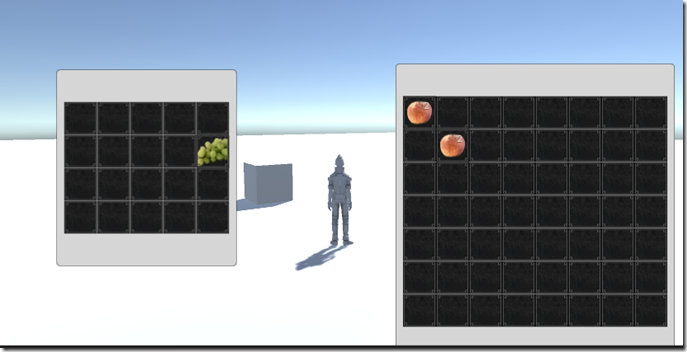
这一篇进入到了游戏中装备窗口的逻辑的深水区了
窗口间物品的拖拽
自己在学习的过程中,虽然读了源码过了几天来写教程,还是有点不清楚,不能亲车熟路(这也许就是读与写的区别吧),给自己提出了几个问题,在重新去翻代码之前先给自己提出几个问题:
1、拖拽的事件发起者应该是那个类?
2、拖拽的事件的Drag是如何确定下方的UI元素的?
3、拖拽后的逻辑操作,应该由哪个类来承接?
4、窗口与窗口之间的拖拽,既有Drag又有Drop,如何更加合理的解决这个问题?
5、窗口间物品拖拽的以及同窗口物品拖拽的逻辑流程是什么?
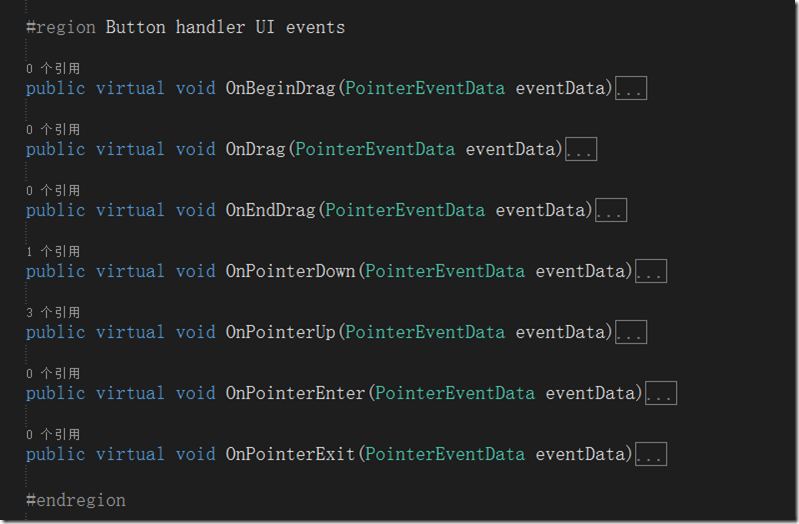
A1 拖拽的事件发起者应该是那个类?:拖拽的发起者必须是UI元素这点是必须的,目前涉及的UI元素有两种一种是窗口容器,一种数据装备格元素,显然装备格元素更有优势,因为少了一层定位逻辑判断,Drag事件直接发起,还可以做Move的相关逻辑,这里Inventory Pro2也确实是怎么做的(这里初次接触UGUI的同学可能要去学习下相关的事件系统,这里就不多说了),这里InventoryUIItemWrapper就是装备格的基类,这里继承了UGUI的相关UI事件,IBeginDragHandler, IEndDragHandler, IDragHandler, IPointerUpHandler, IPointerDownHandler, IPointerEnterHandler, IPointerExitHandler,这么多接口也预示着代码并不简单

这些就是接口实现函数,把他们都弄明白了也就明白了如何实现拖拽
A5 窗口间物品拖拽的以及同窗口物品拖拽的逻辑流程是什么?:先回答这个问题比较合理,在过去的winform的拖拽中并没有这么多接口可以实现,但是我相信拖拽操作的本身逻辑应该是不变的,也就是几个步骤,
1)在物品上点击鼠标左键(记录鼠标点击的元素)->
2)在鼠标不up,且move事件中确认了拖拽开始(Drag事件) –>
3) mouse Move事件中获得鼠标下的元素->
4)mouse up 事件触发Drop,判断鼠标位置及鼠标下元素是否可以drop如果可以进行Drop逻辑至此,这个拖拽操作结束
技术原型就是这么简单。下面看看Uintiy3d ugui Inventory Pro是如何实现的,又读了一遍代码,深深的有体会到了一把,“原理很简单,现实很残酷”,这还是在ugui为我们做了一些封装的情况下,这里其实涉及的函数其实有5个
OnPointerEnter:确定了点击了那个UI元素,对应1)
OnBeginDrag:开始拖拽,对应2)
OnDrag:拖拽中,对应3)
OnEndDrag:结束拖拽,对应4)
OnPointExit:清空选中元素,恢复默认值
具体代码比较多这里不再展开说了,这里庆幸的是,Inventory Pro对拖拽的逻辑进行了封装,在InventoryUIItemWrapper中接口实现函数中,主要做的参数舒适化,主要关于UI的逻辑代码封装在了InventoryUIUtility类中,
以下是主要接口实现函数的代码
public virtual void OnBeginDrag(PointerEventData eventData)

        {

            if (itemCollection == null)

                return;

            if (item != null && eventData.button == PointerEventData.InputButton.Left && itemCollection.canDragInCollection)

            {

                // Create a copy

                var copy = GameObject.Instantiate<InventoryUIItemWrapper>(this);

                copy.index = index;

                copy.itemCollection = itemCollection;

                var copyComp = copy.GetComponent<RectTransform>();

                copyComp.SetParent(InventorySettingsManager.instance.guiRoot);

                copyComp.transform.localPosition = new Vector3(copyComp.transform.localPosition.x, copyComp.transform.localPosition.y, 0.0f);

                copyComp.sizeDelta = GetComponent<RectTransform>().sizeDelta;

                InventoryUIUtility.BeginDrag(copy, (uint)copy.index, itemCollection, eventData); // Make sure they're the same size, copy doesn't handle this.

            }

        }

        public virtual void OnDrag(PointerEventData eventData)

        {

            if (item != null && itemCollection != null && itemCollection.canDragInCollection) // Can only drag existing item

                InventoryUIUtility.Drag(this, index, itemCollection, eventData);

        }

        public virtual void OnEndDrag(PointerEventData eventData)

        {

            if (item != null && itemCollection != null && itemCollection.canDragInCollection)

            {

                var lookup = InventoryUIUtility.EndDrag(this, index, itemCollection, eventData);

                // Didn't end on a button or used wrong key.

                if (lookup == null)

                    return;

                if (lookup.endOnButton)

                {

                    // Place on a slot

                    lookup.startItemCollection.SwapOrMerge((uint)lookup.startIndex, lookup.endItemCollection, (uint)lookup.endIndex);

                }

                else if (lookup.startItemCollection.useReferences)

                {

                    lookup.startItemCollection.SetItem((uint)lookup.startIndex, null);

                    lookup.startItemCollection[lookup.startIndex].Repaint();

                }

                else if(InventoryUIUtility.clickedUIElement == false)

                {

                    TriggerDrop();

                }

            }

        }
以下是InventoryUIUtility类封装的静态函数代码
        public static InventoryUIDragLookup BeginDrag(InventoryUIItemWrapper toDrag, uint startIndex, ItemCollectionBase collection, PointerEventData eventData)

        {

            if (draggingItem != null)

            {

                Debug.LogWarning("Item still attached to cursor, can only drag one item at a time", draggingItem.gameObject);

                return null; // Can only drag one item at a time

            }

            if (eventData.button != PointerEventData.InputButton.Left)

                return null;

            draggingItem = toDrag;

            //draggingButtonCollection = collection;

            // Canvas group allows object to ignore raycasts.

            CanvasGroup group = draggingItem.gameObject.GetComponent<CanvasGroup>();

            if(group == null)

                group = draggingItem.gameObject.AddComponent<CanvasGroup>();

            group.blocksRaycasts = false; // Allows rays to go through so we can hover over the empty slots.

            group.interactable = false;

            var lookup = new InventoryUIDragLookup();

            lookup.startIndex = (int)startIndex;

            lookup.startItemCollection = collection;

            return lookup;

        }

        public static void Drag(InventoryUIItemWrapper toDrag, uint startSlot, ItemCollectionBase handler, PointerEventData eventData)

        {

            if(eventData.button == PointerEventData.InputButton.Left)

                draggingItem.transform.position = new Vector3(eventData.position.x, eventData.position.y, 0.0f);

        }

        public static InventoryUIDragLookup EndDrag(InventoryUIItemWrapper toDrag, uint startSlot, ItemCollectionBase handler, PointerEventData eventData)

        {

            if(eventData.button == PointerEventData.InputButton.Left)

            {

                var lookup = new InventoryUIDragLookup();

                lookup.startIndex = (int)draggingItem.index;

                lookup.startItemCollection = draggingItem.itemCollection;

                if (hoveringItem != null)

                {

                    lookup.endIndex = (int)hoveringItem.index;

                    lookup.endItemCollection = hoveringItem.itemCollection;

                }

                Object.Destroy(draggingItem.gameObject); // No longer need it

                draggingItem = null;

                //draggingButtonCollection = null;

                return lookup;

            }

            return null;

        }

        /// <summary>

        /// When the cursor enters an item

        /// </summary>

        public static void EnterItem(InventoryUIItemWrapper item, uint slot, ItemCollectionBase handler, PointerEventData eventData)

        {

            hoveringItem = item;

            //hoveringItemCollection = handler;

        }

        /// <summary>

        /// When the cursor exits an item

        /// </summary>

        /// <param name="item"></param>

        /// <param name="slot">The slot is the IButtonHandler index not the inventory index.</param>

        /// <param name="handler"></param>

        /// <param name="eventData"></param>

        public static void ExitItem(InventoryUIItemWrapper item, uint slot, ItemCollectionBase handler, PointerEventData eventData)

        {

            hoveringItem = null;

            //hoveringItemCollection = null;

        }
A2 拖拽的事件的Drag是如何确定下方的UI元素的?
这里DragDrop中的元素由 OnPointerEnter 来触发获得(有点像Mouse Move事件),具体保存在InventoryUIUtility类的一个静态变量中
public static InventoryUIItemWrapper hoveringItem { get; private set; }
A3 拖拽后的逻辑操作,应该由哪个类来承接?
也就是Drop的操作由谁来完成,首先回忆下职责InventoryUIItemWrapper类负责事件的触发,InventoryUIUtility类负责UI相关的逻辑(选中,射线,坐标系统)
再看一遍OnDragEnd函数,具体的Drop逻辑是有Drop的后查找的lookup集合类(装备格集合基类ItemCollectionBase)来处理的,具体又有交换\合并两个逻辑,触发代码如下:
if (lookup.endOnButton)
{
// Place on a slot
lookup.startItemCollection.SwapOrMerge((uint)lookup.startIndex, lookup.endItemCollection, (uint)lookup.endIndex);
}
当然还有一种复杂的逻辑,就是扔掉物品的操作,这个是有具体的Item装备模型类(InventoryItemBase)来处理,核心代码在TriggerDrop方法中来调用,具体如下:
        public override void TriggerDrop(bool useRaycast = true)

        {

            if (item == null || itemCollection.canDropFromCollection == false)

                return;

            if(item.isDroppable == false)

            {

                InventoryManager.instance.lang.itemCannotBeDropped.Show(item.name, item.description);

                return;

            }

            Vector3 dropPosition = InventorySettingsManager.instance.playerObject.transform.position;

            Ray ray = Camera.main.ScreenPointToRay(Input.mousePosition);

            RaycastHit hit;

            if (Physics.Raycast(ray, out hit, InventorySettingsManager.instance.maxDropDistance,

                InventorySettingsManager.instance.layersWhenDropping))

            {

                dropPosition = hit.point;

            }

            else

            {

                return; // Couldn't drop item

            }

            var s = InventorySettingsManager.instance;

            if (useRaycast && s.showConfirmationDialogWhenDroppingItem && s.showConfirmationDialogMinRarity.ID <= item.rarity.ID)

            {

                // Not on a button, drop it

                var tempItem = item; // Capture list stuff

                var msg = InventoryManager.instance.lang.confirmationDialogDrop;

                s.confirmationDialog.ShowDialog(msg.title, msg.message, s.defaultDialogPositiveButtonText, s.defaultDialogNegativeButtonText, item,

                    (dialog) =>

                    {

                        ItemCollectionBase startCollection = tempItem.itemCollection;

                        uint startIndex = tempItem.index;

                        var d = tempItem.Drop(dropPosition);

                        if (d != null)

                        {

                            startCollection[startIndex].Repaint();

                        }

                    },

                    (dialog) =>

                    {

                        //Debug.Log("No clicked");

                    });

            }

            else

            {

                var d = item.Drop(dropPosition);

                if (d != null)

                {

                    Repaint();

                }

            }

        }
A4 窗口与窗口之间的拖拽,既有Drag又有Drop,如何更加合理的解决这个问题?
这个问题比较绕,其实也涉及到了问题2,其实无论怎么拖拽也就是两个东西,一个是被拖拽的物体from,一个是要放的地方to,这里其实都是窗口中的格子,只要有了这两个格子类也就确定了from和to的容器,比较特殊的一种情况也就是 from和to两个容器相等,也就是同窗口拖拽了,具体这些对象InventoryUIUtilty类中都做了封装,还是很赞的具体代码如下:
        public class InventoryUIDragLookup

        {

            public int startIndex = -;

            public ItemCollectionBase startItemCollection;

            public int endIndex = -;

            public ItemCollectionBase endItemCollection;

            public bool endOnButton

            {

                get

                {

                    return endItemCollection != null;

                }

            }

        }

        #region Variables

        private static InventoryUIItemWrapper draggingItem;

        public static InventoryUIItemWrapper hoveringItem { get; private set; }

        public static bool isDraggingItem

        {

            get

            {

                return draggingItem != null;

            }

        }

        public static bool clickedUIElement

        {

            get

            {

                return EventSystem.current.IsPointerOverGameObject();

            }

        }

        public static bool isFocusedOnInput

        {

            get

            {

                if (EventSystem.current.currentSelectedGameObject != null)

                    if (EventSystem.current.currentSelectedGameObject.GetComponent<UnityEngine.UI.InputField>() != null)

                        return true;

                return false;

            }

        }

        #endregion
最后
复杂的物品拖拽逻辑总结完毕,再次向我们印证了,从helloworld到现实是多么的困难,实际的情况可能更复杂比如要加入动画效果,要做网络延时验证,数据同步等等吧
通用窗口类 Inventory Pro 2.1.2 Demo1(下)的更多相关文章
- 通用窗口类 Inventory Pro 2.1.2 Demo1(下续篇 ),物品消耗扇形显示功能
本篇想总结的是Inventory Pro中通用窗口的具体实现,但还是要强调下该插件的重点还是装备系统而不是通用窗口系统,所以这里提到的通用窗口类其实是通用装备窗口类(其实该插件中也有非装备窗口比如No ...
- 通用窗口类 Inventory Pro 2.1.2 Demo1(中)
本篇想总结的是Inventory Pro中通用窗口的具体实现,但还是要强调下该插件的重点还是装备系统而不是通用窗口系统,所以这里提到的通用窗口类其实是通用装备窗口类(其实该插件中也有非装备窗口比如No ...
- 通用窗口类 Inventory Pro 2.1.2 Demo1(上)
插件功能 按照Demo1的实现,使用插件来实现一个装备窗口是很easy的,虽然效果还很原始但是也点到为止了,本篇涉及的功能用加粗标出,具体的功能如下: 1.实现了两个窗口,通过点击键盘I来,打开或者关 ...
- DuiLib通用窗口类WindowImplBase封装
.h头文件 class WindowImplBase : public CWindowWnd, public INotifyUI, public IMessageFilterUI, public ID ...
- Unity3D 通用提示窗口实现分析(Inventory Pro学习总结)
背景 游戏中的UI系统或者叫做GUI窗口系统主要有:主要装备窗口(背包,角色窗口也是一种特殊窗口).确实提示窗口(如购买确认).信息提示窗口(一遍没有按钮,ContexntMenu)和特殊窗口(聊天记 ...
- Unity3d UGUI 通用Confirm确认对话框实现(Inventory Pro学习总结)
背景 曾几何时,在Winform中,使用MessageBox对话框是如此happy,后来还有人封装了可以选择各种图标和带隐藏详情的MessageBox,现在Unity3d UGui就没有了这样的好事情 ...
- Unity3D 装备系统学习Inventory Pro 2.1.2 总结
前言 写在最前面,本文未必适合纯新手,但有一些C#开发经验的还是可以看懂的,虽然本人也是一位Unity3D新人,但是本文只是自己在学习Inventory Pro的学习总结,而不是教程,本人觉得要读懂理 ...
- Unity3D 装备系统学习Inventory Pro 2.1.2 基础篇
前言 前一篇 Unity3D 装备系统学习Inventory Pro 2.1.2 总结 基本泛泛的对于Inventory Pro 这个插件进行了讲解,主要是想提炼下通用装备系统结构和类体系.前两天又读 ...
- 窗口类(Window Class)概述
windows窗口编程(通常意义上的win32)有几个比较核心的概念:入口函数WinMain.窗口类Window Class.窗口过程.消息处理机制.通用控件.本文主要介绍窗口类的相关概念,包括: 窗 ...
随机推荐
- 不再以讹传讹,GET和POST的真正区别
不再以讹传讹,GET和POST的真正区别 网上的多数答案都是错的 在 2012年05月03日 那天写的 已经有 19940 次阅读了 感谢 参考或原文 www.cnblogs.com 服务 ...
- Locking
Computer Science An Overview _J. Glenn Brookshear _11th Edition To solve such problems, a DBMS could ...
- 【转】 Update和FixedUpdate的区别
MonoBehaviour.Update 更新 当MonoBehaviour启用时,其Update在每一帧被调用. MonoBehaviour.FixedUpdate 固定更新 当MonoBehavi ...
- 阻止默认行为stopDefault
function stopDefault(e){ if(e && e.preventDefault) e.preventDefault(); else window.event.ret ...
- <from>;<input>;readonly:只读;disabled:不可用;checked:用来做选中;selected:用在下拉列表中,设置那一项被选中
表单元素: ①②③④⑤⑥⑦★ 一.<from> 1. 代表表单 2 . action:提交为哪个页面 method:① get :显示提交,由长度限制 ② post: 隐藏提交 二.文 ...
- BLE链路层状态机
BLE的Link层,应当是了解BLE需要首先熟悉的一部分,BLE的Controller部分主要都在围绕这一部分实现的.Link层的内容规定了BLE底层是怎么实现蓝牙设备之间的控制,数据传输等等的.Li ...
- SVN命令详解
在开发中,除了在本机文件夹上进行svn更新外,在命令行中进行svn操作也非常关键,下面列举下网站摘抄的一些文档:1.将文件checkout到本地目录 svn checkout path(path是服务 ...
- interview review
缘起: 因为最近要找工作,自己总结了一下面试的注意事项. 1自我介绍方法 1.基本情况:姓名.年龄.学历.家庭与理想. 简单明了,不要啰嗦. 2.学习能力:专业知识.勤奋好学. 用事实说明学习能力不错 ...
- 371. Sum of Two Integers
不用加减法计算两个整数的和.这道题其实是考察一些基本的布尔代数知识.我们知道,二进制表示时: 0 + 0 = 00 1 + 0 = 01 0 + 1 = 01 1 + 1 = 10 所以,两个二进制整 ...
- Magento white screen or how XML can break your site?
Magento white screen or how XML can break your site? by SANDO on 02. OCT, 2012 in MAGENTO, SMALL TIP ...