
ASP.NET Core分布式项目-1.IdentityServer4登录中心
一.添加服务端的api
1.添加NUGet包 IdentityServer4

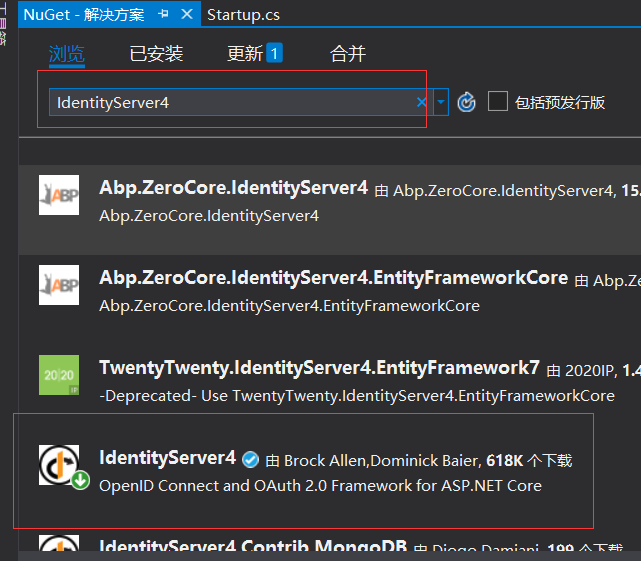
点击下载,重新生成
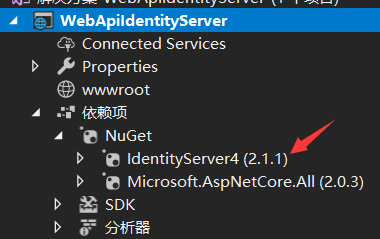
2。添加Startup配置
打开Startup文件
 public class Startup

    {

        public Startup(IConfiguration configuration)

        {

            Configuration = configuration;

        }

        public IConfiguration Configuration { get; }

        // This method gets called by the runtime. Use this method to add services to the container.

        public void ConfigureServices(IServiceCollection services)

        {

            //添加依赖注入配置

            services.AddIdentityServer()

                .AddDeveloperSigningCredential();

            services.AddMvc();

        }

        // This method gets called by the runtime. Use this method to configure the HTTP request pipeline.

        public void Configure(IApplicationBuilder app, IHostingEnvironment env)

        {

            if (env.IsDevelopment())

            {

                app.UseDeveloperExceptionPage();

            }

            app.UseIdentityServer();

            //app.UseMvc();

        }

    }
3.添加config配置,添加一个config类
    public class config

    {

        public static IEnumerable<ApiResource> GetResources()

        {

            return new List<ApiResource> { new ApiResource("api","MQapi")};

        }

        public static IEnumerable<Client> GetClients()

        {

            return new List<Client>

            {

                new Client()

                {

                    ClientId="ClientId",

                    AllowedGrantTypes=GrantTypes.ClientCredentials,

                    ClientSecrets={ new Secret("secrt".Sha256())},

                    AllowedScopes={ "api"}

                }

            };

        }

    }
4.修改IdentityServer的配置,打开Startup文件
 public void ConfigureServices(IServiceCollection services)

        {

            //添加依赖注入配置

            services.AddIdentityServer()

                .AddDeveloperSigningCredential()

                .AddInMemoryApiResources(config.GetResources())

                .AddInMemoryClients(config.GetClients());

            services.AddMvc();

        }
运行在浏览器中输入http://localhost:51227/.well-known/openid-configuration

二,添加客户端的api
添加一个api项目 ClientCredentialApi, 应用NuGet 包IdentityServer4.AccessTokenValidation
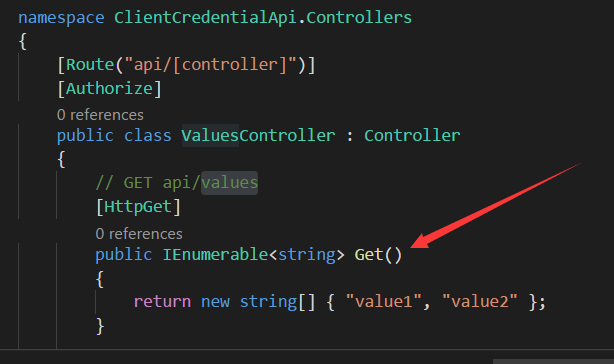
在控制器上添加[Authorize]标识。
然后在Startup文件里把认证授权添加进来
public void ConfigureServices(IServiceCollection services)

        {

            services.AddAuthentication("Bearer")

                .AddIdentityServerAuthentication(c =>

                {

                    c.Authority = "http://localhost:50000";

                    c.RequireHttpsMetadata = false;

                    c.ApiName = "api";

                });

            services.AddMvc();

        }
我们用visual studio code 把两个项目打开
运行WebApiIdentityServer项目 dotnet run

打开浏览器http://localhost:50000/.well-known/openid-configuration

可以通过http://localhost:50000/connect/token 这个拿到token
打开Postman
post访问http://localhost:50000/connect/token
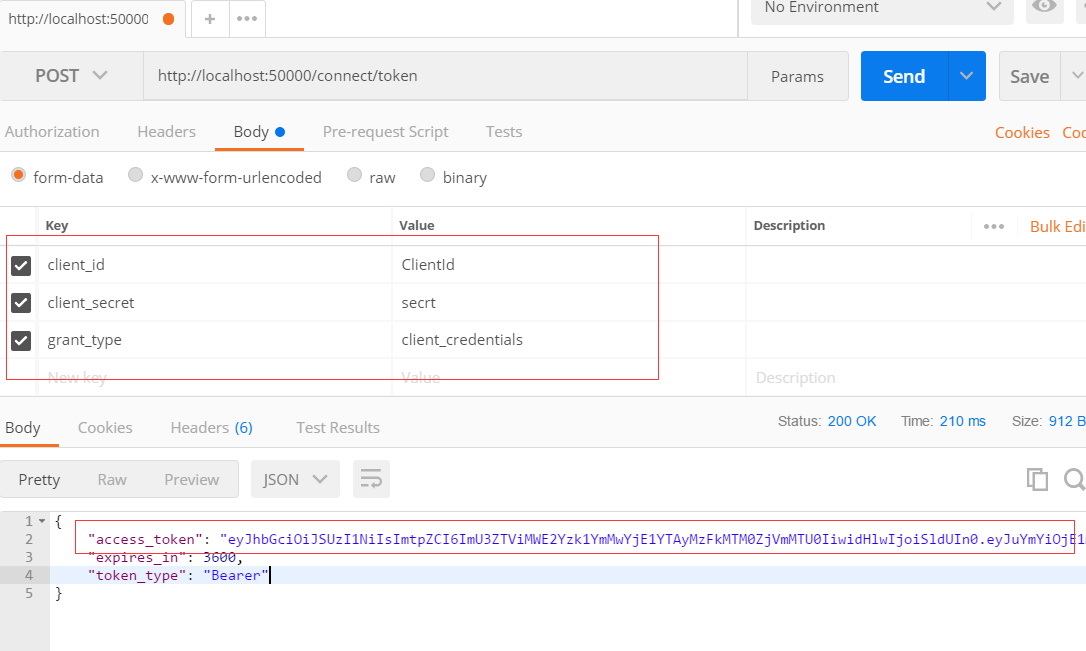
参数是在这里设置的
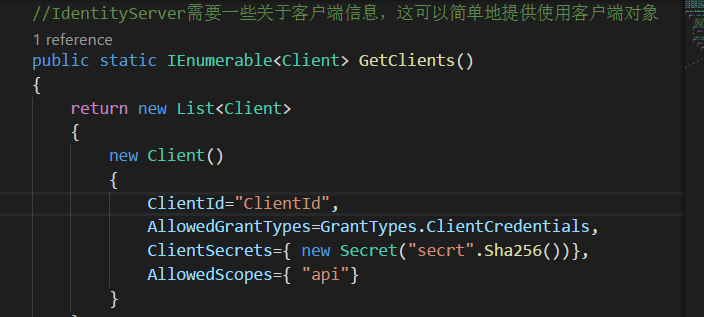
我再启动客户端
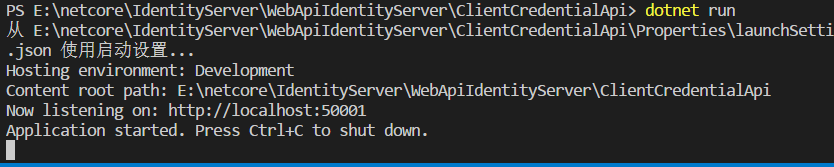
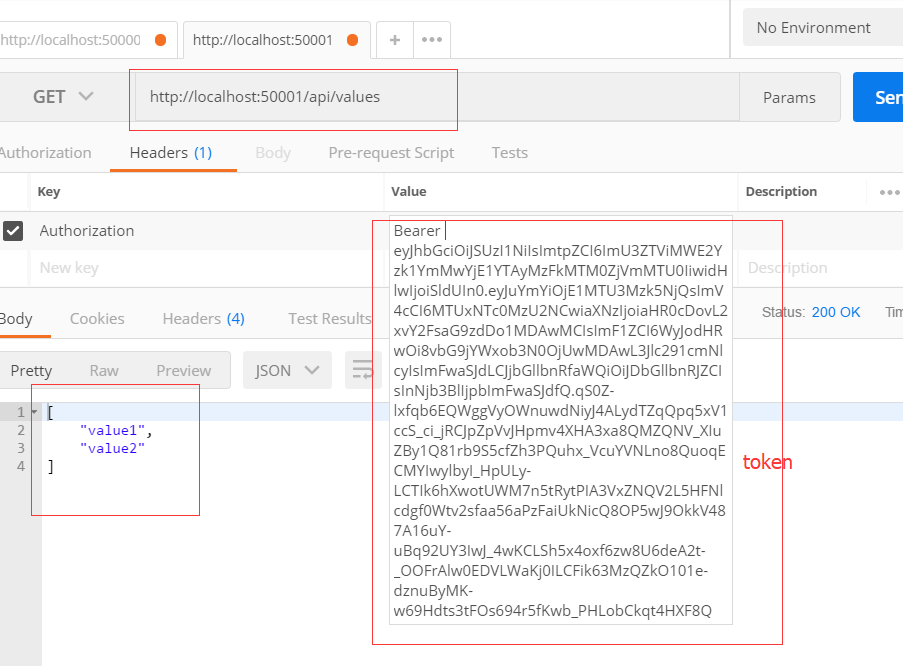
打开postMan去访问http://localhost:50001/api/values
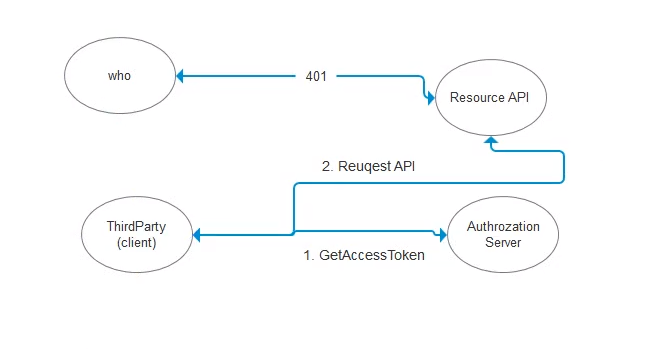
最后一张流程图
ASP.NET Core分布式项目-1.IdentityServer4登录中心的更多相关文章
- ASP.NET Core分布式项目-2.oauth密码模式identity server4实现
源码下载 这里根据<ASP.NET Core分布式项目-1.IdentityServer4登录中心>的代码来继续更新oauth密码模式,这里的密码模式比上次的客户端模式更安全 在WebAp ...
- ASP.NET Core分布式项目实战
ASP.NET Core开发者成长路线图 asp.net core 官方文档 https://docs.microsoft.com/zh-cn/aspnet/core/getting-started/ ...
- 【笔记目录2】ASP.NET Core分布式项目实战
当前标签: ASP.NET Core分布式项目实战 共2页: 上一页 1 2 11.ClientCredential模式总结 GASA 2019-03-11 12:59 阅读:26 评论:0 10. ...
- 【笔记目录1】ASP.NET Core分布式项目实战
当前标签: ASP.NET Core分布式项目实战 共2页: 1 2 下一页 35.Docker安装Mysql挂载Host Volume GASA 2019-06-20 22:02 阅读:51 评论 ...
- ASP.NET Core分布式项目实战-目录
前言 今年是2018年,发现已经有4年没有写博客了,在这4年的时光里,接触了很多的.NET技术,自己的技术也得到很大的进步.在这段时光里面很感谢张队长以及其他开发者一直对.NET Core开源社区做出 ...
- 【ASP.NET Core分布式项目实战】(三)整理IdentityServer4 MVC授权、Consent功能实现
本博客根据http://video.jessetalk.cn/my/course/5视频整理(内容可能会有部分,推荐看源视频学习) 前言 由于之前的博客都是基于其他的博客进行开发,现在重新整理一下方便 ...
- 【ASP.NET Core分布式项目实战】(一)IdentityServer4登录中心、oauth密码模式identity server4实现
本博客根据http://video.jessetalk.cn/my/course/5视频整理 资料 OAuth2 流程:http://www.ruanyifeng.com/blog/2014/05/o ...
- 【ASP.NET Core分布式项目实战】(二)oauth2 + oidc 实现 server部分
本博客根据http://video.jessetalk.cn/my/course/5视频整理(内容可能会有部分,推荐看源视频学习) 资料 我们基于之前的MvcCookieAuthSample来做开发 ...
- 【ASP.NET Core分布式项目实战】(六)Gitlab安装
Gitlab GitLab是由GitLabInc.开发,使用MIT许可证的基于网络的Git仓库管理工具,且具有wiki和issue跟踪功能.使用Git作为代码管理工具,并在此基础上搭建起来的web服务 ...
随机推荐
- linux 的real time 、user time、 sys time
<APUE>上提到了三个时间Real time, User time和Sys time.这三者是什么关系呢?在使用time(1)命令的时候,为什么real time < user t ...
- 从xml中返回的对象,和new 返回的对象时不同的。
public BigDecimal getTax() { return tax == null ? BigDecimal.ZERO : tax; } 这是自定义的一个类 对null 做出了处理. 但是 ...
- 20175313 张黎仙《获奖感想与Java阶段性学习总结》
一.获奖感想 很荣幸能够成为为数不多的小黄衫获得者之一,这是对我近一学期以来学习成果的肯定,也激励着我更加努力学习. 首先我要感谢的人就是娄嘉鹏老师.我曾在师生关系中提到,我认为的好老师的特点之一是: ...
- 2018-2019-2 20165114《网络对抗技术》Exp7 网络欺诈防范
Exp7 网络欺诈防范 目录 一.实验内容 二.基础问题回答 (1)通常在什么场景下容易受到DNS spoof攻击 (2)在日常生活工作中如何防范以上两攻击方法 三.实践过程记录 3.1简单应用SET ...
- Selenium: 利用select模块操作下拉框
在利用selenium进行UI自动化测试过程中,经常会遇到下拉框选项,这篇博客,就介绍下如何利用selenium的Select模块来对标准select下拉框进行操作... 首先导入Select模块: ...
- phpstorm有红波浪线,怎么找到语法错误的地方
在phpstorm里面,有时候不小心多打了个字符,会导致IDE显示红色波浪线,提示有语法错误了,但是不容易找出在哪一行. 在有红色波浪线的文件上,右键[inspect code]: 检查代码后就会知道 ...
- Vue的axios如何全局注册
最近用 Vue 写项目的时候,用到 axios ,因为 axios 不能用 Vue.use() ,所以在每个 .vue 文件中使用 axios 时就需要 import , .vue 文件少的话还好说, ...
- 使用python显示当前系统中的所有进程并关闭某一进程
环境: Windows 10操作系统 python idle 原理: 调用windows系统自带的命令task,该命令使用方式: 第一步.调用cmd命令行,显示当前系统中所有进程: Win+R-> ...
- Linux中显示系统中USB信息的lsusb命令
来源:Linux中国 原文:https://linux.cn/article-2448-1.html 通用串行总线(USB)被设计成为连接计算机外设的标准,如键盘.鼠标.打印机.数码相机.便携式媒体 ...
- consul上删除已经注册的节点
1,在consul上找到要删除的ID, 2,在consul的节点上删除这个ID:固定格式: 命令如果运行成功:没有任何的返回值 [root@beta-commonsrv01 ~] $curl --re ...