
Hadoop基础-MapReduce的排序
Hadoop基础-MapReduce的排序
作者:尹正杰
版权声明:原创作品,谢绝转载!否则将追究法律责任。
一.MapReduce的排序分类
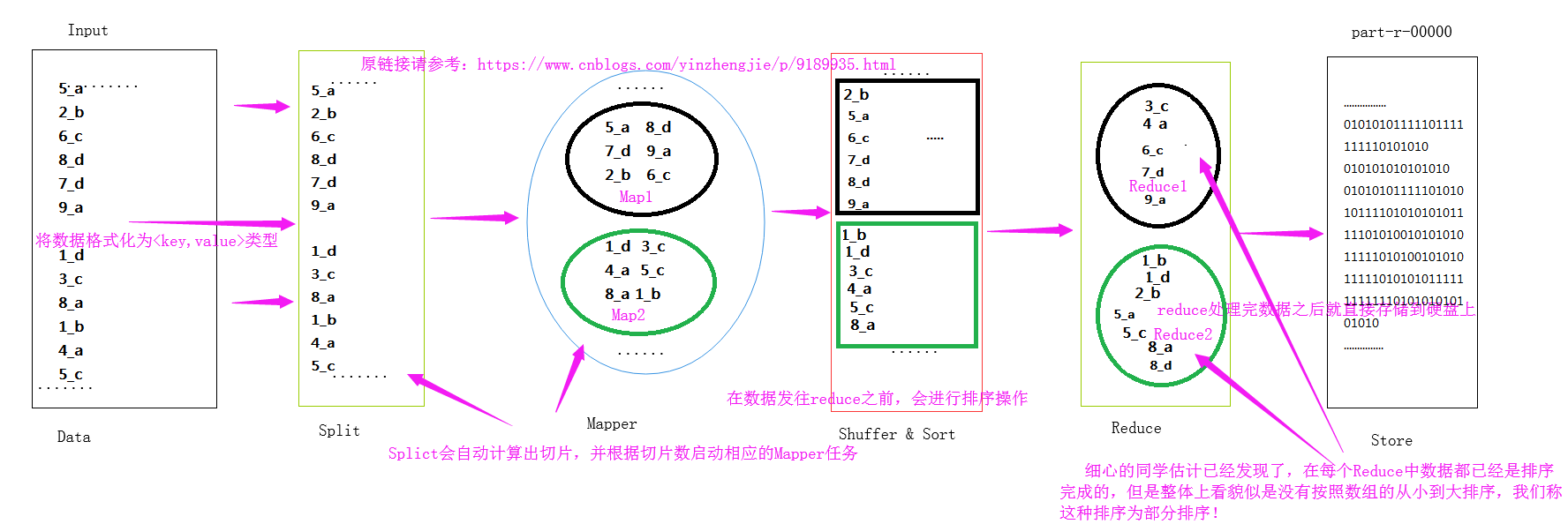
1>.部分排序
部分排序是对单个分区进行排序,举个简单的例子,第一个分区中的数据为1,3,5;而第二个分区为2,4,这两个分区的值看起来是没有连续性的,但是每个分区中的数据又是排序的!下面是我画的一个草图:
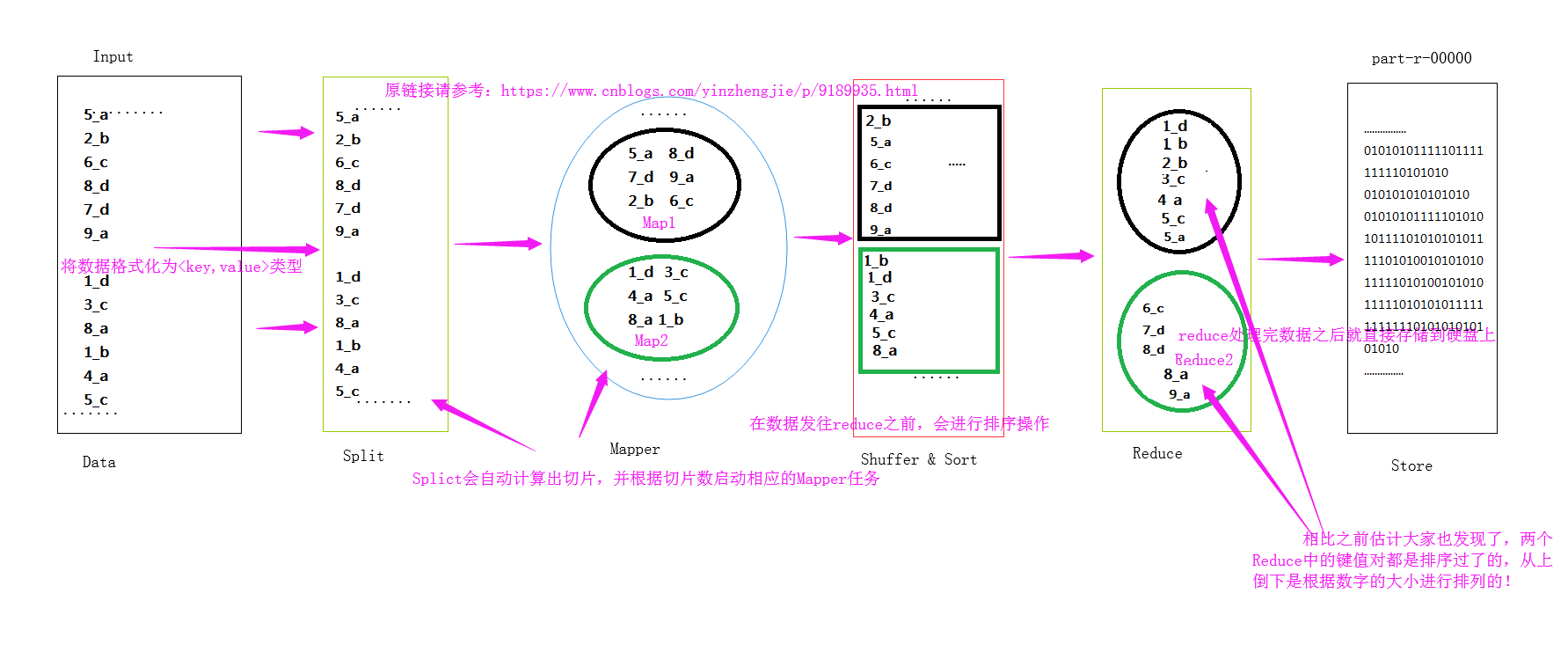
2>.全排序
全排序是对所有分区中的数据均排序,比如第一个分区的值为1,2,3,而第二个分区为4,5 很显然2个分区是经过排序的,可以明显的看清楚每个分区的具体的取值规范。下面是我画的一个草图:
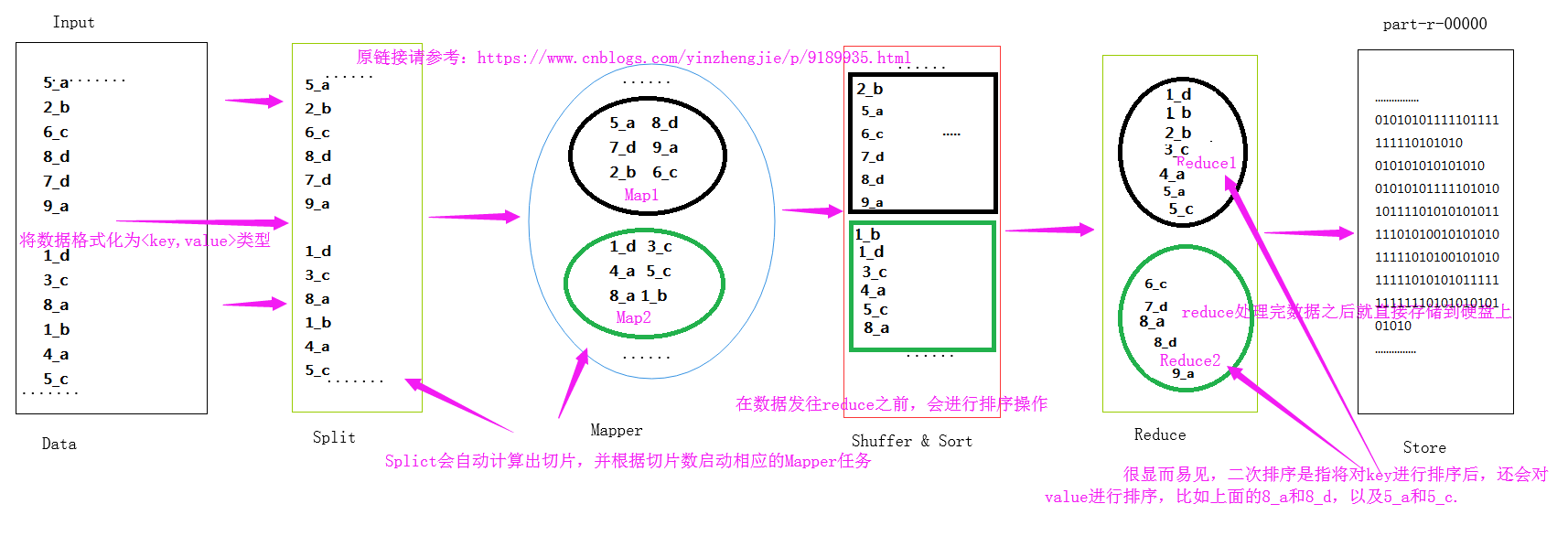
3>.二次排序
二次排序是指对key排序的基础上,对value进行排序。
二.全排序的实现方案
 May, : Release 3.0.-alpha3 available

This is a security release in the 3.0. release line. It consists of alpha2 plus security fixes, along with necessary build-related fixes. Users on 3.0.-alpha1 and 3.0.-alpha2 are encouraged to upgrade to 3.0.-alpha3.

Please note that alpha releases come with no guarantees of quality or API stability, and are not intended for production use.

Users are encouraged to read the overview of major changes coming in 3.0.. The alpha3 release notes and changelog detail the changes since 3.0.-alpha2.
wordCount.txt 文件内容
1>.一个Reduce实现全排序
缺点:单个节点负载较高!如果计算数据较大,那么会浪费很长的时间!不推荐使用!
 /*

 @author :yinzhengjie

 Blog:http://www.cnblogs.com/yinzhengjie/tag/Hadoop%E8%BF%9B%E9%98%B6%E4%B9%8B%E8%B7%AF/

 EMAIL:y1053419035@qq.com

 */

 package cn.org.yinzhengjie.mapreduce.wordcount;

 import org.apache.hadoop.io.IntWritable;

 import org.apache.hadoop.io.LongWritable;

 import org.apache.hadoop.io.Text;

 import org.apache.hadoop.mapreduce.Mapper;

 import java.io.IOException;

 /**

  *      我们定义的map端类为WordCountMap,它需要继承“org.apache.hadoop.mapreduce.Mapper.Mapper”,

  * 该Mapper有四个参数,前两个参数是指定map端输入key和value的数据类型,而后两个参数是指定map端输出

  * key和value的数据类型。

  */

 public class WordCountMap extends Mapper<LongWritable,Text,Text,IntWritable> {

     /**

      *

      * @param key               : 表示输入的key变量。

      * @param value             : 表示输入的value

      * @param context           : 表示map端的上下文,它是负责将map端数据传给reduce。

      */

     protected void map(LongWritable key, Text value, Context context) throws IOException, InterruptedException {

         //得到一行数据

         String line = value.toString();

         //以空格切开一行的数据

         String[] arr = line.split(" ");

         for (String word:arr){

             //遍历arr中的每个元素,并对每个元素赋初值为1,然后在将数据传给reduce端

             context.write(new Text(word),new IntWritable(1));

         }

     }

 }
WordCountMap.java 文件内容
 /*

 @author :yinzhengjie

 Blog:http://www.cnblogs.com/yinzhengjie/tag/Hadoop%E8%BF%9B%E9%98%B6%E4%B9%8B%E8%B7%AF/

 EMAIL:y1053419035@qq.com

 */

 package cn.org.yinzhengjie.mapreduce.wordcount;

 import org.apache.hadoop.io.IntWritable;

 import org.apache.hadoop.io.Text;

 import org.apache.hadoop.mapreduce.Reducer;

 import java.io.IOException;

 /**

  *      我们定义的reduce端类为WordCountReduce,它需要继承“org.apache.hadoop.mapreduce.Reducer.Reducer”,

  * 该Reducer有四个参数,前两个参数是指定map端输入key和value的数据类型,而后两个参数是指定map端输出

  * key和value的数据类型。

  */

 public class WordCountReduce extends Reducer<Text,IntWritable,Text,IntWritable> {

     /**

      *

      * @param key               :  表示输入的key变量。

      * @param values            : 表示输入的value,这个变量是可迭代的,因此传递的是多个值。

      * @param context           : 表示reduce端的上下文,它是负责将reduce端数据传给调用者(调用者可以传递的数据输出到文件,也可以输出到下一个MapReduce程序。

      */

     protected void reduce(Text key, Iterable<IntWritable> values, Context context) throws IOException, InterruptedException {

         //定义一个单词计数器

         Integer count = 0;

         //由于输入端只有一个key,因此value的所有值都属于这个key的,我们需要做的是对value进行遍历并将所有数据进行相加操作,最终的结果就得到了同一个key的出现的次数。

         for (IntWritable value : values){

             //获取到value的get方法获取到value的值。

             count += value.get();

         }

         //我们将key原封不动的返回,并将key的values的所有int类型的参数进行折叠,最终返回单词书以及该单词总共出现的次数。

         context.write(key,new IntWritable(count));

     }

 }
WordCountReduce.java 文件内容
 /*

 @author :yinzhengjie

 Blog:http://www.cnblogs.com/yinzhengjie/tag/Hadoop%E8%BF%9B%E9%98%B6%E4%B9%8B%E8%B7%AF/

 EMAIL:y1053419035@qq.com

 */

 package cn.org.yinzhengjie.mapreduce.wordcount;

 import org.apache.hadoop.conf.Configuration;

 import org.apache.hadoop.fs.FileSystem;

 import org.apache.hadoop.fs.Path;

 import org.apache.hadoop.io.IntWritable;

 import org.apache.hadoop.io.Text;

 import org.apache.hadoop.mapreduce.Job;

 import org.apache.hadoop.mapreduce.lib.input.FileInputFormat;

 import org.apache.hadoop.mapreduce.lib.output.FileOutputFormat;

 import java.io.IOException;

 public class WordCountApp {

     public static void main(String[] args) throws IOException, ClassNotFoundException, InterruptedException {

         //实例化一个Configuration,它会自动去加载本地的core-site.xml配置文件的fs.defaultFS属性。(该文件放在项目的resources目录即可。)

         Configuration conf = new Configuration();

         //将hdfs写入的路径定义在本地,需要修改默认为文件系统,这样就可以覆盖到之前在core-site.xml配置文件读取到的数据。

         conf.set("fs.defaultFS","file:///");

         //代码的入口点,初始化HDFS文件系统,此时我们需要把读取到的fs.defaultFS属性传给fs对象。

         FileSystem fs = FileSystem.get(conf);

         //创建一个任务对象job,别忘记把conf穿进去哟!

         Job job = Job.getInstance(conf);

         //给任务起个名字

         job.setJobName("WordCount");

         //指定main函数所在的类,也就是当前所在的类名

         job.setJarByClass(WordCountApp.class);

         //指定map的类名,这里指定咱们自定义的map程序即可

         job.setMapperClass(WordCountMap.class);

         //指定reduce的类名,这里指定咱们自定义的reduce程序即可

         job.setReducerClass(WordCountReduce.class);

         //设置输出key的数据类型

         job.setOutputKeyClass(Text.class);

         //设置输出value的数据类型

         job.setOutputValueClass(IntWritable.class);

         //设置输入路径,需要传递两个参数,即任务对象(job)以及输入路径

         FileInputFormat.addInputPath(job,new Path("D:\\10.Java\\IDE\\yhinzhengjieData\\MyHadoop\\MapReduce\\wordCount.txt"));

         //设置输出路径,需要传递两个参数,即任务对象(job)以及输出路径

         Path localPath = new Path("D:\\10.Java\\IDE\\yhinzhengjieData\\MyHadoop\\MapReduce\\CountOut");

         if (fs.exists(localPath)){

             fs.delete(localPath,true);

         }

         FileOutputFormat.setOutputPath(job,localPath);

         //设置1个Reduce任务,这样就可以生成的数据会被保存在1个文件中,从而实现了全排序!

         job.setNumReduceTasks(1);

         //等待任务执行结束,将里面的值设置为true。

         job.waitForCompletion(true);

     }

 }
WordCountApp.java 文件内容
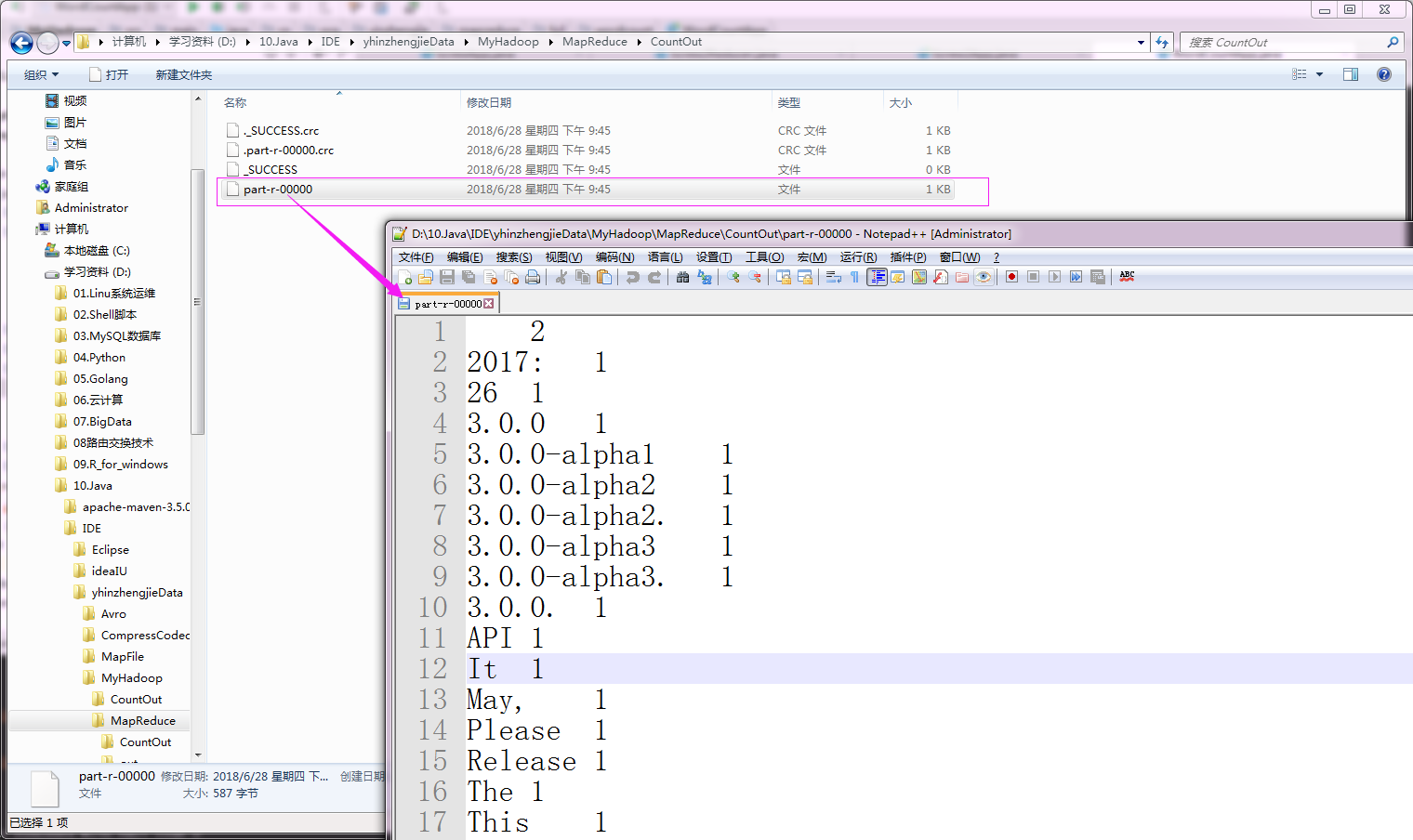
执行以上代码后,会生成1个分区文件,如下:
     2

 2017:    1

 26    1

 3.0.0    1

 3.0.0-alpha1    1

 3.0.0-alpha2    1

 3.0.0-alpha2.    1

 3.0.0-alpha3    1

 3.0.0-alpha3.    1

 3.0.0.    1

 API    1

 It    1

 May,    1

 Please    1

 Release    1

 The    1

 This    1

 Users    2

 a    1

 along    1

 alpha    1

 alpha2    1

 alpha3    1

 and    3

 are    3

 available    1

 build-related    1

 changelog    1

 changes    2

 come    1

 coming    1

 consists    1

 detail    1

 encouraged    2

 fixes,    1

 fixes.    1

 for    1

 guarantees    1

 in    2

 intended    1

 is    1

 line.    1

 major    1

 necessary    1

 no    1

 not    1

 note    1

 notes    1

 of    3

 on    1

 or    1

 overview    1

 plus    1

 production    1

 quality    1

 read    1

 release    3

 releases    1

 security    2

 since    1

 stability,    1

 that    1

 the    3

 to    3

 upgrade    1

 use.    1

 with    2
part-r-00000 文件内容
2>.自定义分区函数进行排序
自定义分区函数需要划分key空间,按照范围指定分区索引。缺点:需要准确估算key的范围,否则容易导致数据倾斜。如果你对业务把控不是很准确的话,这种方法也不推荐使用!
 /*

 @author :yinzhengjie

 Blog:http://www.cnblogs.com/yinzhengjie/tag/Hadoop%E8%BF%9B%E9%98%B6%E4%B9%8B%E8%B7%AF/

 EMAIL:y1053419035@qq.com

 */

 package cn.org.yinzhengjie.mapreduce.full;

 import org.apache.hadoop.io.IntWritable;

 import org.apache.hadoop.io.LongWritable;

 import org.apache.hadoop.io.Text;

 import org.apache.hadoop.mapreduce.Mapper;

 import java.io.IOException;

 public class FullMapper extends Mapper<LongWritable, Text, Text, IntWritable> {

     @Override

     protected void map(LongWritable key, Text value, Context context) throws IOException, InterruptedException {

         //得到一行数据

         String line = value.toString();

         String[] arr = line.split(" ");

         for (String word : arr) {

             context.write(new Text(word), new IntWritable(1));

         }

     }

 }
FullMapper.java 文件内容
 /*

 @author :yinzhengjie

 Blog:http://www.cnblogs.com/yinzhengjie/tag/Hadoop%E8%BF%9B%E9%98%B6%E4%B9%8B%E8%B7%AF/

 EMAIL:y1053419035@qq.com

 */

 package cn.org.yinzhengjie.mapreduce.full;

 import org.apache.hadoop.io.IntWritable;

 import org.apache.hadoop.io.Text;

 import org.apache.hadoop.mapreduce.Reducer;

 import java.io.IOException;

 public class FullReducer extends Reducer<Text, IntWritable , Text, IntWritable> {

     @Override

     protected void reduce(Text key, Iterable<IntWritable> values, Context context) throws IOException, InterruptedException {

         Integer sum = 0;

         for(IntWritable value : values){

             sum += value.get();

         }

         context.write(key, new IntWritable(sum));

     }

 }
FullReducer.java 文件内容
 /*

 @author :yinzhengjie

 Blog:http://www.cnblogs.com/yinzhengjie/tag/Hadoop%E8%BF%9B%E9%98%B6%E4%B9%8B%E8%B7%AF/

 EMAIL:y1053419035@qq.com

 */

 package cn.org.yinzhengjie.mapreduce.full;

 import org.apache.hadoop.io.IntWritable;

 import org.apache.hadoop.io.Text;

 import org.apache.hadoop.mapreduce.Partitioner;

 public class FullPartition extends Partitioner<Text,IntWritable> {

     @Override

     public int getPartition(Text text, IntWritable intWritable, int numPartitions) {

         String key = text.toString();

         if(key.compareTo("f") < 0){

             return 0;

         }

         else {

             return 1;

         }

     }

 }
FullPartition.java 文件内容
 /*

 @author :yinzhengjie

 Blog:http://www.cnblogs.com/yinzhengjie/tag/Hadoop%E8%BF%9B%E9%98%B6%E4%B9%8B%E8%B7%AF/

 EMAIL:y1053419035@qq.com

 */

 package cn.org.yinzhengjie.mapreduce.full;

 import org.apache.hadoop.conf.Configuration;

 import org.apache.hadoop.fs.FileSystem;

 import org.apache.hadoop.fs.Path;

 import org.apache.hadoop.io.IntWritable;

 import org.apache.hadoop.io.Text;

 import org.apache.hadoop.mapreduce.Job;

 import org.apache.hadoop.mapreduce.lib.input.FileInputFormat;

 import org.apache.hadoop.mapreduce.lib.output.FileOutputFormat;

 import java.io.IOException;

 public class FullApp {

     public static void main(String[] args) throws IOException, ClassNotFoundException, InterruptedException {

         //实例化一个Configuration,它会自动去加载本地的core-site.xml配置文件的fs.defaultFS属性。(该文件放在项目的resources目录即可。)

         Configuration conf = new Configuration();

         //将hdfs写入的路径定义在本地,需要修改默认为文件系统,这样就可以覆盖到之前在core-site.xml配置文件读取到的数据。

         conf.set("fs.defaultFS","file:///");

         //代码的入口点,初始化HDFS文件系统,此时我们需要把读取到的fs.defaultFS属性传给fs对象。

         FileSystem fs = FileSystem.get(conf);

         //创建一个任务对象job,别忘记把conf穿进去哟!

         Job job = Job.getInstance(conf);

         //给任务起个名字

         job.setJobName("WordCount");

         //指定main函数所在的类,也就是当前所在的类名

         job.setJarByClass(FullApp.class);

         //指定map的类名,这里指定咱们自定义的map程序即可

         job.setMapperClass(FullMapper.class);

         //指定reduce的类名,这里指定咱们自定义的reduce程序即可

         job.setReducerClass(FullReducer.class);

         //指定Partition的类名,这里指定咱们自定义的Partition程序即可

         job.setPartitionerClass(FullPartition.class);

         //设置输出key的数据类型

         job.setOutputKeyClass(Text.class);

         //设置输出value的数据类型

         job.setOutputValueClass(IntWritable.class);

         //设置输入路径,需要传递两个参数,即任务对象(job)以及输入路径

         FileInputFormat.addInputPath(job,new Path("D:\\10.Java\\IDE\\yhinzhengjieData\\MyHadoop\\MapReduce\\wordCount.txt"));

         //设置输出路径,需要传递两个参数,即任务对象(job)以及输出路径

         Path localPath = new Path("D:\\10.Java\\IDE\\yhinzhengjieData\\MyHadoop\\MapReduce\\CountOut");

         if (fs.exists(localPath)){

             fs.delete(localPath,true);

         }

         FileOutputFormat.setOutputPath(job,localPath);

         //设置2个Reduce任务,这样就可以生成的数据会被保存在2个文件中

         job.setNumReduceTasks(2);

         //等待任务执行结束,将里面的值设置为true。

         job.waitForCompletion(true);

     }

 }
FullApp.java 文件内容
执行以上代码后,会生成2个分区文件,如下:
     2

 2017:    1

 26    1

 3.0.0    1

 3.0.0-alpha1    1

 3.0.0-alpha2    1

 3.0.0-alpha2.    1

 3.0.0-alpha3    1

 3.0.0-alpha3.    1

 3.0.0.    1

 API    1

 It    1

 May,    1

 Please    1

 Release    1

 The    1

 This    1

 Users    2

 a    1

 along    1

 alpha    1

 alpha2    1

 alpha3    1

 and    3

 are    3

 available    1

 build-related    1

 changelog    1

 changes    2

 come    1

 coming    1

 consists    1

 detail    1

 encouraged    2
part-r-00000 文件内容
fixes,    1

fixes.    1

for    1

guarantees    1

in    2

intended    1

is    1

line.    1

major    1

necessary    1

no    1

not    1

note    1

notes    1

of    3

on    1

or    1

overview    1

plus    1

production    1

quality    1

read    1

release    3

releases    1

security    2

since    1

stability,    1

that    1

the    3

to    3

upgrade    1

use.    1

with    2
part-r-00001 文件内容

3>.采样
要使用采样的前提是不能使用文本类型,因为文本类型的Key为IntWritable。采样过程是在Mapper之前,采样的目的是为了让各个分区整体上实现全排序。
a>.随机采样(性能差,适合乱序的源数据)
 循环的条件:

        当前已经扫描的分区数小于SplitToSample或者当前已经扫描的分区数超过了SplitToSample但是小于输出分区总数并且当前的采样数小于最大采样数numSamples。

 每个分区中记录采样的具体过程如下:

     从指定分区中取出一条记录,判断得到的随机浮点数是否小于等于采样频率freq,如果大于则放弃这条记录,然后判断当前你的采样是否小于最大采样数,如果小于则这条记录被选中,被放进采样集合中,否则从[0,numSamples]中选择一个随机数,如果这个随机数不等于最大采样数numSamples,则用这条记录替换掉采样集合随机数对应位置的记录,同时采样频率freq较少变为freq*(numSamples-1)/numSamples。然后依次遍历分区中的其它记录。
 /*

 @author :yinzhengjie

 Blog:http://www.cnblogs.com/yinzhengjie/tag/Hadoop%E8%BF%9B%E9%98%B6%E4%B9%8B%E8%B7%AF/

 EMAIL:y1053419035@qq.com

 */

 package cn.org.yinzhengjie.sequencefile;

 import org.apache.hadoop.conf.Configuration;

 import org.apache.hadoop.fs.FileSystem;

 import org.apache.hadoop.fs.Path;

 import org.apache.hadoop.io.IntWritable;

 import org.apache.hadoop.io.SequenceFile;

 import org.apache.hadoop.io.Text;

 import java.io.IOException;

 import java.util.Random;

 public class TestSeq {

     public static void main(String[] args) throws IOException {

         createSeq();

     }

     public static void createSeq() throws IOException {

         Configuration conf = new Configuration();

         conf.set("fs.defaultFS", "file:///");

         FileSystem fs = FileSystem.get(conf);

         Path localPath = new Path("D:\\BigData\\JavaSE\\yinzhengjieData\\MyHadoop\\MapReduce\\block.seq");

         SequenceFile.Writer block_writer = SequenceFile.createWriter(fs, conf, localPath, Text.class, IntWritable.class,SequenceFile.CompressionType.BLOCK);

         for (int i = 0; i < 1000; i++) {

             Random r = new Random();

             int j = r.nextInt(1000);

             Text key = new Text("yinzhengjie" + j);

             IntWritable val = new IntWritable(j);

             block_writer.append(key, val);

         }

         block_writer.close();

     }

 }
生产SequenceFile的代码
 /*

 @author :yinzhengjie

 Blog:http://www.cnblogs.com/yinzhengjie/tag/Hadoop%E8%BF%9B%E9%98%B6%E4%B9%8B%E8%B7%AF/

 EMAIL:y1053419035@qq.com

 */

 package cn.org.yinzhengjie.totalsampler;

 import org.apache.hadoop.io.IntWritable;

 import org.apache.hadoop.io.LongWritable;

 import org.apache.hadoop.io.Text;

 import org.apache.hadoop.mapreduce.Mapper;

 import java.io.IOException;

 public class SamplerMapper extends Mapper<Text, IntWritable, Text, IntWritable> {

     @Override

     protected void map(Text key, IntWritable value, Context context) throws IOException, InterruptedException {

         context.write(key, value);

     }

 }
SamplerMapper.java 文件内容
 /*

 @author :yinzhengjie

 Blog:http://www.cnblogs.com/yinzhengjie/tag/Hadoop%E8%BF%9B%E9%98%B6%E4%B9%8B%E8%B7%AF/

 EMAIL:y1053419035@qq.com

 */

 package cn.org.yinzhengjie.totalsampler;

 import org.apache.hadoop.io.IntWritable;

 import org.apache.hadoop.io.Text;

 import org.apache.hadoop.mapreduce.Reducer;

 import java.io.IOException;

 public class SamplerReducer extends Reducer<Text, IntWritable , Text, IntWritable> {

     @Override

     protected void reduce(Text key, Iterable<IntWritable> values, Context context) throws IOException, InterruptedException {

         Integer sum = 0;

         for(IntWritable value : values){

             sum += value.get();

         }

         context.write(key, new IntWritable(sum));

     }

 }
SamplerReducer.java 文件内容
 /*

 @author :yinzhengjie

 Blog:http://www.cnblogs.com/yinzhengjie/tag/Hadoop%E8%BF%9B%E9%98%B6%E4%B9%8B%E8%B7%AF/

 EMAIL:y1053419035@qq.com

 */

 package cn.org.yinzhengjie.totalsampler;

 import org.apache.hadoop.conf.Configuration;

 import org.apache.hadoop.fs.FileSystem;

 import org.apache.hadoop.fs.Path;

 import org.apache.hadoop.io.IntWritable;

 import org.apache.hadoop.io.Text;

 import org.apache.hadoop.mapreduce.Job;

 import org.apache.hadoop.mapreduce.lib.input.FileInputFormat;

 import org.apache.hadoop.mapreduce.lib.input.SequenceFileInputFormat;

 import org.apache.hadoop.mapreduce.lib.output.FileOutputFormat;

 import org.apache.hadoop.mapreduce.lib.partition.InputSampler;

 import org.apache.hadoop.mapreduce.lib.partition.TotalOrderPartitioner;

 public class SamplerApp {

     public static void main(String[] args) throws Exception {

         Configuration conf = new Configuration();

         conf.set("fs.defaultFS","file:///");

         Job job = Job.getInstance(conf);

         FileSystem fs = FileSystem.get(conf);

         job.setJobName("Wordcount");

         job.setJarByClass(SamplerApp.class);

         job.setMapperClass(SamplerMapper.class);

         job.setReducerClass(SamplerReducer.class);

         //设置输入类型 ===> sequenceFile

         job.setInputFormatClass(SequenceFileInputFormat.class);

         job.setOutputKeyClass(Text.class);

         job.setOutputValueClass(IntWritable.class);

         Path p = new Path("D:\\BigData\\JavaSE\\yinzhengjieData\\MyHadoop\\MapReduce\\out");

         if (fs.exists(p)) {

             fs.delete(p, true);

         }

         FileInputFormat.addInputPath(job, new Path("D:\\BigData\\JavaSE\\yinzhengjieData\\MyHadoop\\MapReduce\\block.seq"));

         FileOutputFormat.setOutputPath(job, p);

         //设置Reduce任务的个数,你也可以理解为分区个数!

         job.setNumReduceTasks(5);

         //设置全排序分区类

         job.setPartitionerClass(TotalOrderPartitioner.class);

         /**

          * 采样代码一定要到job设置的最后部分

          */

         //设置分区文件

         TotalOrderPartitioner.setPartitionFile(job.getConfiguration(),new Path("D:\\BigData\\JavaSE\\yinzhengjieData\\MyHadoop\\MapReduce\\par\\par.dat"));

         /**

          * 初始化采样器

          * freq             每个Key被选中的概率     freq x key > 分区数(我上面设置的分区数是5个,这里的key应该是你的条目数,如果这个freq设置的值较小,就会抛异常:ArrayIndexOutOfBoundsException)

          * numSamples       需要的样本数           numSamples  > 分区数(我上面设置的分区数是5个,如果numSamples的个数小于分区数也会抛异常:ArrayIndexOutOfBoundsException)

          * maxSplitsSampled 文件最大切片数         maxSplitsSampled > 当前切片数

          *

          */

         InputSampler.RandomSampler sampler = new InputSampler.RandomSampler(0.01,5,3);

         //写入分区文件

         InputSampler.writePartitionFile(job, sampler);

         job.waitForCompletion(true);

     }

 }
SamplerApp.java 文件内容
执行以上代码后,会生成5个分区文件,如下:
b>.间隔采样(性能较好,适合有序的源数据)
固定采样间隔, 当数量达到numSamples,停止采样。
 /*

 @author :yinzhengjie

 Blog:http://www.cnblogs.com/yinzhengjie/tag/Hadoop%E8%BF%9B%E9%98%B6%E4%B9%8B%E8%B7%AF/

 EMAIL:y1053419035@qq.com

 */

 package cn.org.yinzhengjie.totalsampler;

 import org.apache.hadoop.io.IntWritable;

 import org.apache.hadoop.io.Text;

 import org.apache.hadoop.mapreduce.Mapper;

 import java.io.IOException;

 public class SamplerMapper extends Mapper<Text, IntWritable, Text, IntWritable> {

     @Override

     protected void map(Text key, IntWritable value, Context context) throws IOException, InterruptedException {

         context.write(key, value);

     }

 }
SamplerMapper.java 文件内容
 /*

 @author :yinzhengjie

 Blog:http://www.cnblogs.com/yinzhengjie/tag/Hadoop%E8%BF%9B%E9%98%B6%E4%B9%8B%E8%B7%AF/

 EMAIL:y1053419035@qq.com

 */

 package cn.org.yinzhengjie.totalsampler;

 import org.apache.hadoop.io.IntWritable;

 import org.apache.hadoop.io.Text;

 import org.apache.hadoop.mapreduce.Reducer;

 import java.io.IOException;

 public class SamplerReducer extends Reducer<Text, IntWritable , Text, IntWritable> {

     @Override

     protected void reduce(Text key, Iterable<IntWritable> values, Context context) throws IOException, InterruptedException {

         Integer sum = 0;

         for(IntWritable value : values){

             sum += value.get();

         }

         context.write(key, new IntWritable(sum));

     }

 }
SamplerReducer.java 文件内容
 /*

 @author :yinzhengjie

 Blog:http://www.cnblogs.com/yinzhengjie/tag/Hadoop%E8%BF%9B%E9%98%B6%E4%B9%8B%E8%B7%AF/

 EMAIL:y1053419035@qq.com

 */

 package cn.org.yinzhengjie.totalsampler;

 import org.apache.hadoop.conf.Configuration;

 import org.apache.hadoop.fs.FileSystem;

 import org.apache.hadoop.fs.Path;

 import org.apache.hadoop.io.IntWritable;

 import org.apache.hadoop.io.Text;

 import org.apache.hadoop.mapreduce.Job;

 import org.apache.hadoop.mapreduce.lib.input.FileInputFormat;

 import org.apache.hadoop.mapreduce.lib.input.SequenceFileInputFormat;

 import org.apache.hadoop.mapreduce.lib.output.FileOutputFormat;

 import org.apache.hadoop.mapreduce.lib.partition.InputSampler;

 import org.apache.hadoop.mapreduce.lib.partition.TotalOrderPartitioner;

 public class SamplerApp {

     public static void main(String[] args) throws Exception {

         Configuration conf = new Configuration();

         conf.set("fs.defaultFS","file:///");

         Job job = Job.getInstance(conf);

         FileSystem fs = FileSystem.get(conf);

         job.setJobName("Wordcount");

         job.setJarByClass(SamplerApp.class);

         job.setMapperClass(SamplerMapper.class);

         job.setReducerClass(SamplerReducer.class);

         //job.setCombinerClass(WCReducer.class);

         //设置输入类型 ===> sequenceFile

         job.setInputFormatClass(SequenceFileInputFormat.class);

         job.setOutputKeyClass(Text.class);

         job.setOutputValueClass(IntWritable.class);

         Path localPath = new Path("D:\\10.Java\\IDE\\yhinzhengjieData\\MyHadoop\\MapReduce\\out");

         if (fs.exists(localPath)) {

             fs.delete(localPath, true);

         }

         FileInputFormat.addInputPath(job, new Path("D:\\10.Java\\IDE\\yhinzhengjieData\\MyHadoop\\MapReduce\\block.seq"));

         FileOutputFormat.setOutputPath(job, localPath);

         job.setNumReduceTasks(5);

         //设置全排序分区类

         job.setPartitionerClass(TotalOrderPartitioner.class);

         /**

          * 采样代码一定要到job设置的最后部分

          */

         //设置分区文件,该文件为采样文件,作用是用于判断分区个数,比如有4个采样,那么就可以生成5个分区!

         TotalOrderPartitioner.setPartitionFile(job.getConfiguration(),new Path("D:\\10.Java\\IDE\\yhinzhengjieData\\MyHadoop\\MapReduce\\par\\par.dat"));

         /**

          * 初始化采样器

          * freq             每个Key被选中的概率     freq x key > 分区数

          * maxSplitsSampled 文件最大切片数         maxSplitsSampled > 当前切片数

          *

          */

         InputSampler.IntervalSampler sampler = new InputSampler.IntervalSampler(0.01,10);

         //写入分区文件

         InputSampler.writePartitionFile(job, sampler);

         job.waitForCompletion(true);

     }

 }
SamplerApp.java 文件内容
执行以上代码后,会生成5个分区文件,如下:
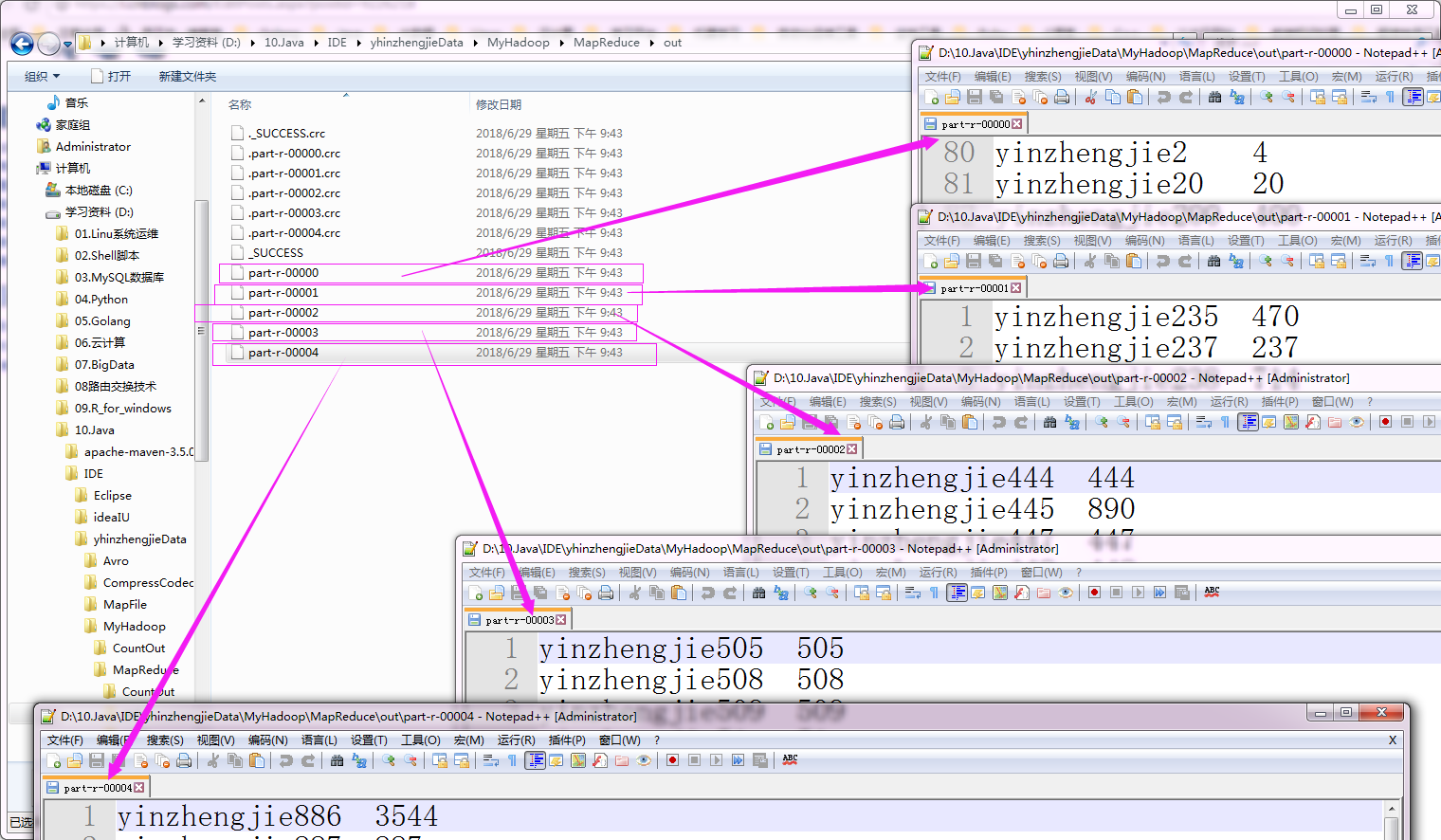
c>.切片采样(性能较好,适合有序的源数据)
对每个切片的前n个数据进行采样。
 /*

 @author :yinzhengjie

 Blog:http://www.cnblogs.com/yinzhengjie/tag/Hadoop%E8%BF%9B%E9%98%B6%E4%B9%8B%E8%B7%AF/

 EMAIL:y1053419035@qq.com

 */

 package cn.org.yinzhengjie.totalsampler;

 import org.apache.hadoop.io.IntWritable;

 import org.apache.hadoop.io.Text;

 import org.apache.hadoop.mapreduce.Mapper;

 import java.io.IOException;

 public class SamplerMapper extends Mapper<Text, IntWritable, Text, IntWritable> {

     @Override

     protected void map(Text key, IntWritable value, Context context) throws IOException, InterruptedException {

         context.write(key, value);

     }

 }
SamplerMapper.java 文件内容
 /*

 @author :yinzhengjie

 Blog:http://www.cnblogs.com/yinzhengjie/tag/Hadoop%E8%BF%9B%E9%98%B6%E4%B9%8B%E8%B7%AF/

 EMAIL:y1053419035@qq.com

 */

 package cn.org.yinzhengjie.totalsampler;

 import org.apache.hadoop.io.IntWritable;

 import org.apache.hadoop.io.Text;

 import org.apache.hadoop.mapreduce.Reducer;

 import java.io.IOException;

 public class SamplerReducer extends Reducer<Text, IntWritable , Text, IntWritable> {

     @Override

     protected void reduce(Text key, Iterable<IntWritable> values, Context context) throws IOException, InterruptedException {

         Integer sum = 0;

         for(IntWritable value : values){

             sum += value.get();

         }

         context.write(key, new IntWritable(sum));

     }

 }
SamplerReducer.java 文件内容
 /*

 @author :yinzhengjie

 Blog:http://www.cnblogs.com/yinzhengjie/tag/Hadoop%E8%BF%9B%E9%98%B6%E4%B9%8B%E8%B7%AF/

 EMAIL:y1053419035@qq.com

 */

 package cn.org.yinzhengjie.totalsampler;

 import org.apache.hadoop.conf.Configuration;

 import org.apache.hadoop.fs.FileSystem;

 import org.apache.hadoop.fs.Path;

 import org.apache.hadoop.io.IntWritable;

 import org.apache.hadoop.io.Text;

 import org.apache.hadoop.mapreduce.Job;

 import org.apache.hadoop.mapreduce.lib.input.FileInputFormat;

 import org.apache.hadoop.mapreduce.lib.input.SequenceFileInputFormat;

 import org.apache.hadoop.mapreduce.lib.output.FileOutputFormat;

 import org.apache.hadoop.mapreduce.lib.partition.InputSampler;

 import org.apache.hadoop.mapreduce.lib.partition.TotalOrderPartitioner;

 public class SamplerApp {

     public static void main(String[] args) throws Exception {

         Configuration conf = new Configuration();

         conf.set("fs.defaultFS","file:///");

         Job job = Job.getInstance(conf);

         FileSystem fs = FileSystem.get(conf);

         job.setJobName("Wordcount");

         job.setJarByClass(SamplerApp.class);

         job.setMapperClass(SamplerMapper.class);

         job.setReducerClass(SamplerReducer.class);

         //job.setCombinerClass(WCReducer.class);

         //设置输入类型 ===> sequenceFile

         job.setInputFormatClass(SequenceFileInputFormat.class);

         job.setOutputKeyClass(Text.class);

         job.setOutputValueClass(IntWritable.class);

         Path localPath = new Path("D:\\10.Java\\IDE\\yhinzhengjieData\\MyHadoop\\MapReduce\\out");

         if (fs.exists(localPath)) {

             fs.delete(localPath, true);

         }

         FileInputFormat.addInputPath(job, new Path("D:\\10.Java\\IDE\\yhinzhengjieData\\MyHadoop\\MapReduce\\block.seq"));

         FileOutputFormat.setOutputPath(job, localPath);

         job.setNumReduceTasks(5);

         //设置全排序分区类

         job.setPartitionerClass(TotalOrderPartitioner.class);

         /**

          * 采样代码一定要到job设置的最后部分

          */

         //设置分区文件,该文件为采样文件,作用是用于判断分区个数,比如有4个采样,那么就可以生成5个分区!

         TotalOrderPartitioner.setPartitionFile(job.getConfiguration(),new Path("D:\\10.Java\\IDE\\yhinzhengjieData\\MyHadoop\\MapReduce\\par\\par.dat"));

         /**

          * 初始化采样器

          * numSamples       需要的样本数           numSamples  > 分区数

          * maxSplitsSampled 文件最大切片数         maxSplitsSampled > 当前切片数

          *

          */

         InputSampler.SplitSampler sampler = new InputSampler.SplitSampler(10,5);

         //写入分区文件

         InputSampler.writePartitionFile(job, sampler);

         job.waitForCompletion(true);

     }

 }
SamplerApp.java 文件内容
执行以上代码后,会生成5个分区文件,如下:
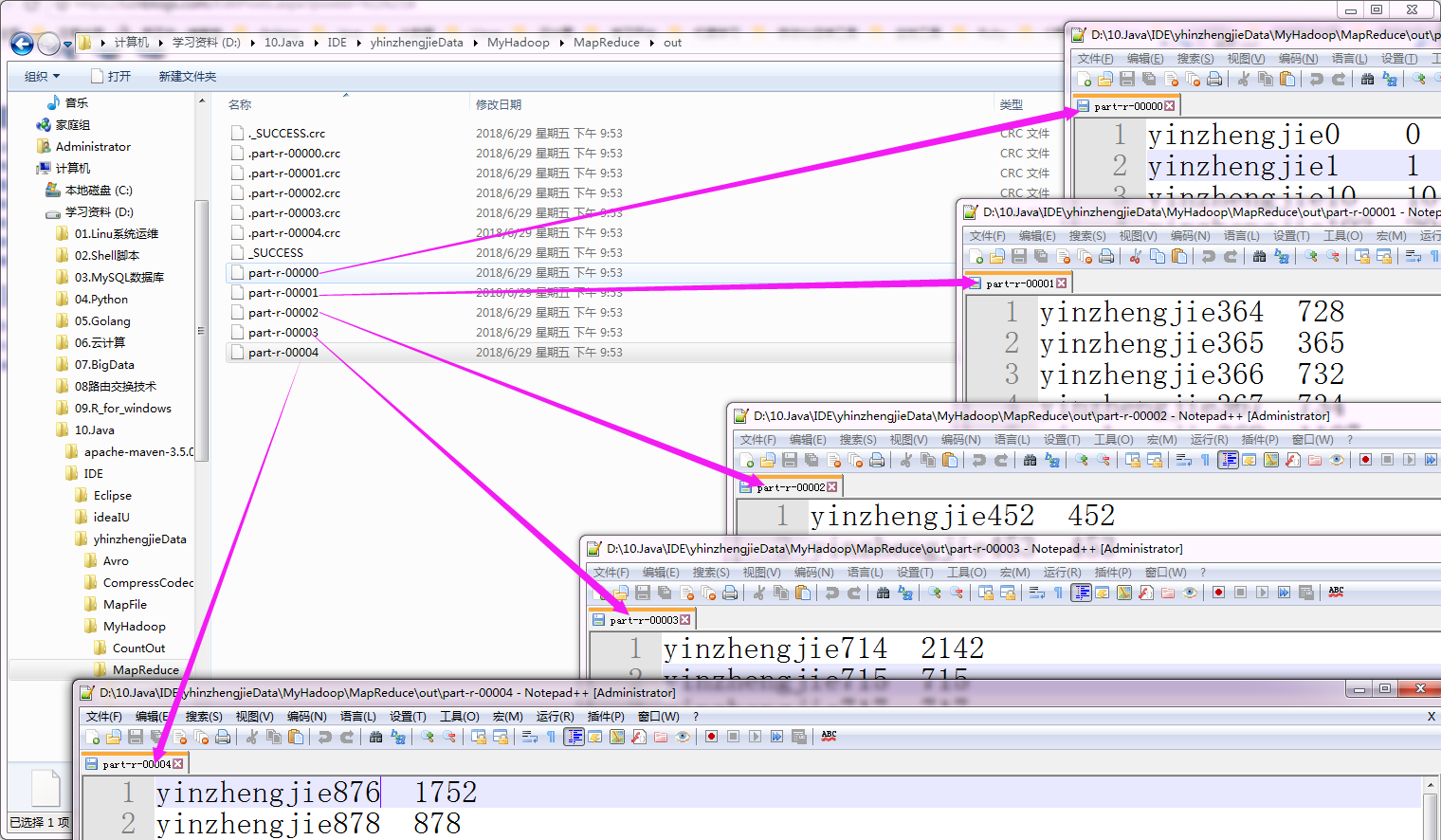
三.二次排序实现方案
-
-
-
-
-
-
-
-
-
-
- - - - -
-
-
-
- -
-
-
-
- -
-
-
-
-
-
-
-
-
-
- -
- -
-
-
-
-
-
- -
- - - - -
- -
-
-
-
- -
- - -
-
- - - -
-
-
-
-
-
-
-
-
-
-
-
-
-
-
-
-
- -
-
-
-
-
-
-
-
-
-
-
-
-
-
-
-
-
-
- -
-
-
- -
-
- -
-
-
-
-
-
-
-
-
-
-
-
-
-
-
-
-
-
-
-
- - - -
-
-
-
-
-
-
-
-
-
-
-
-
-
-
-
-
-
-
-
-
-
-
-
-
-
-
-
-
-
-
-
-
-
-
- -
-
-
-
-
-
-
-
-
-
-
-
-
-
-
-
-
-
- -
-
-
-
-
- -
-
-
-
-
-
-
-
-
-
-
-
-
-
-
-
-
-
-
- -
-
- -
-
-
- -
-
-
-
-
-
-
-
-
-
-
-
-
-
-
-
-
-
-
-
-
-
-
-
-
-
-
-
-
-
-
-
-
-
-
-
-
-
- -
-
-
-
-
-
-
-
- - -
-
-
- -
- - -
- -
- -
-
-
-
-
-
-
-
-
-
-
-
-
-
-
-
-
-
-
-
-
-
-
- -
-
-
- - - - - -
-
- - - - - -
-
-
-
- - -
-
-
-
-
-
-
-
-
-
-
-
-
-
-
-
-
-
-
-
-
-
-
-
-
-
-
-
-
-
-
- - -
-
-
-
-
-
-
-
-
- -
-
- -
- - -
-
-
-
-
-
-
-
-
-
-
-
-
-
-
-
-
-
-
-
-
- -
-
-
-
-
-
-
-
-
- -
-
-
-
-
-
-
-
-
-
-
-
-
-
-
-
-
-
-
-
-
-
-
-
-
-
-
-
- - -
-
-
-
-
-
-
-
-
-
- -
-
-
-
-
-
-
-
- -
-
-
-
-
-
-
-
-
-
-
-
-
-
-
-
- -
-
-
-
-
-
-
-
-
-
-
-
-
- -
-
- -
-
-
-
-
-
- - -
-
-
-
-
-
-
-
-
-
-
-
- - -
-
-
-
- -
-
-
-
-
-
-
-
-
-
-
-
-
-
-
-
-
- - -
-
-
-
-
-
-
-
-
-
-
-
-
-
-
-
-
-
-
- -
- -
-
-
-
-
-
-
-
-
-
-
-
-
-
-
-
-
-
-
-
-
-
-
-
-
-
-
-
-
-
-
-
-
-
-
-
-
-
-
-
-
-
-
-
-
-
-
- -
-
-
-
-
-
-
- - -
-
- - - -
-
-
-
- - -
-
-
-
- - -
-
-
- -
-
-
- - - - - -
- - - - -
- -
- -
- -
- - - -
- - - - - -
- - -
- -
- -
-
-
-
-
-
-
-
-
-
-
-
-
- -
-
-
-
- -
-
-
-
- -
- -
- -
- -
-
-
-
-
-
-
- -
- - -
-
-
-
-
-
-
-
-
-
-
-
- -
-
-
-
-
-
- -
- -
-
-
-
-
-
-
-
-
-
-
-
-
-
-
-
-
-
-
-
-
-
- - -
-
-
-
-
-
-
-
-
- -
-
-
-
-
-
-
-
-
-
-
-
-
-
-
-
- -
-
-
-
-
-
-
-
-
-
-
-
-
-
-
-
- -
-
-
-
-
-
-
-
-
-
-
-
-
-
-
-
-
-
-
-
-
-
-
-
-
-
-
-
-
-
-
-
-
-
-
-
-
-
-
-
-
-
-
-
-
-
-
-
-
-
-
-
-
-
-
-
-
-
- - -
-
-
-
-
-
-
-
- -
-
-
-
-
-
-
-
-
-
- -
-
-
-
-
-
-
-
-
-
-
-
-
-
-
- - -
-
-
-
-
-
-
-
-
- -
-
-
-
-
-
-
-
-
-
-
-
-
-
-
-
-
-
-
-
-
-
-
-
-
-
- -
- -
-
-
-
-
-
-
-
-
-
-
-
-
-
-
- -
- -
-
-
- -
- -
- - -
-
-
-
-
-
-
-
-
-
-
-
-
-
-
-
-
-
-
-
-
-
-
- -
-
-
-
-
-
-
- - -
-
-
- - - -
- - -
-
-
- - -
-
-
- - - -
-
-
-
-
-
-
-
-
-
-
-
-
-
-
-
-
-
-
- -
- -
- -
- -
-
-
-
- - - -
- -
- -
- -
- -
-
-
-
-
-
-
-
-
-
-
-
-
-
-
-
-
-
-
-
-
-
- -
-
-
-
-
-
-
-
-
-
-
-
-
-
-
-
-
-
-
-
-
-
-
-
-
- -
-
-
-
-
-
-
-
-
-
-
-
-
-
-
-
-
-
-
-
-
-
-
-
-
-
-
-
-
-
-
-
-
-
-
-
-
-
-
-
-
-
-
-
-
-
-
-
-
-
-
-
-
-
-
-
-
-
-
-
-
-
-
-
-
-
-
-
-
-
-
-
-
-
-
-
-
-
-
-
-
-
-
-
-
-
-
-
-
-
-
-
-
-
-
-
-
-
-
-
-
-
-
-
-
-
-
-
- -
-
-
-
-
-
-
-
-
-
-
-
-
-
-
-
-
-
-
-
-
-
-
-
-
-
-
-
-
-
-
-
-
-
-
-
-
-
-
- -
-
-
-
-
-
-
-
-
-
-
-
-
-
-
- -
-
-
-
-
-
-
-
-
-
-
-
-
-
-
-
-
-
-
-
-
-
-
-
-
-
-
-
-
-
-
-
-
-
-
-
-
-
-
-
-
-
-
-
-
-
-
-
-
-
-
-
-
-
-
-
-
-
-
-
-
-
-
-
-
-
-
-
-
-
-
-
-
-
-
-
-
-
-
-
- - - -
-
-
-
-
-
-
-
- -
-
-
- -
-
-
-
-
-
-
-
- -
-
-
-
-
-
-
-
-
-
-
- - - -
-
-
-
-
-
-
-
-
-
-
-
-
-
- -
-
-
- - -
-
- -
-
-
-
-
- - -
-
-
- - - - - -
-
-
-
- -
-
-
-
-
-
-
-
-
-
-
-
-
-
-
-
- - -
-
-
-
-
-
-
-
-
-
-
-
-
- -
-
-
-
-
-
-
-
-
-
-
-
-
-
-
-
-
-
-
- -
- -
-
-
-
-
-
-
-
-
-
-
-
-
-
-
-
-
-
-
-
-
-
-
-
-
-
-
-
-
-
-
-
-
-
-
-
-
-
-
-
-
-
-
-
-
-
-
-
-
-
-
-
- -
-
- - - -
-
-
-
- - -
- -
-
-
-
-
-
-
-
-
-
-
-
-
-
-
-
-
-
-
-
- - - -
- - -
- - -
- -
- -
- - -
- -
- -
-
-
-
- -
- - - -
-
-
- -
-
-
-
-
-
-
- - -
yinzhengjie.txt 文件内容
对以上文件的value进行二次排序(降序排序),具体代码如下:
 /*

 @author :yinzhengjie

 Blog:http://www.cnblogs.com/yinzhengjie/tag/Hadoop%E8%BF%9B%E9%98%B6%E4%B9%8B%E8%B7%AF/

 EMAIL:y1053419035@qq.com

 */

 package cn.org.yinzhengjie.mapreduce.SecondReducer;

 import org.apache.hadoop.io.WritableComparable;

 import java.io.DataInput;

 import java.io.DataOutput;

 import java.io.IOException;

 /**

  * 定义组合key

  */

 public class CompKey implements WritableComparable<CompKey>{

     private String year;

     private int temp;

     public int compareTo(CompKey o) {

         //如果年份相等的情况下

         if( this.getYear().equals(o.getYear())){

             //返回temp的比较

             return  o.getTemp() - this.getTemp() ;

         }

         else {

             //年分不等,返回年份比较

             return this.getYear().compareTo(o.getYear());

         }

     }

     //序列化方式

     public void write(DataOutput out) throws IOException {

         out.writeUTF(year);

         out.writeInt(temp);

     }

     //反序列化方式

     public void readFields(DataInput in) throws IOException {

         year = in.readUTF();

         temp = in.readInt();

     }

     public String getYear() {

         return year;

     }

     public void setYear(String year) {

         this.year = year;

     }

     public int getTemp() {

         return temp;

     }

     public void setTemp(int temp) {

         this.temp = temp;

     }

     @Override

     public String toString() {

         return year + '\t' + temp;

     }

 }
CompKey.java 文件内容
 /*

 @author :yinzhengjie

 Blog:http://www.cnblogs.com/yinzhengjie/tag/Hadoop%E8%BF%9B%E9%98%B6%E4%B9%8B%E8%B7%AF/

 EMAIL:y1053419035@qq.com

 */

 package cn.org.yinzhengjie.mapreduce.SecondReducer;

 import org.apache.hadoop.io.WritableComparable;

 import org.apache.hadoop.io.WritableComparator;

 /**

  * 定义分组对比器

  */

 public class MyGroupComparator extends WritableComparator {

     //标准写法,

     public MyGroupComparator() {

         //将我们定义的组合key类传递进去,并创建实例

         super(CompKey.class, true);

     }

     @Override

     public int compare(WritableComparable a, WritableComparable b) {

         //将a和b进行向下转型,将其类型转化为CompKey(因为我们已经实现了CompKey的WritableComparable接口)。这样就可以调用getYear()方法了!

         CompKey ck1 = (CompKey)a;

         CompKey ck2 = (CompKey)b;

         return ck1.getYear().compareTo(ck2.getYear());

     }

 }
MyGroupComparator.java 文件内容
 /*

 @author :yinzhengjie

 Blog:http://www.cnblogs.com/yinzhengjie/tag/Hadoop%E8%BF%9B%E9%98%B6%E4%B9%8B%E8%B7%AF/

 EMAIL:y1053419035@qq.com

 */

 package cn.org.yinzhengjie.mapreduce.SecondReducer;

 import org.apache.hadoop.io.NullWritable;

 import org.apache.hadoop.io.Text;

 import org.apache.hadoop.mapreduce.Mapper;

 import java.io.IOException;

 public class SecondMapper extends Mapper<Text,Text,CompKey,NullWritable> {

     @Override

     protected void map(Text key, Text value, Context context) throws IOException, InterruptedException {

         String year = key.toString();

         int temp = Integer.parseInt(value.toString());

         CompKey ck = new CompKey();

         ck.setYear(year);

         ck.setTemp(temp);

         context.write(ck,NullWritable.get());

     }

 }
SecondMapper.java 文件内容
 /*

 @author :yinzhengjie

 Blog:http://www.cnblogs.com/yinzhengjie/tag/Hadoop%E8%BF%9B%E9%98%B6%E4%B9%8B%E8%B7%AF/

 EMAIL:y1053419035@qq.com

 */

 package cn.org.yinzhengjie.mapreduce.SecondReducer;

 import org.apache.hadoop.io.NullWritable;

 import org.apache.hadoop.mapreduce.Reducer;

 import java.io.IOException;

 public class SecondReducer extends Reducer<CompKey,NullWritable,CompKey,NullWritable> {

     @Override

     protected void reduce(CompKey key, Iterable<NullWritable> values, Context context) throws IOException, InterruptedException {

         String Delimiter = "==================== 我是分隔符 ====================";

         CompKey ck2 = new CompKey();

         //下面事物给ck2传递了两个参数,一个是String,一个是int类型,做这个操作的目的就是为了在每个key输出玩之后打印一下这个分隔符!

         ck2.setYear(Delimiter);

         ck2.setTemp();

         for (NullWritable value : values) {

             context.write(key,value);

         }

         //将变量Delimiter在每次循环后进行打印

         context.write(ck2,NullWritable.get());

     }

 }
SecondReducer.java 文件内容
 /*

 @author :yinzhengjie

 Blog:http://www.cnblogs.com/yinzhengjie/tag/Hadoop%E8%BF%9B%E9%98%B6%E4%B9%8B%E8%B7%AF/

 EMAIL:y1053419035@qq.com

 */

 package cn.org.yinzhengjie.mapreduce.SecondReducer;

 import org.apache.hadoop.conf.Configuration;

 import org.apache.hadoop.fs.FileSystem;

 import org.apache.hadoop.fs.Path;

 import org.apache.hadoop.io.NullWritable;

 import org.apache.hadoop.mapreduce.Job;

 import org.apache.hadoop.mapreduce.lib.input.FileInputFormat;

 import org.apache.hadoop.mapreduce.lib.input.KeyValueTextInputFormat;

 import org.apache.hadoop.mapreduce.lib.output.FileOutputFormat;

 public class App {

     public static void main(String[] args) throws Exception {

         Configuration conf = new Configuration();

         conf.set("fs.defaultFS","file:///");

         //如果conf设置了新值,一定要在初始化job时将conf传进去

         Job job = Job.getInstance(conf);

         FileSystem fs = FileSystem.get(conf);

         job.setJobName("SecondarySort");

         job.setJarByClass(App.class);

         job.setInputFormatClass(KeyValueTextInputFormat.class);

         job.setOutputKeyClass(CompKey.class);

         job.setOutputValueClass(NullWritable.class);

         job.setMapperClass(SecondMapper.class);

         job.setReducerClass(SecondReducer.class);

         //设置分组对比器的类,这里指定我们自定义的分组对比器即可

         job.setGroupingComparatorClass(MyGroupComparator.class);

         FileInputFormat.addInputPath(job,new Path("D:\\10.Java\\IDE\\yhinzhengjieData\\MyHadoop\\MapReduce\\yinzhengjie.txt"));

         Path localPath = new Path("D:\\10.Java\\IDE\\yhinzhengjieData\\MyHadoop\\MapReduce\\second");

         if (fs.exists(localPath)) {

             fs.delete(localPath, true);

         }

         FileOutputFormat.setOutputPath(job,localPath);

         job.waitForCompletion(true);

     }

 }
App.java 文件内容
执行以上代码会生成一个分区文件,如下:
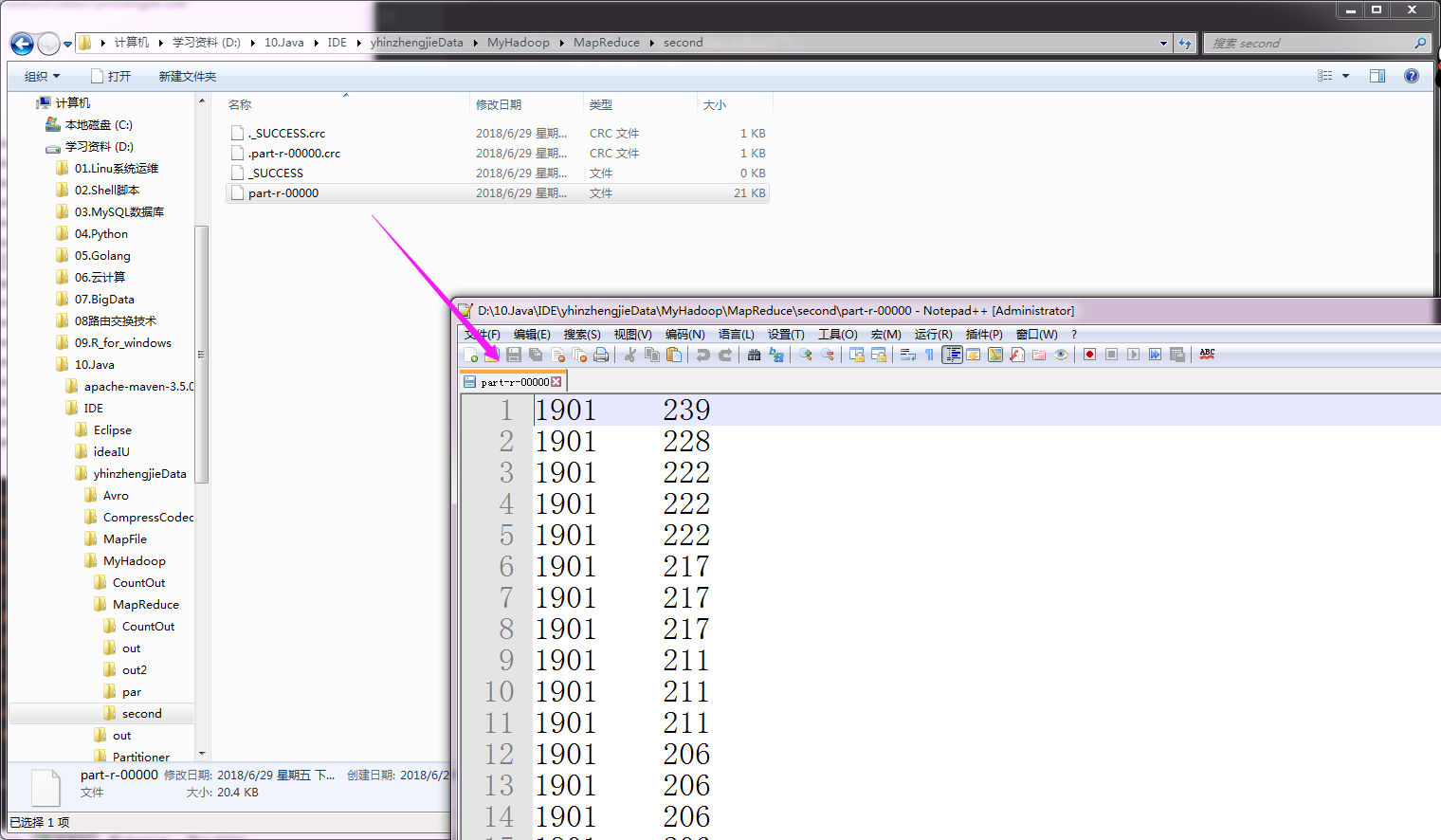
Hadoop基础-MapReduce的排序的更多相关文章
- Hadoop基础-MapReduce的工作原理第二弹
Hadoop基础-MapReduce的工作原理第二弹 作者:尹正杰 版权声明:原创作品,谢绝转载!否则将追究法律责任. 一.Split(切片) 1>.MapReduce处理的单位(切片) 想必 ...
- Hadoop基础-MapReduce的工作原理第一弹
Hadoop基础-MapReduce的工作原理第一弹 作者:尹正杰 版权声明:原创作品,谢绝转载!否则将追究法律责任. 在本篇博客中,我们将深入学习Hadoop中的MapReduce工作机制,这些知识 ...
- Hadoop基础-MapReduce入门篇之编写简单的Wordcount测试代码
Hadoop基础-MapReduce入门篇之编写简单的Wordcount测试代码 作者:尹正杰 版权声明:原创作品,谢绝转载!否则将追究法律责任. 本文主要是记录一写我在学习MapReduce时的一些 ...
- Hadoop基础-MapReduce的常用文件格式介绍
Hadoop基础-MapReduce的常用文件格式介绍 作者:尹正杰 版权声明:原创作品,谢绝转载!否则将追究法律责任. 一.MR文件格式-SequenceFile 1>.生成SequenceF ...
- Hadoop基础-MapReduce的Join操作
Hadoop基础-MapReduce的Join操作 作者:尹正杰 版权声明:原创作品,谢绝转载!否则将追究法律责任. 一.连接操作Map端Join(适合处理小表+大表的情况) no001 no002 ...
- Hadoop基础-MapReduce的数据倾斜解决方案
Hadoop基础-MapReduce的数据倾斜解决方案 作者:尹正杰 版权声明:原创作品,谢绝转载!否则将追究法律责任. 一.数据倾斜简介 1>.什么是数据倾斜 答:大量数据涌入到某一节点,导致 ...
- Hadoop基础-MapReduce的Partitioner用法案例
Hadoop基础-MapReduce的Partitioner用法案例 作者:尹正杰 版权声明:原创作品,谢绝转载!否则将追究法律责任. 一.Partitioner关键代码剖析 1>.返回的分区号 ...
- Hadoop基础-MapReduce的Combiner用法案例
Hadoop基础-MapReduce的Combiner用法案例 作者:尹正杰 版权声明:原创作品,谢绝转载!否则将追究法律责任. 一.编写年度最高气温统计 如上图说所示:有一个temp的文件,里面存放 ...
- Hadoop基础-Map端链式编程之MapReduce统计TopN示例
Hadoop基础-Map端链式编程之MapReduce统计TopN示例 作者:尹正杰 版权声明:原创作品,谢绝转载!否则将追究法律责任. 一.项目需求 对“temp.txt”中的数据进行分析,统计出各 ...
随机推荐
- 解决Git在添加ignore文件之前就提交了项目无法再过滤问题
由于未添加ignore文件造成提交的项目很大(包含生成的二进制文件).所以我们可以将编译生成的文件进行过滤,避免添加到版本库中了. 首先为避免冲突需要先同步下远程仓库 $ git pull 在本地项目 ...
- EF Core 新特性——Owned Entity Types
Owned Entity Types 首先owned entity type是EF Core 2.0的新特性. 至于什么是owned entity types,可以先把他理解为EF Core官方支持的 ...
- SpringBoot日记——信息修改PUT篇
我们常用的功能,除了post和get,还有put和delete,这篇文章就介绍一下这个put的基本用法. 页面跳转和回显 1. 首先,我们之前的页面已经将添加和修改的按钮都做好了,那么如何实现这些按钮 ...
- 这可能是最详细的Python文件操作
删除 # ==================删除==================# 只能删除文件,若为目录则报错# 若文件正在使用,Windows下会直接报错,Linux下会在目录表中删除记录, ...
- 微软职位内部推荐-Software Engineer II-Search
微软近期Open的职位: Do you want to work on a fast-cycle, high visibility, hardcore search team with ambitio ...
- spark执行在yarn上executor内存不足异常ERROR YarnScheduler: Lost executor 542 on host-bigdata3: Container marked as failed: container_e40_1550646084627_1007653_01_000546 on host: host-bigdata3. Exit status: 143.
当spark跑在yarn上时 单个executor执行时,数据量过大时会导致executor的memory不足而使得rdd 最后lost,最终导致任务执行失败 其中会抛出如图异常信息 如图中异常所示 ...
- 11.4 Daily Scrum
今天依旧是学习阶段,大家继续学习安卓的一些相关内容,并尝试将要用到的数据的API应用到程序中去. Today's tasks Tomorrow's tasks 丁辛 餐厅列表json/xml数据 ...
- 《TCP-IP详解卷1》中BGP部分的笔记
- Daily Scrum - 12/07
Meeting Minutes 确认基本完成了UI组件的基本功能的动画实现: 准备开始实行UI组件的合并: 讨论了长期计划算法的难点,以及简单版本的实现方案. 督促大家更新TFS: Burndown ...
- Beta阶段冲刺-5
一. 每日会议 1. 照片 2. 昨日完成工作 3. 今日完成工作 4. 工作中遇到的困难 杨晨露:现在我过的某种意义上挺滋润的,没啥事了都.......咳,困难就是前端每天都在想砸电脑,我要怎么阻止 ...