
pygame-KidsCanCode系列jumpy-part14-背景音乐及音效
没有音乐和音效的游戏是没有灵魂的,这回讲解如何处理背景音乐及跳跃音效。加载music及sound的方法,之前已经写过,见:pygame 笔记-8 背景音乐&子弹音效 。
先介绍一个很棒的生成各种音效的网站:https://www.bfxr.net/,该网站提供了一个音效生成器,界面如下:
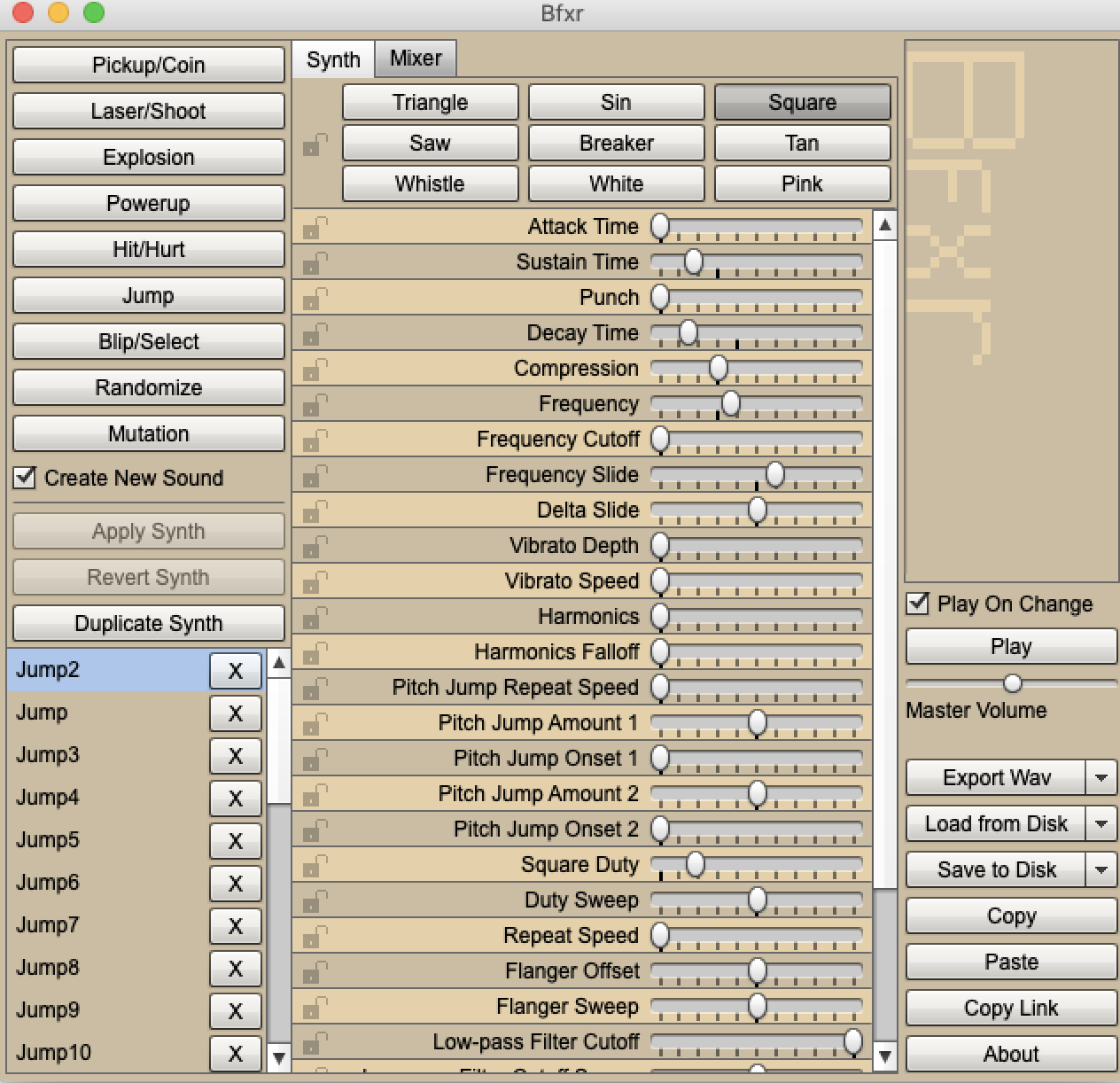
利用该工具,可以生成各种跳跃、爆炸之类的音效wav文件。
然后就是背景音乐了,pygame支持wav, mp3, ogg等这种格式,但是考虑到背景音乐通常比较大,不建议用wav做背景音乐,最好是mp3或ogg格式,mp3格式有专利,而且pygame对mp3的兼容性不太好,最佳推荐是ogg格式。
提供2个在线转换成ogg格式的网址:
https://cloudconvert.com/wav-to-ogg
https://cloudconvert.com/mp3-to-ogg
另外,再送一波福利,可以在opengameart.org上找到很多游戏的常用背景音乐:
有了这些素材后,就该写代码了:

将准备好的声音素材,放到指定的目录,参考上图。
然后在main.py的load_data中,加载跳跃的音效:
     def load_data(self):

         file_path = path.join(self.dir, HIGH_SCORE_FILE)

         if path.exists(file_path):

             with open(file_path, "r") as f:

                 try:

                     self.high_score = int(f.read())

                 except:

                     self.high_score = 0

         self.spritesheet = Spritesheet(path.join(self.dir, SPRITE_SHEET_PNG_FILE),

                                        path.join(self.dir, SPRITE_SHEET_XML_FILE))

         # 设置声音目录

         # 声音素材,可通过https://www.bfxr.net/获取

         self.snd_dir = path.join(self.dir, "../snd")

         self.jump_sound = pg.mixer.Sound(path.join(self.snd_dir, "Jump.wav"))
然后在new函数中,加载背景音乐
     def new(self):

         self.score = 0

         ...

         # 加载背景音乐

         pg.mixer.music.load(path.join(self.snd_dir, "bgm.mp3"))

         self.run()
run函数中,循环播放背景音乐:
     def run(self):

         # 循环播放背景音乐

         pg.mixer.music.play(-1)

         self.playing = True

         while self.playing:

             self.clock.tick(FPS)

             self.events()

             self.update()

             self.draw()

         # game over时背景音乐淡出

         pg.mixer.music.fadeout(500)
注:这里用了一个小技巧,GameOver的时候,如果硬生生把背景音乐关掉,有点突兀,用fadeout淡出方法,会友好一些。
如果start界面和game over界面,如果希望放另一种背景音乐,也依葫芦画瓢:
     def show_start_screen(self):

         # 启动界面播放背景音乐

         pg.mixer.music.load(path.join(self.snd_dir, "start_and_go.ogg"))

         pg.mixer.music.play(-1)

         self.screen.fill(BG_COLOR)

         ...

         self.wait_for_key()

         # 有按键开始时,淡出背景音

         pg.mixer.music.fadeout(500)
     def show_go_screen(self):

         # 启动界面播放背景音乐

         pg.mixer.music.load(path.join(self.snd_dir, "start_and_go.ogg"))

         pg.mixer.music.play(-1)

         self.screen.fill(BG_COLOR)

         ...

         pg.display.update()

         self.wait_for_key()

         # 有按键开始时,淡出背景音

         pg.mixer.music.fadeout(500)
目前为止,跳跃的音效还没使用到,可以要Player类的jump函数中,播放该音效:
     def jump(self):

         hits = pg.sprite.spritecollide(self, self.game.platforms, False)

         if hits and not self.jumping:

             # 播放声音

             self.game.jump_sound.play()

            ...
博客无法直接上传视频文件,最终带声音效果的视频如下:
链接: https://pan.baidu.com/s/1DTalKLFfYBOLw3MQpLIsig 提取码: wnhs
源码:https://github.com/yjmyzz/kids-can-code/tree/master/part_14
pygame-KidsCanCode系列jumpy-part14-背景音乐及音效的更多相关文章
- Cocos2d-x实例:设置背景音乐与音效- AppDelegate实现
为了进一步了解背景音乐和音效播放的,我们通过一个实例给大家介绍一下.如下图所示有两个场景:HelloWorld和Setting.在HelloWorld场景点击“游戏设置”菜单可以切换到Setting场 ...
- android开发之背景音乐与音效
android开发之背景音乐与音效 一:添加背景音乐(MediaPlayer) MediaPlayer class can be used to control playback of audio/v ...
- Cocos2d-x使用UserDefault数据持久化实例:保存背景音乐和音效设置
UserDefault可以实现数据的存储,但是它的使用不能泛滥,具体讲一般情况下不会使用它保存大量的数据,它没有SQL语句那样的灵活.UserDefault除了保存游戏设置外,还有可以长期保持游戏精灵 ...
- Swift - 给游戏添加背景音乐和音效(SpriteKit游戏开发)
游戏少不了背景音乐和音效.下面我们通过创建一个管理音效的类,来实现背景音乐的播放,同时点击屏幕可以播放相应的音效. 声音管理类 SoundManager.swift 1 2 3 4 5 6 7 8 9 ...
- 关于Cocos2d-x中背景音乐和音效的添加
1.首先引入头文件和命名空间 #include "SimpleAudioEngine.h" using namespace CocosDenshion; 2.在GameScene. ...
- pygame 笔记-8 背景音乐&子弹音效
游戏哪能没有音效?这节我们研究下如何加背景音乐,其实也很简单: # 加载背景音乐 pygame.mixer.music.load(music_base_path + "music.mp3&q ...
- Pygame播放背景音乐与音效
1.播放背景音乐 pygame.mixer.music.load() 加载MP3格式 加入pygame.mixer.init()即可 第十一行第一个参数:播放次数(n>0),n=0时播放1次,- ...
- Cocos2d-x实例:设置背景音乐与音效-设置场景实现
设置场景(Setting),Setting.h文件代码如下: #ifndef __Setting_SCENE_H__ #define __Setting_SCENE_H__ #include &quo ...
- Cocos2d-x实例:设置背景音乐与音效-HelloWorld场景实现
HelloWorld场景就是游戏中的主菜单场景.HelloWorld.h文件代码如下: #define __HELLOWORLD_SCENE_H__ #include "cocos2d.h& ...
随机推荐
- 【BZOJ3514】Codechef MARCH14 GERALD07加强版 LCT+主席树
题解: 还是比较简单的 首先我们的思路是 确定起点 然后之后贪心的选择边(也就是越靠前越希望选) 我们发现我们只需要将起点从后向前枚举 然后用lct维护连通性 因为强制在线,所以用主席树记录状态就可以 ...
- luogu 1471
题意: 蒟蒻HansBug在一本数学书里面发现了一个神奇的数列,包含N个实数.他想算算这个数列的平均数和方差. 操作1:1 x y k ,表示将第x到第y项每项加上k,k为一实数. 操作2:2 x y ...
- RN错误随笔 - Unable to resolve module 'AccessibilityInfo'
错误信息:.React Native 运行报错:Unable to resolve module 'AccessibilityInfo' 可以看到在 异常的返回的JSON 结构中给出了推荐的解决方法 ...
- [转]DBCP连接池的最简单应用(用于ORACLE数据库)
http://blog.csdn.net/iihero/article/details/8254107 http://www.programgo.com/article/81693457907/ 鉴于 ...
- Python_list部分功能介绍
x.append():在列表尾部添加一个元素 x.clear():把列表清空 x.count():判断某个元素出现的次数 x.extend():合并两个列表,或者一个元组 x.index():获取元素 ...
- Codeforces 342D Xenia and Dominoes 状压dp
码就完事了. #include<bits/stdc++.h> #define LL long long #define fi first #define se second #define ...
- php通过CURL模拟post提交请求
<?php header("Content-type:text/html;charset=utf-8"); class Test{ public function reque ...
- Codeforces 1017F The Neutral Zone 数论
原文链接https://www.cnblogs.com/zhouzhendong/p/CF1017F.html 题目传送门 - CF1017F 题意 假设一个数 $x$ 分解质因数后得到结果 $x=p ...
- NOIP2017提高组Day2T2 宝藏 洛谷P3959 状压dp
原文链接https://www.cnblogs.com/zhouzhendong/p/9261079.html 题目传送门 - 洛谷P3959 题目传送门 - Vijos P2032 题意 给定一个 ...
- Git submodule 仓库中包含另外的仓库(子仓库)
Git submodule 仓库中包含另外的仓库(子仓库) 添加 submodule 在父仓库 git 目录下: git submodule add ssh://ip/[path]/xxx.git 注 ...