
solr7之solrJ的使用
solr7的官网API介绍

网页翻译的不是很准确,只能了解个大概,基本能获取如下信息:
一、构建和运行SolrJ应用程序
对于用Maven构建的项目, pom.xml配置:
<dependency>

  <groupId>org.apache.solr</groupId>

  <artifactId>solr-solrj</artifactId>

  <version>7.1.0</version>

</dependency>
如果不用maven构建项目,只需要将solr-solrj-7.1.0.jar 和 在dist/solrj-lib目录中的依赖包放入到工程中。
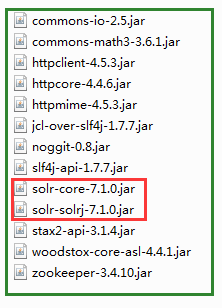
二、solr7 API
在solr5系之后跟solr4最大的区别是被发布成了一个独立的应用。而不再需要tomcat等容器。在其内部集成了jetty服务器,他可以通过bin目录的脚本直接运行启动。solr5有两种运行模式,独立模式和云模式,独立模式是以core来管理,云模式是以collection来管理。
SolrClient是一个抽象类,下边有很多被实现的子类,HttpSolrClient是通用客户端。 可以与一个Solr节点直接通信。),
LBHttpSolrClient,CloudSolrClient,ConcurrentUpdateSolrClient
HttpSolrClient的创建需要用户指定一个或多个Solr基础URL,然后客户端使用Solr发送HTTP请求。
一个URL的路径指向一个特定的核心或集合(例如,
http://hostname:8983/solr/core1)。当核心或集合中指定基础的URL,后续请求由客户机不需要测量影响集合。 然而,客户端是有限的核心/集合、发送请求,不能发送请求到任何其他实例。一个URL指向根Solr路径(例如,
http://hostname:8983/solr)。 当没有指定核心或集合的基URL,可以请求任何核心/收集,但受影响的核心/必须指定集合的所有请求。
一般来说,如果你的 SolrClient 只会被用在一个核心/收集,包括实体的路径是最方便的。 需要更多的灵活性,收集/核心应该被排除在外。
1、solrJ客户端实例创建并设置连接超时时间:
final String solrUrl = "http://127.0.0.1:8080/solr";

//创建solrClient同时指定超时时间,不指定走默认配置

HttpSolrClient build = new HttpSolrClient.Builder(solrUrl)

                .withConnectionTimeout(10000)

                .withSocketTimeout(60000)

                .build();
不同solr版本solrj 的创建方式有所不同
//solr4创建方式

//SolrServer solrServer = new HttpSolrServer("http://127.0.0.1:8080/solr");

//solr5创建方式,在url中指定core名称:core1

//HttpSolrClient solrServer=new HttpSolrClient("http://127.0.0.1:8080/solr/core1");

//solr7创建方式,在url中指定core名称:core1

HttpSolrClient solrServer= new HttpSolrClient.Builder("http://127.0.0.1:8080/solr/core1").build();
注意:solr5以后URL指向自定义核心的名称,如实例名称是core1,那么URL为http://127.0.0.1:8080/solr/core1
2、solrJ之查询
SolrClient有很多quary() 查询方法用于从solr中获取结果,这些方法都需要一个SolrParams 类型的参数,该对象可以封装任意的查询参数。和每个方法输出 QueryResponse 一个包装器,可以用来访问结果文档和其他相关的元数据。
/**

         * 查询

         * @throws Exception

         */

        @Test

        public void querySolr() throws Exception{

        //[1]获取连接

       // HttpSolrClient client= new HttpSolrClient.Builder("http://127.0.0.1:8080/solr/core1").build();

        String solrUrl = "http://127.0.0.1:8080/solr/core1";

        //创建solrClient同时指定超时时间,不指定走默认配置

        HttpSolrClient client = new HttpSolrClient.Builder(solrUrl)

                                .withConnectionTimeout(10000)

                                .withSocketTimeout(60000)

                                .build();

        //[2]封装查询参数

        Map<String, String> queryParamMap = new HashMap<String, String>();

        queryParamMap.put("q", "*:*");

        //[3]添加到SolrParams对象

        MapSolrParams queryParams = new MapSolrParams(queryParamMap);

        //[4]执行查询返回QueryResponse

        QueryResponse response = client.query(queryParams);

        //[5]获取doc文档

        SolrDocumentList documents = response.getResults();

        //[6]内容遍历

        for(SolrDocument doc : documents) {

              System.out.println("id:"+doc.get("id")

                 +"\tproduct_name:"+doc.get("product_name")

                +"\tproduct_catalog_name:"+doc.get("product_catalog_name")

                +"\tproduct_number:"+doc.get("product_number")

                +"\tproduct_price:"+doc.get("product_price")

                +"\tproduct_picture:"+doc.get("product_picture"));

        }

        client.close();

     }
SolrParams 有一个 SolrQuery 子类,它提供了一些方法极大地简化了查询操作。下面是 SolrQuery示例代码 :
/**

         * 2、使用 SolrParams 的子类 SolrQuery,它提供了一些方便的方法,极大地简化了查询操作。

         * @throws Exception

         */

        @Test

        public void querySolr2() throws Exception{

            //[1]获取连接

            // HttpSolrClient client= new HttpSolrClient.Builder("http://127.0.0.1:8080/solr/core1").build();

            String solrUrl = "http://127.0.0.1:8080/solr/core1";

            //创建solrClient同时指定超时时间,不指定走默认配置

            HttpSolrClient client = new HttpSolrClient.Builder(solrUrl)

                    .withConnectionTimeout(10000)

                    .withSocketTimeout(60000)

                    .build();

            //[2]封装查询参数

            SolrQuery query = new SolrQuery("*:*");

            //[3]添加需要回显得内容

            query.addField("id");

            query.addField("product_name");

            query.setRows(20);//设置每页显示多少条

            //[4]执行查询返回QueryResponse

            QueryResponse response = client.query(query);

            //[5]获取doc文档

            SolrDocumentList documents = response.getResults();

            //[6]内容遍历

            for(SolrDocument doc : documents) {

                System.out.println("id:"+doc.get("id")

                +"\tproduct_name:"+doc.get("product_name")

                +"\tname:"+doc.get("name")

                +"\tproduct_catalog_name:"+doc.get("product_catalog_name")

                +"\tproduct_number:"+doc.get("product_number")

                +"\tproduct_price:"+doc.get("product_price")

                +"\tproduct_picture:"+doc.get("product_picture"));

            }

            client.close();

        }
3、用solrJ创建索引
添加索引使用SolrClient的add()方法
/**

       * 添加

       * @throws SolrServerException

       * @throws IOException

       */

      @Test

      public void solrAdd() throws Exception{

            //[1]获取连接

            // HttpSolrClient client= new HttpSolrClient.Builder("http://127.0.0.1:8080/solr/core1").build();

            String solrUrl = "http://127.0.0.1:8080/solr/core1";

            //创建solrClient同时指定超时时间,不指定走默认配置

            HttpSolrClient client = new HttpSolrClient.Builder(solrUrl)

                    .withConnectionTimeout(10000)

                    .withSocketTimeout(60000)

                    .build();

            //[2]创建文档doc

            SolrInputDocument doc = new SolrInputDocument();

            //[3]添加内容

            String str = UUID.randomUUID().toString();

            System.out.println(str);

            doc.addField("id", str);

            doc.addField("name", "Amazon Kindle Paperwhite");

            //[4]添加到client

            UpdateResponse updateResponse = client.add(doc);

            System.out.println(updateResponse.getElapsedTime());

            //[5] 索引文档必须commit

            client.commit();

      }
在正常情况下,文档应该在更大的批次,索引,而不是一次一个的进行索引。 它也建议使用Solra Solr管理员提交文档时设置为autocommit自动提交,而不是使用显式的 commit() 调用。
4、solrJ之单个id 的删除索引
/**

  * 4、单个id 的删除索引

  */

 @Test

  public void solrDelete() throws Exception{

     //[1]获取连接

    HttpSolrClient client = Constant.getSolrClient();

    //[2]通过id删除

    client.deleteById("30000");

    //[3]提交

    client.commit();

    //[4]关闭资源

    client.close();

}
5、solrJ之多个id 的list集合 删除索引
/**

   * 5、多个id 的list集合 删除索引

   */

    @Test

    public void solrDeleteList() throws Exception{

        //[1]获取连接

        HttpSolrClient client = Constant.getSolrClient();

         //[2]通过id删除

        ArrayList<String> ids = new ArrayList<String>();

        ids.add("30000");

        ids.add("1");

        client.deleteById(ids);

        //[3]提交

        client.commit();

        //[4]关闭资源

        client.close();

    }
6、Java对象绑定
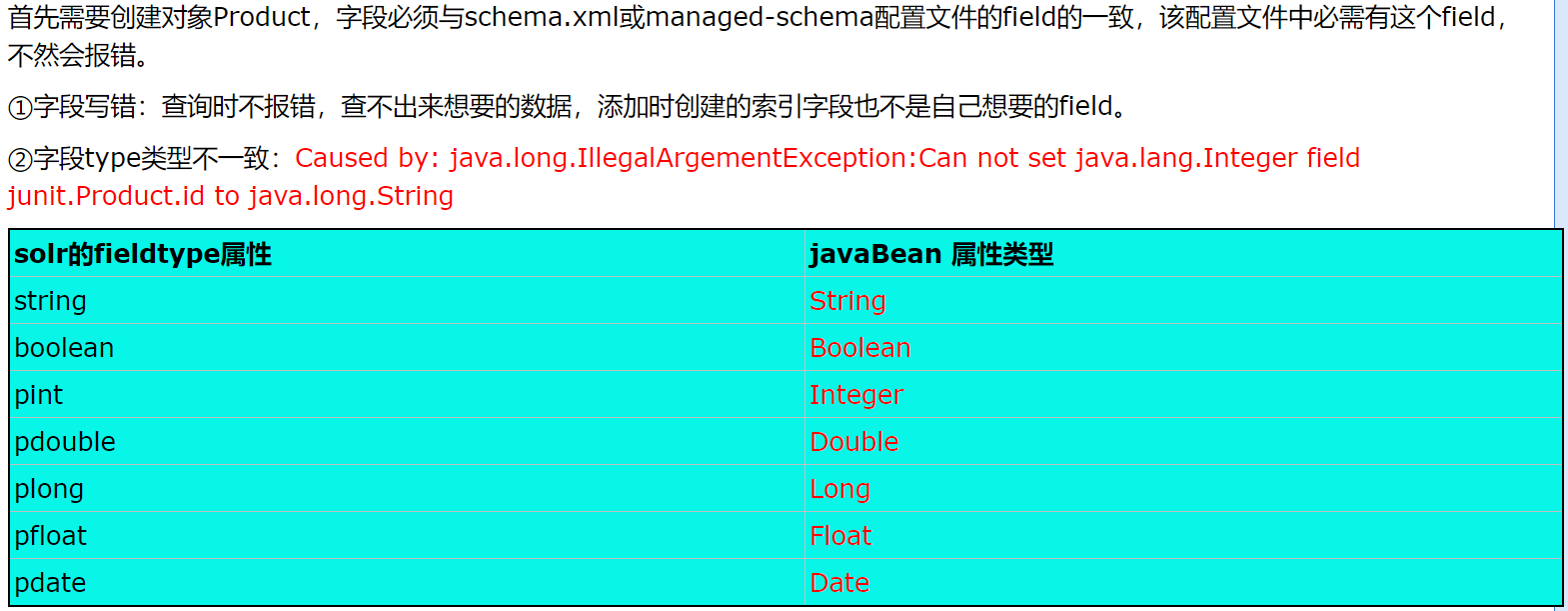
SolrJ提供两个有用的接口,UpdateResponse 和 QueryResponse,它们可以很方便的处理特定域的对象,可以使您的应用程序更容易被理解。SolrJ支持通过每个实例变量在Java对象可以映射到一个相应的Solr字段中,使用 @Field注解隐式转换文档与任何类。field注解。
先查看一下配置:
solrconfig.xml配置
<requestHandler name="/dataimport" class="solr.DataImportHandler">

        <lst name="defaults">

          <!--数据源配置文件所在路径-->

          <str name="config">./data-config.xml</str>

        </lst>

</requestHandler>
data-config.xml配置
<?xml version="1.0" encoding="UTF-8" ?>

<dataConfig>

     <dataSource type="JdbcDataSource"

                 driver="com.mysql.jdbc.Driver"

                 url="jdbc:mysql://localhost:3306/solrdata"

                 user="root"

                 password="root"/>

    <document>

         <entity name="product" query="select pid,name,catalog,catalog_name,price,number,description,picture from products">

             <field column="pid" name="id"/>

             <field column="name" name="p_name"/>

             <field column="catalog_name" name="p_catalog_name"/>

             <field column="price" name="p_price"/>

             <field column="number" name="p_number"/>

             <field column="description" name="p_description"/>

             <field column="picture" name="p_picture"/>

         </entity>

    </document>

</dataConfig>
managed-schema文件配置
<!--配置ik分词器-->

  <fieldType name="text_ik" class="solr.TextField">

    <analyzer type="index" class="org.wltea.analyzer.lucene.IKAnalyzer"/>

    <analyzer type="query" class="org.wltea.analyzer.lucene.IKAnalyzer"/>

  </fieldType>

  <!--配置ik分词器-->

  <field name="name_ik" type="text_ik" indexed="true" stored="true"/>

  <!--项目中的字段-->

    <field name="p_name" type="text_ik" indexed="true" stored="true"/>

    <field name="p_catalog_name" type="string" indexed="true" stored="true"/>

    <field name="p_price" type="pfloat" indexed="true" stored="true"/>

    <field name="p_number" type="plong" indexed="true" stored="true"/>

    <field name="p_description" type="text_ik" indexed="true" stored="true"/>

    <field name="p_picture" type="string" indexed="false" stored="true"/>

    <!--关键词  定义复制域字段,将商品名称和商品描述都复制到 product_keywords这一个字段上-->

    <field name="p_keywords" type="text_ik" indexed="true" stored="false" multiValued="true" />

    <copyField source="p_name" dest="p_keywords" />

    <copyField source="p_description" dest="p_keywords" />
其中 indexed="true" 表示开启索引(当字段不需要被检索时,最好不要开启索引,) stored="true"表示存储原来数据(当字段不被检索,而只是需要通过其他字段检索而获得时,要设为true) multiValued="true" 表示返回多值,如一个返回多个content,此时要在java代码中把 content设置 集合或数组类型如
private String[] content;//多值,对应 multiValued="true"
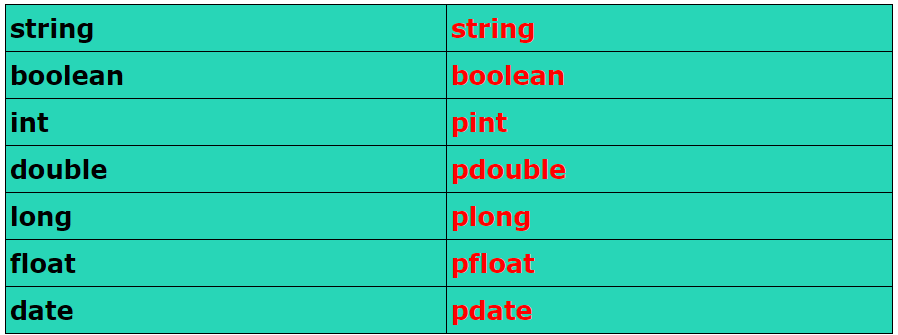
注意:solr4版本的field的type属性的基本数据类型到solr7的变化
详细内容参照solr-7.1.0\example\example-DIH\solr\db\conf\目录下的managed-schema
product实体对象:
package junit;

import org.apache.solr.client.solrj.beans.Field;

public class Product {

    /**

     * 商品编号

     */

    @Field

    private String id;

    /**

     * 商品名称

     */

    @Field

    private String p_name;

    /**

     * 商品分类名称

     */

    @Field

    private String p_catalog_name;

    /**

     * 价格

     */

    @Field

    private Float p_price;

    /**

     * 数量

     */

    @Field

    private Long p_number;

    /**

     * 图片名称

     */

    @Field

    private String p_picture;

    /**

     * 商品描述

     */

    @Field

    private String p_description;

    public String getId() {

        return id;

    }

    public void setId(String id) {

        this.id = id;

    }

    public String getP_name() {

        return p_name;

    }

    public void setP_name(String p_name) {

        this.p_name = p_name;

    }

    public String getP_catalog_name() {

        return p_catalog_name;

    }

    public void setP_catalog_name(String p_catalog_name) {

        this.p_catalog_name = p_catalog_name;

    }

    public Float getP_price() {

        return p_price;

    }

    public void setP_price(Float p_price) {

        this.p_price = p_price;

    }

    public Long getP_number() {

        return p_number;

    }

    public void setP_number(Long p_number) {

        this.p_number = p_number;

    }

    public String getP_picture() {

        return p_picture;

    }

    public void setP_picture(String p_picture) {

        this.p_picture = p_picture;

    }

    public String getP_description() {

        return p_description;

    }

    public void setP_description(String p_description) {

        this.p_description = p_description;

    }

    //空参数构造

    public Product() {}

    //满参数构造

    public Product(String id, String p_name, String p_catalog_name, Float p_price, Long p_number, String p_picture,

            String p_description) {

        super();

        this.id = id;

        this.p_name = p_name;

        this.p_catalog_name = p_catalog_name;

        this.p_price = p_price;

        this.p_number = p_number;

        this.p_picture = p_picture;

        this.p_description = p_description;

    }

}
三 在应用中使用:
(1)Java对象绑定,通过对象创建索引
/**

         * 6、Java对象绑定,通过对象创建索引

         */

        @Test

        public void addBean() throws Exception{

            //[1]获取连接

            // HttpSolrClient client= new HttpSolrClient.Builder("http://127.0.0.1:8080/solr/core1").build();

            String solrUrl = "http://127.0.0.1:8080/solr/core1";

            //创建solrClient同时指定超时时间,不指定走默认配置

            HttpSolrClient client = new HttpSolrClient.Builder(solrUrl)

                    .withConnectionTimeout(10000)

                    .withSocketTimeout(60000)

                    .build();

            //[3]创建对象

            Product product = new Product();

            product.setId("30000");

            product.setP_name("测试商品名称");

            product.setP_catalog_name("测试商品分类名称");

            product.setP_price(399F);

            product.setP_number(30000L);

            product.setP_description("测试商品描述");

            product.setP_picture("测试商品图片.jpg");

            //[4]添加对象

            UpdateResponse response = client.addBean(product);

            //[5]提交操作

            client.commit();

            //[6]关闭资源

            client.close();

        }
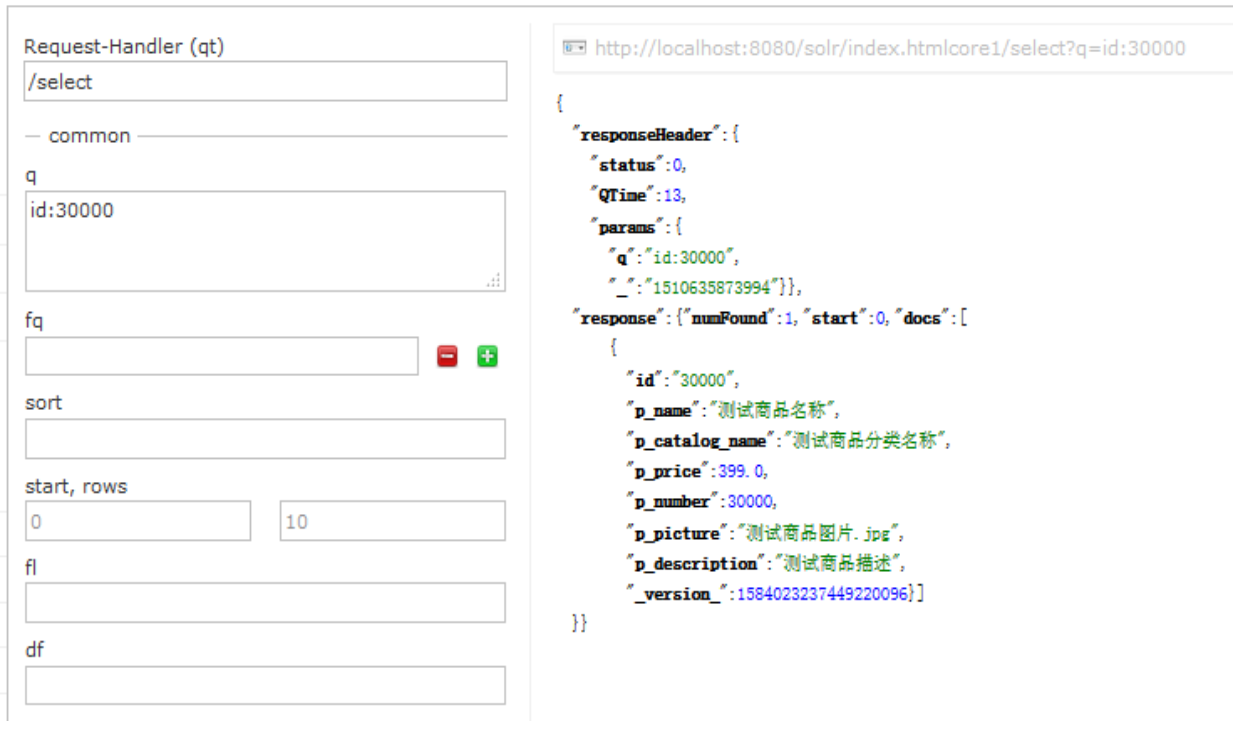
查看添加的内容如下:
(2)Java对象绑定,通过对象索引查询
搜索时可以通过QueryResponse的直接转换成bean对象:getbean()方法将结果
/**

         * 7、Java对象绑定,通过对象查询索引

         */

        @Test

        public void queryBean() throws Exception{

            //[1]获取连接

            // HttpSolrClient client= new HttpSolrClient.Builder("http://127.0.0.1:8080/solr/core1").build();

            String solrUrl = "http://127.0.0.1:8080/solr/core1";

            //创建solrClient同时指定超时时间,不指定走默认配置

            HttpSolrClient client = new HttpSolrClient.Builder(solrUrl)

                    .withConnectionTimeout(10000)

                    .withSocketTimeout(60000)

                    .build();

            //[2]创建SolrQuery对象

            SolrQuery query = new SolrQuery("*:*");

            //添加回显的内容

            query.addField("id");

            query.addField("p_name");

            query.addField("p_price");

            query.addField("p_catalog_name");

            query.addField("p_number");

            query.addField("p_picture");

            query.setRows(200);//设置每页显示多少条

            //[3]执行查询返回QueryResponse

            QueryResponse response = client.query(query);

            //[4]获取doc文档

            List<Product> products = response.getBeans(Product.class);

            //[5]遍历

            for (Product product : products) {

                System.out.println("id:"+product.getId()

                +"\tp_name:"+product.getP_name()

                +"\tp_price:"+product.getP_price()

                +"\tp_catalog_name:"+product.getP_catalog_name()

                +"\tp_number:"+product.getP_number()

                +"\tp_picture:"+product.getP_picture()

                );

            }

            //[6]关闭资源

            client.close();

        }
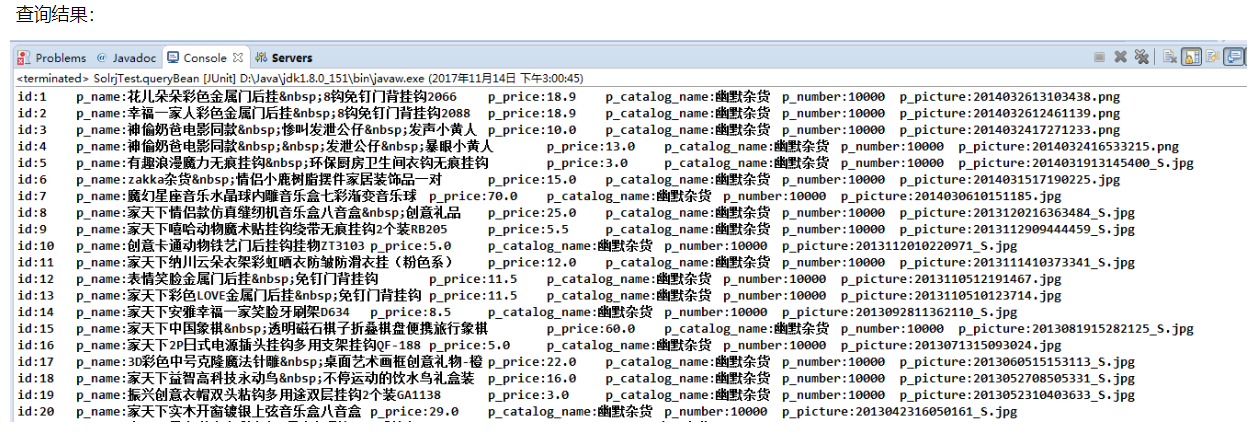
(3) solrJ之通过deleteByQuery删除索引
/**

         * 8、通过deleteByQuery删除索引

         */

        @Test

        public void deleteBean() throws Exception{

            //[1]获取连接

            // HttpSolrClient client= new HttpSolrClient.Builder("http://127.0.0.1:8080/solr/core1").build();

            String solrUrl = "http://127.0.0.1:8080/solr/core1";

            //创建solrClient同时指定超时时间,不指定走默认配置

            HttpSolrClient client = new HttpSolrClient.Builder(solrUrl)

                    .withConnectionTimeout(10000)

                    .withSocketTimeout(60000)

                    .build();

            //[2]执行删除

            client.deleteByQuery("id:100");

            //[3]提交操作

            client.commit();

            //[4]关闭资源

            client.close();

        }
下面是官网API的对字段类型定义的说法
四 字段类型定义和属性
在managed-schema文件中的字段类型定义
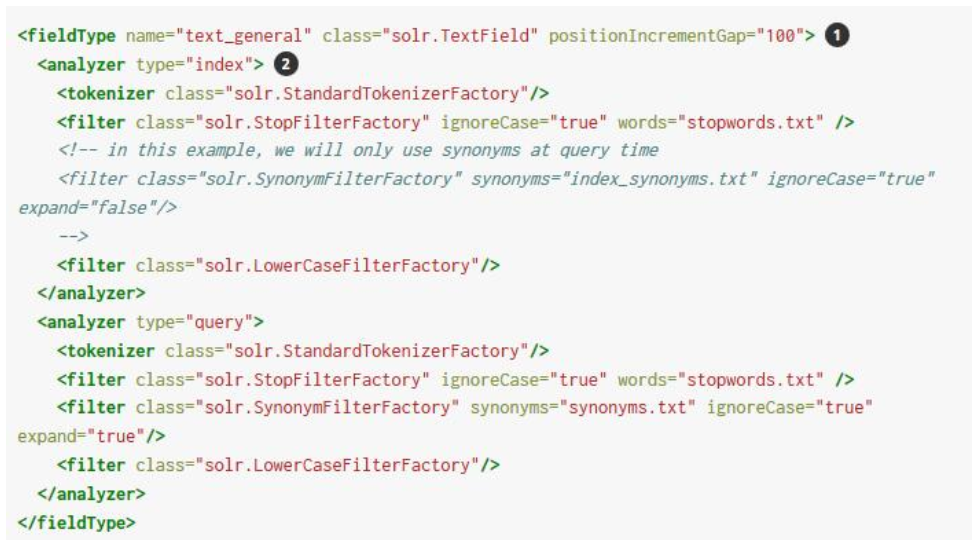
① 上面的示例中的第一行包含字段类型名称 name="text_general",实现类的名称class="solr.TextField"
② 其余的定义是关于对field分析、描述 理解分析、分词器和过滤器。
实现类负责确保字段是正确的被处理。 在managed-schema中的类名,字符串 solr 是 org.apache.solr.schema 或org.apache.solr.analysis的缩写。如: solr.TextField 真的是 org.apache.solr.schema.TextField 。
字段类型属性
field type的class属性决定了大多数字段类型的行为,但可选属性也可以被定义。例如,下面的日期字段类型定义两个属性的定义,sortMissingLast和omitNorms 。
<fieldType name="date" class="solr.DatePointField" sortMissingLast="true" omitNorms="true"/>
可以为一个给定的指定的属性字段类型分为三大类:
- 特定的字段类型的class属性。
Solr支持任何字段类型。
可以指定的字段类型所继承的字段,使用这个类型而不是默认的行为。
一般属性
这些都是一般的属性字段
name
- fieldType的name。 这个值被用于field定义的“type”属性。 强烈建议名称只包含字母数字或下划线字符,而不是从一个数字开始。 这不是目前严格执行。
class
-
class的name,用于存储和索引的数据类型。 请注意,您可能包括类名前面加上“solr。 ”,Solr搜索会自动找出哪些包类,所以
solr.TextField将工作。如果您使用的是第三方的类,你可能需要一个完全限定的类名。完全限定的等效
solr.TextField是org.apache.solr.schema.TextField。
positionIncrementGap-
对于多值字段,指定多个值之间的距离,防止虚假的短语匹配。
autoGeneratePhraseQueries-
对于文本字段。 如果
true,Solr自动生成短语查询相邻。 如果false
enableGraphQueries-
对于text fields,查询时适用
sow = false(这是默认的sow参数)。 使用true、默认字段类型的查询分析器包括graph-aware过滤器,例如, Synonym Graph Filter 和 Word Delimiter Graph Filter。使用
false字段类型的查询分析器可以匹配文档包括过滤器,当一些令牌丢失,例如, Shingle Filter。
docValuesFormat-
定义了一个定制的
DocValuesFormat用于这种类型的字段。 这就要求一个感知的编解码器,如SchemaCodecFactory已经配置在xml。 postingsFormat-
定义了一个定制的
PostingsFormat用于这种类型的字段。 这就要求一个感知的编解码器,如SchemaCodecFactory已经配置在xml。
字段默认属性
这些属性可以指定字段类型,或对个人领域覆盖提供的字段类型的值。
每个属性的默认值取决于底层 FieldType 类,进而可能取决于 版本 的属性<schema/> 。 下表包含了大部分的默认值 FieldType Solr提供了实现,假设 schema.xml 声明 version = " 1.6 " 。
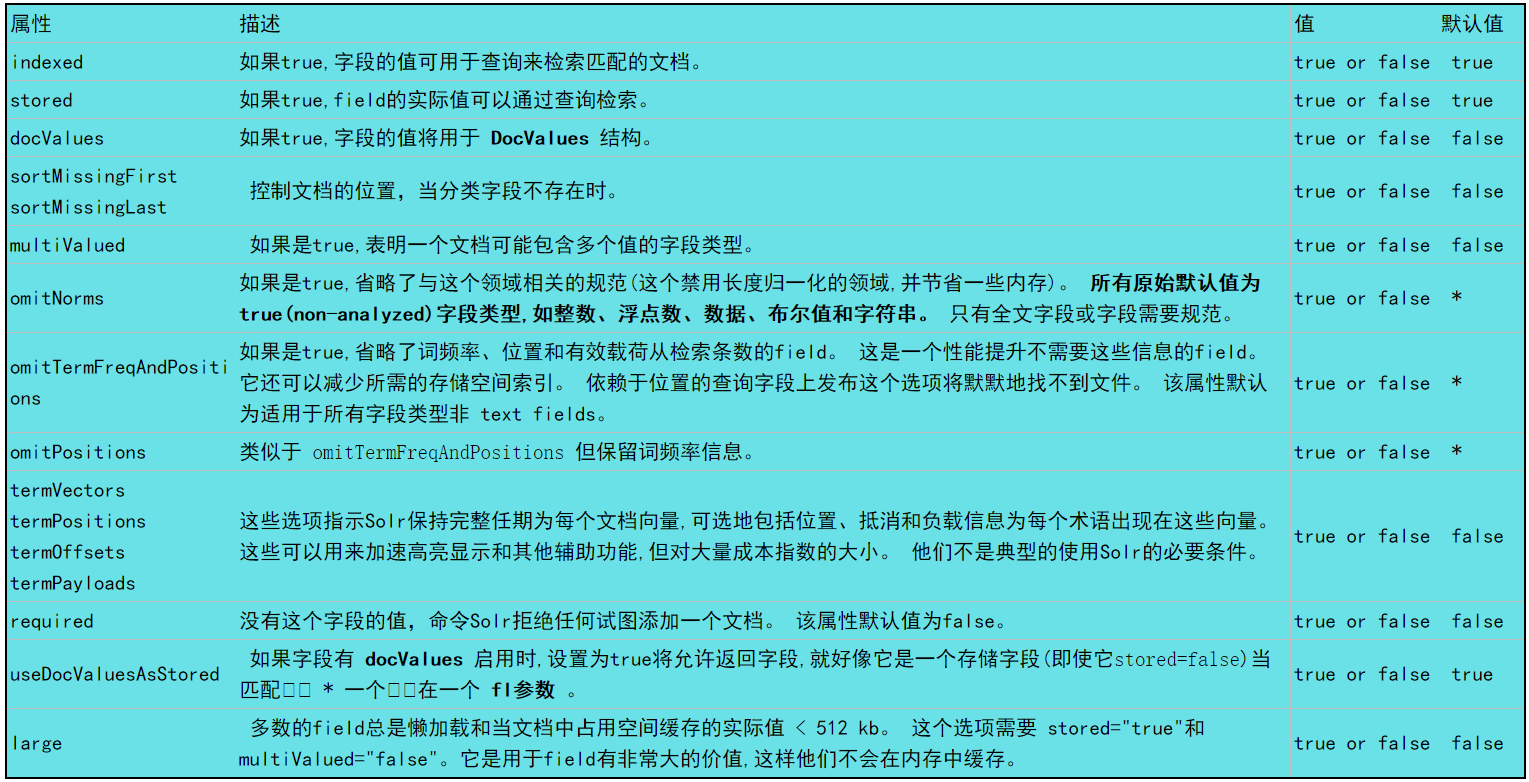
包含在Solr中字段类型
下表列出了在Solr可用字段类型。 的 org.apache.solr.schema 包包括所有表中列出的类。
由于工作原因,下边的描述还有待查证。
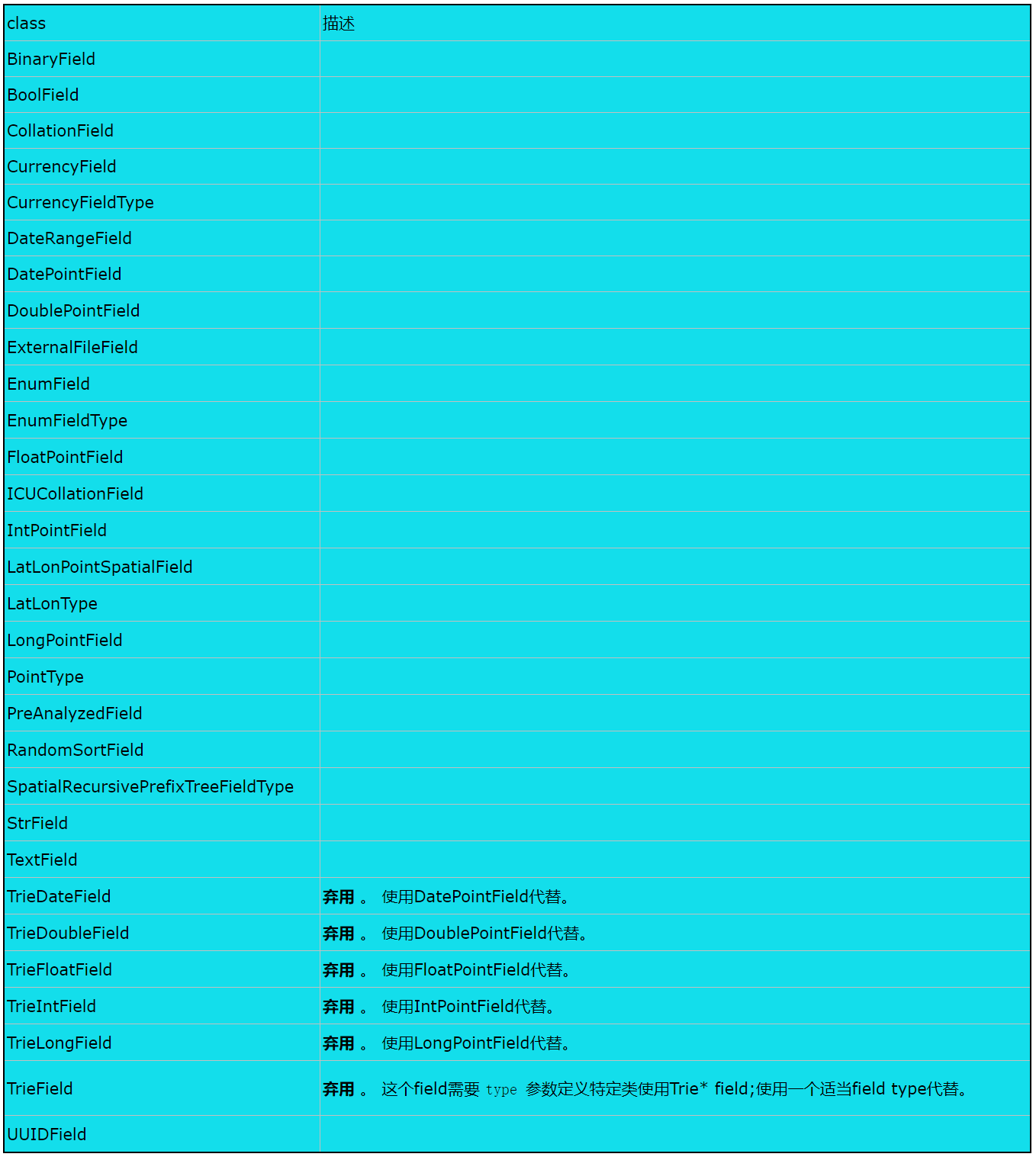
上面的整理来自博文:https://www.cnblogs.com/gaogaoyanjiu/p/7815558.html
它使用的7.1.0版本。在这里感谢博主的分享。
solr7之solrJ的使用的更多相关文章
- (五)solr7.1.0之solrJ的使用
(五)solr7.1.0之solrJ的使用 下面是solr7的官网API介绍: 网页翻译的不是很准确,只能了解个大概,基本能获取如下信息: 一.构建和运行SolrJ应用程序 对于用Maven构建的项目 ...
- Solr7.4.0的API(Solrj)操作及项目中的使用
一.SolrJ的概念 solr单机版服务搭建:https://www.cnblogs.com/frankdeng/p/9615253.html solr集群版服务搭建:https://www.cnbl ...
- Solr7.4.0的API(Solrj)操作
一.SolrJ的概念 solr单机版服务搭建:https://www.cnblogs.com/frankdeng/p/9615253.html solr集群版服务搭建:https://www.cnbl ...
- solr7.4.0+mysql+solrj(简而优美)
目录: 1 solr7部署+创建核心2 solr mysql 连接 2.1 导入相关 jar包 2.2 配置连接信息 2.3 配置中文分析器3 solrj JAVA客户端应用 3.1 solrj 构建 ...
- SolrJ 复杂查询 高亮显示
SolrJ 复杂查询 高亮显示 上一章搭建了Solr服务器和导入了商品数据,本章通过SolrJ去学习Solr在企业中的运用.笔者最先是通过公司的云客服系统接触的Solr,几百万的留言秒秒钟就查询并高亮 ...
- Solr7.1---数据库导入并建立中文分词器
这里只是告诉你如何导入,生产环境不要这样部署你的solr服务. 首先修改solrConfig.xml文件 备份_default文件夹 修改solrconfig.xml 加入如下内容 官方示例:< ...
- Solr学习笔记---部署Solr到Tomcat上,可视化界面的介绍和使用,Solr的基本内容介绍,SolrJ的使用
学习Solr前需要有Lucene的基础 Lucene的一些简单用法:https://www.cnblogs.com/dddyyy/p/9842760.html 1.部署Solr到Tomcat(Wind ...
- Solr7.1--- 高亮查询
由于测试数据比较少,昨天用Java爬了简书的几百篇文章,唉,又特么两点多睡的.如果你需要这些测试文件GitHub. 如果你看过我前面的文章,直接打开db-data-config.xml文件,添加一个e ...
- Solr7.1---Getting Start
目前最新版的Solr是7.1.0 有个我还不清楚的地方是,为何5.5.X或者6.6.X版本还在更新,给我的感觉好像每一个大版本都有自己的维护团队.不管了. 首先-系统要求 JDK1.8+ 解压Solr ...
随机推荐
- Poj2231 Moo Volume 2017-03-11 22:58 30人阅读 评论(0) 收藏
Moo Volume Time Limit: 1000MS Memory Limit: 65536K Total Submissions: 22104 Accepted: 6692 Descr ...
- CYUSB3014芯片使用EEPROM无法下载固件说明
当使用128KB的EEPROM存储CYUSB3014芯片的固件时,需要注意,不同厂家的EEPROM存储器,其A0.A1.A2功能不一样,在设计时电路也不一样.Microchip对应的128KB的EEP ...
- [编译,报错以及其他] 有关C/C++中int不能用-2147483648当最小值的问题
这个取决于今早看耗子叔的微博: 这里说到了int的取值范围的问题,int的取值是-2147483648 ~ 2147483647,但是如果直接在编译器(VS2013)中使用-2147483648会报错 ...
- Android-SurfaceView生命周期
SurfaceView的生命周期,和 Activity生命周期,Service生命周期,BroadcastReceiver生命周期,等,不一样: 因为SurfaceView显示的是(视频画面,游戏画面 ...
- MySQL 笔记整理(20) --幻读是什么,幻读有什么问题?
笔记记录自林晓斌(丁奇)老师的<MySQL实战45讲> (本篇内图片均来自丁奇老师的讲解,如有侵权,请联系我删除) 20) --幻读是什么,幻读有什么问题? 我们先来看看表结构和初始化数据 ...
- PG数据库错误: 检测到OA幸运飞艇源码ShareLock死锁处理
PostgreSQL 是一个免费数据库,OA幸运飞艇源码下载,详情咨询[企娥166848365]对于处理分析型+交易型混合型系统来说确实很不错,特别是版本的升级到11.2后性能提升很多,很多运行机制跟 ...
- kubernetes yaml
apiVersion: v1 #指定api版本,此值必须在kubectl apiversion中 kind: Deployment #指定创建资源的角色/类型 metadata: #资源的元数据/属性 ...
- [Elixir005] 查看指定数据的详细信息 i helper
elixir在1.2后增加了一个新的特性i helper. 在iex shell中使用i可以查看任意数据的数据类型和详细描述 #查看变量描述 iex(1)> i {:test, "Th ...
- Tempdb--查看tempdb使用的脚本
GO /****** Object: StoredProcedure [dbo].[usp_GetTempDBUsedSpace] Script Date: 03/05/2014 13:24:42 * ...
- js日期转换工具
var dq = new Date();//定义当前时间var sDueDate = formatDate(dq);/调用日期转换方法 传入当前时间 //进行日期转换 function formatD ...