
socketserver模块解析
socketserver模块是基于socket而来的模块,它是在socket的基础上进行了一层封装,并且实现并发等功能。
看看具体用法:
ximport socketserver #1、引入模块
class MyServer(socketserver.BaseRequestHandler): #2、自己写一个类,类名自己随便定义,然后继承socketserver这个模块里面的BaseRequestHandler这个类
def handle(self): #3、写一个handle方法,必须叫这个名字,不写运行父类的pass
#self.request #6、self.request 相当于一个conn
self.request.recv(1024) #7、收消息
msg = '亲,学会了吗'
self.request.send(bytes(msg,encoding='utf-8')) #8、发消息
self.request.close() #9、关闭连接
# 拿到了我们对每个客户端的管道,那么我们自己在这个方法里面的就写我们接收消息发送消息的逻辑就可以了
pass
if __name__ == '__mian__':
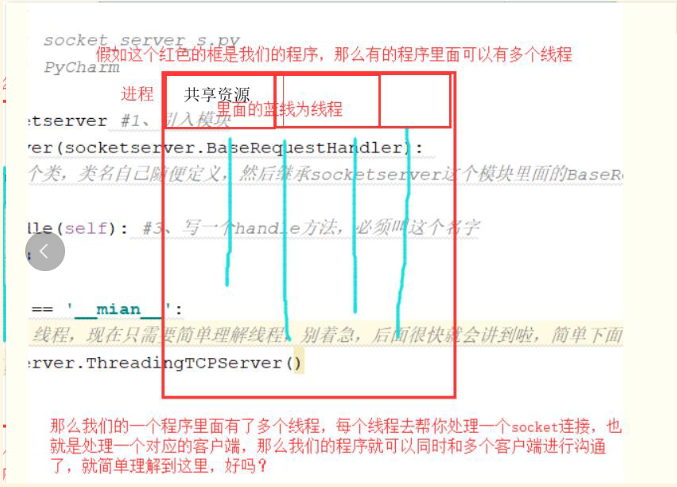
#thread 线程,现在只需要简单理解线程,别着急,后面很快就会讲到啦,看下面的图
server = socketserver.ThreadingTCPServer(('127.0.0.1',8090),MyServer)#4、使用socketserver的ThreadingTCPServer这个类,将IP和端口的元祖传进去,还需要将上面咱们自己定义的类传进去,得到一个对象,相当于我们通过它进行了bind、listenserver.serve_forever() #5、使用我们上面这个类的对象来执行serve_forever()方法,他的作用就是说,我的服务一直开启着,就像京东一样,不能关闭网站,对吧,并且serve_forever()帮我们进行了accept
#注意:
#有socketserver 那么有socketclient的吗?
#当然不会有,我要作为客户去访问京东的时候,京东帮我也客户端了吗,客户端是不是在我们自己的电脑啊,并且socketserver对客户端没有太高的要求,只需要自己写一些socket就行了
简单的应用
xxxxxxxxxx
#服务端
import socketserver
class Myserver(socketserver.BaseRequestHandler):
def handle(self):
self.data = self.request.recv(1024).strip()
print("{} wrote:".format(self.client_address[0]))print(self.data)
self.request.sendall(self.data.upper())
if __name__ == "__main__":
HOST, PORT = "127.0.0.1", 9999
# 设置allow_reuse_address允许服务器重用地址
socketserver.TCPServer.allow_reuse_address = True
# 创建一个server, 将服务地址绑定到127.0.0.1:9999
#server = socketserver.TCPServer((HOST, PORT),Myserver)
server = socketserver.ThreadingTCPServer((HOST, PORT),Myserver)
# 让server永远运行下去,除非强制停止程序
server.serve_forever()
#客服端
import socket
HOST, PORT = "127.0.0.1", 9999
data = "hello"
# 创建一个socket链接,SOCK_STREAM代表使用TCP协议
with socket.socket(socket.AF_INET, socket.SOCK_STREAM) as sock:
sock.connect((HOST, PORT)) # 链接到客户端
sock.sendall(bytes(data + "\n", "utf-8")) # 向服务端发送数据
received = str(sock.recv(1024), "utf-8")# 从服务端接收数据
print("Sent: {}".format(data))print("Received: {}".format(received))
socketserver模块源码解读

从上图我们可以看出SocketServer主要被抽象为两个主要的类: BaseServer类,用于处理连接相关的网络操作 BaseRequestHandler类,用于实际处理数据相关的操作,SocketServer还提供了两个MixIn类:ThreadingMinxIn和ForkingMixinl 用于扩展server,实现多进程和多线程。
xxxxxxxxxx
#以下从这几个主要的类开始做整体分析
#BaseServer类:
# server_activate
# serve_forever
# shutdown
# service_actions
# handle_request
# handlerequest_noblock
# handle_timeout
# verify_request
# process_request
# server_close
# finish_request
# shutdown_request
# close_request
# handle_error
#先看看BaseServer的初始化函数,主要是实现创建server对象,并初始化serve地址和处理请求的类:RequestHandlerClass
def __init__(self, server_address, RequestHandlerClass):
"""Constructor. May be extended, do not override."""
self.server_address = server_address
self.RequestHandlerClass = RequestHandlerClass
self.__is_shut_down = threading.Event()
self.__shutdown_request = False
#serve_forever函数,创建server对象之后我们会使用server对象开启无限循环,接受一个参数poll_interval,用于表示select轮询的时间,然后进入一个死循环,用select方法进行网络IO的监听,这里通过调用selector.register(self, selectors.EVENT_READ)进行了注册,当ready有返回是,表示有IO连接或者数据,这个时候会调用_handle_request_noblock
def serve_forever(self, poll_interval=0.5):
self.__is_shut_down.clear()
try:
with _ServerSelector() as selector:
selector.register(self, selectors.EVENT_READ) #检测是否注册
while not self.__shutdown_request:
ready = selector.select(poll_interval) # 监听
if ready:
self._handle_request_noblock()
self.service_actions()
finally:
self.__shutdown_request = False
self.__is_shut_down.set()
#handlerequest_noblock函数,即开始处理一个请求,并且是非阻塞。该方法通过get_request方法获取连接,具体的实现在其子类。一旦得到了连接,调用verify_request方法验证请求。验证通过,即调用process_request处理请求。如果中途出现错误,则调用handle_error处理错误,以及shutdown_request结束连接,而verify_request中默认直接返回True,所以当验证通过后讲调用process_request
def _handle_request_noblock(self):
try:
request, client_address = self.get_request()
except OSError:
return
if self.verify_request(request, client_address):
try:
self.process_request(request, client_address)
except:
self.handle_error(request, client_address)
self.shutdown_request(request)
else:
self.shutdown_request(request)
# process_request函数, process_request方法是mixin的入口,MixIn子类通过重写该方法,进行多线程或多进程的配置 。调用finish_request完成请求的处理,同时调用shutdown_request结束请求.
def process_request(self, request, client_address):
self.finish_request(request, client_address)
self.shutdown_request(request)
#finish_request函数,关于请求的部分到这里就已经处理完毕,接下来是要对数据的处理,finish_request方法将会处理完毕请求.
#BaseRequestHandler类,用于实际处理数据相关的操作.
#初始化函数,该类会处理每一个请求。初始化对象的时候,设置请求request对象。然后调用setup方法,子类会重写该方法,用于处理socket连接。接下来的将是handler和finish方法。所有对请求的处理,都可以重写handler方法。
def __init__(self, request, client_address, server):
self.request = request
self.client_address = client_address
self.server = server
self.setup()
try:
self.handle()
finally:
self.finish()
figure:first-child { margin-top: -20px; }
#write ol, #write ul { position: relative; }
img { max-width: 100%; vertical-align: middle; }
button, input, select, textarea { color: inherit; font-style: inherit; font-variant: inherit; font-weight: inherit; font-stretch: inherit; font-size: inherit; line-height: inherit; font-family: inherit; }
input[type="checkbox"], input[type="radio"] { line-height: normal; padding: 0px; }
*, ::after, ::before { box-sizing: border-box; }
#write h1, #write h2, #write h3, #write h4, #write h5, #write h6, #write p, #write pre { width: inherit; }
#write h1, #write h2, #write h3, #write h4, #write h5, #write h6, #write p { position: relative; }
h1, h2, h3, h4, h5, h6 { break-after: avoid-page; break-inside: avoid; orphans: 2; }
p { orphans: 4; }
h1 { font-size: 2rem; }
h2 { font-size: 1.8rem; }
h3 { font-size: 1.6rem; }
h4 { font-size: 1.4rem; }
h5 { font-size: 1.2rem; }
h6 { font-size: 1rem; }
.md-math-block, .md-rawblock, h1, h2, h3, h4, h5, h6, p { margin-top: 1rem; margin-bottom: 1rem; }
.hidden { display: none; }
.md-blockmeta { color: rgb(204, 204, 204); font-weight: 700; font-style: italic; }
a { cursor: pointer; }
sup.md-footnote { padding: 2px 4px; background-color: rgba(238, 238, 238, 0.7); color: rgb(85, 85, 85); border-radius: 4px; cursor: pointer; }
sup.md-footnote a, sup.md-footnote a:hover { color: inherit; text-transform: inherit; text-decoration: inherit; }
#write input[type="checkbox"] { cursor: pointer; width: inherit; height: inherit; }
figure { overflow-x: auto; margin: 1.2em 0px; max-width: calc(100% + 16px); padding: 0px; }
figure > table { margin: 0px !important; }
tr { break-inside: avoid; break-after: auto; }
thead { display: table-header-group; }
table { border-collapse: collapse; border-spacing: 0px; width: 100%; overflow: auto; break-inside: auto; text-align: left; }
table.md-table td { min-width: 32px; }
.CodeMirror-gutters { border-right: 0px; background-color: inherit; }
.CodeMirror-linenumber { user-select: none; }
.CodeMirror { text-align: left; }
.CodeMirror-placeholder { opacity: 0.3; }
.CodeMirror pre { padding: 0px 4px; }
.CodeMirror-lines { padding: 0px; }
div.hr:focus { cursor: none; }
#write pre { white-space: pre-wrap; }
#write.fences-no-line-wrapping pre { white-space: pre; }
#write pre.ty-contain-cm { white-space: normal; }
.CodeMirror-gutters { margin-right: 4px; }
.md-fences { font-size: 0.9rem; display: block; break-inside: avoid; text-align: left; overflow: visible; white-space: pre; background: inherit; position: relative !important; }
.md-diagram-panel { width: 100%; margin-top: 10px; text-align: center; padding-top: 0px; padding-bottom: 8px; overflow-x: auto; }
#write .md-fences.mock-cm { white-space: pre-wrap; }
.md-fences.md-fences-with-lineno { padding-left: 0px; }
#write.fences-no-line-wrapping .md-fences.mock-cm { white-space: pre; overflow-x: auto; }
.md-fences.mock-cm.md-fences-with-lineno { padding-left: 8px; }
.CodeMirror-line, twitterwidget { break-inside: avoid; }
.footnotes { opacity: 0.8; font-size: 0.9rem; margin-top: 1em; margin-bottom: 1em; }
.footnotes + .footnotes { margin-top: 0px; }
.md-reset { margin: 0px; padding: 0px; border: 0px; outline: 0px; vertical-align: top; background: 0px 0px; text-decoration: none; text-shadow: none; float: none; position: static; width: auto; height: auto; white-space: nowrap; cursor: inherit; -webkit-tap-highlight-color: transparent; line-height: normal; font-weight: 400; text-align: left; box-sizing: content-box; direction: ltr; }
li div { padding-top: 0px; }
blockquote { margin: 1rem 0px; }
li .mathjax-block, li p { margin: 0.5rem 0px; }
li { margin: 0px; position: relative; }
blockquote > :last-child { margin-bottom: 0px; }
blockquote > :first-child, li > :first-child { margin-top: 0px; }
.footnotes-area { color: rgb(136, 136, 136); margin-top: 0.714rem; padding-bottom: 0.143rem; white-space: normal; }
#write .footnote-line { white-space: pre-wrap; }
@media print {
body, html { border: 1px solid transparent; height: 99%; break-after: avoid; break-before: avoid; }
#write { margin-top: 0px; padding-top: 0px; border-color: transparent !important; }
.typora-export * { -webkit-print-color-adjust: exact; }
html.blink-to-pdf { font-size: 13px; }
.typora-export #write { padding-left: 32px; padding-right: 32px; padding-bottom: 0px; break-after: avoid; }
.typora-export #write::after { height: 0px; }
@page { margin: 20mm 0px; }
}
.footnote-line { margin-top: 0.714em; font-size: 0.7em; }
a img, img a { cursor: pointer; }
pre.md-meta-block { font-size: 0.8rem; min-height: 0.8rem; white-space: pre-wrap; background: rgb(204, 204, 204); display: block; overflow-x: hidden; }
p > .md-image:only-child:not(.md-img-error) img, p > img:only-child { display: block; margin: auto; }
p > .md-image:only-child { display: inline-block; width: 100%; }
#write .MathJax_Display { margin: 0.8em 0px 0px; }
.md-math-block { width: 100%; }
.md-math-block:not(:empty)::after { display: none; }
[contenteditable="true"]:active, [contenteditable="true"]:focus { outline: 0px; box-shadow: none; }
.md-task-list-item { position: relative; list-style-type: none; }
.task-list-item.md-task-list-item { padding-left: 0px; }
.md-task-list-item > input { position: absolute; top: 0px; left: 0px; margin-left: -1.2em; margin-top: calc(1em - 10px); border: none; }
.math { font-size: 1rem; }
.md-toc { min-height: 3.58rem; position: relative; font-size: 0.9rem; border-radius: 10px; }
.md-toc-content { position: relative; margin-left: 0px; }
.md-toc-content::after, .md-toc::after { display: none; }
.md-toc-item { display: block; color: rgb(65, 131, 196); }
.md-toc-item a { text-decoration: none; }
.md-toc-inner:hover { text-decoration: underline; }
.md-toc-inner { display: inline-block; cursor: pointer; }
.md-toc-h1 .md-toc-inner { margin-left: 0px; font-weight: 700; }
.md-toc-h2 .md-toc-inner { margin-left: 2em; }
.md-toc-h3 .md-toc-inner { margin-left: 4em; }
.md-toc-h4 .md-toc-inner { margin-left: 6em; }
.md-toc-h5 .md-toc-inner { margin-left: 8em; }
.md-toc-h6 .md-toc-inner { margin-left: 10em; }
@media screen and (max-width: 48em) {
.md-toc-h3 .md-toc-inner { margin-left: 3.5em; }
.md-toc-h4 .md-toc-inner { margin-left: 5em; }
.md-toc-h5 .md-toc-inner { margin-left: 6.5em; }
.md-toc-h6 .md-toc-inner { margin-left: 8em; }
}
a.md-toc-inner { font-size: inherit; font-style: inherit; font-weight: inherit; line-height: inherit; }
.footnote-line a:not(.reversefootnote) { color: inherit; }
.md-attr { display: none; }
.md-fn-count::after { content: "."; }
code, pre, samp, tt { font-family: var(--monospace); }
kbd { margin: 0px 0.1em; padding: 0.1em 0.6em; font-size: 0.8em; color: rgb(36, 39, 41); background: rgb(255, 255, 255); border: 1px solid rgb(173, 179, 185); border-radius: 3px; box-shadow: rgba(12, 13, 14, 0.2) 0px 1px 0px, rgb(255, 255, 255) 0px 0px 0px 2px inset; white-space: nowrap; vertical-align: middle; }
.md-comment { color: rgb(162, 127, 3); opacity: 0.8; font-family: var(--monospace); }
code { text-align: left; vertical-align: initial; }
a.md-print-anchor { white-space: pre !important; border-width: initial !important; border-style: none !important; border-color: initial !important; display: inline-block !important; position: absolute !important; width: 1px !important; right: 0px !important; outline: 0px !important; background: 0px 0px !important; text-decoration: initial !important; text-shadow: initial !important; }
.md-inline-math .MathJax_SVG .noError { display: none !important; }
.html-for-mac .inline-math-svg .MathJax_SVG { vertical-align: 0.2px; }
.md-math-block .MathJax_SVG_Display { text-align: center; margin: 0px; position: relative; text-indent: 0px; max-width: none; max-height: none; min-height: 0px; min-width: 100%; width: auto; overflow-y: hidden; display: block !important; }
.MathJax_SVG_Display, .md-inline-math .MathJax_SVG_Display { width: auto; margin: inherit; display: inline-block !important; }
.MathJax_SVG .MJX-monospace { font-family: var(--monospace); }
.MathJax_SVG .MJX-sans-serif { font-family: sans-serif; }
.MathJax_SVG { display: inline; font-style: normal; font-weight: 400; line-height: normal; zoom: 90%; text-indent: 0px; text-align: left; text-transform: none; letter-spacing: normal; word-spacing: normal; word-wrap: normal; white-space: nowrap; float: none; direction: ltr; max-width: none; max-height: none; min-width: 0px; min-height: 0px; border: 0px; padding: 0px; margin: 0px; }
.MathJax_SVG * { transition: none; }
.MathJax_SVG_Display svg { vertical-align: middle !important; margin-bottom: 0px !important; }
.os-windows.monocolor-emoji .md-emoji { font-family: "Segoe UI Symbol", sans-serif; }
.md-diagram-panel > svg { max-width: 100%; }
[lang="mermaid"] svg, [lang="flow"] svg { max-width: 100%; }
[lang="mermaid"] .node text { font-size: 1rem; }
table tr th { border-bottom: 0px; }
video { max-width: 100%; display: block; margin: 0px auto; }
iframe { max-width: 100%; width: 100%; border: none; }
.highlight td, .highlight tr { border: 0px; }
.CodeMirror { height: auto; }
.CodeMirror.cm-s-inner { background: inherit; }
.CodeMirror-scroll { overflow-y: hidden; overflow-x: auto; z-index: 3; }
.CodeMirror-gutter-filler, .CodeMirror-scrollbar-filler { background-color: rgb(255, 255, 255); }
.CodeMirror-gutters { border-right: 1px solid rgb(221, 221, 221); background: inherit; white-space: nowrap; }
.CodeMirror-linenumber { padding: 0px 3px 0px 5px; text-align: right; color: rgb(153, 153, 153); }
.cm-s-inner .cm-keyword { color: rgb(119, 0, 136); }
.cm-s-inner .cm-atom, .cm-s-inner.cm-atom { color: rgb(34, 17, 153); }
.cm-s-inner .cm-number { color: rgb(17, 102, 68); }
.cm-s-inner .cm-def { color: rgb(0, 0, 255); }
.cm-s-inner .cm-variable { color: rgb(0, 0, 0); }
.cm-s-inner .cm-variable-2 { color: rgb(0, 85, 170); }
.cm-s-inner .cm-variable-3 { color: rgb(0, 136, 85); }
.cm-s-inner .cm-string { color: rgb(170, 17, 17); }
.cm-s-inner .cm-property { color: rgb(0, 0, 0); }
.cm-s-inner .cm-operator { color: rgb(152, 26, 26); }
.cm-s-inner .cm-comment, .cm-s-inner.cm-comment { color: rgb(170, 85, 0); }
.cm-s-inner .cm-string-2 { color: rgb(255, 85, 0); }
.cm-s-inner .cm-meta { color: rgb(85, 85, 85); }
.cm-s-inner .cm-qualifier { color: rgb(85, 85, 85); }
.cm-s-inner .cm-builtin { color: rgb(51, 0, 170); }
.cm-s-inner .cm-bracket { color: rgb(153, 153, 119); }
.cm-s-inner .cm-tag { color: rgb(17, 119, 0); }
.cm-s-inner .cm-attribute { color: rgb(0, 0, 204); }
.cm-s-inner .cm-header, .cm-s-inner.cm-header { color: rgb(0, 0, 255); }
.cm-s-inner .cm-quote, .cm-s-inner.cm-quote { color: rgb(0, 153, 0); }
.cm-s-inner .cm-hr, .cm-s-inner.cm-hr { color: rgb(153, 153, 153); }
.cm-s-inner .cm-link, .cm-s-inner.cm-link { color: rgb(0, 0, 204); }
.cm-negative { color: rgb(221, 68, 68); }
.cm-positive { color: rgb(34, 153, 34); }
.cm-header, .cm-strong { font-weight: 700; }
.cm-del { text-decoration: line-through; }
.cm-em { font-style: italic; }
.cm-link { text-decoration: underline; }
.cm-error { color: red; }
.cm-invalidchar { color: red; }
.cm-constant { color: rgb(38, 139, 210); }
.cm-defined { color: rgb(181, 137, 0); }
div.CodeMirror span.CodeMirror-matchingbracket { color: rgb(0, 255, 0); }
div.CodeMirror span.CodeMirror-nonmatchingbracket { color: rgb(255, 34, 34); }
.cm-s-inner .CodeMirror-activeline-background { background: inherit; }
.CodeMirror { position: relative; overflow: hidden; }
.CodeMirror-scroll { height: 100%; outline: 0px; position: relative; box-sizing: content-box; background: inherit; }
.CodeMirror-sizer { position: relative; }
.CodeMirror-gutter-filler, .CodeMirror-hscrollbar, .CodeMirror-scrollbar-filler, .CodeMirror-vscrollbar { position: absolute; z-index: 6; display: none; }
.CodeMirror-vscrollbar { right: 0px; top: 0px; overflow: hidden; }
.CodeMirror-hscrollbar { bottom: 0px; left: 0px; overflow: hidden; }
.CodeMirror-scrollbar-filler { right: 0px; bottom: 0px; }
.CodeMirror-gutter-filler { left: 0px; bottom: 0px; }
.CodeMirror-gutters { position: absolute; left: 0px; top: 0px; padding-bottom: 30px; z-index: 3; }
.CodeMirror-gutter { white-space: normal; height: 100%; box-sizing: content-box; padding-bottom: 30px; margin-bottom: -32px; display: inline-block; }
.CodeMirror-gutter-wrapper { position: absolute; z-index: 4; background: 0px 0px !important; border: none !important; }
.CodeMirror-gutter-background { position: absolute; top: 0px; bottom: 0px; z-index: 4; }
.CodeMirror-gutter-elt { position: absolute; cursor: default; z-index: 4; }
.CodeMirror-lines { cursor: text; }
.CodeMirror pre { border-radius: 0px; border-width: 0px; background: 0px 0px; font-family: inherit; font-size: inherit; margin: 0px; white-space: pre; word-wrap: normal; color: inherit; z-index: 2; position: relative; overflow: visible; }
.CodeMirror-wrap pre { word-wrap: break-word; white-space: pre-wrap; word-break: normal; }
.CodeMirror-code pre { border-right: 30px solid transparent; width: fit-content; }
.CodeMirror-wrap .CodeMirror-code pre { border-right: none; width: auto; }
.CodeMirror-linebackground { position: absolute; left: 0px; right: 0px; top: 0px; bottom: 0px; z-index: 0; }
.CodeMirror-linewidget { position: relative; z-index: 2; overflow: auto; }
.CodeMirror-wrap .CodeMirror-scroll { overflow-x: hidden; }
.CodeMirror-measure { position: absolute; width: 100%; height: 0px; overflow: hidden; visibility: hidden; }
.CodeMirror-measure pre { position: static; }
.CodeMirror div.CodeMirror-cursor { position: absolute; visibility: hidden; border-right: none; width: 0px; }
.CodeMirror div.CodeMirror-cursor { visibility: hidden; }
.CodeMirror-focused div.CodeMirror-cursor { visibility: inherit; }
.cm-searching { background: rgba(255, 255, 0, 0.4); }
@media print {
.CodeMirror div.CodeMirror-cursor { visibility: hidden; }
}
:root { --side-bar-bg-color: #eee8d5; --text-color: #839496; --item-hover-bg-color: #eee8d5; --window-border: 1px solid #93a1a1; --active-file-bg-color: #fdf6e3; --active-file-text-color: #93a1a1; --item-hover-text-color: #93a1a1; }
html { font-size: 16px; }
body { font-family: Consolas, Mononoki, "Roboto Sans", "Liberation Mono", monospace; color: rgb(88, 110, 117); line-height: 1.6; background-color: rgb(253, 246, 227); }
#write { max-width: 860px; margin: 0px auto; padding: 20px 30px 100px; }
#write > ul:first-child, #write > ol:first-child { margin-top: 30px; }
body > :first-child { margin-top: 0px !important; }
body > :last-child { margin-bottom: 0px !important; }
a { color: rgb(38, 139, 210); }
a:hover { color: rgb(203, 75, 22); }
.md-toc-inner { color: rgb(147, 161, 161) !important; }
h1, h2, h3, h4, h5, h6 { position: relative; margin-top: 1rem; margin-bottom: 1rem; font-weight: normal; line-height: 1.4; cursor: text; }
h1:hover a.anchor, h2:hover a.anchor, h3:hover a.anchor, h4:hover a.anchor, h5:hover a.anchor, h6:hover a.anchor { text-decoration: none; }
h1 tt, h1 code { font-size: inherit; }
h2 tt, h2 code { font-size: inherit; }
h3 tt, h3 code { font-size: inherit; }
h4 tt, h4 code { font-size: inherit; }
h5 tt, h5 code { font-size: inherit; }
h6 tt, h6 code { font-size: inherit; }
h1 { padding-bottom: 0.3em; font-size: 2.25em; line-height: 1.2; border-bottom: 1px solid rgb(238, 232, 213); }
h2 { padding-bottom: 0.3em; font-size: 1.75em; line-height: 1.225; border-bottom: 1px solid rgb(238, 232, 213); }
h3 { font-size: 1.5em; line-height: 1.43; }
h4 { font-size: 1.25em; }
h5 { font-size: 1em; }
h6 { font-size: 1em; color: rgb(119, 119, 119); }
p, ul, ol, dl, table { margin: 0.8em 0px; }
blockquote { margin: 1.6em 3.2em; }
li > ol, li > ul { margin: 0px; }
hr { height: 1px; padding: 0px; margin: 24px 0px; background-color: rgb(238, 232, 213); border-width: 0px 0px 1px; border-style: none none solid; border-top-color: initial; border-right-color: initial; border-left-color: initial; border-image: initial; overflow: hidden; box-sizing: content-box; border-bottom-color: rgb(238, 232, 213); }
body > h2:first-child { margin-top: 0px; padding-top: 0px; }
body > h1:first-child { margin-top: 0px; padding-top: 0px; }
body > h1:first-child + h2 { margin-top: 0px; padding-top: 0px; }
body > h3:first-child, body > h4:first-child, body > h5:first-child, body > h6:first-child { margin-top: 0px; padding-top: 0px; }
a:first-child h1, a:first-child h2, a:first-child h3, a:first-child h4, a:first-child h5, a:first-child h6 { margin-top: 0px; padding-top: 0px; }
h1 p, h2 p, h3 p, h4 p, h5 p, h6 p { margin-top: 0px; }
li p.first { display: inline-block; }
ul, ol { padding-left: 30px; }
ul:first-child, ol:first-child { margin-top: 0px; }
ul:last-child, ol:last-child { margin-bottom: 0px; }
blockquote { border-left: 4px solid rgb(181, 137, 0); padding: 0px 15px; color: rgb(147, 161, 161); }
blockquote blockquote { padding-right: 0px; }
table { padding: 0px; word-break: initial; }
table tr { border-top: 1px solid rgb(204, 204, 204); margin: 0px; padding: 0px; }
table tr:nth-child(2n) { background-color: rgb(248, 248, 248); }
table tr th { font-weight: bold; border: 1px solid rgb(204, 204, 204); text-align: left; margin: 0px; padding: 6px 13px; }
table tr td { border: 1px solid rgb(204, 204, 204); text-align: left; margin: 0px; padding: 6px 13px; }
table tr th:first-child, table tr td:first-child { margin-top: 0px; }
table tr th:last-child, table tr td:last-child { margin-bottom: 0px; }
.CodeMirror-gutters { border-right: 1px solid rgb(221, 221, 221); }
.md-fences, code, tt { background-color: rgb(238, 232, 213); color: rgb(203, 75, 22); border-radius: 3px; font-family: Consolas, Mononoki, "Roboto Mono", "Liberation Mono", Courier, monospace; padding: 2px 4px 0px; font-size: 0.9em; }
.md-fences { margin-bottom: 15px; margin-top: 15px; padding: 8px 1em 6px; }
.task-list { padding-left: 0px; }
.task-list-item { padding-left: 32px; }
.task-list-item input { top: 3px; left: 8px; }
@media screen and (min-width: 914px) {
}
@media print {
html { font-size: 13px; }
table, pre { break-inside: avoid; }
pre { word-wrap: break-word; }
}
.md-fences { background-color: rgb(238, 232, 213); }
#write pre.md-meta-block { padding: 1rem; font-size: 85%; line-height: 1.45; background-color: rgb(247, 247, 247); border: 0px; border-radius: 3px; color: rgb(119, 119, 119); margin-top: 0px !important; }
.mathjax-block > .code-tooltip { bottom: 0.375rem; }
#write > h3.md-focus::before { left: -1.5625rem; top: 0.375rem; }
#write > h4.md-focus::before { left: -1.5625rem; top: 0.285714rem; }
#write > h5.md-focus::before { left: -1.5625rem; top: 0.285714rem; }
#write > h6.md-focus::before { left: -1.5625rem; top: 0.285714rem; }
.md-image > .md-meta { border-radius: 3px; font-family: Consolas, Mononoki, "Roboto Mono", "Liberation Mono", Courier, monospace; padding: 8px 16px; font-size: 0.9em; color: inherit; }
.md-tag { color: inherit; }
.md-toc { margin-top: 10px; padding-bottom: 10px; }
.sidebar-tabs { border-bottom: none; }
#typora-quick-open { background-color: rgb(238, 232, 213); }
#typora-quick-open-item { background-color: rgb(250, 250, 250); border-color: rgb(254, 254, 254) rgb(229, 229, 229) rgb(229, 229, 229) rgb(238, 238, 238); border-style: solid; border-width: 1px; }
#md-notification::before { top: 10px; }
.on-focus-mode blockquote { border-left-color: rgba(85, 85, 85, 0.12); }
header, .context-menu, .megamenu-content, footer { font-family: Consolas, Mononoki, "Roboto Mono", "Liberation Mono", monospace; }
.file-node-content:hover .file-node-icon, .file-node-content:hover .file-node-open-state { visibility: visible; }
.mac-seamless-mode #typora-sidebar { background-color: var(--side-bar-bg-color); }
.typora-export li, .typora-export p, .typora-export, .footnote-line {white-space: normal;}
-->
socketserver模块解析的更多相关文章
- Python socketserver模块解析
参考:https://blog.csdn.net/qq_33733970/article/details/79153938 1.功能简介 socketserver模块是对socket模块的再封装,用于 ...
- Python之路(第三十三篇) 网络编程:socketserver深度解析
一.socketserver 模块介绍 socketserver是标准库中的一个高级模块,用于网络客户端与服务器的实现.(version = "0.4") 在python2中写作S ...
- python 网络编程之socket开发和socketserver模块
一 客户端/服务器架构 1.硬件C/S架构(打印机) 2.软件C/S架构 互联网中处处是C/S架构 如黄色网站是服务端,你的浏览器是客户端(B/S架构也是C/S架构的一种) 腾讯作为服务端为你提供视频 ...
- gevent协程、select IO多路复用、socketserver模块 改造多用户FTP程序例子
原多线程版FTP程序:http://www.cnblogs.com/linzetong/p/8290378.html 只需要在原来的代码基础上稍作修改: 一.gevent协程版本 1. 导入geven ...
- python学习之-- socketserver模块
socketserver 模块简化了网络服务器的编写,主要实现并发的处理. 主要有4个类:这4个类是同步进行处理的,另外通过ForkingMixIn和ThreadingMixIn类来支持异步.sock ...
- socket 和 SocketServer 模块
一 .Socket 网络上的两个程序通过一个双向的通信连接实现数据的交换,这个连接的一端称为一个socket socket(TCP,IP)通常也称作"套接字",用于描述IP地址和端 ...
- TypeScript 素描 - 模块解析、声明合并
模块解析 模块解析有两种方式 相对方式 也就是以/或 ./或-/开头的,比如import jq from "/jq" 非相对方式 比如 import model from ...
- python-pcap模块解析mac地址
python-pcap模块解析mac地址 作者:vpoet mail:vpoet_sir@163.com import pcap import binascii a = pcap.pcap() a.s ...
- SocketServer模块
在利用select实现伪并发的socket博文中我们说了: 如果要实现一个server端可以和多个客户端进行通信可以使用 1.多线程 2.多进程 3.select I/O多路复用 在那篇博文中我们介绍 ...
随机推荐
- 110. Balanced Binary Tree (Tree; DFS)
Given a binary tree, determine if it is height-balanced. For this problem, a height-balanced binary ...
- ORA-01795: maximum number of expressions in a list is 1000
今天发现查询Oracle用In查询In的元素不可以超过1000个还需要分成多个1000查询记录博客备忘!! Load Test的时候发现这么如下这个错误.... ORA-01795: maximum ...
- 在 Ruby 中执行 Shell 命令的 6 种方法
我们时常会与操作系统交互或在 Ruby 中执行 Shell 命令.Ruby为我们提供了完成该任务的诸多方法. Exec Kernel#exec 通过执行给定的命令来替换当前进程,例如: $ irb & ...
- 2-ubuntu下访问window的磁盘
双系统Ubuntu无法进入Windows磁盘的解决方法 有些用户在电脑上安装了Ubuntu和Win10的双系统,正常情况下Ubuntu是可以正常访问Windows磁盘的.但是有些用户就是无法再Ubun ...
- ubuntu库文件路径pkgconfig
settings--->compiler and bug settings -->link settings 在左边添加libpthread.a ,右边添加 -lpthread即可. u ...
- C#使用互斥量(Mutex)实现多进程并发操作时多进程间线程同步操作(进程同步)的简单示例代码及使用方法
本文主要是实现操作系统级别的多进程间线程同步(进程同步)的示例代码及测试结果.代码经过测试,可供参考,也可直接使用. 承接上一篇博客的业务场景[C#使用读写锁三行代码简单解决多线程并发写入文件时线程同 ...
- sizeToFit & sizeThatFits
[sizeToFit & sizeThatFits] 1.sizeToFit,根据sizeThatFits方法返回的大小来调整receiver的大小.自定义子类不应该覆盖这个方法. 2.siz ...
- Chrome Console API 参考
https://developers.google.com/web/tools/chrome-devtools/console/command-line-reference
- 检查路径是否存在与创建指定路径(mfc)
检查路径是否存在 if (access("D:\\Work\\Encryption\\DES", 0)) 为真,则路径不存在 创建指定路径 system("md D:\\ ...
- OpenGl中的Nurbs B样条曲面的封装的GLU的NURBS的接口
OpenGl中的Nurbs B样条曲面的封装的GLU的NURBS的接口 创建一个NURBS对象: GLUnurbs* gluNewNurbsRenderer (void); //创建一个NURBS对象 ...