
Spring Cloud 入门教程(六): 用声明式REST客户端Feign调用远端HTTP服务
首先简单解释一下什么是声明式实现?
要做一件事, 需要知道三个要素,where, what, how。即在哪里( where)用什么办法(how)做什么(what)。什么时候做(when)我们纳入how的范畴。
1)编程式实现: 每一个要素(where,what,how)都需要用具体代码实现来表示。传统的方式一般都是编程式实现,业务开发者需要关心每一处逻辑
2)声明式实现: 只需要声明在哪里(where )做什么(what),而无需关心如何实现(how)。Spring的AOP就是一种声明式实现,比如网站检查是否登录,开发页面逻辑的时候,只需要通过AOP配置声明加载页面(where)需要做检查用户是否登录(what),而无需关心如何检查用户是否登录(how)。如何检查这个逻辑由AOP机制去实现, 而AOP的登录检查实现机制与正在开发页面的逻辑本身是无关的。
在Spring Cloud Netflix栈中,各个微服务都是以HTTP接口的形式暴露自身服务的,因此在调用远程服务时就必须使用HTTP客户端。Feign就是Spring Cloud提供的一种声明式REST客户端。可以通过Feign访问调用远端微服务提供的REST接口。现在我们就用Feign来调用SERVICE-HELLOWORLD暴露的REST接口,以获取到“Hello World”信息。在使用Feign时,Spring Cloud集成了Ribbon和Eureka来提供HTTP客户端的负载均衡。
下面我们就采用Feign的方式来调用Hello World服务集群。
1. 创建Maven工程,加入spring-cloud-starter-feign依赖
        <dependency>

            <groupId>org.springframework.cloud</groupId>

            <artifactId>spring-cloud-starter-feign</artifactId>

        </dependency>
完整的pom文件如下:
 <?xml version="1.0" encoding="UTF-8"?>

 <project xmlns="http://maven.apache.org/POM/4.0.0"

         xmlns:xsi="http://www.w3.org/2001/XMLSchema-instance"

         xsi:schemaLocation="http://maven.apache.org/POM/4.0.0 http://maven.apache.org/xsd/maven-4.0.0.xsd">

     <modelVersion>4.0.0</modelVersion>

     <groupId>com.chry</groupId>

     <artifactId>springcloud.helloworld.feign.client</artifactId>

     <version>0.0.1-SNAPSHOT</version>

     <packaging>jar</packaging>

     <name>springcloud.helloworld.feign.client</name>

     <description>Demo Feigh client application</description>

     <parent>

         <groupId>org.springframework.boot</groupId>

         <artifactId>spring-boot-starter-parent</artifactId>

         <version>1.5.3.RELEASE</version>

         <relativePath/> <!-- lookup parent from repository -->

     </parent>

     <properties>

         <project.build.sourceEncoding>UTF-8</project.build.sourceEncoding>

         <project.reporting.outputEncoding>UTF-8</project.reporting.outputEncoding>

         <java.version>1.8</java.version>

     </properties>

     <dependencies>

         <dependency>

             <groupId>org.springframework.cloud</groupId>

             <artifactId>spring-cloud-starter-eureka</artifactId>

         </dependency>

         <dependency>

             <groupId>org.springframework.cloud</groupId>

             <artifactId>spring-cloud-starter-feign</artifactId>

         </dependency>

         <dependency>

             <groupId>org.springframework.boot</groupId>

             <artifactId>spring-boot-starter-web</artifactId>

         </dependency>

         <dependency>

             <groupId>org.springframework.boot</groupId>

             <artifactId>spring-boot-starter-test</artifactId>

             <scope>test</scope>

         </dependency>

     </dependencies>

     <dependencyManagement>

         <dependencies>

             <dependency>

                 <groupId>org.springframework.cloud</groupId>

                 <artifactId>spring-cloud-dependencies</artifactId>

                 <version>Dalston.RC1</version>

                 <type>pom</type>

                 <scope>import</scope>

             </dependency>

         </dependencies>

     </dependencyManagement>

     <build>

         <plugins>

             <plugin>

                 <groupId>org.springframework.boot</groupId>

                 <artifactId>spring-boot-maven-plugin</artifactId>

             </plugin>

         </plugins>

     </build>

     <repositories>

         <repository>

             <id>spring-milestones</id>

             <name>Spring Milestones</name>

             <url>https://repo.spring.io/milestone</url>

             <snapshots>

                 <enabled>false</enabled>

             </snapshots>

         </repository>

     </repositories>

 </project>
pom.xml
2. 创建启动类,需呀加上@EnableFeignClients注解以使用Feign, 使用@EnableDiscoveryClient开启服务自动发现
 package springcloud.helloworld.feign.service;

 import org.springframework.boot.SpringApplication;

 import org.springframework.boot.autoconfigure.SpringBootApplication;

 import org.springframework.cloud.client.discovery.EnableDiscoveryClient;

 import org.springframework.cloud.netflix.feign.EnableFeignClients;

 @SpringBootApplication

 @EnableDiscoveryClient

 @EnableFeignClients

 public class ServiceFeignApplication {

     public static void main(String[] args) {

         SpringApplication.run(ServiceFeignApplication.class, args);

     }

 }
3. 添加配置文件application.yml, 使用端口8902, 名字定义为service-feign, 并注册到eureka服务中心
 eureka:

    client:

       serviceUrl:

         defaultZone: http://localhost:8761/eureka/

 server:

    port: 8902

 spring:

    application:

       name: service-feign
4. 定义Feign:一个用@FeignClient注解的接口类,
@FeignClient用于通知Feign组件对该接口进行代理(不需要编写接口实现),使用者可直接通过@Autowired注入; 该接口通过value定义了需要调用的SERVICE-HELLOWORLD服务(通过服务中心自动发现机制会定位具体URL); @RequestMapping定义了Feign需要访问的SERVICE-HELLOWORLD服务的URL(本例中为根“/”)
 package springcloud.helloworld.feign.service;

 import org.springframework.cloud.netflix.feign.FeignClient;

 import org.springframework.web.bind.annotation.RequestMapping;

 import org.springframework.web.bind.annotation.RequestMethod;

 @FeignClient(value = "SERVICE-HELLOWORLD")

 public interface HelloWorldService {

     @RequestMapping(value = "/",method = RequestMethod.GET)

     String sayHello();

 }
Spring Cloud应用在启动时,Feign会扫描标有@FeignClient注解的接口,生成代理,并注册到Spring容器中。生成代理时Feign会为每个接口方法创建一个RequetTemplate对象,该对象封装了HTTP请求需要的全部信息,请求参数名、请求方法等信息都是在这个过程中确定的,Feign的模板化就体现在这里
5. 定义一个WebController。
注入之前通过@FeignClient定义生成的bean,
sayHello()映射到http://localhost:8902/hello, 在这里,我修改了Hello World服务的映射,将根“/”, 修改成了“/hello”。
 package springcloud.helloworld.feign.service;

 import org.springframework.beans.factory.annotation.Autowired;

 import org.springframework.web.bind.annotation.RequestMapping;

 import org.springframework.web.bind.annotation.RequestMethod;

 import org.springframework.web.bind.annotation.RestController;

 @RestController

 public class WebController {

     @Autowired HelloWorldService helloWorldFeignService;

     @RequestMapping(value = "/hello",method = RequestMethod.GET)

     public String sayHello(){

         return helloWorldFeignService.sayHello();

     }

 }
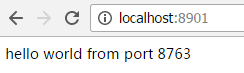
6. 启动Feign应用, 访问http://localhost:8902/hello, 多次刷新,可以看到和前一章Ribbon里面的应用一样, 两个Hello World服务的输出交替出现。说明通过Feign访问服务, Spring Cloud已经缺省使用了Ribbon负载均衡。

6. 在Feign中使用Apache HTTP Client
Feign在默认情况下使用的是JDK原生的URLConnection发送HTTP请求,没有连接池,但是对每个地址gwai会保持一个长连接,即利用HTTP的persistence connection 。我们可以用Apache的HTTP Client替换Feign原始的http client, 从而获取连接池、超时时间等与性能息息相关的控制能力。Spring Cloud从Brixtion.SR5版本开始支持这种替换,首先在项目中声明Apache HTTP Client和feign-httpclient依赖:
 <!-- 使用Apache HttpClient替换Feign原生httpclient -->

         <dependency>

             <groupId>org.apache.httpcomponents</groupId>

             <artifactId>httpclient</artifactId>

         </dependency>

         <dependency>

             <groupId>com.netflix.feign</groupId>

             <artifactId>feign-httpclient</artifactId>

             <version>${feign-httpclient}</version>

         </dependency>
然后在application.properties中添加:
feign.httpclient.enabled=true
7. Feign的Encoder、Decoder和ErrorDecoder
Feign将方法签名中方法参数对象序列化为请求参数放到HTTP请求中的过程,是由编码器(Encoder)完成的。同理,将HTTP响应数据反序列化为Java对象是由解码器(Decoder)完成的。默认情况下,Feign会将标有@RequestParam注解的参数转换成字符串添加到URL中,将没有注解的参数通过Jackson转换成json放到请求体中。注意,如果在@RequetMapping中的method将请求方式指定为POST,那么所有未标注解的参数将会被忽略,例如:
@RequestMapping(value = "/group/{groupId}", method = RequestMethod.GET)

void update(@PathVariable("groupId") Integer groupId, @RequestParam("groupName") String groupName, DataObject obj);
此时因为声明的是GET请求没有请求体,所以obj参数就会被忽略。
在Spring Cloud环境下,Feign的Encoder只会用来编码没有添加注解的参数。如果你自定义了Encoder, 那么只有在编码obj参数时才会调用你的Encoder。对于Decoder, 默认会委托给SpringMVC中的MappingJackson2HttpMessageConverter类进行解码。只有当状态码不在200 ~ 300之间时ErrorDecoder才会被调用。ErrorDecoder的作用是可以根据HTTP响应信息返回一个异常,该异常可以在调用Feign接口的地方被捕获到。我们目前就通过ErrorDecoder来使Feign接口抛出业务异常以供调用者处理。
以上6~7完全摘自 http://blog.csdn.net/neosmith/article/details/52449921
上一篇:Spring Cloud 入门教程(五): Ribbon实现客户端的负载均衡
参考资料: http://blog.csdn.net/neosmith/article/details/52449921
http://blog.csdn.net/forezp/article/details/69808079
http://projects.spring.io/spring-cloud/spring-cloud.html#spring-cloud-feign
Spring Cloud 入门教程(六): 用声明式REST客户端Feign调用远端HTTP服务的更多相关文章
- spring cloud 声明式rest客户端feign调用远程http服务
在Spring Cloud Netflix栈中,各个微服务都是以HTTP接口的形式暴露自身服务的,因此在调用远程服务时就必须使用HTTP客户端.Feign就是Spring Cloud提供的一种声明式R ...
- Spring Cloud官方文档中文版-声明式Rest客户端:Feign
官方文档地址为:http://cloud.spring.io/spring-cloud-static/Dalston.SR2/#spring-cloud-feign 文中例子我做了一些测试在:http ...
- Spring Cloud 入门教程(七): 熔断机制 -- 断路器
对断路器模式不太清楚的话,可以参看另一篇博文:断路器(Curcuit Breaker)模式,下面直接介绍Spring Cloud的断路器如何使用. SpringCloud Netflix实现了断路器库 ...
- Spring Cloud 入门教程(五): Ribbon实现客户端的负载均衡
接上节,假如我们的Hello world服务的访问量剧增,用一个服务已经无法承载, 我们可以把Hello World服务做成一个集群. 很简单,我们只需要复制Hello world服务,同时将原来的端 ...
- Spring Cloud入门教程(二):客户端负载均衡(Ribbon)
对于大型应用系统负载均衡(LB:Load Balancing)是首要被解决一个问题.在微服务之前LB方案主要是集中式负载均衡方案,在服务消费者和服务提供者之间又一个独立的LB,LB通常是专门的硬件,如 ...
- Spring Cloud 入门教程 - 搭建配置中心服务
简介 Spring Cloud 提供了一个部署微服务的平台,包括了微服务中常见的组件:配置中心服务, API网关,断路器,服务注册与发现,分布式追溯,OAuth2,消费者驱动合约等.我们不必先知道每个 ...
- Spring Cloud 入门教程(八): 断路器指标数据监控Hystrix Dashboard 和 Turbine
1. Hystrix Dashboard (断路器:hystrix 仪表盘) Hystrix一个很重要的功能是,可以通过HystrixCommand收集相关数据指标. Hystrix Dashboa ...
- Spring Cloud 入门教程(十):和RabbitMQ的整合 -- 消息总线Spring Cloud Netflix Bus
在本教程第三讲Spring Cloud 入门教程(三): 配置自动刷新中,通过POST方式向客户端发送/refresh请求, 可以让客户端获取到配置的最新变化.但试想一下, 在分布式系统中,如果存在很 ...
- Spring Cloud 入门教程(九): 路由网关zuul
在微服务架构中,需要几个关键的组件,服务注册与发现.服务消费.负载均衡.断路器.智能路由.配置管理等,由这几个组件可以组建一个简单的微服务架构.客户端的请求首先经过负载均衡(zuul.Ngnix),再 ...
随机推荐
- Python高级特性:列表生成式
列表生成式即List Comprehensions,是Python内置的非常简单却强大的可以用来创建list的生成式. 最常见的例子: 生成list [, , , , , , , , , ]可以用li ...
- ButterKnife注解框架详解
Android 懒人注解框架 :https://github.com/JakeWharton/butterknife 前言: 注解,相信很多同学都用到了,对控件进行初始化的时候需要用到 findVie ...
- github上传流程图记录
参考文章 http://blog.csdn.net/laozitianxia/article/details/50682100 首先你得先创建仓库 为仓库取一个名字,然后点击创建就会有一个仓库了, g ...
- Thrift的C++服务端(线程池和非阻塞)模式
非阻塞模式 #include "RpcServiceHandler.h" #include <thrift/concurrency/ThreadManager.h> # ...
- Windows Zip/CentOS/Radhat系统安装Mysql5.7.x方法
CentOS/Redhat 安装: wget http://dev.mysql.com/get/mysql57-community-release-el7-9.noarch.rpm rpm -Uvh ...
- python base64 decode incorrect padding错误解决方法
个人觉得原因应该是不同的语言/base64库编码规则不太统一的问题. python中base64串的长度需为4的整数倍,故对长度不为4整数倍的base64串需要用"='补足 如下代码: da ...
- mysql数据表的基本操作:表结构操作,字段操作
本节介绍: 表结构操作 创建数据表. 查看数据表和查看字段. 修改数据表结构 删除数据表 字段操作 新增字段. 修改字段数据类型.位置或属性. 重命名字段 删除字段 首发时间:2018-02-18 ...
- ThreadPoolExecutor源码解析(二)
1.ThreadPoolExcuter运行实例 首先我们先看如何新建一个ThreadPoolExecutor去运行线程.然后深入到源码中去看ThreadPoolExecutor里面使如何运作的. pu ...
- python timeit模块简单用法
timeit模块提供了一种简便的方法来为Python中的小块代码进行计时. 模块调用函数,stmp为要测试的函数,setup为测试环境,number为运行次数 timeit.timeit(stmt=) ...
- mssql sqlerver 脚本 计算数据表的结余数的方法分享
转自:http://www.maomao365.com/?p=5710 摘要:今天接到一个需求,有一张数据表,记录的是消费明细数据,现在需要做一个累计结余,记录每次的数据结余合计,下文将展示一种sql ...