
Flutter中极光推送的使用----jpush_flutter
原文地址:https://www.cnblogs.com/niceyoo/p/11095994.html
1、申请极光账号和建立应用
极光推送的官方网址为:https://www.jiguang.cn/
注册好后,进入'服务中心',然后再进入'开发者平台',点击创建应用。
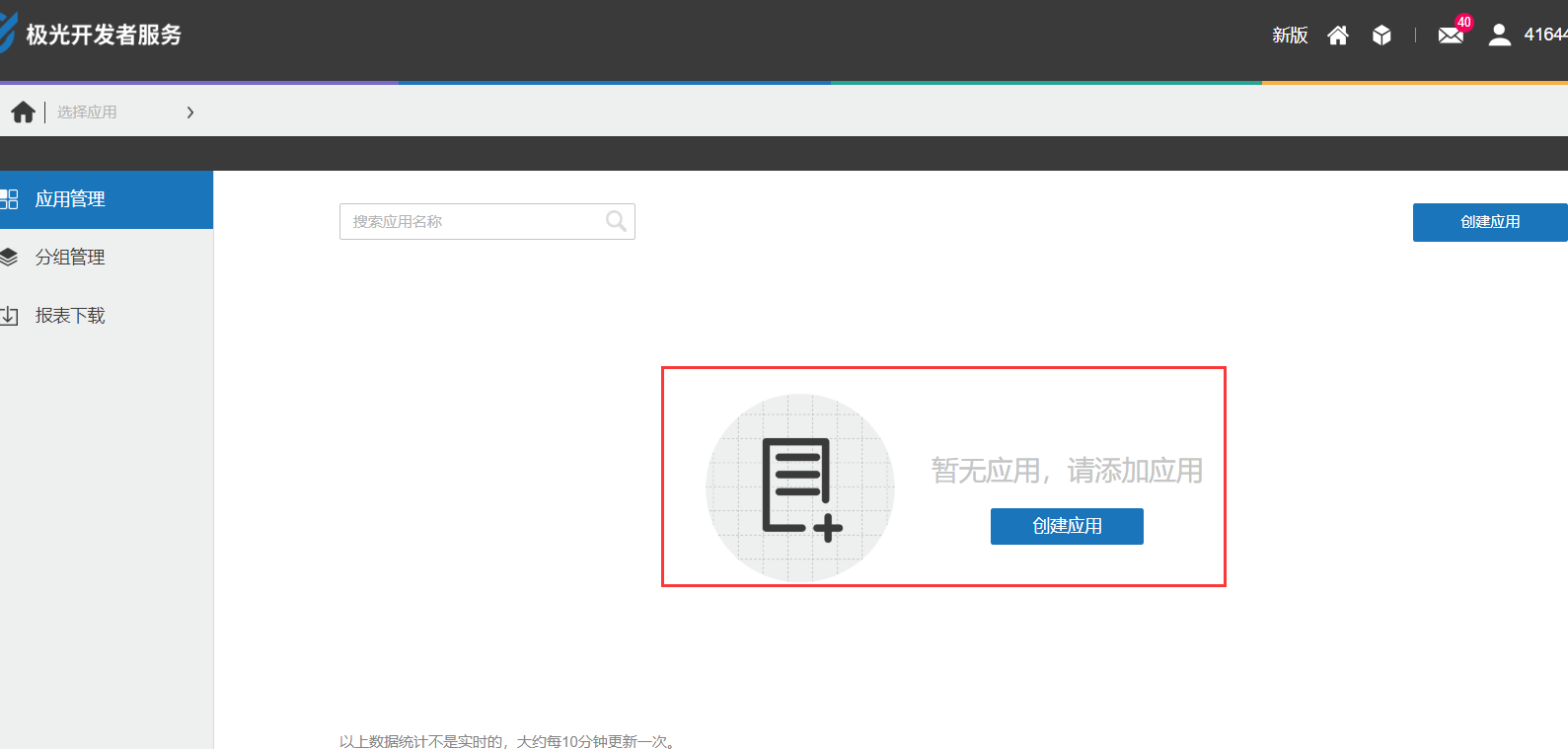
这时候会出现新页面,让你填写“应用名称”和上传“应用图标”。
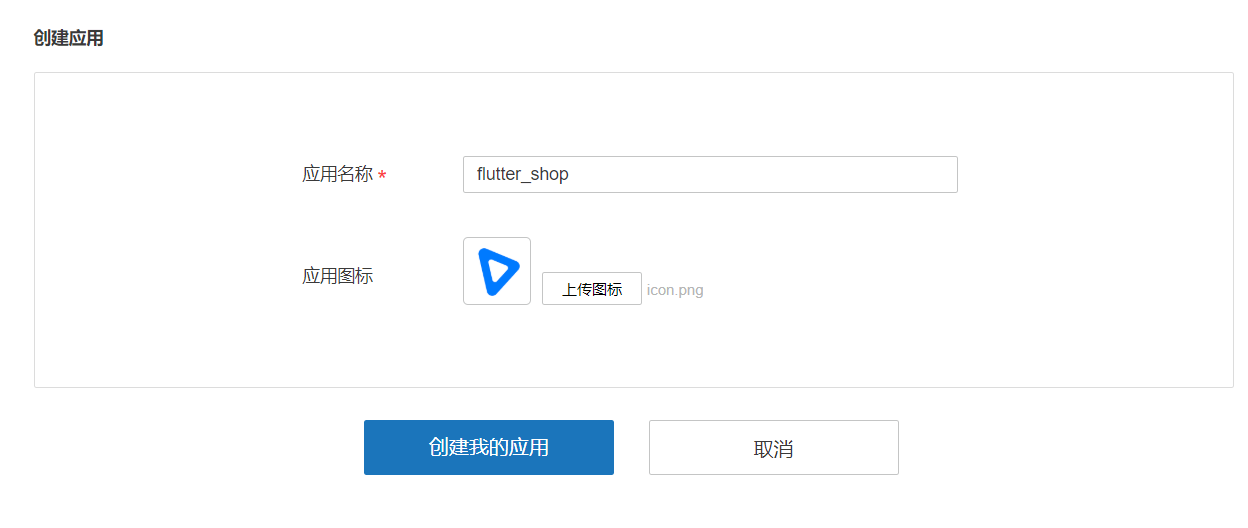
创建完成,极光平台就会给我们两个key。
- appKey : 移动客户端使用的key
- Master Secret : 服务端使用的key
我们这里只做移动端不做服务端,所以只需要appKey。得到这个Key也算是极光平台操作完了
2、加入dependencies依赖
github网址:https://github.com/jpush/jpush-flutter-plugin
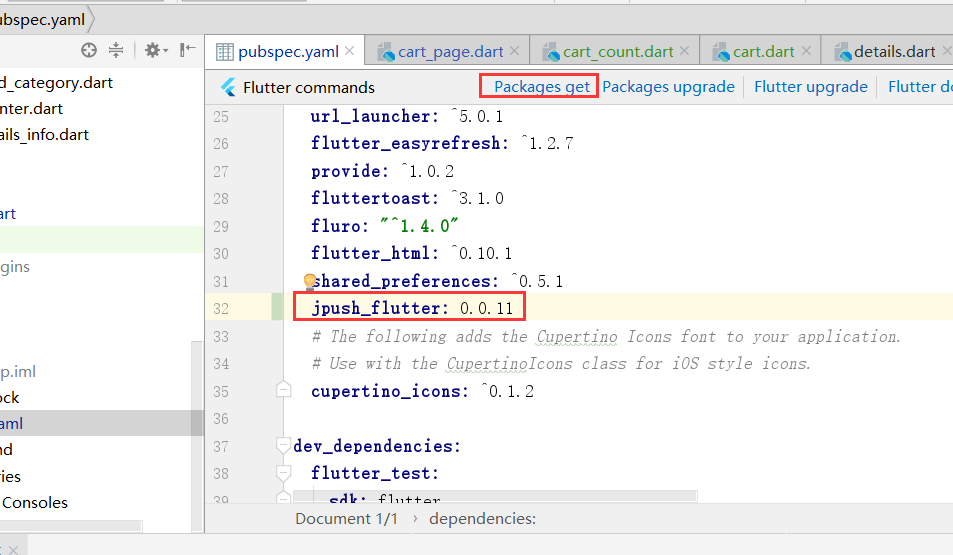
要使用极光推送插件必须先下载包,要下载包就需要先添加依赖,直接把下面的代码加入pubspec.yaml文件中。
jpush_flutter: 0.0.11
写完代码后,选择Android Studio右上角的Packages get进行下载,下载完成后进行操作。
3、build.gradle添加可以和cpu型号代码
打开android/app/src/build.gradle文件,加入如下代码:
defaultConfig {
    applicationId "sscai.club.flutter_shop"
    minSdkVersion 16
    targetSdkVersion 28
    versionCode flutterVersionCode.toInteger()
    versionName flutterVersionName
    testInstrumentationRunner "android.support.test.runner.AndroidJUnitRunner"

    /*新加入的*/
    ndk {
        /*选择要添加的对应 cpu 类型的 .so 库。
        abiFilters 'armeabi', 'armeabi-v7a', 'x86', 'x86_64', 'mips', 'mips64'// 'arm64-v8a',
        /*还可以添加
    }

    manifestPlaceholders = [
        JPUSH_PKGNAME: applicationId,
        JPUSH_APPKEY : "这里写入你自己申请的Key哦", /*NOTE: JPush 上注册的包名对应的 Appkey.*/
        JPUSH_CHANNEL: "developer-default", /*暂时填写默认值即可.*/
    ]
    /*新加入的*/
}
详细请参考:https://github.com/jpush/jpush-flutter-plugin
4、主要代码编写
在 main.dart 中引入依赖
import 'package:flutter/material.dart';
import 'dart:async';

import 'package:flutter/services.dart';
import 'package:jpush_flutter/jpush_flutter.dart';
编写initPlatformState方法
Future<void> initPlatformState() async {
    String platformVersion;

    try {
      /*监听响应方法的编写*/
      jpush.addEventHandler(
          onReceiveNotification: (Map<String, dynamic> message) async {
            print(">>>>>>>>>>>>>>>>>flutter 接收到推送: $message");
            setState(() {
              debugLable = "接收到推送: $message";
            });
          }
      );

    } on PlatformException {
      platformVersion = '平台版本获取失败,请检查!';
    }

    if (!mounted){
      return;
    }

    setState(() {
      debugLable = platformVersion;
    });
}
编写build的视图
@override
  Widget build(BuildContext context) {
    return new MaterialApp(
      home: new Scaffold(
        appBar: new AppBar(
          title: const Text('极光推送'),
        ),
        body: new Center(
            child: new Column(
                children:[
                  new Text('结果: $debugLable\n'),
                  new RaisedButton(
                      child: new Text(
                          '点击发送推送消息\n',
                      ),
                      onPressed: () {
                        /*三秒后出发本地推送*/
                        var fireDate = DateTime.fromMillisecondsSinceEpoch(DateTime.now().millisecondsSinceEpoch + 3000);
                        var localNotification = LocalNotification(
                          id: 234,
                          title: '我是推送测试标题',
                          buildId: 1,
                          content: '看到了说明已经成功了',
                          fireTime: fireDate,
                          subtitle: '一个测试',
                        );
                        jpush.sendLocalNotification(localNotification).then((res) {
                          setState(() {
                            debugLable = res;
                          });
                        });
                      }),
                ]
            )
        ),
      ),
    );
  }
main.dart 完整代码:
import 'package:flutter/material.dart';
import 'dart:async';

import 'package:flutter/services.dart';
import 'package:jpush_flutter/jpush_flutter.dart';

void main() => runApp(new MyApp());

class MyApp extends StatefulWidget {
  @override
  _MyAppState createState() => new _MyAppState();
}

class _MyAppState extends State<MyApp> {
  String debugLable = 'Unknown';   /*错误信息*/
  final JPush jpush = new JPush(); /* 初始化极光插件*/
  @override
  void initState() {
    super.initState();
    initPlatformState();  /*极光插件平台初始化*/
  }

  Future<void> initPlatformState() async {
    String platformVersion;

    try {
      /*监听响应方法的编写*/
      jpush.addEventHandler(
          onReceiveNotification: (Map<String, dynamic> message) async {
            print(">>>>>>>>>>>>>>>>>flutter 接收到推送: $message");
            setState(() {
              debugLable = "接收到推送: $message";
            });
          }
      );

    } on PlatformException {
      platformVersion = '平台版本获取失败,请检查!';
    }

    if (!mounted){
      return;
    }

    setState(() {
      debugLable = platformVersion;
    });
  }

  /*编写视图*/
  @override
  Widget build(BuildContext context) {
    return new MaterialApp(
      home: new Scaffold(
        appBar: new AppBar(
          title: const Text('极光推送'),
        ),
        body: new Center(
            child: new Column(
                children:[
                  new Text('结果: $debugLable\n'),
                  new RaisedButton(
                      child: new Text(
                          '点击发送推送消息\n',
                      ),
                      onPressed: () {
                        /*三秒后出发本地推送*/
                        var fireDate = DateTime.fromMillisecondsSinceEpoch(DateTime.now().millisecondsSinceEpoch + 3000);
                        var localNotification = LocalNotification(
                          id: 234,
                          title: '我是推送测试标题',
                          buildId: 1,
                          content: '看到了说明已经成功了',
                          fireTime: fireDate,
                          subtitle: '一个测试',
                        );
                        jpush.sendLocalNotification(localNotification).then((res) {
                          setState(() {
                            debugLable = res;
                          });
                        });
                      }),
                ]
            )
        ),
      ),
    );
  }
}
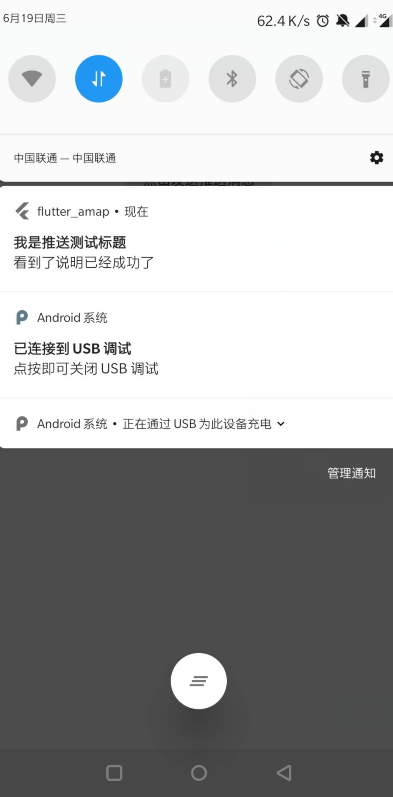
效果图:
4、扩展几个方法
收到推送提醒
监听addReceiveNotificationListener方法:
/*
* 收到推送提醒
* */
  void _ReceiveNotification() async {
    FlutterJPush.addReceiveNotificationListener(
        (JPushNotification notification) {
      setState(() {
        /// 收到推送
        print("收到推送提醒: $notification");
      });
    });
  }
打开推送提醒
监听 addReceiveNotificationListener方法:
 /*
  * 打开推送提醒
  * */
  void _OpenNotification() async {
    FlutterJPush.addReceiveOpenNotificationListener(
        (JPushNotification notification) {
      setState(() {
        print("打开了推送提醒: $notification");
      });
    });
  }
监听接收自定义消息
一般项目这个方法会用的比较多吧!!!
监听 addReceiveCustomMsgListener方法:
  /*
  * 监听接收自定义消息
  * */
  void _ReceiveCustomMsg() async {
    FlutterJPush.addReceiveCustomMsgListener((JPushMessage msg) {
      setState(() {
        print("收到推送消息提醒: $msg");
      });
    });
  }

实际案例:
import 'dart:convert';

import 'package:flutter/material.dart';

import 'dart:async';

import 'package:flutter/services.dart';

import 'package:jpush_flutter/jpush_flutter.dart';

class PushInfoWidget extends StatefulWidget {

  @override

  _PushInfoWidgetState createState() => new _PushInfoWidgetState();

}

class _PushInfoWidgetState extends State<PushInfoWidget> {

  String debugLable = 'Unknown'; /*错误信息*/

  final JPush jpush = new JPush(); /* 初始化极光插件*/

  @override

  void initState() {

    super.initState();

    jpush.setup(

        appKey: '自己的',

        channel: 'developer-default',

        production: true,

        debug: false);

    initPlatformState(); /*极光插件平台初始化*/

  }

  Future<void> initPlatformState() async {

    String platformVersion;

    try {

      /*监听响应方法的编写*/

      jpush.addEventHandler(

        onReceiveNotification: (Map<String, dynamic> message) async {

          print(">>>>>>>>>>>>>>>>>flutter 接收到推送: $message");

          setState(() {

            debugLable = "接收到推送: $message";

          });

        },

        /// 点击通知栏消息,在此时通常可以做一些页面跳转等

        onOpenNotification: (Map<String, dynamic> message) async {

          print(">>>>>>>>>>>>>>>>>点击之后拿到的消息内容");

          print(int.parse(json.decode(message['extras']['cn.jpush.android.EXTRA'])['id']));

          Navigator.pushNamed(context, '/messageDetail', arguments: {

            "id":  int.parse(json.decode(message['extras']['cn.jpush.android.EXTRA'])['id'])

          });

        },

      );

    } on PlatformException {

      platformVersion = '平台版本获取失败,请检查!';

    }

    if (!mounted) {

      return;

    }

    setState(() {

      debugLable = platformVersion;

    });

  }

  /*编写视图*/

  @override

  Widget build(BuildContext context) {

    return new MaterialApp(

      home: new Scaffold(

        appBar: new AppBar(

          title: const Text('极光推送'),

        ),

        body: new Center(

            child: new Column(children: [

          new Text('结果: $debugLable\n'),

          new RaisedButton(

              child: new Text(

                '点击发送推送消息\n',

              ),

              onPressed: () {

                /*三秒后出发本地推送*/

                var fireDate = DateTime.fromMillisecondsSinceEpoch(

                    DateTime.now().millisecondsSinceEpoch + );

                var localNotification = LocalNotification(

                  id: ,

                  title: '我是推送测试标题',

                  buildId: ,

                  content: '看到了说明已经成功了',

                  fireTime: fireDate,

                  subtitle: '一个测试',

                );

                jpush.sendLocalNotification(localNotification).then((res) {

                  setState(() {

                    debugLable = res;

                  });

                });

              }),

        ])),

      ),

    );

  }

}
Flutter中极光推送的使用----jpush_flutter的更多相关文章
- 68-Flutter中极光推送的使用
1.申请极光账号和建立应用 极光推送的官方网址为:https://www.jiguang.cn/ 注册好后,进入'服务中心',然后再进入'开发者平台',点击创建应用. 这时候会出现新页面,让你填写“应 ...
- Flutter接入极光推送
(1)搜索 https://pub.dartlang.org/packages/jpush_flutter ,安装插件,并且按照官方配置 /android/app/build.gradle andro ...
- ionic中极光推送的集成
1.到极光官网注册账号,新建应用获得appkey. 详见:https://www.jiguang.cn/app/list 2.引入jpush插件 详见:https://github.com/jpush ...
- JPush Flutter Plugin(Futter推送-极光推送)
https://pub.flutter-io.cn/packages/jpush_flutter JPush's officially supported Flutter plugin (Androi ...
- 在ionic/cordova中使用极光推送插件(jpush)
Stpe1:创建一个项目(此处使用的是tab类型的项目,创建方式可参照我前一篇如何离线创建Ionic1项目) Stpe2:修改项目信息 打开[config.xml]修改下图内容:
- Ionic项目中使用极光推送
Ionic项目中使用极光推送-android 对于Ionic项目中使用消息推送服务,Ionic官方提供了ngCordova项目,这个里面的提供了用angularjs封装好的消息推送服务(官方文档) ...
- Ionic项目中使用极光推送-android
对于Ionic项目中使用消息推送服务,Ionic官方提供了ngCordova项目,这个里面的提供了用angularjs封装好的消息推送服务(官方文档),使用的是GitHub上的 PushPlugin ...
- 添加极光推送以及在ios中的问题
项目为 ionic1 + angular1 1.添加极光推送插件 用cordova进行添加 cordova plugin add jpush-phonegap-plugin --variable AP ...
- Ionic2中使用第三方插件极光推送
不同于Ionic1中插件的调用,Ionic2提供了Ionic Native.Ionic Native封装了一些常见的插件(如:Camera.Barcode Scanner等),这些插件的使用方式在官方 ...
随机推荐
- win黑窗口命令
rd 删除 文件夹, 语法: rd [/S] [/Q] [drive:]path 参数: drive 盘符 path 文件路径 /S 递归删除文件夹( 删除前, 要确认是否进行删除) /Q 关闭 ...
- Python 并发部分的面试题
进程 进程间内存是否共享?如何实现通讯? 进程间内存不共享,可以通过 Manage模块加锁 通过队列或 通过管道加锁 socket实现通讯 请聊聊进程队列的特点和实现原理? 先进先出 Queue 后进 ...
- centos 7( linux )下搭建elasticsearch踩坑记
原文:https://blog.csdn.net/an88411980/article/details/83150380 概述 公司最近在做全文检索的项目,发现elasticsearch踩了不少 ...
- sklearn---DBSCAN
参考文献: [1]用scikit-learn学习DBSCAN聚类
- ECHO命令输出空行的11种方法和效率
标题: 批处理技术内幕:ECHO命令作者: Demon链接: http://demon.tw/reverse/cmd-internal-echo.html版权: 本博客的所有文章,都遵守“署名-非商业 ...
- Tomcat管理
Tomcat日志 /data/env/tomcat8546/logs/catalina.out echo "" > catalina.out Tomcat配置文件 /data ...
- Spring Cloud Stream 知识点
发布-订阅模式 在Spring Cloud Stream中的消息通信方式遵循了发布-订阅模式,当一条消息被投递到消息中间件之后,它会通过共享的Topic主题进行广播,消息消费者在订阅的主题中收到它并触 ...
- VoIP基本原理
VoIP基本原理 VoIP是通过Internet等互联网络传递语音信息的,主要包括终端设备.网关.网守和网络管理等部分.网关负责提供IP网络和传统的PSTN接口. VoIP的基本原理:通过语音压缩算法 ...
- SpringBoot简便地打成一个war包
正常情况下SpringBoot项目是以jar包的形式,通过命令行: java -jar demo.jar 来运行的,并且SpringBoot是内嵌Tomcat服务器,所以每次重新启动都是用的新的Tom ...
- 滚动加载|页面滑到底部加载数据|jquery.endless-scroll插件|使用demo
<html> <head> <link rel="dns-prefetch" href="http://i.tq121.com.cn&quo ...