
java poi3.10.1基本excel使用
比较好的实现方式是通过提前做好excel文件,然后使用这个做好的excel文件作为模板,使用poi读入这个文件,将需要的值填入;这样就不要编程来设置行宽的样式;
效果:
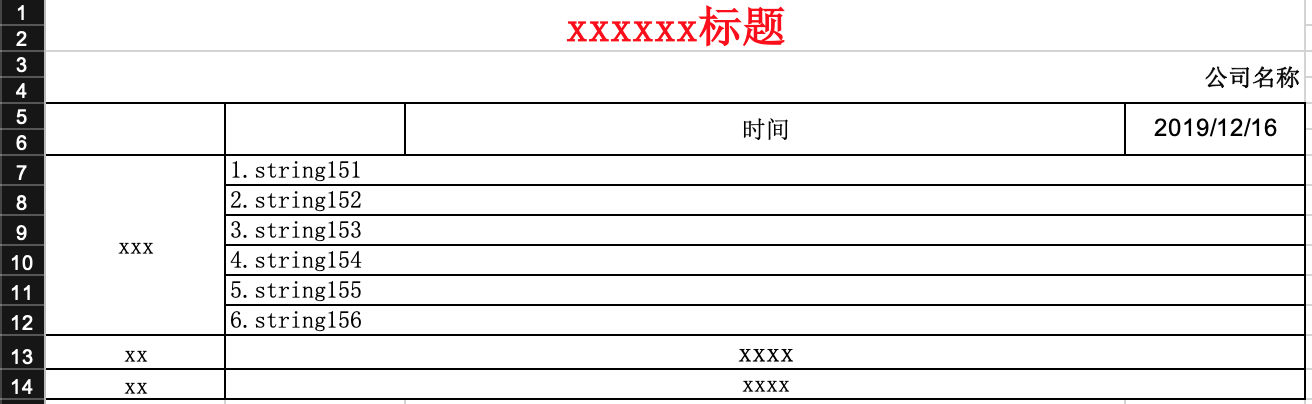
代码:
//时间

		String checkTime = "yyyy/MM/dd";

		//人员查询

		Set preParticipantNames = new HashSet();

		HSSFWorkbook wb = new HSSFWorkbook();

		// 生成一个样式

		HSSFCellStyle style = wb.createCellStyle();

		this.setHSSFCellBorder(style);

		style.setAlignment(HSSFCellStyle.ALIGN_CENTER);// 设置单元格为水平对齐的类型

		style.setVerticalAlignment(HSSFCellStyle.VERTICAL_CENTER);

		HSSFFont songFont = createSongFont(wb);

		style.setFont(songFont);

		HSSFCellStyle songPoint14FontStyle = wb.createCellStyle();

		this.setHSSFCellBorder(songPoint14FontStyle);

		songPoint14FontStyle.setVerticalAlignment(HSSFCellStyle.VERTICAL_CENTER);

		songPoint14FontStyle.setAlignment(HSSFCellStyle.ALIGN_CENTER);// 设置单元格为水平对齐的类型

		HSSFFont songPoint14Font = createSongFont(wb);

		songPoint14Font.setFontHeightInPoints((short) 14); //设置字号

		songPoint14FontStyle.setFont(songPoint14Font);

		HSSFCellStyle arialFontStyle = wb.createCellStyle();

		this.setHSSFCellBorder(arialFontStyle);

		arialFontStyle.setVerticalAlignment(HSSFCellStyle.VERTICAL_CENTER);

		arialFontStyle.setAlignment(HSSFCellStyle.ALIGN_CENTER);// 设置单元格为水平对齐的类型

		HSSFFont arialFont = createSongFont(wb);

		arialFont.setFontName("Arial");

		arialFontStyle.setFont(arialFont);

		HSSFCellStyle rightBoldStyle = wb.createCellStyle();

		rightBoldStyle.setVerticalAlignment(HSSFCellStyle.VERTICAL_CENTER);

		rightBoldStyle.setAlignment(HSSFCellStyle.ALIGN_RIGHT);// 设置单元格为水平对齐的类型

		HSSFFont boldSongFont = createSongFont(wb);

		boldSongFont.setBoldweight(HSSFFont.BOLDWEIGHT_BOLD);//粗体显示

		rightBoldStyle.setFont(boldSongFont);

		HSSFCellStyle songPoint22RedFontStyle = wb.createCellStyle();

		songPoint22RedFontStyle.setVerticalAlignment(HSSFCellStyle.VERTICAL_CENTER);

		songPoint22RedFontStyle.setAlignment(HSSFCellStyle.ALIGN_CENTER);// 设置单元格为水平对齐的类型

		HSSFFont songPoint22RedFont = createSongFont(wb);

		songPoint22RedFont.setFontHeightInPoints((short) 22); //设置字号

		songPoint22RedFont.setBoldweight(HSSFFont.BOLDWEIGHT_BOLD);//粗体显示

		songPoint22RedFont.setColor(HSSFColor.RED.index);

		songPoint22RedFontStyle.setFont(songPoint22RedFont);

		HSSFCellStyle contentDefaultStyle = wb.createCellStyle();

		this.setHSSFCellBorder(contentDefaultStyle);

		contentDefaultStyle.setVerticalAlignment(HSSFCellStyle.VERTICAL_CENTER);

		contentDefaultStyle.setFont(songFont);

		HSSFCellStyle verticalStyle = wb.createCellStyle();

		this.setHSSFCellBorder(verticalStyle);

		verticalStyle.setAlignment(HSSFCellStyle.ALIGN_CENTER);// 设置单元格为水平对齐的类型

		verticalStyle.setVerticalAlignment(HSSFCellStyle.VERTICAL_CENTER);

		verticalStyle.setFont(songFont);

		// 建立新的sheet对象(excel的表单)

		HSSFSheet sheet = wb.createSheet(excelFileName);

		sheet.setColumnWidth(0,15* 256);

		sheet.setColumnWidth(1,15* 256);

		sheet.setColumnWidth(2,60* 256);

		sheet.setColumnWidth(3,15* 256);

		sheet.addMergedRegion(new CellRangeAddress(0,1,0,3));

		sheet.addMergedRegion(new CellRangeAddress(2,3,0,3));

		sheet.addMergedRegion(new CellRangeAddress(4,5,0,0));

		sheet.addMergedRegion(new CellRangeAddress(4,5,1,1));

		sheet.addMergedRegion(new CellRangeAddress(4,5,2,2));

		sheet.addMergedRegion(new CellRangeAddress(4,5,3,3));

		int beginRowIndex = 6;

		int endRowIndex = 6;

		//要获总记录,下一步来确定合并的单元格的数量

		List<TbCheckSamplEventReportVo> detailList = this.checkCountDao.getCheckResultDaily(checkEventCountDto);

		if (detailList != null && detailList.size() > 0) {

			endRowIndex += detailList.size() -1;

			log.info("detailList.size() " + detailList.size());

		}

		sheet.addMergedRegion(new CellRangeAddress(beginRowIndex,endRowIndex,0,0));

		int sumScore = 0;

		for (int i = beginRowIndex; i <= endRowIndex; i++) {

			int j = i - beginRowIndex;

			sheet.addMergedRegion(new CellRangeAddress(i,i,1,3));

			HSSFRow row = sheet.createRow(i);

			if (i == beginRowIndex) {

				HSSFCell problemTextCell = row.createCell(0);

				problemTextCell.setCellValue("问题");

				problemTextCell.setCellStyle(verticalStyle);

			}

			StringBuilder contentDetail = new StringBuilder();

			if (detailList != null && detailList.size() > 0) {

				BigDecimal checkScore = detailList.get(j).getCheckScore() == null ? null : detailList.get(j).getCheckScore();

				if (checkScore != null) {

					sumScore += checkScore.intValue();

				}

				if (detailList.get(j).getPreParticipantName() != null) {

					preParticipantNames.add(detailList.get(j).getPreParticipantName());

				}

				contentDetail.append(j+1).append(".").append(detailList.get(j).getDesc()).append(" ").append("xxx").append(checkScore == null ? "" : checkScore.intValue())

						.append("xxx(").append(detailList.get(j).getCheckTypeName()).append(")");

			}

			HSSFCell cell = row.createCell(1);

			cell.setCellValue(contentDetail.toString());

			cell.setCellStyle(contentDefaultStyle);

			HSSFCell cell2 = row.createCell(2);

			cell2.setCellStyle(contentDefaultStyle);

			HSSFCell cell3 = row.createCell(3);

			cell3.setCellStyle(contentDefaultStyle);

		}

		//合计

		sheet.addMergedRegion(new CellRangeAddress(endRowIndex+1,endRowIndex+1,1,3));

		//人员

		sheet.addMergedRegion(new CellRangeAddress(endRowIndex+2,endRowIndex+2,1,3));

		HSSFRow row0 = sheet.createRow(0);

		HSSFCell row0Cell0 = row0.createCell(0);

		row0Cell0.setCellValue("xxxxxx");

		row0Cell0.setCellStyle(songPoint22RedFontStyle);

		HSSFRow row1 = sheet.createRow(2);

		HSSFCell row1Cell0 = row1.createCell(0);

		row1Cell0.setCellValue(checkEventCountDto.getCompanyName());

		row1Cell0.setCellStyle(rightBoldStyle);

		//5行

		HSSFRow row2 = sheet.createRow(4);

		HSSFCell row2Cell0 = row2.createCell(0);

		row2Cell0.setCellStyle(style);

		HSSFCell row2Cell1 = row2.createCell(1);

		row2Cell1.setCellStyle(style);

		HSSFCell row2Cell2 = row2.createCell(2);

		row2Cell2.setCellStyle(style);

		row2Cell2.setCellValue("时间");

		HSSFCell row2Cell3 = row2.createCell(3);

		row2Cell3.setCellValue(checkTime);

		row2Cell3.setCellStyle(arialFontStyle);

		//6行

		HSSFRow row3 = sheet.createRow(5);

		HSSFCell row3Cell0 = row3.createCell(0);

		row3Cell0.setCellStyle(style);

		HSSFCell row3Cell1 = row3.createCell(1);

		row3Cell1.setCellStyle(style);

		HSSFCell row3Cell2 = row3.createCell(2);

		row3Cell2.setCellStyle(style);

		HSSFCell row3Cell3 = row3.createCell(3);

		row3Cell3.setCellStyle(style);

		//xxxxx

		HSSFRow row5 = sheet.createRow(endRowIndex+1);

		HSSFCell row5Cell0 = row5.createCell(0);

		row5Cell0.setCellValue("合计");

		row5Cell0.setCellStyle(style);

		HSSFCell row5Cell1 = row5.createCell(1);

		row5Cell1.setCellValue(new StringBuilder("xx").append(sumScore).append("xxx").toString());

		row5Cell1.setCellStyle(songPoint14FontStyle);

		HSSFCell row5Cell2 = row5.createCell(2);

		row5Cell2.setCellStyle(songPoint14FontStyle);

		HSSFCell row5Cell3 = row5.createCell(3);

		row5Cell3.setCellStyle(songPoint14FontStyle);

		//人员

		HSSFRow row6 = sheet.createRow(endRowIndex+2);

		HSSFCell row6Cell0 = row6.createCell(0);

		row6Cell0.setCellValue("人员");

		row6Cell0.setCellStyle(style);

		StringBuilder tmpNames = new StringBuilder();

		if (preParticipantNames.size() > 0){

			preParticipantNames.forEach(item -> tmpNames.append(item).append(","));

		}

		HSSFCell row6Cell1 = row6.createCell(1);

		row6Cell1.setCellValue(tmpNames.toString().length() > 0 ? (tmpNames.toString().substring(0,tmpNames.toString().length() -1)) : "");

		row6Cell1.setCellStyle(style);

		HSSFCell row6Cell2 = row6.createCell(2);

		row6Cell2.setCellStyle(style);

		HSSFCell row6Cell3 = row6.createCell(3);

		row6Cell3.setCellStyle(style);

		return wb;
代码里面的问题:
1、关于cell的style可以使用for循环来做,代码更加简洁;
2、每列的宽度没有做子适应展开,现在四列是用了固定值来设置列宽的。
3、...
java poi3.10.1基本excel使用的更多相关文章
- (6) 如何用Apache POI操作Excel文件-----POI-3.10的一个和注解(comment)相关的另外一个bug
如果POI-3.10往一个工作表(sheet)里面插入数据的话,需要注意了,其有一个不太被容易发现的bug. 被插入的工作表(sheet)里面的单元格没有包含任何的注解(comment)的时候,插入一 ...
- [转]Java中导入、导出Excel
原文地址:http://blog.csdn.net/jerehedu/article/details/45195359 一.介绍 当前B/S模式已成为应用开发的主流,而在企业办公系统中,常常有客户这样 ...
- Java中导入、导出Excel
原文:Java中导入.导出Excel 一.介绍 当前B/S模式已成为应用开发的主流,而在企业办公系统中,常常有客户这样子要求:你要把我们的报表直接用Excel打开(电信系统.银行系统).或者是:我们已 ...
- 我是陌生人 Java中导入、导出Excel
我是陌生人 Java中导入.导出Excel 一.介绍 当前B/S模式已成为应用开发的主流,而在企业办公系统中,常常有客户这样子要求:你要把我们的报表直接用Excel打开(电信系统.银行系统).或者是: ...
- java的poi技术读取Excel数据到MySQL
这篇blog是介绍java中的poi技术读取Excel数据,然后保存到MySQL数据中. 你也可以在 : java的poi技术读取和导入Excel了解到写入Excel的方法信息 使用JXL技术可以在 ...
- Java利用POI导入导出Excel中的数据
首先谈一下今天发生的一件开心的事,本着一颗android的心我被分配到了PB组,身在曹营心在汉啊!好吧,今天要记录和分享的是Java利用POI导入导出Excel中的数据.下面POI包的下载地 ...
- java的poi技术读取Excel数据
这篇blog主要是讲述java中poi读取excel,而excel的版本包括:2003-2007和2010两个版本, 即excel的后缀名为:xls和xlsx. 读取excel和MySQL相关: ja ...
- java的poi技术写Excel的Sheet
在这之前写过关于java读,写Excel的blog如下: Excel转Html java的poi技术读,写Excel[2003-2007,2010] java的poi技术读取Excel[2003-20 ...
- java的poi技术读取Excel[2003-2007,2010]
这篇blog主要是讲述java中poi读取excel,而excel的版本包括:2003-2007和2010两个版本, 即excel的后缀名为:xls和xlsx. 读取excel和MySQL相关: ja ...
随机推荐
- c++ ros 计算两点距离
#include <iostream> /* puts, printf */ #include <time.h> /* time_t, struct tm, time, loc ...
- TripleDES加解密Java、C#、php
TripleDES说明: TripleDES(3Des)和Des都是对称加密算法,TripleDes是Des加密算法的增强版本,这里主要说的是TripleDes加密算法的应用. 工作中 ...
- 20165223《网络对抗技术》Exp7 网络欺诈防范
目录 -- 网络欺诈防范 实践说明 实践目标 基础知识问答 实验工具学习 实践内容 简单应用SET工具建立冒名网站 ettercap DNS spoof 结合应用两种技术,用DNS spoof引导特定 ...
- C++利用openssl进行公钥解密
私钥加密的部分内容,需要用公钥解密下面的实例代码,由于私钥加密后的字符串有不可打印字符,所以程序里面进行了base64,要用的时候先解dec base64 再传递给函数 进行解密 #include & ...
- maven报错解决
maven-resources-plugin prior to 2.4 is not supported by m2e. Use maven- resources-plugin versio < ...
- SQL-W3School-函数:SQL AVG() 函数
ylbtech-SQL-W3School-函数:SQL AVG() 函数 1.返回顶部 1. 定义和用法 AVG 函数返回数值列的平均值.NULL 值不包括在计算中. SQL AVG() 语法 SEL ...
- nginx+lua 设置跨域
nginx 配置: header_filter_by_lua_file cros.lua; access_by_lua ' if ngx.var.request_method == "OPT ...
- java判断字符串是否中文、日文
直接上代码: import java.io.UnsupportedEncodingException; public class StringUtil { /** * 去掉字符串中的标点符号.空格和数 ...
- 关于Selenium remote模式分布式执行UI自动化测试必定面临的性能问题
1.大部分自动化测试人员都是在本地执行UI自动化测试,也就是代码和浏览器必须在同一台机器上,这样的的缺陷很多,无法多任务并发执行UI自动化测试用例,效率极低 2.正是如此,Selenium 的remo ...
- Day6作业:计算器
嗯,稀里糊涂就居然写完了...... readme: 程序说明: 此计算器比较简单,只支持普通的加减乘除和小括号,不支持[],{},求幂之类的均不支持! 测试过的字符串: -1/2*((60-30+( ...