
C++混合编程之idlcpp教程Lua篇(8)
上一篇在这 C++混合编程之idlcpp教程Lua篇(7)
第一篇在这 C++混合编程之idlcpp教程(一)
与前面的工程相似,工程LuaTutorial6中,同样加入了四个文件:LuaTutorial6.cpp, Tutorial6.cpp, Tutorial6.i, tutorial6.lua。其中LuaTutorial6.cpp的内容基本和LuaTutorial5.cpp雷同,不再赘述。
首先看一下Tutorial6.i的内容:
#import "../../paf/src/pafcore/typedef.i"

namespace tutorial

{
   template<N>

    struct Vector3

    {

        Vector3();

        Vector3(const Vector3& v);

        Vector3(N a, N b, N c);

        Vector3(const N* p);

        N getLength();

        N length get;

        N lengthSquare get;

        static Vector3<N> s_zero;

        nocode N x;

        nocode N y;

        nocode N z;

        nocode N v[#];

        #{

        union

        {

            struct

            {

                N x,y,z;

            };

            N v[];

        };

        #}

    };

    export Vector3<float>;

    export Vector3<double>;

    typedef Vector3<float> Vector3f;

    typedef Vector3<double> Vector3d;

    #{

    template<typename N>

    Vector3<N> Vector3<N>::s_zero(, , );

    template<typename N>

    inline Vector3<N>::Vector3()

    {

    }

    template<typename N>

    inline Vector3<N>::Vector3(const Vector3<N>& v) : x(v.x), y(v.y), z(v.z)

    {}

    template<typename N>

    inline Vector3<N>::Vector3(N a, N b, N c) : x(a), y(b), z(c)

    {}

    template<typename N>

    inline Vector3<N>::Vector3(const N* p) : x(p[]), y(p[]), z(p[])

    {}

    template<typename N>

    inline N Vector3<N>::getLength()

    {

        return N(sqrt(x * x + y * y + z * z));

    }

    template<typename N>

    inline N Vector3<N>::get_length()

    {

        return N(sqrt(x * x + y * y + z * z));

    }

    template<typename N>

    inline N Vector3<N>::get_lengthSquare()

    {

        return (x * x + y * y + z * z);

    }

    #}

}
template<N>
struct Vector3
这是一个模板类,C++的模板功能复杂强大,编译器实在难写。所以大多数C++模板的高级特性在idlcpp中都没有做支持,毕竟idlcpp只负责对脚本语言提供接口,有一些简单的模板功能就够用了。另外由于不准备支持数值做为模板参数,只支持类型做为模板参数。
static Vector3 s_zero;
这一行声明了一个静态成员变量。idlcpp支持静态成员变量,静态成员函数,静态属性(实际上也是静态成员函数)。
nocode N x;
nocode N y;
nocode N z;
nocode N v[#3];
#{
union
{
struct
{
N x,y,z;
};
N v[3];
};
#}
idlcpp 没有提供 union。好在可以通过nocode 和 #{#} 分别在生成的元数据描述代码和C++头文件提供各自的内容。
下面两行代码
export Vector3<float>;
export Vector3<double>;
用于生成元数据代码。idlcpp中通过这样的声明语句才会生成相应类型的元数据信息。
再下面两行代码
typedef Vector3<float> Vector3f;
typedef Vector3<double> Vector3d;
为模板类实例类型声明了类型别名。因为这两个类型名分别是::tutorial::Vector3<float> 和 ::tutorial::Vector3<double>,在脚本中使用不方便,有了类型别名之后就可以通过::tutorial::Vector3f和::tutorial::Vector3d来使用。
后面就是成员函数的实现代码,不在赘述。
编译后生成的Tutorial6.h的内容如下:
//DO NOT EDIT THIS FILE, it is generated by idlcpp

//http://www.idlcpp.org

#pragma once

namespace tutorial

{

    template<typename N>

    struct Vector3

    {

    public:

        Vector3();

        Vector3(const Vector3& v);

        Vector3(N a,N b,N c);

        Vector3(const N* p);

        N getLength();

        N get_length();

        N get_lengthSquare();

        static Vector3<N> s_zero;

        union

        {

            struct

            {

                N x,y,z;

            };

            N v[];

        };

    };

    typedef Vector3<float> Vector3f;

    typedef Vector3<double> Vector3d;

    template<typename N>

    Vector3<N> Vector3<N>::s_zero(, , );

    template<typename N>

    inline Vector3<N>::Vector3()

    {

    }

    template<typename N>

    inline Vector3<N>::Vector3(const Vector3<N>& v) : x(v.x), y(v.y), z(v.z)

    {}

    template<typename N>

    inline Vector3<N>::Vector3(N a, N b, N c) : x(a), y(b), z(c)

    {}

    template<typename N>

    inline Vector3<N>::Vector3(const N* p) : x(p[]), y(p[]), z(p[])

    {}

    template<typename N>

    inline N Vector3<N>::getLength()

    {

        return N(sqrt(x * x + y * y + z * z));

    }

    template<typename N>

    inline N Vector3<N>::get_length()

    {

        return N(sqrt(x * x + y * y + z * z));

    }

    template<typename N>

    inline N Vector3<N>::get_lengthSquare()

    {

        return (x * x + y * y + z * z);

    }

}
idlcpp会为只读属性length和lengthSquare 生成对应的函数声明get_length和get_lengthSquare。
其他的内容,C++和idl基本上都是一样的。
然后是Tutorial6.cpp
#include "Tutorial6.h"

#include "Tutorial6.mh"

#include "Tutorial6.ic"

#include "Tutorial6.mc"
因为模板类的代码都写在头文件中了,所以Tutorial6.cpp只需要包含对应的四个文件即可。
最后看一下Tutorial6.lua的内容
v1 = paf.tutorial.Vector3f(,,);

v1.z = ;

print(v1.length._);

v2 = paf.tutorial.Vector3d(,,);

v2.v[] = ;

print(v2:getLength()._);
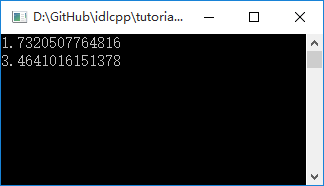
编译执行,结果如下图:
C++混合编程之idlcpp教程Lua篇(8)的更多相关文章
- C++混合编程之idlcpp教程Lua篇(9)
上一篇在这 C++混合编程之idlcpp教程Lua篇(8) 第一篇在这 C++混合编程之idlcpp教程(一) 与前面的工程相比,工程LuaTutorial7中除了四个文件LuaTutorial7.c ...
- C++混合编程之idlcpp教程Lua篇(7)
上一篇在这 C++混合编程之idlcpp教程Lua篇(6) 第一篇在这 C++混合编程之idlcpp教程(一) 与LuaTutorial4工程相似,工程LuaTutorial5中,同样加入了四个文件: ...
- C++混合编程之idlcpp教程Lua篇(6)
上一篇在这 C++混合编程之idlcpp教程Lua篇(5) 第一篇在这 C++混合编程之idlcpp教程(一) 工程LuaTutorial4中加入了四个文件:LuaTutorial4.cpp, Tut ...
- C++混合编程之idlcpp教程Lua篇(5)
上一篇在这 C++混合编程之idlcpp教程Lua篇(4) 第一篇在这 C++混合编程之idlcpp教程(一) 与前面的工程相似,工程LuaTutorial3中,同样加入了三个文件:LuaTutori ...
- C++混合编程之idlcpp教程Lua篇(4)
上一篇在这 C++混合编程之idlcpp教程Lua篇(3) 与前面的工程相似,工程LuaTutorial2中,同样加入了三个文件 LuaTutorial2.cpp, Tutorial2.i, tut ...
- C++混合编程之idlcpp教程Lua篇(3)
上一篇 C++混合编程之idlcpp教程Lua篇(2) 是一个 hello world 的例子,仅仅涉及了静态函数的调用.这一篇会有新的内容. 与LuaTutorial0相似,工程LuaTutoria ...
- C++混合编程之idlcpp教程Lua篇(2)
在上一篇 C++混合编程之idlcpp教程(一) 中介绍了 idlcpp 工具的使用.现在对 idlcpp 所带的示例教程进行讲解,这里针对的 Lua 语言的例子.首先看第一个示例程序 LuaTuto ...
- C++混合编程之idlcpp教程Python篇(7)
上一篇在这 C++混合编程之idlcpp教程Python篇(6) 第一篇在这 C++混合编程之idlcpp教程(一) 与PythonTutorial4工程相似,工程PythonTutorial5中,同 ...
- C++混合编程之idlcpp教程Python篇(6)
上一篇在这 C++混合编程之idlcpp教程Python篇(5) 第一篇在这 C++混合编程之idlcpp教程(一) 工程PythonTutorial4中加入了四个文件:PythonTutorial4 ...
随机推荐
- spring-data-redis注册fastjson序列化工具
使用spring-data-redis的时候,其序列化工具自带:
- 模糊测试(Fuzz testing)
模糊测试(fuzz testing)是一种安全测试方法,他介于完全的手工测试和完全的自动化测试之间.为什么是介于那两者之间?首先完全的手工测试即是渗透测试,测试人员可以模拟黑客恶意进入系统.查找漏洞, ...
- iava多线程详解(2)-成员变量与局部变量访问
有两段代码 1.线程访问成员变量 public class FirstThreadTest { public static void main(String[] args) { FirstThread ...
- 文件上传——servlet实现
自己对照别的博主的博客实现的,记录用. 整个上传的结构如下: 上传的页面:unload.jsp <%@ page language="java" import="j ...
- github中cesium-terrain-builder和cesium-terrain-server使用
cesium-terrain-builder的使用: 这个是用来把含有高程数据的tif图片切片成.terrain的小文件,是给cesium-terrain-server提供服务的. cesium-te ...
- Windows安装mxnet
code { white-space: pre } div.sourceCode { } table.sourceCode,tr.sourceCode,td.lineNumbers,td.source ...
- 搭建高可用mongodb集群(四)—— 分片
按照上一节中<搭建高可用mongodb集群(三)—— 深入副本集>搭建后还有两个问题没有解决: 从节点每个上面的数据都是对数据库全量拷贝,从节点压力会不会过大? 数据压力大到机器支撑不了的 ...
- PoEdu - C++阶段班【Po学校】- 第3天
引用 C中指针的功能强大,使用起来繁杂,因为指针要控制的东西太多:有指针的类型,指针的解引用,指针空间内的值,它本身是有空间的,有自己的地址等.指针也是强大的,比如:我们要在函数之内,修改方法之外的值 ...
- c++ chap1 to chap 3
#ifndef MAIN_H_INCLUDED#define MAIN_H_INCLUDED struct Course{ int id; std::string name;}; const int ...
- Qt ffmpeg环境搭建
ffmpeg下载地址:https://ffmpeg.zeranoe.com/builds/ 版本选择第一个,然后多少位看自己的pc(我的是64),右边对应三个都要下载,Static,Shared,De ...