
【转】Setting up SDL 2 on Code::Blocks 12.11
FROM: http://lazyfoo.net/tutorials/SDL/01_hello_SDL/windows/codeblocks/index.php
Setting up SDL 2 on Code::Blocks 12.11
Last Updated 9/17/13
1)First thing you need to do is download SDL headers, libary and binaries. You will find them on the SDL website, specifically on this page.
Since Code::Blocks comes with the MinGW compiler by default, odds are you'll want to download the MinGW development libraries.
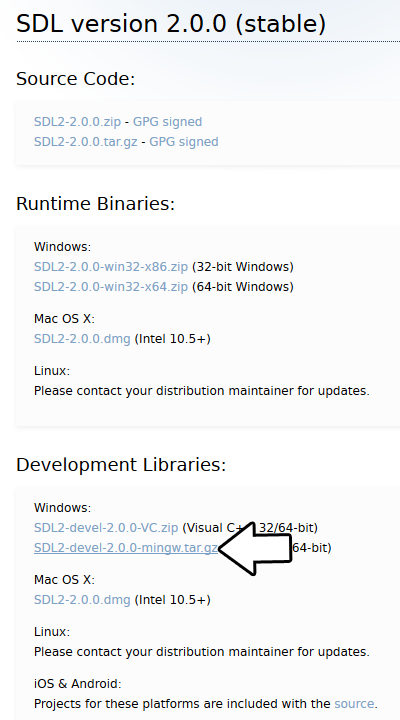
Open the gzip archive and there should be a tar archive. Open up the tar archive and the should be a folder called SDL2-2.something.something. In side of that folder there should be a bunch of folders and files, most importantly i686-w64-mingw32 which contains the 32bit library and x86_64-w64-mingw32 which contains the 64bit library.
This is important: most compilers still compile 32bit binaries by default to maximize compatibility. We will be using the 32bit binaries for this tutorial set. It doesn't matter if you have a 64bit operating system, since we are compiling 32bit binaries we will be using the 32bit library.
Inside of i686-w64-mingw32 are the include, lib, and bin folders which contain everything we need compile and run SDL applications. Copy the contents of i686-w64-mingw32 to any directory you want. I recommend putting it in a folder that you dedicate to holding all your development libraries for MinGW. For these tutorials I'm putting it in a directory I created C:\mingw_dev_lib
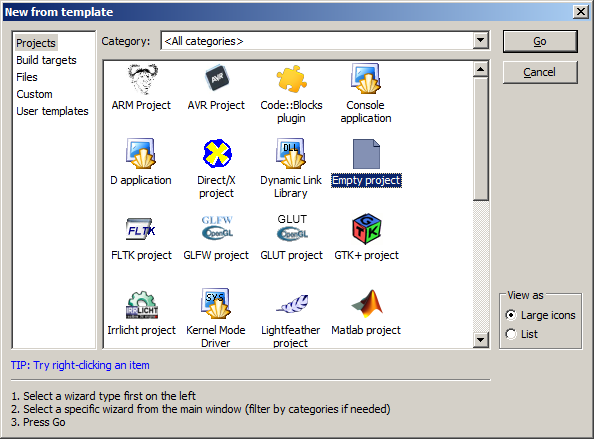
2)Start up Code::Blocks and create a new empty project.
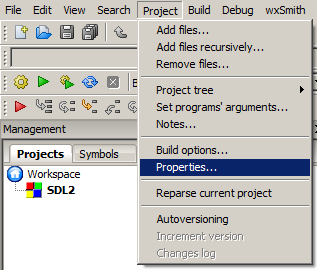
3)Go to project properties.
4)Now we have to tell Code::Blocks to search for header files in the library folder we just extracted. Go to build options.
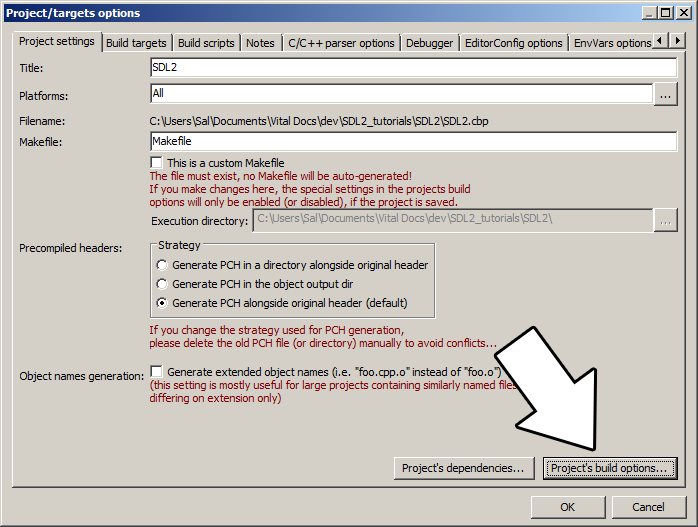
In the Search Directories, we need to add a new compiler directory. Click add, Select the SDL2 folder inside of the include directory from the folder we extracted. Say no when it asks you whether you want it to be a relative path. Now Code::Blocks knows where to find the SDL 2 header files.

If you get an error where the compiler says it can't find SDL.h, it means you messed up this step.
5)Next we are going to tell Code::Blocks to search for library files in the SDL folder we just extracted. All you have to is go to the linker tab and add the lib directory from the folder we extacted to the linker search directories.
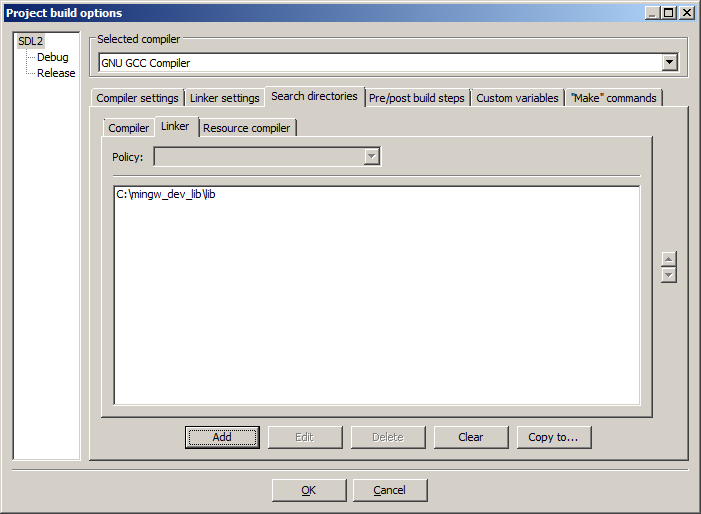
If you get an error where the linker complains it can't find -lSDL2 or -lSDL2main, it means you messed up this step.
6)In order to compile SDL 2 code, we have to tell the compiler to link against the libraries. Go under Linker Settings and paste
-lmingw32 -lSDL2main -lSDL2
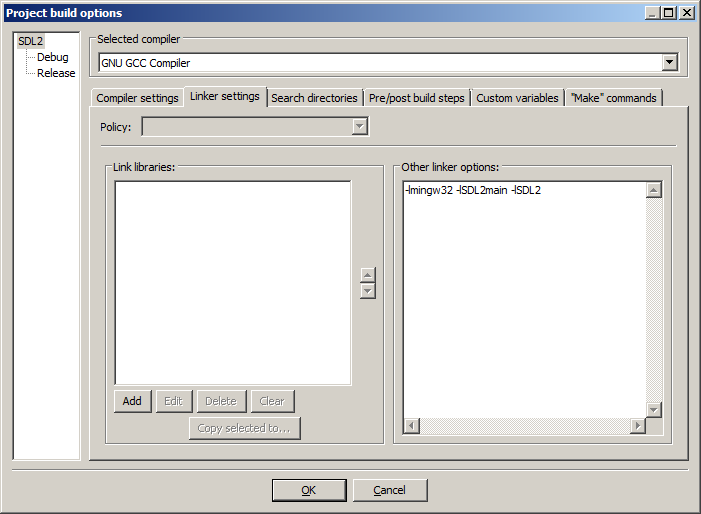
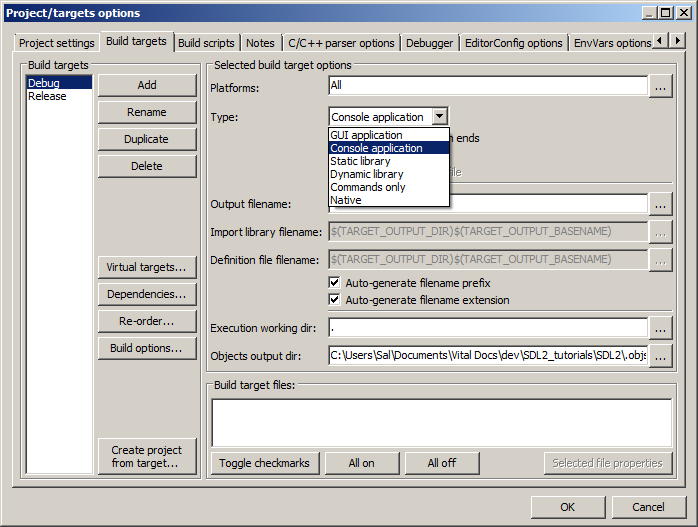
7)Go back to the project properites and under Build Targets select the build type.
8)When our SDL 2 application runs, the operating system needs to be able to find the dll file.
Go find the SDL 2 folder you extracted and from the bin folder inside copy SDL2.dll and put it either where your executable will run, or inside of the system directory. C:\WINDOWS\SYSTEM32 is the 32bit windows system directory and C:\Windows\SysWOW64 is the 64bit system directory of 32bit applications. For these tutorials, I'm assuming we're making 32bit applications. If you get an error when you run the program where it complains that it can't find SDL2.dll, it means you messed up this step.
9)Now go download the source for lesson 01. Add the source files inside to your project.
Now build. If there are any errors, make sure you didn't skip a step.
Now that you have SDL 2 compiling, it time to go onto part 2 of the tutorial.
【转】Setting up SDL 2 on Code::Blocks 12.11的更多相关文章
- 【转】Setting up SDL Extension Libraries on Code::Blocks 12.11
FROM: http://lazyfoo.net/tutorials/SDL/06_extension_libraries_and_loading_other_image_formats/window ...
- Code::Blocks
Code::Blocks 是一个开放源码的全功能的跨平台C/C++集成开发环境. Code::Blocks是开放源码软件.Code::Blocks由纯粹的C++语言开发完成,它使用了著名的图形界面库w ...
- 【转】Setting up SDL Extension Libraries on Windows
FROM: http://lazyfoo.net/tutorials/SDL/06_extension_libraries_and_loading_other_image_formats/window ...
- 【转】Setting up SDL on Windows
FROM: http://lazyfoo.net/tutorials/SDL/01_hello_SDL/windows/index.php Setting up SDL on Windows Last ...
- 【转】Setting up SDL 2 on MinGW
FROM: http://lazyfoo.net/tutorials/SDL/01_hello_SDL/windows/mingw/index.php Setting up SDL 2 on MinG ...
- Code::Blocks配置GTK+2和GTK+3
Code::Blocks配置GTK+2和GTK+3 作者 He YiJun – storysnail<at>gmail.com 团队 ls 版权 转载请保留本声明! 本文档包含的原创代码根 ...
- 【转】Setting up SDL 2 on Visual Studio 2010 Ultimate
from: Lazy Foo'Productions - Setting up SDL 2 on Visual Studio 2010 Ultimate 1)First thing you need ...
- code::Blocks生成的dll 在 java jni 调用遇到的问题
Test.java__________________________________ public class Test{ public static native void p(); pub ...
- 编译Code::Blocks源码 with MinGW on Win
Build Code::Blocks源码 ---By 狂徒归来 CodeBlocks是一款非常优秀的IDE !可惜的是没有64位的版本,而且本来是轻量级别的IDE就应该够轻,能够像记事本工具一样,迅速 ...
随机推荐
- 使用eclipse启动tomcat,正常模式下可以启动tomcat,却在debug模式下无法启动tomcat 问题解决
这个问题可能是由于eclipse和tomcat的交互而产生的,在以debug模式启动tomcat时,发生了读取文件错误,eclipse自动设置了断点,导致tomcat不能正常启动. 解决方法把brea ...
- JUC 常用4大并发工具类
什么是JUC? JUC就是java.util.concurrent包,这个包俗称JUC,里面都是解决并发问题的一些东西 该包的位置位于java下面的rt.jar包下面 4大常用并发工具类: Count ...
- 使用VS2015从TFS获取项目后编译报错
把VS2015关闭后,打开C:\Windows\Temp,把里面的文件清空后,重新打开VS即可.
- 基于gis的系统开发,程序运行出现问题 ArcGIS product not specified.You must first bind to an ArcGIS version prior to using any ArcGIS components.
在之前初始化的时候添加下面的一行代码:ESRI.ArcGIS.RuntimeManager.Bind(ESRI.ArcGIS.ProductCode.EngineOrDesktop);还需要添加一个引 ...
- 00 在Windows环境中开发Cordova项目的准备工作
1.开发环境准备: 安装nodejs 安装Cordova 安装Visual Studio Code 安装nodejs步骤: 通过nodejs官网(https:/ ...
- TP5发送邮件
1,前提去qq邮箱开启smtp 2,生成授权码 2,发送短信给 3,附上代码 贴上代码如下 <?phpnamespace app\mails\controller;use \think\Cont ...
- DX12龙书 02 - DirectXMath 库中与向量有关的类和函数
0x00 需要用到的头文件 #include <DirectXMath> #include <DirectXPackedVector.h> using namespace Di ...
- thinkphp6.0.x 反序列化详记(二)
前言 接上文找第二条POP链. 环境配置 同上文 POP链构造 寻找__destruct方法 仍然是寻找__destruct,这次关注AbstractCache.php(/vendor/league/ ...
- Hudi on Flink在顺丰的实践应用
获取PDF版本 请关注"实时流式计算" 后台回复 "flink1015"
- SpringBoot常见注解
0.前言 这篇文章介绍的 Spring/SpringBoot 常用注解基本已经涵盖你工作中遇到的大部分常用的场景.对于每一个注解我都说了具体用法,掌握搞懂,使用 SpringBoot 来开发项目基本没 ...