
【转】Setting up SDL Extension Libraries on Code::Blocks 12.11
Setting up SDL Extension Libraries on Code::Blocks 12.11
Last Updated 11/18/13
1)First thing you need to do is download SDL_image headers and binaries. You will find them on the SDL_image website, specifically on this page.
Since Code::Blocks comes with the MinGW compiler by default, odds are you'll want to download the MinGW development libraries.

Open the gzip archive and there should be a tar archive. Open up the tar archive and the should be a folder called SDL2_image-2.something.something. In side of that folder there should be a bunch of folders and files, most importantly i686-w64-mingw32 which contains the 32bit library and x86_64-w64-mingw32 which contains the 64bit library.
2)This is important: most compilers still compile 32bit binaries by default to maximize compatibility. We will be using the 32bit binaries for this tutorial set. It doesn't matter if you have a 64bit operating system, since we are compiling 32bit binaries we will be using the 32bit library.
Inside of i686-w64-mingw32 are the include, lib, and bin folders which contain everything we need compile and run SDL applications. Copy the contents of i686-w64-mingw32 to any directory you want. I recommend putting it in a folder that you dedicate to holding all your development libraries for MinGW. For these tutorials I'm putting it in a directory I created C:\mingw_dev_lib
3)Open up your SDL 2 project and go to project properties.
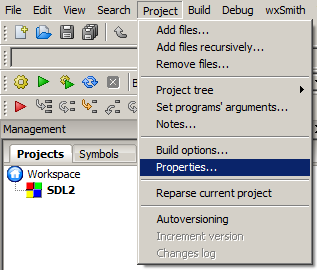
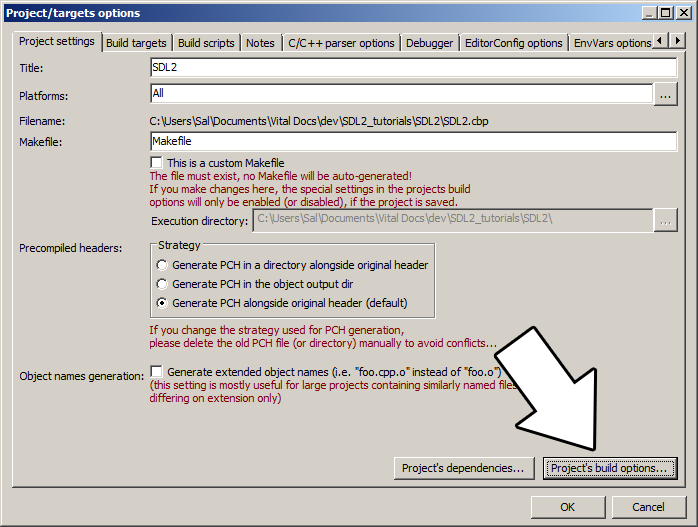
4)Now we have to tell Code::Blocks to search for header files in the library folder we just extracted. Go to build options.
In the Search Directories, we need to add a new compiler directory. Click add, Select the SDL_image folder inside of the include directory from the folder we extracted. Say no when it asks you whether you want it to be a relative path. Now Code::Blocks knows where to find the SDL_image header files.
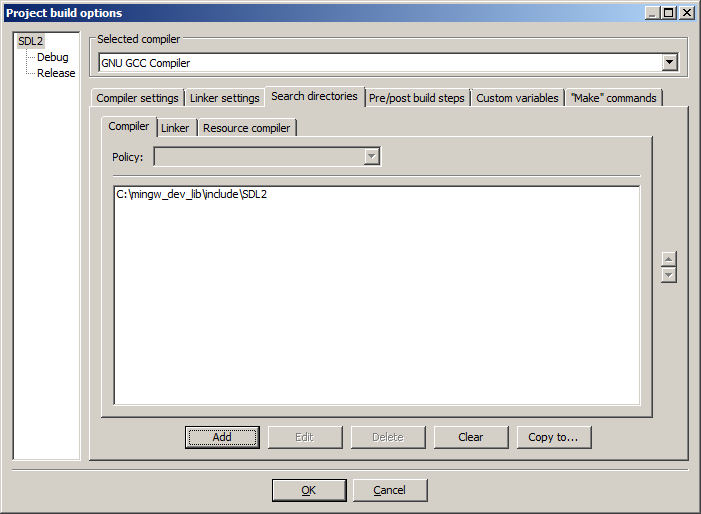
If you get an error where the compiler says it can't find SDL.h, it means you messed up this step.
You may have noticed that the folder added here is the same as the one for the SDL 2 main set up. Personally, I like keeping the SDL_image, SDL_ttf, and SDL_mixer headers and libraries in the same directories. Other people like to keep them separate. If you put the extension libary headers in the same directories as SDL 2, you can skip this step since you already told the compiler to look in that directory. If you put them somewhere else, you have to do this step so your compiler will look for the extension library headers in the right directory.
5)Next we are going to tell Code::Blocks to search for library files in the SDL folder we just extracted. All you have to is go to the linker tab and add the lib directory from the folder we extacted to the linker search directories.

If you get an error where the linker complains it can't find -lSDL2_image (or -lSDL2_ttf/-lSDL2_mixer), it means you messed up this step.
As with before, if you put the library files for the extension library in the same directory as SDL 2, you can skip this step since the compiler is already looking in that directory.
6)In order to compile SDL 2 code, we have to tell the compiler to link against the libraries. Go under Linker Settings and paste
-lSDL2_image
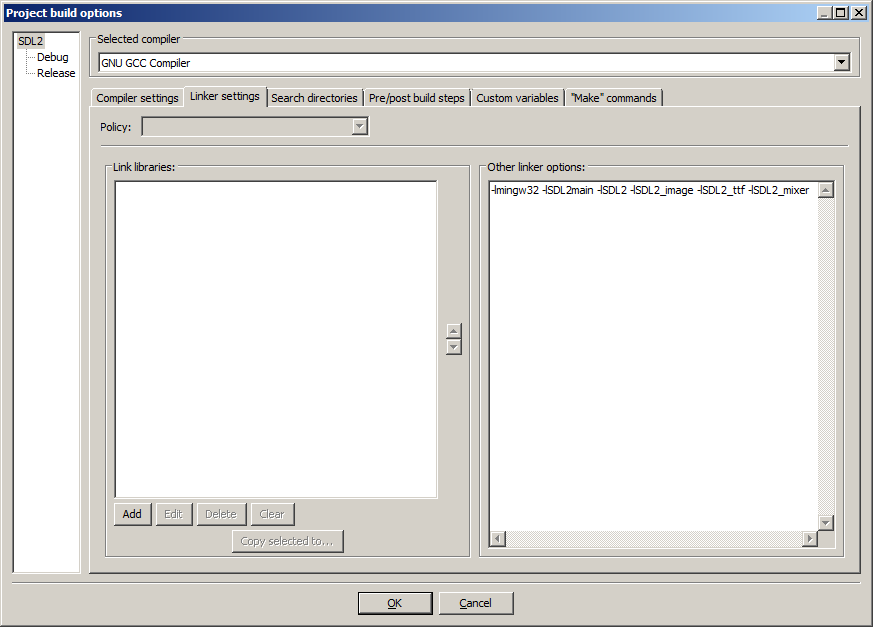
If you get an error where the linker complains about a bunch of undefined references, it means you messed up this step.
7)Like with plain SDL, the operating system needs to be able to find the dll files for the extension library while running.
Go find the SDL 2 folder you extracted and from the bin folder inside copy the dll files (all of them if there's more than one) and put it either where your executable will run, or inside of the system directory. C:\WINDOWS\SYSTEM32 is the 32bit windows system directory and C:\Windows\SysWOW64 is the 64bit system directory of 32bit applications. For these tutorials, I'm assuming we're making 32bit applications. If you get an error when you run the program where it complains that it can't find dll files, it means you messed up this step.
8)>Now go download the source for lesson 06. Add the source file inside to your project.
Now build. If there are any errors, make sure you didn't skip a step.
Now that you have the extension library compiling, it's time to go onto part 2 of the tutorial.
【转】Setting up SDL Extension Libraries on Code::Blocks 12.11的更多相关文章
- 【转】Setting up SDL Extension Libraries on Visual Studio 2010 Ultimate
FROM:http://lazyfoo.net/tutorials/SDL/06_extension_libraries_and_loading_other_image_formats/windows ...
- 【转】Setting up SDL Extension Libraries on Visual Studio 2019 Community
FROM:http://lazyfoo.net/tutorials/SDL/06_extension_libraries_and_loading_other_image_formats/windows ...
- 【转】Setting up SDL Extension Libraries on Windows
FROM: http://lazyfoo.net/tutorials/SDL/06_extension_libraries_and_loading_other_image_formats/window ...
- 【转】Setting up SDL Extension Libraries on MinGW
FROM:http://lazyfoo.net/tutorials/SDL/06_extension_libraries_and_loading_other_image_formats/windows ...
- 【转】Setting up SDL 2 on Code::Blocks 12.11
FROM: http://lazyfoo.net/tutorials/SDL/01_hello_SDL/windows/codeblocks/index.php Setting up SDL 2 on ...
- 【转】Setting up SDL on Windows
FROM: http://lazyfoo.net/tutorials/SDL/01_hello_SDL/windows/index.php Setting up SDL on Windows Last ...
- Code::Blocks
Code::Blocks 是一个开放源码的全功能的跨平台C/C++集成开发环境. Code::Blocks是开放源码软件.Code::Blocks由纯粹的C++语言开发完成,它使用了著名的图形界面库w ...
- 【转】Extension Libraries and Loading Other Image Formats
FROM: http://lazyfoo.net/tutorials/SDL/06_extension_libraries_and_loading_other_image_formats/index. ...
- 【转】Setting up SDL 2 on MinGW
FROM: http://lazyfoo.net/tutorials/SDL/01_hello_SDL/windows/mingw/index.php Setting up SDL 2 on MinG ...
随机推荐
- 绝了!这款工具让SpringBoot不再需要Controller、Service、DAO、Mapper!
Dataway介绍 Dataway 是基于 DataQL 服务聚合能力,为应用提供的一个接口配置工具,使得使用者无需开发任何代码就配置一个满足需求的接口.整个接口配置.测试.冒烟.发布,一站式都通过 ...
- textarea输入框回车加大高度
JavaScript var agt = navigator.userAgent.toLowerCase(); var is_op = (agt.indexOf("opera") ...
- 拉格朗日乘子法 Lagrange multipliers
- 概率派VS贝叶斯派
机器学习中的MLE和MAP两大学派的争论: 频率学派 - Frequentist - Maximum Likelihood Estimation (MLE,最大似然估计): 频率学派认为世界是确定的, ...
- 开源 C#工作流管理平台
{ font-family: 宋体; panose-1: 2 1 6 0 3 1 1 1 1 1 } @font-face { font-family: "Cambria Math" ...
- Hyper-V Server + Windows Admin Center
2020年的十一黄金周是双节,偶然间得知再出现双节可能要几十年之后了,很可惜我并没有出去游玩的打算.所以假期没什么事,就来研究下Hyper Server + Windows Admin Center. ...
- LiteOS-任务篇
目录 前言 链接 参考 笔录草稿 基本概念 任务相关概念 LiteOS 任务运作机制 内核初始化 创建任务 创建任务有两种方案 任务相关函数 任务开发流程 创建创建任务 部分源码 例子 创建任务的任务 ...
- NOIP提高组2016 D1T2 【天天爱跑步】
码了一个下午加一个晚上吧...... 题目描述: 小c同学认为跑步非常有趣,于是决定制作一款叫做<天天爱跑步>的游戏.<天天爱跑步>是一个养成类游戏,需要玩家每天按时上线,完成 ...
- EDI模拟实验
EDI模拟实验 [实验目的] ⑴.了解EDI报文的格式和特点. ⑵.掌握EDI报文生成和发送流程. [实验条件] ⑴.个人计算机一台,预装Windows XP操作系统和浏览器 ⑵.计算机通过局域网形式 ...
- 多测师讲解自动化测试 _RF关键字001_(上)_高级讲师肖sir
讲解案例1: Open Browser http://www.baidu.com gc #打开浏览器 Maximize Browser Window #窗口最大化 sleep 2 #线程等待2秒 In ...