
【转】Setting up SDL 2 on Visual Studio 2010 Ultimate
from: Lazy Foo'Productions - Setting up SDL 2 on Visual Studio 2010 Ultimate
1)First thing you need to do is download SDL 2 headers and binaries. You will find them on the SDL website, specifically on this page.
You'll want to download the visual c++ development libraries.

Open the zip archive and there should be a folder called SDL2-2.something.something. Copy the contents of the folder and put it anywhere you'd like. I recommend putting it in a folder that you dedicate to holding all your development libraries for Visual Studio. For these tutorials I'm putting them in a directory I created called C:\vs_dev_lib
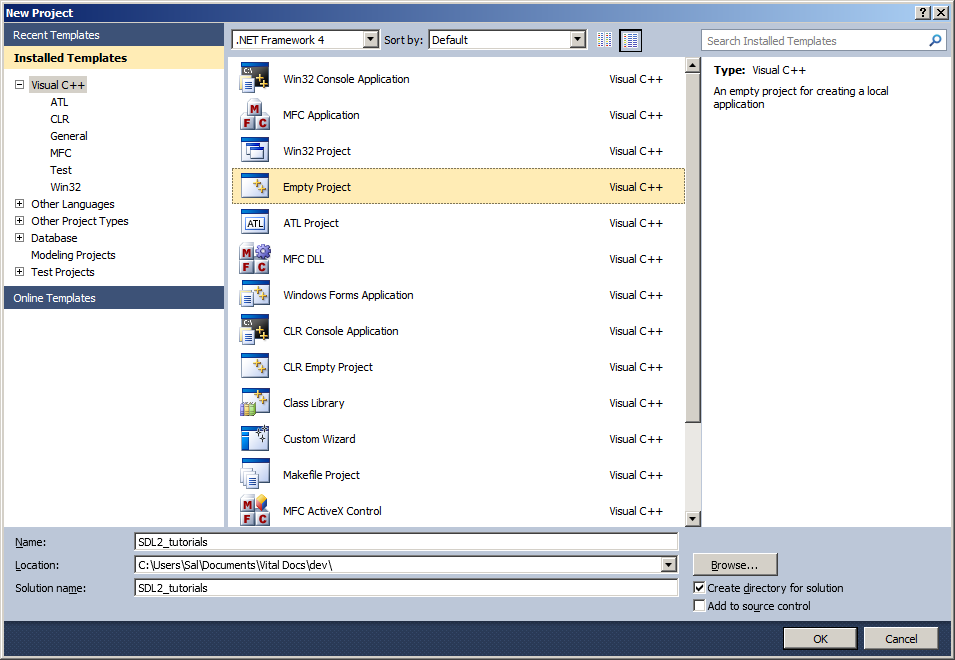
2)Start up Visual Studio and create a new empty project.
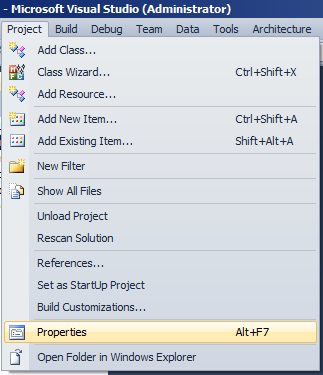
3)Go to project properties.
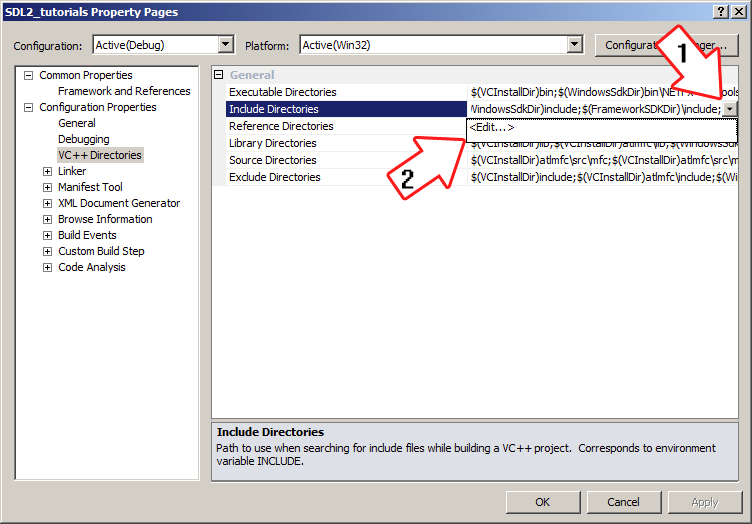
4)Now we have to tell Visual C++ to search for header files in the SDL 2 include folder we just extracted. Under Configuration Properties in the VC++ Directories menu, select the Include Directories field, click the tiny down arrow button, and click edit.
5)Click the folder icon, and then click the button that pops up.
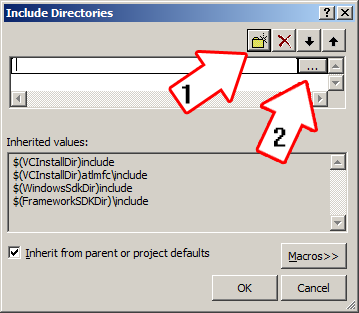
6)Now go find the SDL2 folders you extracted, and select the include folder and click OK.

Now Visual Studio knows where to find the header files. If you get an error that the compiler can't find SDL.h, it means you messed up this step.
7)Next we going to tell Visual C++ to search for library files in the SDL 2 library folder we just extracted. Select the Library Directories field, click the tiny down arrow button, and click edit.

8)Click the folder icon, and then click the button that pops up.

9)Now go find the lib folder you extracted, and select the lib folder where you find two folders. There's one for 32bit x86 architecture and for 64bit x64 architecture.
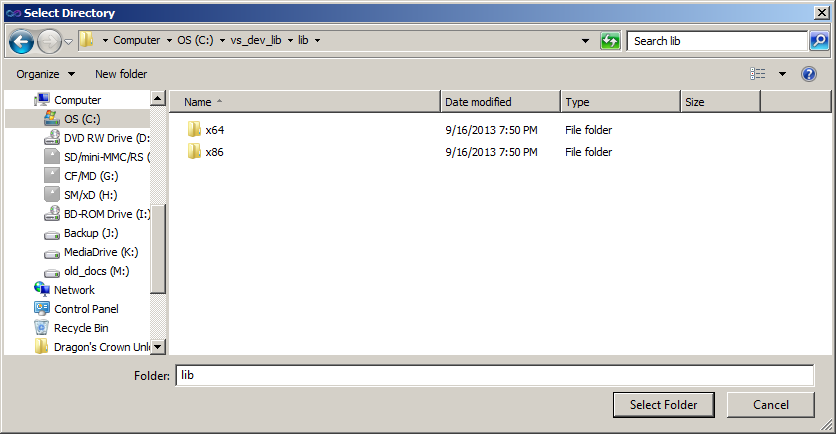
This is important: most compilers still compile 32bit binaries by default to maximize compatibility. We will be using the 32bit binaries for this tutorial set. It doesn't matter if you have a 64bit operating system, since we are compiling 32bit binaries we will be using the 32bit library. This means you need to select the x86 folder and click ok. Now Visual Studio knows where to find the library files. If you get an error how the linker can't find SDL2.lib, it means you missed this step.
10)In order to compile SDL code, we have to tell the Visual C++ to link against the libraries. Go under Linker in the Input menu, edit the additional dependencies.
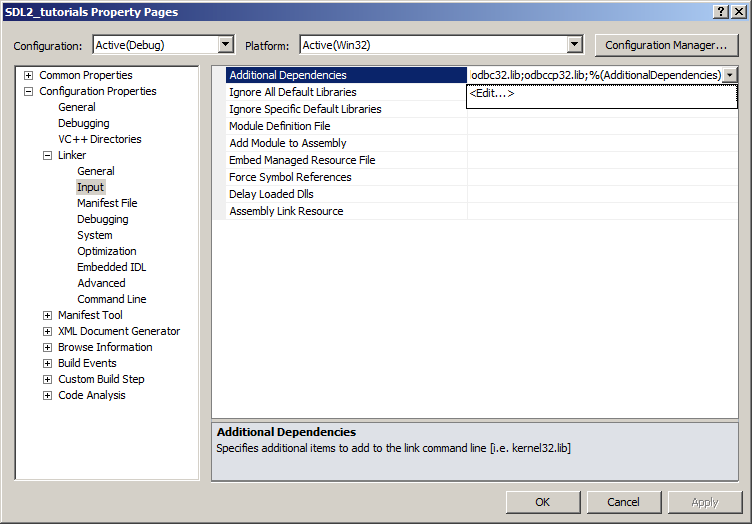
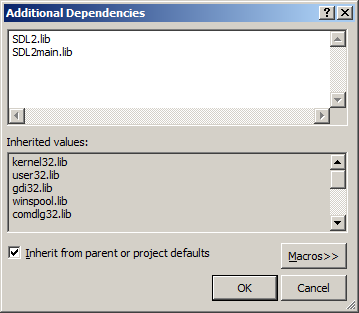
11)Now paste
SDL2.lib;
SDL2main.lib;
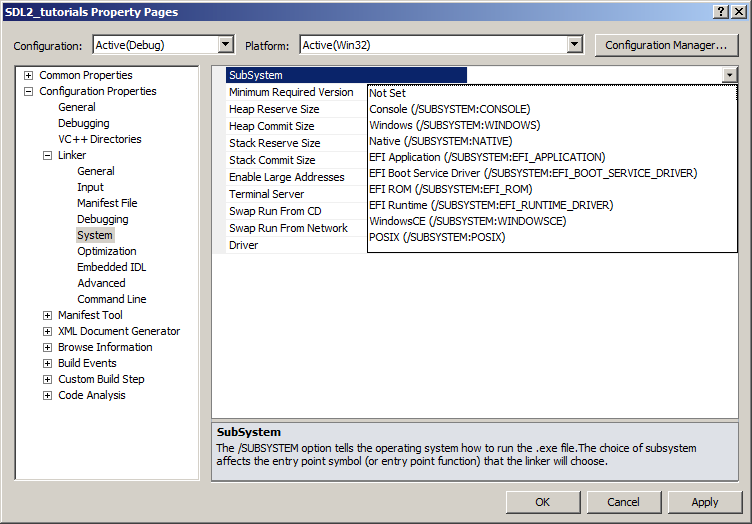
Go find the SDL 2 lib folder you extracted and copy SDL2.dll and put it either your project's working directory (where the vcxproj file is at), or inside of the system directory. C:\WINDOWS\SYSTEM32 is the 32bit windows system directory and C:\Windows\SysWOW64 is the 64bit system directory of 32bit applications. For these tutorials, I'm assuming we're making 32bit applications.
Now build. If there are any errors, make sure you didn't skip a step.
Now that you have SDL 2 compiling, it's time to go onto part 2 of the tutorial.
【转】Setting up SDL 2 on Visual Studio 2010 Ultimate的更多相关文章
- 【转】Setting up SDL Extension Libraries on Visual Studio 2010 Ultimate
FROM:http://lazyfoo.net/tutorials/SDL/06_extension_libraries_and_loading_other_image_formats/windows ...
- 【转】Setting up SDL 2 on Visual Studio 2019 Community
FROM: http://lazyfoo.net/tutorials/SDL/01_hello_SDL/windows/msvc2019/index.php Setting up SDL 2 on V ...
- Visual Studio 2010 简体中文旗舰、专业版(MSDN原版下载)
Visual Studio 2010 简体中文旗舰.专业版(MSDN原版下载)(Visual Studio 2010 ultimate professional x86 dvd)2010[光盘镜像]- ...
- visual studio 2010 破解版 破解方法
1.Microsoft Visual Studio 2010下载(均来自微软官网) 高级版(Premium) [建议下载] http://download.microsoft.com/do ...
- 《转》Visual Studio 2010 终极定制安装精简方法
打开VS2010安装目录下的 Setup 文件夹,找到 baseline.dat 文件和 vs_setup.pdi 文件还有一个 locdata.ini 文件,是对应的. 这些都是文本文件,用记事本就 ...
- Visual Studio 2010 更新NuGet Package Manager出错解决办法
在Visual Studio 2010的扩展管理器中发现NuGet Package Manger有最新版本更新提示,选择更新安装提示以下错误信息: 2013/4/25 1:11:48 - Micros ...
- Visual Studio 2010下载 + 附破解方法
Visual Studio 2010下载 + 附破解方法 1.Microsoft Visual Studio 2010下载 旗舰版(Ultimate) http://download.microsof ...
- SharePoint 2010中使用Visual Studio 2010进行方便快速的Web Part开发
转:http://www.cnblogs.com/fatwhale/archive/2010/02/24/1672633.html 在Visual Studio 2010中, 已经集成了用于Shar ...
- Visual Studio 2010以及TeamFoundationServer 2010 MSDN免Key版地址分享(转载)
以下链接转自互联网,已经下载验证SHA1码和MSDN公布的一致,跟我一样不喜欢下试用版再自己动手的同学,请使用最新版的BT工具或者迅雷下载(需要支持Magnet协议) Download Visual ...
随机推荐
- 放下VS2010,拥抱VS2019
VS2019 再过几天就要正式发布了,我们还在使用 VS2010 进行软件开发.由于所处行业环境及项目类型,加之之前的代码积累,所以即使不用新的开发环境.新的语言技术也能比较好的完成工作.那究竟要不要 ...
- CodeForces Round #554 Div.2
A. Neko Finds Grapes 代码: #include <bits/stdc++.h> using namespace std; ; int N, M; int a[maxn] ...
- [转帖] Linux 时间参数
Linux下文件的三个时间参数 https://blog.csdn.net/GGxiaobai/article/details/53609478 想用touch修改创建时间呢 发现不知道怎么修改来着. ...
- java篇 之 java概念
Jvm:java虚拟机,让java拥有跨平台的能力,一次编写,导出运行 Java优点:提供了一个解释性环境(多线程,可执行程序跨平台,加快开发,支持动态更新) 没有指针,有垃圾将回收器(回收内存) 执 ...
- [2019.04.16] 由Python写成的自动解压脚本
很久很久以前(二十七天吧……大概)被要求写一个脚本来检索并解压磁盘上所有的以特定格式命名的tar文件,于是乎学习和摸鱼就一起开始了. 这次要写的脚本,针对的是这样的文件结构: 文件结构如上图所示 可以 ...
- 【CF1063D】Candies for Children 数学
题目大意 有 \(n\) 个人排成一个圈,你有 \(k\) 颗糖,你要从第 \(l\) 个人开始发糖,直到第 \(r\) 个人拿走最后一颗糖.注意这 \(n\) 个人拍成了一个圈,所以第 \(n\) ...
- 实用HTML5游戏资源
awesome games Web-First游戏引擎协同构建令人惊叹的HTML5可视化和游戏 HTML5游戏开发者和技术传播者,华沙,波兰- @EnclaveGames独立工作室的创始人 代表作 ...
- linux Java项目CPU内存占用高故障排查
linux Java项目CPU内存占用高故障排查 top -Hp 进程号 显示进程中每个线程信息,配合jstack定位java线程运行情况 # 线程详情 jstack 线程PID # 查看堆内存中的对 ...
- python学习day19 面向对象(一)封装/多态/继承
面向对象 封装思想:将同一类的函数函数封装到同一个py文件中,方便调用 面向对象也有封装的作用,将同一类的函数封装到一个类中 多态(鸭子模型):多种类型/多种形态 #,什么事鸭子模型 对于一个函数,p ...
- 将gbk字符串转换成utf-8,存储到注册表中后,再次从注册表读取转换成gbk,有问题!!!
char *a = "新2新"; printf("gbk:'%s'\n", a); int ii; ; ii < strlen(a); ii++) { p ...