
8-IdentityServer4登录中心
1-新建webapi IdentityServer4服务器项目
E:\coding\netcore\IdentityServerSample>dotnet new webapi --name IdentityServerCenter
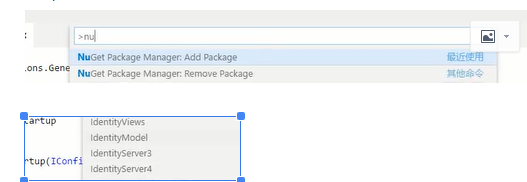
2-增加IdentityServer4 Nuget包, 按下Ctrl+p, 输入>nuget ,增加IdentityServer4包,然后再用dotnet restore保存
3-增加Config.cs类, 用于提供IdentityServer的ApiResource和Client
namespace IdentityServerCenter{

    public class Config{

        public static IEnumerable<ApiResource> GetResources(){

            return new List<ApiResource>(){

                new ApiResource("api","My Api")

            };

        }

        public static IEnumerable<Client> GetClients(){

            return new List<Client>(){

                new Client(){

                    ClientId="client",

                    AllowedGrantTypes=GrantTypes.ClientCredentials,

                    ClientSecrets = {

                        new Secret("secret".Sha256())

                    },

                    AllowedScopes = {"api"}

                }

            };

        }

    }

}
4-在Startup.cs 启用时启用IdentifyServer
 public void ConfigureServices(IServiceCollection services)

        {

            services.AddIdentityServer()

            .AddDeveloperSigningCredential()

            .AddInMemoryApiResources(Config.GetResources())

            .AddInMemoryClients(Config.GetClients());

            services.AddMvc().SetCompatibilityVersion(CompatibilityVersion.Version_2_1);

        }
  public void Configure(IApplicationBuilder app, IHostingEnvironment env)

        {

            if (env.IsDevelopment())

            {

                app.UseDeveloperExceptionPage();

            }

            app.UseIdentityServer(); //启用IdentityServer

        }
5-在Progrom.cs启动类中设置启动的Url
 public static IWebHostBuilder CreateWebHostBuilder(string[] args) =>

            WebHost.CreateDefaultBuilder(args)

                .UseStartup<Startup>().UseUrls("http://localhost:5000");
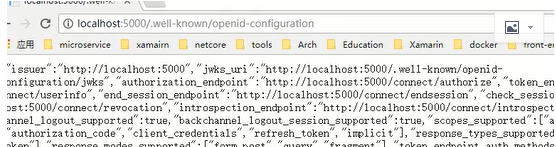
6-输入 http://localhost:5000/.well-known/openid-configuration进行测试IdentityServer4是否起作用,结果如下
8-IdentityServer4登录中心的更多相关文章
- 08.IdentityServer4登录中心
08.IdentityServer4登录中心 IdentityServer就是一套Framework,实现了OAuth的授权 理解OAuth流程,学会怎么使用他 http://ruanyifeng.c ...
- 【ASP.NET Core分布式项目实战】(一)IdentityServer4登录中心、oauth密码模式identity server4实现
本博客根据http://video.jessetalk.cn/my/course/5视频整理 资料 OAuth2 流程:http://www.ruanyifeng.com/blog/2014/05/o ...
- ASP.NET Core分布式项目-1.IdentityServer4登录中心
源码下载 一.添加服务端的api 1.添加NUGet包 IdentityServer4 点击下载,重新生成 2.添加Startup配置 打开Startup文件 public class Startup ...
- Asp.Net Core 中IdentityServer4 授权中心之自定义授权模式
一.前言 上一篇我分享了一篇关于 Asp.Net Core 中IdentityServer4 授权中心之应用实战 的文章,其中有不少博友给我提了问题,其中有一个博友问我的一个场景,我给他解答的还不够完 ...
- IdentityServer4 登录成功后,跳转到原来页面
IdentityServer4 登录成功后,默认会跳转到Config.Client配置的RedirectUris地址http://localhost:5003/callback.html,用于获取 T ...
- Asp.Net Core 中IdentityServer4 授权中心之应用实战
一.前言 查阅了大多数相关资料,查阅到的IdentityServer4 的相关文章大多是比较简单并且多是翻译官网的文档编写的,我这里在 Asp.Net Core 中IdentityServer4 的应 ...
- IdentityServer4 登录使用数据库
业务场景: IdentityServer4 默认使用TestUser和UserStore,需要模拟和加载所有的用户数据,正式环境肯定不能这样实现,我们想从自己的数据库中读取用户信息,另外,因为 Ide ...
- 统一登录中心SSO 单点登录系统的构想
什么是单点登录?我想肯定有一部分人“望文生义”的认为单点登录就是一个用户只能在一处登录,其实这是错误的理解.单点登录指的是多个子系统只需要登录一个,其他系统不需要登录了(一个浏览器内).一个子系统退出 ...
- IdentityServer4登陆中心
1. 使用Vsual Studio Code 终端执行 dotnet new webapi --name IdentityServerSample 命令创建一个webapi 的 IdentitySer ...
随机推荐
- 根据操作系统进程号,查找sql语句
有时需要根据操作系统编号查找正在执行的sql语句:select sess.username,sql1.SQL_TEXTfrom v$session sess,v$sqltext sql1,v$proc ...
- January 28 2017 Week 4 Saturday
Do what you say, say what you do. 做你说过的,说你能做的. Do more than what you say, and sometimes say more tha ...
- Django 模型中FileField字段
FileField¶ class FileField([upload_to=None, max_length=100, **options])¶ 一个上传文件的字段. 注意 FileField字段不支 ...
- Git bash 终止git log 命令
Git bash中 可以通过键入: q ,结束该命令.
- centos 在安装YouCompleteMe时提示 Fatal : pyconfig.h No such file or directory
问题:centos 在安装YouCompleteMe时提示 Fatal : pyconfig.h No such file or directory 解决:安装python-devel yum ins ...
- 利用Apache Isis快速原型化-宠物诊所的宠物管理
前言 Apache Isis是DDD方法的一个实现框架. 需求分析 宠物诊所需要记录宠物的资料,包括类型.名字.及其主人. 多个宠物可能同属于一个主人. 宠物可能更换主人. 宠物主人记录姓名,我们可以 ...
- 可决系数R^2和MSE,MAE,SMSE
波士顿房价预测 首先这个问题非常好其实要完整的回答这个问题很有难度,我也没有找到一个完整叙述这个东西的资料,所以下面主要是结合我自己的理解和一些资料谈一下r^2,mean square error 和 ...
- android:windowSoftInputMode属性详解 软键盘
android:windowSoftInputMode activity主窗口与软键盘的交互模式,可以用来避免输入法面板遮挡问题,Android1.5后的一个新特性. 这个属性能影响两件事情: [一] ...
- AOP切点切面内容
一.实现接口MethodBeforeAdvice该拦截器会在调用方法前执行 实现接口 AfterReturningAdvice该拦截器会在调用方法后执行 ...
- Vue教程:Class 与 Style 绑定(四)
绑定 HTML Class 对象语法 ①.添加单个class: <div v-bind:class="{ active: isActive }"></div> ...