
二层环路保护,SEP多实例的配置
作者:邓聪聪
智能以太保护SEP(Smart Ethernet Protection)是一种专用于以太网链路层的环网协议。SEP是一种以太环路保护机制,它通过有选择性地阻塞网络环路冗余链路,来达到消除网络二层环路的目的,避免报文在环路网络中增生和无限循环,有效防止形成网络风暴。本人刚接手了一套网络,布局也不是太复杂,基本全是2层网络,所以就利用了sep这个小技术。
实例1:


sysname sw1

#

vlan batch  to

#

stp disable

#

sep segment

 control-vlan

 block port optimal

 preempt delay

 protected-instance  to

sep segment

 control-vlan

 block port optimal

 preempt delay

 tc-notify segment

 protected-instance  to

#

interface Vlanif12

 ip address 10.1.1.1 255.255.255.224

#

interface GigabitEthernet0//

 port link-type trunk

 port trunk allow-pass vlan

 stp disable

 sep segment

#

interface GigabitEthernet0//

 port link-type access

 port default vlan

#

interface GigabitEthernet0//

 shutdown

 port link-type trunk

 undo port trunk allow-pass vlan

 port trunk allow-pass vlan  to

 stp disable

 sep segment  edge primary

#

interface GigabitEthernet0//

 shutdown

 port link-type trunk

 port trunk allow-pass vlan

 stp disable

 sep segment 10 edge primary

#
sysname sw2

#

stp disable

#

sep segment

 control-vlan

 protected-instance  to

#
sep segment 11
control-vlan 100
block port optimal
preempt delay 30
tc-notify segment 5
protected-instance 0 to 48
interface GigabitEthernet0//

 port link-type trunk

 undo port trunk allow-pass vlan

 port trunk allow-pass vlan

 stp disable

 sep segment

#

interface GigabitEthernet0//

 port link-type trunk

 undo port trunk allow-pass vlan

 port trunk allow-pass vlan

 stp disable

 sep segment 5
interface GigabitEthernet0/0/4
port link-type trunk
port trunk allow-pass vlan 11 100
stp disable
sep segment 11 edge primary
sysname sw3

#

stp disable

#

sep segment

 control-vlan

 protected-instance  to

sep segment

 control-vlan

 tc-notify segment

 protected-instance  to

#

interface Vlanif11

 ip address 1.1.1.30 255.255.255.224

#

interface Vlanif12

 ip address 10.1.1.2 255.255.255.224

#

interface MEth0//

#

interface GigabitEthernet0//

 port link-type access

 port default vlan

#

interface GigabitEthernet0//

 port link-type trunk

 undo port trunk allow-pass vlan

 port trunk allow-pass vlan

 stp disable

 sep segment

#

interface GigabitEthernet0//

 port link-type trunk

 undo port trunk allow-pass vlan

 port trunk allow-pass vlan  to

 stp disable

 sep segment

 sep segment  priority

#

interface GigabitEthernet0//

 port link-type trunk

 undo port trunk allow-pass vlan

 port trunk allow-pass vlan

 stp disable

 sep segment

 sep segment  priority

#
sysname sw4

#

vlan batch

#

stp disable

#

sep segment

 control-vlan

 protected-instance  to

#
sep segment 11
control-vlan 100
tc-notify segment 10
protected-instance 0 to 48
interface Vlanif11

 ip address 1.1.1.4 255.255.255.224

#
interface GigabitEthernet0/0/3
port link-type trunk
port trunk allow-pass vlan 11 100
stp disable
sep segment 11
sep segment 11 priority 128
interface GigabitEthernet0//

 port link-type trunk

 undo port trunk allow-pass vlan

 port trunk allow-pass vlan

 stp disable

 sep segment

#

interface GigabitEthernet0//

 port link-type trunk

 port trunk allow-pass vlan

 stp disable

 sep segment
sysname sw5

#

sep segment

 control-vlan

 protected-instance  to

#

interface GigabitEthernet0//

 port link-type trunk

 port trunk allow-pass vlan

 stp disable

 sep segment

#

interface GigabitEthernet0//

 port link-type trunk

 port trunk allow-pass vlan

 stp disable

 sep segment

#
实例2:
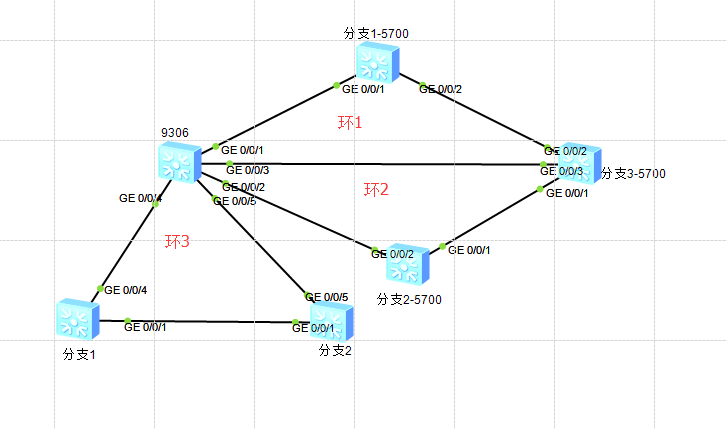
9306配置:
sep segment 1
control-vlan 4094
block port optimal
preempt delay 30
tc-notify segment 2
protected-instance 0 to 48
sep segment 2
control-vlan 4094
block port optimal
preempt delay 15
tc-notify segment 1
protected-instance 0 to 48
sep segment 3
control-vlan 4090
block port optimal
preempt delay 15
protected-instance 0 to 48
#
interface Vlanif1
ip address 1.1.1.1 255.255.255.0
#
interface MEth0/0/1
#
interface GigabitEthernet0/0/1
shutdown
port hybrid tagged vlan 4094
stp disable
sep segment 1 edge secondary
#
interface GigabitEthernet0/0/2
port link-type trunk
port trunk allow-pass vlan 4094
stp disable
sep segment 2 edge primary
#
interface GigabitEthernet0/0/3
port hybrid tagged vlan 4094
stp disable
sep segment 1 edge primary
#
interface GigabitEthernet0/0/4
port hybrid tagged vlan 4090
stp disable
sep segment 3 edge primary
#
interface GigabitEthernet0/0/5
port hybrid tagged vlan 4090
stp disable
sep segment 3 edge secondary
#
分支1-5700配置:
sep segment

 control-vlan

 block port optimal

 protected-instance  to

#

interface Vlanif1

 ip address 1.1.1.254 255.255.255.0

#

interface MEth0//

#

interface GigabitEthernet0//

 port hybrid tagged vlan

 stp disable

 sep segment

#

interface GigabitEthernet0//

 port hybrid tagged vlan

 stp disable

 sep segment

#
分支3-5700配置:
sep segment 1
control-vlan 4094
tc-notify segment 2
protected-instance 0 to 48
sep segment 2
control-vlan 4094
tc-notify segment 1
protected-instance 0 to 48
#
interface Vlanif1
ip address 1.1.1.2 255.255.255.0
#
interface MEth0/0/1
#
interface GigabitEthernet0/0/1
port link-type trunk
port trunk allow-pass vlan 4094
stp disable
sep segment 2 edge secondary
#
interface GigabitEthernet0/0/2
port hybrid tagged vlan 4094
stp disable
sep segment 1
sep segment 1 priority 128
#
interface GigabitEthernet0/0/3
port hybrid tagged vlan 4094
stp disable
sep segment 1
#
分支2-5700配置:
sep segment 2
control-vlan 4094
protected-instance 0 to 48
#
interface Vlanif1
ip address 1.1.1.3 255.255.255.0
#
interface MEth0/0/1
#
interface GigabitEthernet0/0/1
port hybrid tagged vlan 4094
stp disable
sep segment 2
sep segment 2 priority 128
#
interface GigabitEthernet0/0/2
shutdown
port hybrid tagged vlan 4094
stp disable
sep segment 2
分支1配置:
sep segment

 control-vlan

 protected-instance  to

#

interface Vlanif1

#

interface MEth0//

#

interface GigabitEthernet0//

 port hybrid tagged vlan

 stp disable

 sep segment

#

interface GigabitEthernet0//

 port hybrid tagged vlan

 stp disable

 sep segment

#
分支2配置:
sep segment

 control-vlan

 protected-instance  to

#

interface Vlanif1

 ip address 1.1.1.6 255.255.255.0

#

interface MEth0//

#

interface GigabitEthernet0//

 port hybrid tagged vlan

 stp disable

 sep segment

 sep segment  priority

#

interface GigabitEthernet0//

 port hybrid tagged vlan

 stp disable

 sep segment
二层环路保护,SEP多实例的配置的更多相关文章
- 二层环路保护,RRPP多环的配置
作者:邓聪聪 组网需求: 局域网中,由A/B/C/D构成RRPP域1换网络结构,要求环网机构中的任意两条线路中断都不能影响业务. 配置思路: 环路由两部分组成,ring1.ring2,B为环1的主节点 ...
- MSTP多实例的配置
MSTP多实例的配置 这次实验主要是为了加强对stp生成树协议中,RP(根端口),DP(指定端口),AP(阻塞端口)的判断方法:虽然很多时候不需要我们人工判断,因为当我们吧所有的配置好之后,然后开启生 ...
- 《连载 | 物联网框架ServerSuperIO教程》2.服务实例的配置参数说明
1.C#跨平台物联网通讯框架ServerSuperIO(SSIO)介绍 <连载 | 物联网框架ServerSuperIO教程>1.4种通讯模式机制 一.综述 SuperIO(SIO)定位 ...
- mysql多实例的配置和管理
原文地址:mysql多实例的配置和管理 作者:飞鸿无痕 多实例mysql的安装和管理 mysql的多实例有两种方式可以实现,两种方式各有利弊.第一种是使用多个配置文件启动不同的进程来实现多实例,这种方 ...
- 第十七章——配置SQLServer(4)——优化SQLServer实例的配置
原文:第十七章--配置SQLServer(4)--优化SQLServer实例的配置 前言: Sp_configure 可以用于管理和优化SQLServer资源,而且绝大部分配置都可以使用SQLServ ...
- SuperSocket入门(三)-Telnet多服务实例和服务实例交互配置详解
在SuperSocket入门(二)中我们已经简单了解了通过配置App.config文件使用BootStrap启动SuperSocket服务.我们先来看一下上个案例中的基本配置文件示例: < ...
- oracle 单实例DG(配置篇二)
一,DG搭建实例--主库配置 one : 归档配置 01,查看归档 1 select log_mode,force_logging from v$database; 02,开启归档 关闭数据库重新启 ...
- Amazon EC2安装mysql多实例并配置主从复制
1.MySQL安装: EC2直接使用yum安装mysql很方便: yum install mysql mysql-server mysql-libs 此处安装了三个包 完事之后可以直接使用 servi ...
- 基于mysqld_multi实现MySQL 5.7.24多实例多进程配置
学习环境: 操作系统 IP地址 主机名 软件包 备注 CentOS7.5 192.168.200.111 localhost 实验初始配置:所有主机关闭防火墙与selinux [root@ ...
随机推荐
- python 微信爬虫实例
单线程版: import urllib.request import urllib.parse import urllib.error import re,time headers = (" ...
- springMVC的全局异常设置
先说为什么要设置全局异常.比如说,你程序出错了,500错误,大家都知道,程序出错就不会往下面执行,但是客户端那边还是一直等待状态,所以,我们后台无论正常还是报错都要给客户端返回数据.当然,我们可以tr ...
- python 内置函数,匿名函数,sorted,filter,map,递归,二分法,冒泡算法 eval
############################总结#################################1. lambda 匿名函数 语法——lambda 参数:返回值 __na ...
- VScode 1.13 gocode提示dial tcp 216.239.37.1:443: connectex: A connection attempt failed because the connected..
在将VScode升级至 1.13后让升级gocode,在升级时报出如下错误 D:\go_work\src>go get -u -v github.com/mdempsky/gocode gith ...
- mvn项目压缩打包
通常情况下,maven打包结果为jar或war包.如果需要一并打包配置文件等参数,通过resources配置指定需要打包的文件参数,如下示例: <project> ... <!-- ...
- 使用JAVA数组实现顺序栈
1,首先总结一下线性表(分为顺序表和链接表,[即顺序存储结构和链式存储结构的区别])和栈(顺序栈和链接栈)还有队列(顺序队列和链接队列)的JAVA类库中的实现: java.util.ArrayList ...
- SQL Server进阶 SQL优化
找到消耗内存最多的SQL SELECT mg.granted_memory_kb, mg.session_id, t.text, qp.query_plan FROM sys.dm_exec_quer ...
- Python 生成requirement 使用requirements.txt安装类库
快速生成requirement.txt的安装文件 (CenterDesigner) xinghe@xinghe:~/PycharmProjects/CenterDesigner$ pip freeze ...
- JavaSE回顾及巩固的自学之路(一)——————前言
长长的呼出一口气,终于到了末端了,JavaSE,Java入门的基础,历经一个多月,终于细细的学了一遍,大部分的时间都是熬夜到半夜两点钟.本来是一个月的课程,足足让我给学了将近两个月,为什么呢?第一,还 ...
- 【51nod 1100】斜率最大
Description 平面上有N个点,任意2个点确定一条直线,求出所有这些直线中,斜率最大的那条直线所通过的两个点. (点的编号为1-N,如果有多条直线斜率相等,则输出所有结果,按照点的X轴坐标 ...