
Entity Framework Tutorial Basics(28):Concurrency
Concurrency in Entity Framework:
Entity Framework supports Optimistic Concurrency by default. In the optimistic concurrency, EF saves the entity to the database, assuming that the same data has not changed since the entity was loaded. If it determines that the data has changed, then an exception is thrown and you must resolve the conflict before attempting to save it again.
Let's see how to handle optimistic concurrency with Student entity.
First of all, you need to have a rowversion column in the Student table in order to handle concurrency with Student entity. Rowversion is a datatype in the SQL Server that automatically generates unique binary number whenever the insert or update operation is performed in a table. The rowversion datatype is simply an incrementing number. Rowversion is a similar to the timestamp datatype.
Create a new column RowVersion in Student table with timestamp datatype as shown below:
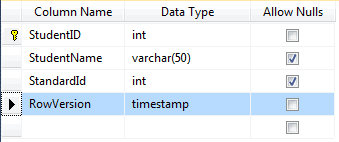
Note: The value of RowVersion will be added and updated automatically by the database during the Insert and Update operation.
Now, create a new Entity Data Model as shown in Create Entity Data Model section or if you already have an EDM then update it by right clicking on designer -> Update Model From Database -> Refresh Student table. Now, you will see the RowVersion property added in the Student entity.
Then, you need to set the concurrency mode to fixed by right clicking on RowVersion property in the Student entity (right click on RowVersion property not Student entity) -> select Property. Change Concurrency Mode to Fixed from None in the property window as shown below:
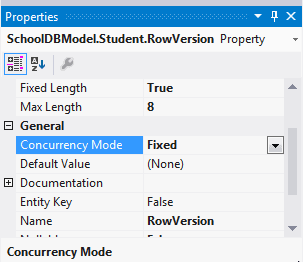
EF will now include a RowVersion column in the where clause, whenever you do an update operation and if the rowversion value is different than in the where clause then it will throwDbUpdateConcurrencyException.
The following code shows that User1 and User2 get the same student and update StudentName at the same time:
Student student1WithUser1 = null;

Student student1WithUser2 = null;

//User 1 gets student

using (var context = new SchoolDBEntities())

{

    context.Configuration.ProxyCreationEnabled = false;

    student1WithUser1 = context.Students.Where(s => s.StudentID == ).Single();

}

//User 2 also get the same student

using (var context = new SchoolDBEntities())

{

    context.Configuration.ProxyCreationEnabled = false;

    student1WithUser2 = context.Students.Where(s => s.StudentID == ).Single();

}

//User 1 updates Student name

student1WithUser1.StudentName = "Edited from user1";

//User 2 updates Student name

student1WithUser2.StudentName = "Edited from user2";
User1 saves his changes before User2. So when user2 tries to save the changes, he will get concurrency exection:
//User 1 saves changes first

using (var context = new SchoolDBEntities())

{

    try

    {

        context.Entry(student1WithUser1).State = EntityState.Modified;

        context.SaveChanges();

    }

    catch (DbUpdateConcurrencyException ex)

    {

        Console.WriteLine("Optimistic Concurrency exception occured");

    }

}

//User 2 saves changes after User 1.

//User 2 will get concurrency exection

//because CreateOrModifiedDate is different in the database

using (var context = new SchoolDBEntities())

{

    try

    {

        context.Entry(student1WithUser2).State = EntityState.Modified;

        context.SaveChanges();

    }

    catch (DbUpdateConcurrencyException ex)

    {

        Console.WriteLine("Optimistic Concurrency exception occured");

    }

}
Concurrency in Code-First:
You can create a timestamp property in code-first by using [Timestamp] attribute. Make sure that the property type is byte[] because timestamp is binary in C#.
[Timestamp]

public byte[] RowVersion { get; set; }
EF includes a property in the where clause, during the update operation, if the property is marked with the Timestamp attribute.
You can resolve concurrency exceptions many ways. Visit msdn for detailed information on how to resolve optimistic concurrency.
Download sample project for the basic tutorials.
Entity Framework Tutorial Basics(28):Concurrency的更多相关文章
- Entity Framework Tutorial Basics(1):Introduction
以下系列文章为Entity Framework Turial Basics系列 http://www.entityframeworktutorial.net/EntityFramework5/enti ...
- Entity Framework Tutorial Basics(4):Setup Entity Framework Environment
Setup Entity Framework Environment: Entity Framework 5.0 API was distributed in two places, in NuGet ...
- Entity Framework Tutorial Basics(43):Download Sample Project
Download Sample Project: Download sample project for basic Entity Framework tutorials. Sample projec ...
- Entity Framework Tutorial Basics(42):Colored Entity
Colored Entity in Entity Framework 5.0 You can change the color of an entity in the designer so that ...
- Entity Framework Tutorial Basics(41):Multiple Diagrams
Multiple Diagrams in Entity Framework 5.0 Visual Studio 2012 provides a facility to split the design ...
- Entity Framework Tutorial Basics(37):Lazy Loading
Lazy Loading: One of the important functions of Entity Framework is lazy loading. Lazy loading means ...
- Entity Framework Tutorial Basics(36):Eager Loading
Eager Loading: Eager loading is the process whereby a query for one type of entity also loads relate ...
- Entity Framework Tutorial Basics(34):Table-Valued Function
Table-Valued Function in Entity Framework 5.0 Entity Framework 5.0 supports Table-valued functions o ...
- Entity Framework Tutorial Basics(33):Spatial Data type support in Entity Framework 5.0
Spatial Data type support in Entity Framework 5.0 MS SQL Server 2008 introduced two spatial data typ ...
随机推荐
- python whl包的安装
1.首先安装PIP. https://pip.pypa.io/en/latest/installing.html#install-pip python get-pip.py 2.设置好环境变量: C: ...
- 大鱼吃小鱼(运用stack的模拟)
个人心得:这一题在暑假集训的周测里做到过,当时就死模拟,然后卡了很久很久才做对.现在发现运用stack其实非常方便, 将向左向右游动的鱼分开,则往后走只要往右移动的就放入stack,往左的时候就与st ...
- 2825 codevs危险的组合(递推)
2825 危险的组合 时间限制: 1 s 空间限制: 64000 KB 题目等级 : 钻石 Diamond 题目描述 Description 有一些装有铀(用U表示)和铅(用L表示)的盒子,数量均足够 ...
- Oracle的启动过程
在Windows操作系统平台下,可以使用SQL*Plus.OEM和系统服务管理等方式进行数据库的启动与关闭操作.数据库启动分为3个步骤:创建并启动数据库实例.装载数据库和打开数据库.数据库的关闭过程与 ...
- What makes an inferred latch? how To avoid creating inferred latches? when do you know you need latches?
What makes an inferred latch?For combinatorial logic, the output of the circuit is a function of inp ...
- c++11之三: sizeof运算符 auto的优势 __func__预定义标识符
在C++11中,对非静态成员变量使用sizeof操作是合法的. auto推导的一个最大优势就是在拥有初始化表达式的复杂类型变量声明时简化代码.如:std:vector<std::string&g ...
- 使用Azure Site Recovery把VM批量搬迁到Azure
Azure Site Recovery可以提供如下服务: Site Recovery 服务:Site Recovery 可以在站点出现故障时,让应用在其他站点继续可用,从而确保业务连续性. Site ...
- Erlang pool management -- RabbitMQ worker_pool
在RabbitMQ中,pool 是以worker_pool 的形式存在的, 其主要用途之一是对Mnesia transaction 的操作. 而在RabbitMQ 中, pool 中的worker 数 ...
- 分治思想的应用:C++实现快速排序和随机化的快速排序
分治思想的应用:C++实现快速排序和随机化的快速排序 原创 2014年09月08日 14:04:49 标签: 快速排序 / 随机化快速排序 / 排序算法 / 数据结构 947 1. 快速排序时冒泡排序 ...
- JS:Window
ylbtech-JS:Window 1.返回顶部 1.happy.js ; (function () { var happyUi = { initHappy: function (type) { ut ...