
Entity Framework Tutorial Basics(28):Concurrency
Concurrency in Entity Framework:
Entity Framework supports Optimistic Concurrency by default. In the optimistic concurrency, EF saves the entity to the database, assuming that the same data has not changed since the entity was loaded. If it determines that the data has changed, then an exception is thrown and you must resolve the conflict before attempting to save it again.
Let's see how to handle optimistic concurrency with Student entity.
First of all, you need to have a rowversion column in the Student table in order to handle concurrency with Student entity. Rowversion is a datatype in the SQL Server that automatically generates unique binary number whenever the insert or update operation is performed in a table. The rowversion datatype is simply an incrementing number. Rowversion is a similar to the timestamp datatype.
Create a new column RowVersion in Student table with timestamp datatype as shown below:
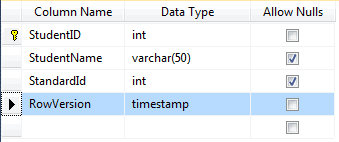
Note: The value of RowVersion will be added and updated automatically by the database during the Insert and Update operation.
Now, create a new Entity Data Model as shown in Create Entity Data Model section or if you already have an EDM then update it by right clicking on designer -> Update Model From Database -> Refresh Student table. Now, you will see the RowVersion property added in the Student entity.
Then, you need to set the concurrency mode to fixed by right clicking on RowVersion property in the Student entity (right click on RowVersion property not Student entity) -> select Property. Change Concurrency Mode to Fixed from None in the property window as shown below:
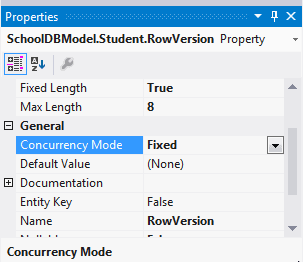
EF will now include a RowVersion column in the where clause, whenever you do an update operation and if the rowversion value is different than in the where clause then it will throwDbUpdateConcurrencyException.
The following code shows that User1 and User2 get the same student and update StudentName at the same time:
Student student1WithUser1 = null;

Student student1WithUser2 = null;

//User 1 gets student

using (var context = new SchoolDBEntities())

{

    context.Configuration.ProxyCreationEnabled = false;

    student1WithUser1 = context.Students.Where(s => s.StudentID == ).Single();

}

//User 2 also get the same student

using (var context = new SchoolDBEntities())

{

    context.Configuration.ProxyCreationEnabled = false;

    student1WithUser2 = context.Students.Where(s => s.StudentID == ).Single();

}

//User 1 updates Student name

student1WithUser1.StudentName = "Edited from user1";

//User 2 updates Student name

student1WithUser2.StudentName = "Edited from user2";
User1 saves his changes before User2. So when user2 tries to save the changes, he will get concurrency exection:
//User 1 saves changes first

using (var context = new SchoolDBEntities())

{

    try

    {

        context.Entry(student1WithUser1).State = EntityState.Modified;

        context.SaveChanges();

    }

    catch (DbUpdateConcurrencyException ex)

    {

        Console.WriteLine("Optimistic Concurrency exception occured");

    }

}

//User 2 saves changes after User 1.

//User 2 will get concurrency exection

//because CreateOrModifiedDate is different in the database

using (var context = new SchoolDBEntities())

{

    try

    {

        context.Entry(student1WithUser2).State = EntityState.Modified;

        context.SaveChanges();

    }

    catch (DbUpdateConcurrencyException ex)

    {

        Console.WriteLine("Optimistic Concurrency exception occured");

    }

}
Concurrency in Code-First:
You can create a timestamp property in code-first by using [Timestamp] attribute. Make sure that the property type is byte[] because timestamp is binary in C#.
[Timestamp]

public byte[] RowVersion { get; set; }
EF includes a property in the where clause, during the update operation, if the property is marked with the Timestamp attribute.
You can resolve concurrency exceptions many ways. Visit msdn for detailed information on how to resolve optimistic concurrency.
Download sample project for the basic tutorials.
Entity Framework Tutorial Basics(28):Concurrency的更多相关文章
- Entity Framework Tutorial Basics(1):Introduction
以下系列文章为Entity Framework Turial Basics系列 http://www.entityframeworktutorial.net/EntityFramework5/enti ...
- Entity Framework Tutorial Basics(4):Setup Entity Framework Environment
Setup Entity Framework Environment: Entity Framework 5.0 API was distributed in two places, in NuGet ...
- Entity Framework Tutorial Basics(43):Download Sample Project
Download Sample Project: Download sample project for basic Entity Framework tutorials. Sample projec ...
- Entity Framework Tutorial Basics(42):Colored Entity
Colored Entity in Entity Framework 5.0 You can change the color of an entity in the designer so that ...
- Entity Framework Tutorial Basics(41):Multiple Diagrams
Multiple Diagrams in Entity Framework 5.0 Visual Studio 2012 provides a facility to split the design ...
- Entity Framework Tutorial Basics(37):Lazy Loading
Lazy Loading: One of the important functions of Entity Framework is lazy loading. Lazy loading means ...
- Entity Framework Tutorial Basics(36):Eager Loading
Eager Loading: Eager loading is the process whereby a query for one type of entity also loads relate ...
- Entity Framework Tutorial Basics(34):Table-Valued Function
Table-Valued Function in Entity Framework 5.0 Entity Framework 5.0 supports Table-valued functions o ...
- Entity Framework Tutorial Basics(33):Spatial Data type support in Entity Framework 5.0
Spatial Data type support in Entity Framework 5.0 MS SQL Server 2008 introduced two spatial data typ ...
随机推荐
- hdu 4445 Crazy Tank(物理过程枚举)
遇到物理题,千万不要一味的当成物理题去想着推出一个最终结果来,这样ACM竞赛成了物理比赛,出题人就没水平了...往往只需要基础的物理分析,然后还是用算法去解决问题.这题n小于等于200,一看就估计是暴 ...
- HDU - 5412 CRB and Queries (整体二分)
题目链接 动态区间第k小,但是这道题的话用主席树+树状数组套线段树的空间复杂度是O(nlog2n)会爆掉. 另一种替代的方法是用树状数组套平衡树,空间复杂度降到了O(nlogn),但我感觉平衡树是个挺 ...
- tp中自定义跳转页面
1.在admin->view下建立public文件夹 2.在public文件夹下建立error.html success.html 3.在项目下公共common ->config.php写 ...
- virtualvm一次插件安装想到的
在麒麟操作系统visualvm安装插件失败,因为使用的内网,所以在官网下载了插件到本地:因为本地安装的jdk1.6,为了享受jdk1.8,在visualvm文件中增加了对于jdk1.8的引用: exp ...
- asp.net给按钮添加删除确认
if (!IsPostBack) { BtnDel.Attributes["onclick"] = "javascript:return window.confirm(' ...
- GWT中自定义你的"cell"
GWT内部提供了CellTable组件,它允许自由增加column以及cell,在设定column之后就是在其中填充cell了.但GWT所提供的CellTable样式确实不敢恭维,为了解决这一问题,在 ...
- Java-API-Package:java.lang
ylbtech-Java-API-Package:java.lang 1.返回顶部 1. Package java.lang Provides classes that are fundamental ...
- C Primer Plus学习笔记(四)- 运算符、表达式和语句
基本运算符 赋值运算符:= 在C语言中,=不是“相等”,而是赋值运算符,把左边的值赋给右边的变量 a = 2018; //把值2018赋给变量a 赋值表达式语句的目的是把值储存到内存位置上,用于储存值 ...
- Java中弱引用、软引用、虚引用及强引用的区别
Java中弱引用VS软引用 Java中有如下四种类型的引用: 强引用(Strong Reference) 弱引用(WeakReference) 软引用(SoftReference) 虚引用(Phant ...
- vue中父子组件传递信息实现
为了能够在父子组件中实现双向控制,需要以下的步骤: 第一步:子组件中挖坑 (1)在需要父组件填充具体内容的地方挖坑,方式为 <slot name="message">& ...