
Android布局之LinearLayout
LinearLayout
1.核心属性
高度:layout_height (基于内容 wrap_content;基于父控件;)
宽度:layout_width
方向:orientation (纵向 vertical;横向 horizontal;)
位置:layout_gravity (居中 center;居右 right;)
2.等分控件
做等分时将layout_width设为0dp layout_weight设为权重比是谷歌推荐的做法
<?xml version="1.0" encoding="utf-8"?>

<LinearLayout

    android:orientation="vertical"

    xmlns:android="http://schemas.android.com/apk/res/android"

    android:layout_height="wrap_content"

    android:layout_width="match_parent">

    <!-- 横排等分 layout_width="match_parent" 根据父控件的宽度决定自己的宽度-->

    <LinearLayout

        android:orientation="horizontal"

        xmlns:android="http://schemas.android.com/apk/res/android"

        android:layout_height="wrap_content"

        android:layout_width="match_parent">

        <!-- 做等分时将layout_width设为0dp layout_weight设为权重比是谷歌推荐的做法-->

        <Button

            android:layout_width="0dp"

            android:layout_height="wrap_content"

            android:layout_weight="1"

            android:background="#234578"

            android:text="等分1"/>

        <Button

            android:layout_width="0dp"

            android:layout_height="wrap_content"

            android:layout_weight="1"

            android:background="#234578"

            android:text="等分1"/>

        <Button

            android:layout_width="0dp"

            android:layout_height="wrap_content"

            android:layout_weight="2"

            android:background="#284578"

            android:text="等分(1+1)"/>

    </LinearLayout>

    <!-- 横排非等分 layout_width="wrap_content" 根据内容的宽度决定自己的宽度-->

    <LinearLayout

        android:orientation="horizontal"

        xmlns:android="http://schemas.android.com/apk/res/android"

        android:layout_height="wrap_content"

        android:layout_width="wrap_content"

        android:layout_marginTop="10dp">

        <Button

            android:layout_width="wrap_content"

            android:layout_height="wrap_content"

            android:background="#897654"

            android:text="非等分1"/>

        <Button

            android:layout_width="wrap_content"

            android:layout_height="wrap_content"

            android:background="#897654"

            android:text="=====非等分123====="/>

        <Button

            android:layout_width="wrap_content"

            android:layout_height="wrap_content"

            android:textAllCaps="false"

            android:background="#897654"

            android:text="Demo"/>

    </LinearLayout>

    <!-- 横排等分 -->

    <LinearLayout

        android:orientation="horizontal"

        xmlns:android="http://schemas.android.com/apk/res/android"

        android:layout_height="match_parent"

        android:layout_width="wrap_content"

        android:layout_marginTop="10dp">

        <!-- 竖排等分 -->

        <LinearLayout

            android:orientation="vertical"

            xmlns:android="http://schemas.android.com/apk/res/android"

            android:layout_height="match_parent"

            android:layout_width="0dp"

            android:layout_weight="1">

            <Button

                android:layout_width="wrap_content"

                android:layout_height="0dp"

                android:layout_weight="2"

                android:background="#457421"

                android:text="等分1"/>

            <Button

                android:layout_width="wrap_content"

                android:layout_height="0dp"

                android:layout_weight="1"

                android:background="#126735"

                android:text="等分2"/>

            <Button

                android:layout_width="wrap_content"

                android:layout_height="0dp"

                android:layout_weight="1"

                android:background="#843975"

                android:text="等分3"/>

        </LinearLayout>

        <!-- 竖排按数值确定高度 -->

        <LinearLayout

            android:orientation="vertical"

            xmlns:android="http://schemas.android.com/apk/res/android"

            android:layout_height="wrap_content"

            android:layout_width="0dp"

            android:layout_weight="1"

            android:layout_marginLeft="20dp">

            <Button

                android:layout_width="wrap_content"

                android:layout_height="44dp"

                android:background="#547836"

                android:text="按钮1"/>

            <Button

                android:layout_width="wrap_content"

                android:layout_height="66dp"

                android:background="#837282"

                android:text="按钮2"/>

            <Button

                android:layout_width="wrap_content"

                android:layout_height="98dp"

                android:layout_weight="2"

                android:background="#973422"

                android:text="按钮3"/>

        </LinearLayout>

    </LinearLayout>

    <LinearLayout

        android:orientation="vertical"

        xmlns:android="http://schemas.android.com/apk/res/android"

        android:layout_height="wrap_content"

        android:layout_width="wrap_content"

        android:layout_gravity="right">

        <Button

            android:layout_width="wrap_content"

            android:layout_height="44dp"

            android:background="#547836"

            android:text="靠右"/>

    </LinearLayout>

    <LinearLayout

        android:orientation="vertical"

        xmlns:android="http://schemas.android.com/apk/res/android"

        android:layout_height="wrap_content"

        android:layout_width="wrap_content"

        android:layout_gravity="center">

        <Button

            android:layout_width="wrap_content"

            android:layout_height="44dp"

            android:background="#547836"

            android:text="居中"/>

    </LinearLayout>

</LinearLayout>
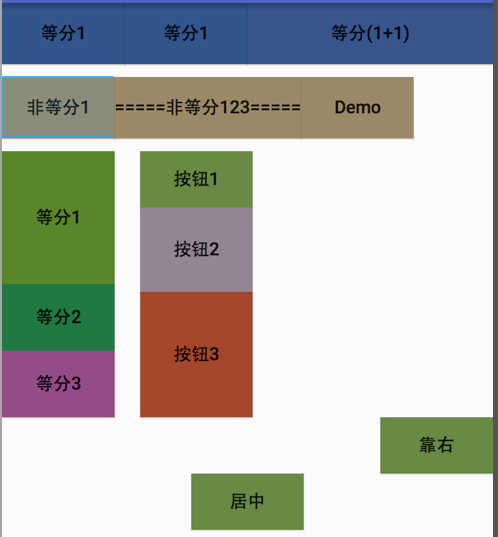
效果图
Android布局之LinearLayout的更多相关文章
- Android 布局之LinearLayout
Android 布局之LinearLayout 1 LinearLayout简介 LinearLayout是线程布局.它包括2个方向(android:orientation):“水平”(horizon ...
- Android 布局之LinearLayout 子控件weight权重的作用详析(转)
关于Android开发中的LinearLayout子控件权重android:layout_weigh参数的作用,网上关于其用法有两种截然相反说法: 说法一:值越大,重要性越高,所占用的空间越大: 说法 ...
- Android 布局之LinearLayout 子控件weight权重的作用详析
关于Android开发中的LinearLayout子控件权重android:layout_weigh参数的作用,网上关于其用法有两种截然相反说法: 说法一:值越大,重要性越高,所占用的空间越大: 说法 ...
- android 布局之LinearLayout(学习一)
一,View localView = mRadioGroup_content.getChildAt(i);指定自定义菜单栏的点击格,如child3 其中:mRadioGroup_content = ( ...
- Android布局管理详解(1)—— LinearLayout 线性布局
Android的布局方式共有6种,分别是LinearLayout(线性布局).TableLayout(表格布局).FrameLayout(帧布局).RelativeLayout(相对布局).GridL ...
- Android布局及属性归总(查询用)
常见布局 LinearLayout 线性布局 子元素任意,组织成一个单一的水平或垂直行,默认为水平方向TableLayout 表格布局 子元素为<Tabl ...
- Android中的LinearLayout布局
LinearLayout : 线性布局 在一般情况下,当有很多控件需要在一个界面列出来时,我们就可以使用线性布局(LinearLayout)了, 线性布局是按照垂直方向(vertical)或水平方向 ...
- Android的学习第六章(布局一LinearLayout)
今天我们来说一下Android五大布局-LinearLayout布局(线性布局) 含义:线性布局,顾名思义,指的是整个Android布局中的控件摆放方式是以线性的方式摆放的, 主要作用:主要对整个界面 ...
- android布局学习-使用FrameLayout和LinearLayout制作QQ空间底部导航栏
[声明:本博客通过学习“J灬叶小超 ”博客而写,链接:http://www.cnblogs.com/yc-755909659/p/4288260.html] --------------------- ...
随机推荐
- 使用Javascript D3创建属于你的涂鸦作品
Matplotlib能够用来创建非常美丽精确的数学图形: 可是有时候在进行想法交流的时候,不想那么严谨正式.想使用那种轻松的.涂鸦风格的图形: MATLAB XKCDify项目能够用来生成上述的涂鸦作 ...
- hdoj 1719 Friend
Friend Time Limit: 1000/1000 MS (Java/Others) Memory Limit: 32768/32768 K (Java/Others) Total Sub ...
- 转发真阿当老师的一片文章 受益匪浅 (出处:http://cly84920.blog.163.com/blog/static/24750013320158203575958/)
忽悠程序员做一辈子程序员,以白胡子白头发hacker为目标的人有两种: 1,自己不写程序,但需要有将才为自己打下手的人,这种人往往看他资质和勤奋均平平,却成了你领导.别不服,这种人虽不见得有帅才的能力 ...
- 自己封装js组件 - 初级
2天前抱着试试看的态度注册了此神博,心血来潮呕心沥血写了一篇关于vue 自定义组件的小文章 尼玛果然一个评论的没有!果然毫无人气!(当然了我这文章内容有限和大神们的比起来简直是粗制滥造...)索性我就 ...
- 英语影视台词---四、Sideways
英语影视台词---四.Sideways 一.总结 一句话总结:杯酒人生 Sideways,大致意思是“偏离.倾斜.转向…”.很明显中文译名与英文原名并没有什么关联,<杯酒人生>这个名字,其 ...
- nyoj--1057--寻找最大数(三)(贪心)
寻找最大数(三) 时间限制:1000 ms | 内存限制:65535 KB 难度:2 描述 给出一个整数N,每次可以移动2个相邻数位上的数字,最多移动K次,得到一个新的整数. 求这个新的整数的最大 ...
- hdoj--1869--六度分离(floyd)
六度分离 Time Limit: 5000/1000 MS (Java/Others) Memory Limit: 32768/32768 K (Java/Others) Total Submi ...
- OpenGL编程(四)改变窗口大小时保持图形的原形
前面的例子,当我们通过拖拉的方法改变窗口的长宽比例时,窗口里的图形的长宽也相应地伸缩,导致图形变形.如下图: 正如上图所示,当我们把窗口宽度拉长后,图形就会显得比较胖.同样,当我们把窗口的高度拉长后, ...
- CentOS6.9下sftp配置和scp用法
基于 ssh 的 sftp 服务相比 ftp 有更好的安全性(非明文帐号密码传输)和方便的权限管理(限制用户的活动目录). 1.如果只想让某些用户只能使用 sftp 操作文件, 而不能通过ssh进行服 ...
- C#调用C/C++动态库,封装各种复杂结构体
C#调用C/C++动态库,封装各种复杂结构体. 标签: c++结构内存typedefc# 2014-07-05 12:10 6571人阅读 评论(1) 收藏 举报 分类: C(8) C#(6) ...