
pygame 笔记-6 碰撞检测
这一节学习碰撞检测,先看原理图:
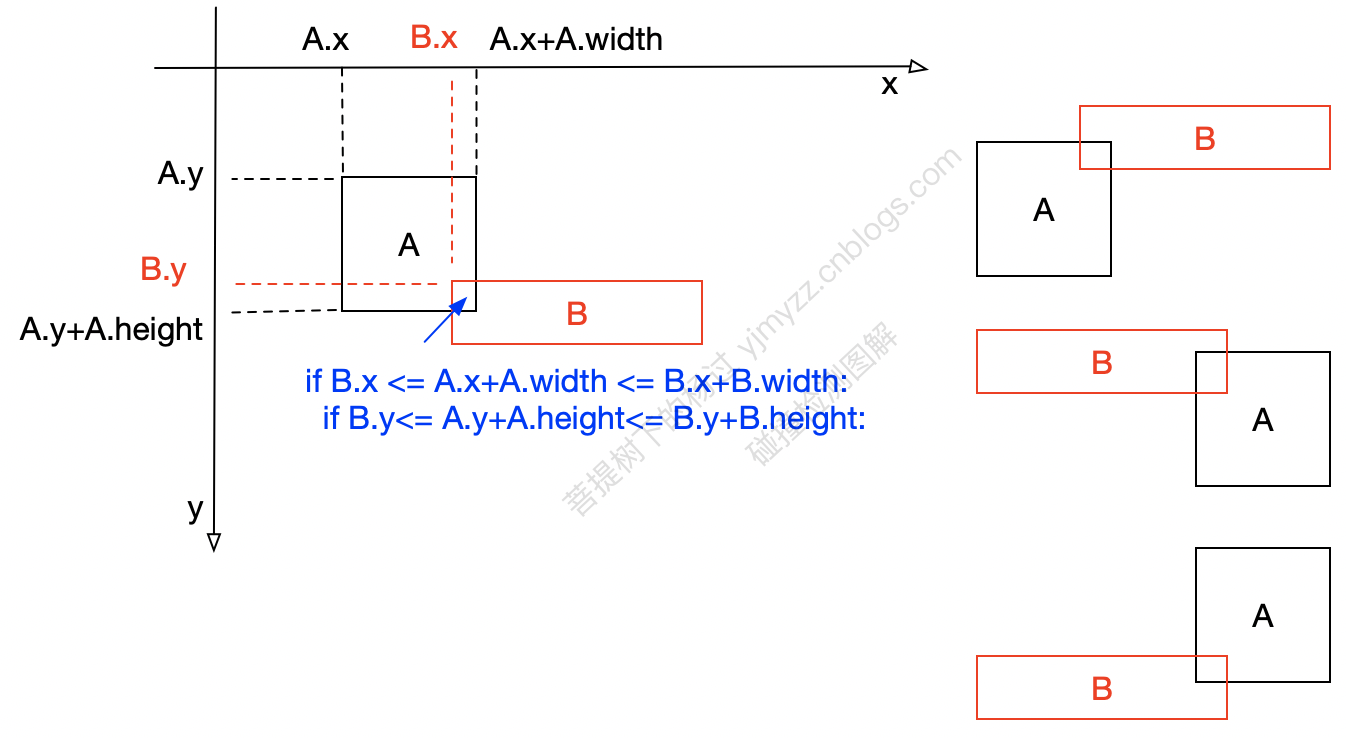
2个矩形如果发生碰撞(即:图形有重叠区域),按上图的判断条件就能检测出来,如果是圆形,则稍微变通一下,用半径检测。如果是其它不规则图形,大多数游戏中,并不要求精确检测,可以在外层套一个矩形,大致用上图的原理检测。
可以封装一个函数:
def collision_check(a, b):

    temp1 = (b.x <= a.x + a.width <= b.x + b.width)

    temp2 = (b.y <= a.y + a.height <= b.y + b.height)

    return temp1 and temp2
要注意的是:矩形A,B碰撞时,有可能是A撞B,也有可能是B撞A,所以使用上面的函数时,最好写好 if collision_check(a,b) or collision_check(b,a):
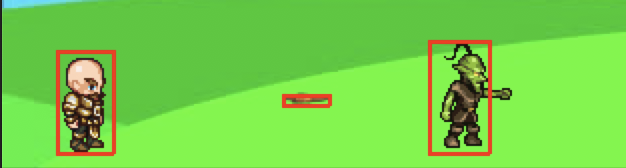
为了方便观察,我们在上节的3个类文件(即:Player、Enemy、Bullet)里,略做修改,手动在外层套一个矩形(hit_box)
import pygame

# 主角

class Player(object):

    def __init__(self, x, y, width, height, img_base_path):

        self.x = x

        self.y = y

        self.width = width

        self.height = height

        self.speed = 5

        self.left = False

        self.right = True

        self.isJump = False

        self.walkCount = 0

        self.t = 10

        self.speed = 5

        self.char = pygame.image.load(img_base_path + 'standing.png')

        self.walkRight = [pygame.image.load(img_base_path + 'actor/R1.png'),

                          pygame.image.load(img_base_path + 'actor/R2.png'),

                          pygame.image.load(img_base_path + 'actor/R3.png'),

                          pygame.image.load(img_base_path + 'actor/R4.png'),

                          pygame.image.load(img_base_path + 'actor/R5.png'),

                          pygame.image.load(img_base_path + 'actor/R6.png'),

                          pygame.image.load(img_base_path + 'actor/R7.png'),

                          pygame.image.load(img_base_path + 'actor/R8.png'),

                          pygame.image.load(img_base_path + 'actor/R9.png')]

        self.walkLeft = [pygame.image.load(img_base_path + 'actor/L1.png'),

                         pygame.image.load(img_base_path + 'actor/L2.png'),

                         pygame.image.load(img_base_path + 'actor/L3.png'),

                         pygame.image.load(img_base_path + 'actor/L4.png'),

                         pygame.image.load(img_base_path + 'actor/L5.png'),

                         pygame.image.load(img_base_path + 'actor/L6.png'),

                         pygame.image.load(img_base_path + 'actor/L7.png'),

                         pygame.image.load(img_base_path + 'actor/L8.png'),

                         pygame.image.load(img_base_path + 'actor/L9.png')]

        self.hit_box = (self.x + 17, self.y + 11, 29, 52)

    def draw(self, win):

        if self.walkCount >= 9:

            self.walkCount = 0

        if self.left:

            win.blit(self.walkLeft[self.walkCount % 9], (self.x, self.y))

            self.walkCount += 1

        elif self.right:

            win.blit(self.walkRight[self.walkCount % 9], (self.x, self.y))

            self.walkCount += 1

        else:

            win.blit(self.char, (self.x, self.y))

        # 碰撞检测框

        self.hit_box = (self.x + 17, self.y + 11, 29, 52)

        pygame.draw.rect(win, (255, 0, 0), self.hit_box, 2)
Enemy类:
import pygame

class Enemy(object):

    def __init__(self, x, y, width, height, end, img_base_path):

        self.x = x

        self.y = y

        self.width = width

        self.height = height

        self.path = [x, end]

        self.walkCount = 0

        self.vel = 3

        self.walkRight = [pygame.image.load(img_base_path + 'enemy/R1E.png'),

                          pygame.image.load(img_base_path + 'enemy/R2E.png'),

                          pygame.image.load(img_base_path + 'enemy/R3E.png'),

                          pygame.image.load(img_base_path + 'enemy/R4E.png'),

                          pygame.image.load(img_base_path + 'enemy/R5E.png'),

                          pygame.image.load(img_base_path + 'enemy/R6E.png'),

                          pygame.image.load(img_base_path + 'enemy/R7E.png'),

                          pygame.image.load(img_base_path + 'enemy/R8E.png'),

                          pygame.image.load(img_base_path + 'enemy/R9E.png'),

                          pygame.image.load(img_base_path + 'enemy/R10E.png'),

                          pygame.image.load(img_base_path + 'enemy/R11E.png')]

        self.walkLeft = [pygame.image.load(img_base_path + 'enemy/L1E.png'),

                         pygame.image.load(img_base_path + 'enemy/L2E.png'),

                         pygame.image.load(img_base_path + 'enemy/L3E.png'),

                         pygame.image.load(img_base_path + 'enemy/L4E.png'),

                         pygame.image.load(img_base_path + 'enemy/L5E.png'),

                         pygame.image.load(img_base_path + 'enemy/L6E.png'),

                         pygame.image.load(img_base_path + 'enemy/L7E.png'),

                         pygame.image.load(img_base_path + 'enemy/L8E.png'),

                         pygame.image.load(img_base_path + 'enemy/L9E.png'),

                         pygame.image.load(img_base_path + 'enemy/L10E.png'),

                         pygame.image.load(img_base_path + 'enemy/L11E.png')]

        self.hit_box = (self.x + 17, self.y + 2, 31, 57)

    def draw(self, win):

        self.move()

        if self.walkCount >= 11:

            self.walkCount = 0

        if self.vel > 0:

            win.blit(self.walkRight[self.walkCount % 11], (self.x, self.y))

            self.walkCount += 1

        else:

            win.blit(self.walkLeft[self.walkCount % 11], (self.x, self.y))

            self.walkCount += 1

        # 碰撞检测框

        self.hit_box = (self.x + 17, self.y + 2, 31, 57)

        pygame.draw.rect(win, (255, 0, 0), self.hit_box, 2)

    def move(self):

        if self.vel > 0:

            if self.x < self.path[1] + self.vel:

                self.x += self.vel

            else:

                self.vel = self.vel * -1

                self.x += self.vel

                self.walkCount = 0

        else:

            if self.x > self.path[0] - self.vel:

                self.x += self.vel

            else:

                self.vel = self.vel * -1

                self.x += self.vel

                self.walkCount = 0
以及子弹类:
import pygame

# 子弹类

class Bullet(object):

    def __init__(self, x, y, direction, img_base_path):

        self.x = x

        self.y = y

        self.direction = direction

        self.vel = 8 * direction

        self.width = 24

        self.height = 6

        self.bullet_right = pygame.image.load(img_base_path + 'r_bullet.png')

        self.bullet_left = pygame.image.load(img_base_path + 'l_bullet.png')

        self.hit_box = (self.x + 17, self.y + 11, 24, 6)

    def draw(self, win):

        # 根据人物行进的方向,切换不同的子弹图片

        if self.direction == -1:

            win.blit(self.bullet_left, (self.x - 35, self.y))

            # 碰撞检测框

            self.hit_box = (self.x - 38, self.y + 1, 24, 6)

        else:

            win.blit(self.bullet_right, (self.x + 10, self.y))

            # 碰撞检测框

            self.hit_box = (self.x + 10, self.y + 1, 24, 6)

        pygame.draw.rect(win, (255, 0, 0), self.hit_box, 2)
这样处理后,运动起来的样子如下:
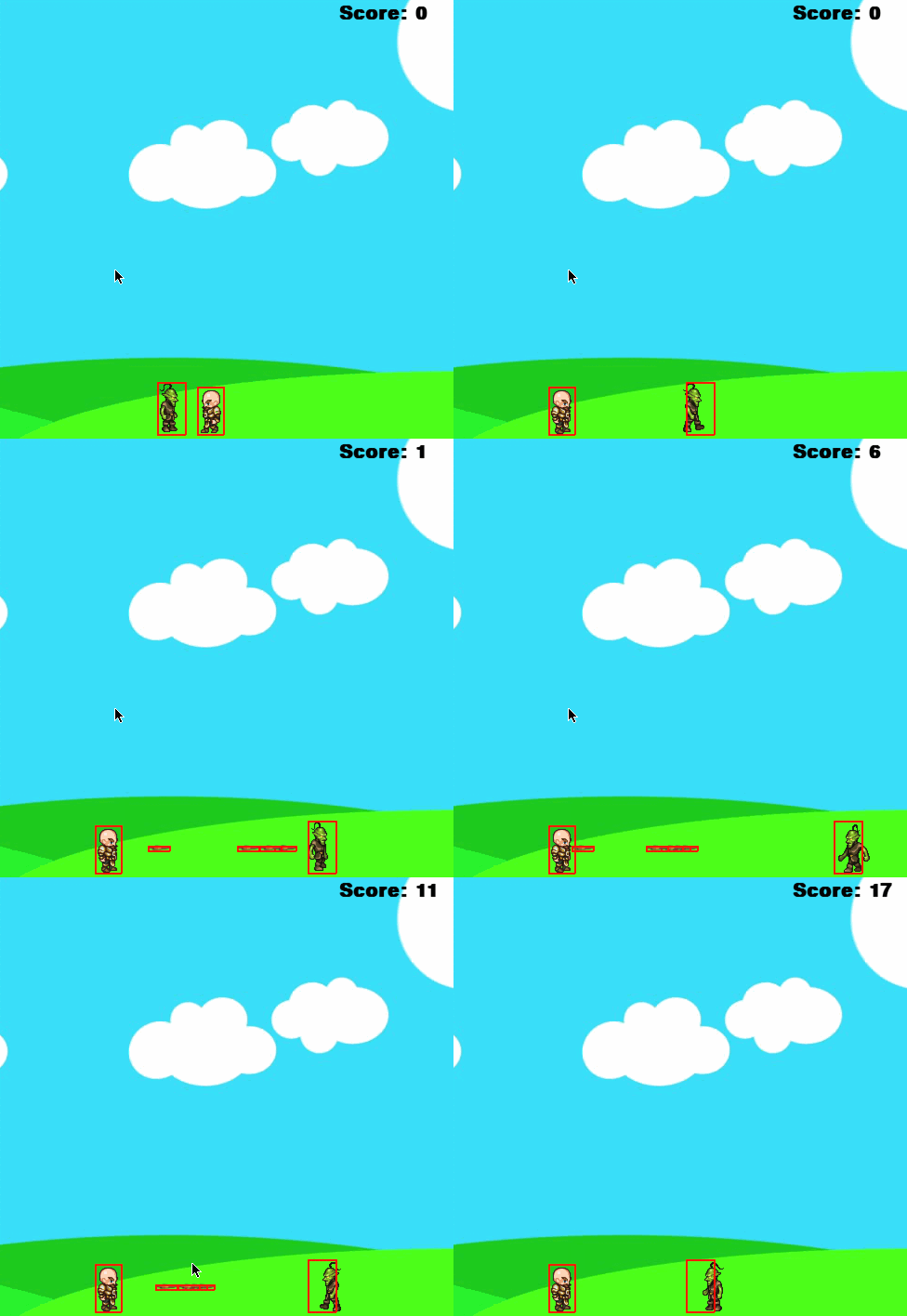
最后主文件中,加入碰撞检测代码:
import os

from bullet import *

from player import *

from enemy import *

WIN_WIDTH, WIN_HEIGHT = 500, 500

pygame.init()

win = pygame.display.set_mode((WIN_WIDTH, WIN_HEIGHT))

pygame.display.set_caption("first game")

img_base_path = os.getcwd() + '/img/'

bg = pygame.image.load(img_base_path + 'bg.jpg')

clock = pygame.time.Clock()

def redraw_game_window():

    win.blit(bg, (0, 0))

    # 显示击中后的得分

    text = font.render('Score: ' + str(score), 1, (0, 0, 0))

    win.blit(text, (370, 10))

    man.draw(win)

    enemy.draw(win)

    for bullet in bullets:

        bullet.draw(win)

    pygame.display.update()

def collision_check(a, b):

    temp1 = (b.x <= a.x + a.width <= b.x + b.width)

    temp2 = (b.y <= a.y + a.height <= b.y + b.height)

    return temp1 and temp2

# main

font = pygame.font.SysFont('comicsans', 30, True)

man = Player(200, 410, 64, 64, img_base_path)

enemy = Enemy(100, 414, 64, 64, 400, img_base_path)

run = True

score = 0

bullets = []

while run:

    clock.tick(27)

    for event in pygame.event.get():

        if event.type == pygame.QUIT:

            run = False

    for b in bullets:

        # 碰撞检测

        if collision_check(b, enemy) or collision_check(enemy, b):

            score += 1

            bullets.pop(bullets.index(b))

        if WIN_WIDTH > b.x > 0:

            b.x += b.vel

        else:

            bullets.pop(bullets.index(b))

    keys = pygame.key.get_pressed()

    if keys[pygame.K_SPACE]:

        if man.left:

            direction = -1

        else:

            direction = 1

        if len(bullets) < 5:

            bullets.append(Bullet(man.x + man.width // 2, man.y + man.height // 2, direction, img_base_path))

    if keys[pygame.K_LEFT] and man.x > 0:

        man.x -= man.speed

        man.left = True

        man.right = False

    elif keys[pygame.K_RIGHT] and man.x < win.get_size()[0] - man.width:

        man.x += man.speed

        man.left = False

        man.right = True

    else:

        man.walkCount = 0

    if not man.isJump:

        if keys[pygame.K_UP]:

            man.isJump = True

            man.walkCount = 0

    else:

        if man.t >= -10:

            a = 1

            if man.t < 0:

                a = -1

            man.y -= 0.5 * a * (man.t ** 2)

            man.t -= 1

        else:

            man.isJump = False

            man.t = 10

    redraw_game_window()

pygame.quit()
源码下载: https://github.com/yjmyzz/pygame_tutorial
pygame 笔记-6 碰撞检测的更多相关文章
- pygame 笔记-10 摩擦力与屏幕环绕
多年前写过一篇 Flash/Flex学习笔记(25):摩擦力与屏幕环绕,可惜的当时上传的flash,服务器后来无人维护,现在flash链接都失效了.本篇用pygame重新实现了一个: 原理是类似,但要 ...
- pygame 笔记-9 图片旋转及边界反弹
h5或flash中,可以直接对矢量对象,比如line, rectange旋转,但是pygame中,仅支持对image旋转,本以为这个是很简单的事情,但是发现还是有很多小猫腻的,记录一下: 先看一个错误 ...
- pygame 笔记-7 生命值/血条处理
通常游戏中的角色都有所谓的生命值,而且头顶上会有一个血条显示.生命值无非就是一个属性而已,很容易在Player.py类中增加,头顶上的血条其实就是绘制二个矩形,叠加在一起. 以上节的Player.py ...
- pygame 笔记-5 模块化&加入敌人
上一节,已经用OOP方法,把几个类抽象出来了,但是都集中在一个.py文件中,代码显得很冗长,这一节复用模块化的思想,把这个大文件拆分成几个小文件: 先把主角Player单独放到一个文件player.p ...
- pygame 笔记-8 背景音乐&子弹音效
游戏哪能没有音效?这节我们研究下如何加背景音乐,其实也很简单: # 加载背景音乐 pygame.mixer.music.load(music_base_path + "music.mp3&q ...
- pygame 笔记-4 代码封装&发射子弹
继续之前的内容,随着游戏的内容越来越复杂,有必要把代码优化一下,可以参考OOP的做法,把人物类抽象出来,弄成一个单独的类,这们便于代码维护,同时我们给小人儿,加个发射子弹的功能,代码如下:(看上去略长 ...
- pygame 笔记-3 角色动画及背景的使用
上二节,已经知道如何控制基本的运动了,但是只有一个很单调的方块,不太美观,本节学习如何加载背景图,以及角色的动画. 素材准备:(原自github) 角色动画的原理:动画都是一帧帧渲染的,比如向左走的动 ...
- pygame 笔记-2 模仿超级玛丽的弹跳
在上一节的基础上,结合高中物理中的匀加速直线运动位移公式 ,就能做出类似超级玛丽的弹跳效果. import pygame pygame.init() win = pygame.display.set_ ...
- pygame 笔记-1 按键控制方块移动
背景:家里的娃慢慢长大了,准备教一些儿童入门的编程知识,研究了一阵麻省理工的scratch 2 虽然不错,但是功能有限,很多高级点的东西玩不出来.所以就有了这一系列,先提前自学一下,顺便拿来练手pyt ...
随机推荐
- Windows 7 64bit VS2015 配置CUDA
1. 更新驱动 下载系统显卡驱动,首先在设备管理器中查看自己的显卡型号,我的是GeForce GTX 960,然后在官网下载对应的驱动程序并安装. 官网网址:NVIDIA 驱动程序下载 2. 安装 ...
- 【Android】LMK 工作机制
Android分析之LowMemoryKiller Android Kernel 会定时执行一次检查,杀死一些进程,释放掉内存. 那么,如何来判断,那些进程是需要杀死的呢?答案就是我们的标题:Low ...
- 【Android】Android 代码判断是否获取ROOT权限(二)
[Android]Android 代码判断是否获取ROOT权限 方法比较简单,直接粘贴代码 /** * 判断当前手机是否有ROOT权限 * @return */ public boolean isRo ...
- SpringMVC-1-(简介及HelloWord)
首先我们来看一下servlet的处理请求的方式: 一:SpringMVC简介: 一)SpringMVC中的几个重要组件 1.DispatchServlet: 前端控制器,mvc模式中的c,是整个流程的 ...
- 20165220 Java第五周学习总结
教材学习内容总结 1.try—catch语句:Java用try—catch语句来处理异常.将可能出现的异常操作放在try中,当try出现异常时,此部分立刻结束运行,转向执行catch部分.一个try- ...
- Nowcoder contest 370F Rinne Loves Edges (简单树形DP) || 【最大流】(模板)
<题目链接> 题目大意: 一个 $n$ 个节点 $m$ 条边的无向连通图,每条边有一个边权 $w_i$.现在她想玩一个游戏:选取一个 “重要点” S,然后选择性删除一些边,使得原图中所有除 ...
- c/c++关于指针的一点理解
#include <iostream> #include <string> using namespace std; int main() { }, n{}; cout < ...
- mac安装Elasticsearch
去官网下载https://www.elastic.co/downloads/elasticsearch 本人使用的是2.3.2版本,我下载的是tar版本的,然后解压. 进入es的安装目录, cd el ...
- MySQL Unable to convert MySQL datetime value to System.DateTime 解决方案
Unable to convert MySQL date/time value to System.DateTime 解决方案 这个问题发生在MySQL数据里面有Date类型数据,在C#中查询出来时候 ...
- IE和DOM事件流
* ie采用冒泡型事件 Netscape使用捕获型事件 dom使用先冒泡后捕获事件 冒泡型事件模型: button->div->body (IE事件流) 捕获型事件模型: body-> ...