
pygame 笔记-5 模块化&加入敌人
上一节,已经用OOP方法,把几个类抽象出来了,但是都集中在一个.py文件中,代码显得很冗长,这一节复用模块化的思想,把这个大文件拆分成几个小文件:
先把主角Player单独放到一个文件player.py里:
import pygame

# 主角

class Player(object):

    def __init__(self, x, y, width, height, img_base_path):

        self.x = x

        self.y = y

        self.width = width

        self.height = height

        self.speed = 5

        self.left = False

        self.right = True

        self.isJump = False

        self.walkCount = 0

        self.t = 10

        self.speed = 5

        self.char = pygame.image.load(img_base_path + 'standing.png')

        # 向右走的图片数组

        self.walkRight = [pygame.image.load(img_base_path + 'actor/R1.png'),

                          pygame.image.load(img_base_path + 'actor/R2.png'),

                          pygame.image.load(img_base_path + 'actor/R3.png'),

                          pygame.image.load(img_base_path + 'actor/R4.png'),

                          pygame.image.load(img_base_path + 'actor/R5.png'),

                          pygame.image.load(img_base_path + 'actor/R6.png'),

                          pygame.image.load(img_base_path + 'actor/R7.png'),

                          pygame.image.load(img_base_path + 'actor/R8.png'),

                          pygame.image.load(img_base_path + 'actor/R9.png')]

        # 向左走的图片数组

        self.walkLeft = [pygame.image.load(img_base_path + 'actor/L1.png'),

                         pygame.image.load(img_base_path + 'actor/L2.png'),

                         pygame.image.load(img_base_path + 'actor/L3.png'),

                         pygame.image.load(img_base_path + 'actor/L4.png'),

                         pygame.image.load(img_base_path + 'actor/L5.png'),

                         pygame.image.load(img_base_path + 'actor/L6.png'),

                         pygame.image.load(img_base_path + 'actor/L7.png'),

                         pygame.image.load(img_base_path + 'actor/L8.png'),

                         pygame.image.load(img_base_path + 'actor/L9.png')]

    def draw(self, win):

        if self.walkCount >= 9:

            self.walkCount = 0

        if self.left:

            win.blit(self.walkLeft[self.walkCount % 9], (self.x, self.y))

            self.walkCount += 1

        elif self.right:

            win.blit(self.walkRight[self.walkCount % 9], (self.x, self.y))

            self.walkCount += 1

        else:

            win.blit(self.char, (self.x, self.y))
其次是子弹类:
import pygame

# 子弹类

class Bullet(object):

    def __init__(self, x, y, direction, img_base_path):

        self.x = x

        self.y = y

        self.facing = direction

        self.vel = 8 * direction

        self.width = 24

        self.height = 6

        self.bullet_right = pygame.image.load(img_base_path + 'r_bullet.png')

        self.bullet_left = pygame.image.load(img_base_path + 'l_bullet.png')

    def draw(self, win):

        # 根据人物行进的方向,切换不同的子弹图片

        if self.direction == -1:

            win.blit(self.bullet_left, (self.x - 35, self.y))

        else:

            win.blit(self.bullet_right, (self.x + 10, self.y))
做为一个射击类的小游戏,这一节我们再加入目标敌人的类:
import pygame

class Enemy(object):

    def __init__(self, x, y, width, height, end, img_base_path):

        self.x = x

        self.y = y

        self.width = width

        self.height = height

        self.path = [x, end]

        self.walkCount = 0

        self.vel = 3

        self.walkRight = [pygame.image.load(img_base_path + 'enemy/R1E.png'),

                          pygame.image.load(img_base_path + 'enemy/R2E.png'),

                          pygame.image.load(img_base_path + 'enemy/R3E.png'),

                          pygame.image.load(img_base_path + 'enemy/R4E.png'),

                          pygame.image.load(img_base_path + 'enemy/R5E.png'),

                          pygame.image.load(img_base_path + 'enemy/R6E.png'),

                          pygame.image.load(img_base_path + 'enemy/R7E.png'),

                          pygame.image.load(img_base_path + 'enemy/R8E.png'),

                          pygame.image.load(img_base_path + 'enemy/R9E.png'),

                          pygame.image.load(img_base_path + 'enemy/R10E.png'),

                          pygame.image.load(img_base_path + 'enemy/R11E.png')]

        self.walkLeft = [pygame.image.load(img_base_path + 'enemy/L1E.png'),

                         pygame.image.load(img_base_path + 'enemy/L2E.png'),

                         pygame.image.load(img_base_path + 'enemy/L3E.png'),

                         pygame.image.load(img_base_path + 'enemy/L4E.png'),

                         pygame.image.load(img_base_path + 'enemy/L5E.png'),

                         pygame.image.load(img_base_path + 'enemy/L6E.png'),

                         pygame.image.load(img_base_path + 'enemy/L7E.png'),

                         pygame.image.load(img_base_path + 'enemy/L8E.png'),

                         pygame.image.load(img_base_path + 'enemy/L9E.png'),

                         pygame.image.load(img_base_path + 'enemy/L10E.png'),

                         pygame.image.load(img_base_path + 'enemy/L11E.png')]

    def draw(self, win):

        self.move()

        if self.walkCount >= 11:

            self.walkCount = 0

        if self.vel > 0:

            win.blit(self.walkRight[self.walkCount % 11], (self.x, self.y))

            self.walkCount += 1

        else:

            win.blit(self.walkLeft[self.walkCount % 11], (self.x, self.y))

            self.walkCount += 1

    def move(self):

        if self.vel > 0:

            if self.x < self.path[1] + self.vel:

                self.x += self.vel

            else:

                self.vel = self.vel * -1

                self.x += self.vel

                self.walkCount = 0

        else:

            if self.x > self.path[0] - self.vel:

                self.x += self.vel

            else:

                self.vel = self.vel * -1

                self.x += self.vel

                self.walkCount = 0
这3个.py文件放在与主文件tutorial_6.py同一个目录下,如下图:
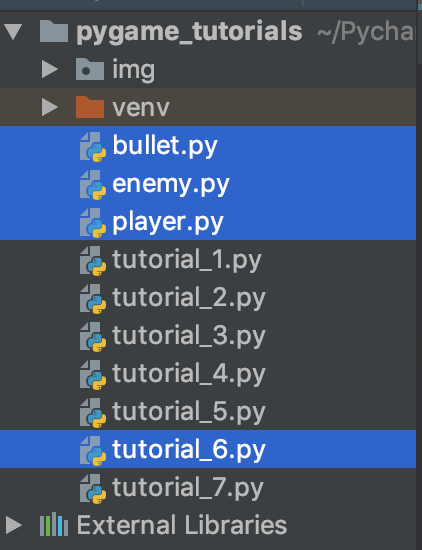
然后在主文件tutorial_6.py里,把这3个模块导进来:
import os

# 导入3个模块

from bullet import *

from player import *

from enemy import *

pygame.init()

WIN_WIDTH, WIN_HEIGHT = 500, 500

win = pygame.display.set_mode((WIN_WIDTH, WIN_HEIGHT))

pygame.display.set_caption("first game")

img_base_path = os.getcwd() + '/img/'

bg = pygame.image.load(img_base_path + 'bg.jpg')

clock = pygame.time.Clock()

def redraw_game_window():

    win.blit(bg, (0, 0))

    man.draw(win)

    goblin.draw(win)

    for b in bullets:

        b.draw(win)

    pygame.display.update()

# main

man = Player(200, 410, 64, 64, img_base_path)

goblin = Enemy(100, 410, 64, 64, 400, img_base_path)

run = True

bullets = []

while run:

    clock.tick(24)

    for event in pygame.event.get():

        if event.type == pygame.QUIT:

            run = False

    for bullet in bullets:

        if WIN_WIDTH > bullet.x > 0:

            bullet.x += bullet.vel

        else:

            bullets.pop(bullets.index(bullet))

    keys = pygame.key.get_pressed()

    if keys[pygame.K_SPACE]:

        if man.left:

            facing = -1

        else:

            facing = 1

        if len(bullets) < 5:

            bullets.append(Bullet(round(man.x + man.width // 2), round(man.y + man.height // 2), facing, img_base_path))

    if keys[pygame.K_LEFT] and man.x > 0:

        man.x -= man.speed

        man.left = True

        man.right = False

    elif keys[pygame.K_RIGHT] and man.x < win.get_size()[0] - man.width:

        man.x += man.speed

        man.left = False

        man.right = True

    else:

        man.walkCount = 0

    if not man.isJump:

        if keys[pygame.K_UP]:

            man.isJump = True

            man.walkCount = 0

    else:

        if man.t >= -10:

            a = 1

            if man.t < 0:

                a = -1

            man.y -= 0.5 * a * (man.t ** 2)

            man.t -= 1

        else:

            man.isJump = False

            man.t = 10

    redraw_game_window()

pygame.quit()
效果:
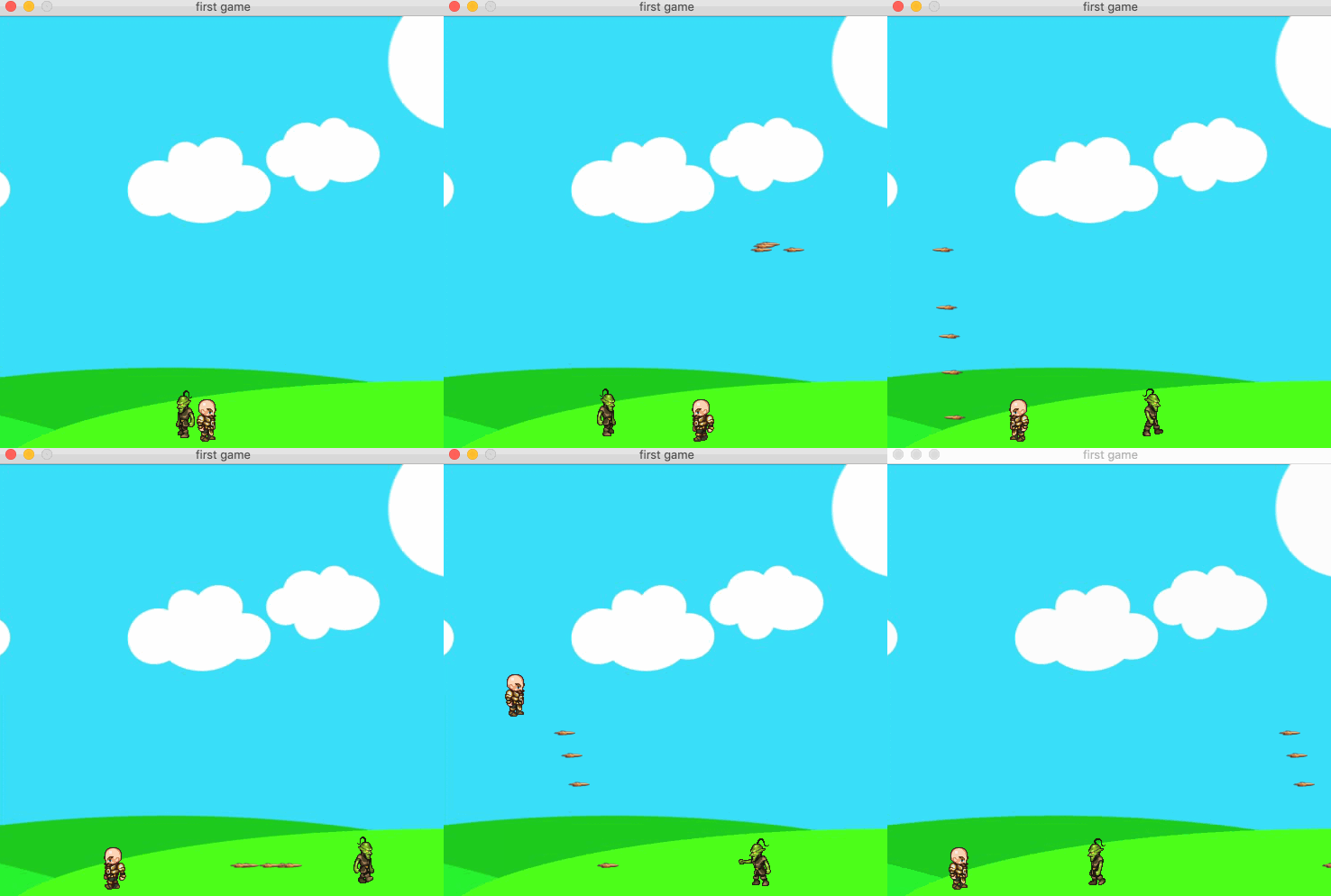
该出场的人物与道具都齐全了,下一节将讨论"碰撞检测"。
pygame 笔记-5 模块化&加入敌人的更多相关文章
- thinkphp学习笔记5—模块化设计
原文:thinkphp学习笔记5-模块化设计 1.模块结构 完整的ThinkPHP用用围绕模块/控制器/操作设计,并支持多个入口文件盒多级控制.ThinkPHP默认PATHINFO模式,如下: htt ...
- pygame 笔记-10 摩擦力与屏幕环绕
多年前写过一篇 Flash/Flex学习笔记(25):摩擦力与屏幕环绕,可惜的当时上传的flash,服务器后来无人维护,现在flash链接都失效了.本篇用pygame重新实现了一个: 原理是类似,但要 ...
- pygame 笔记-7 生命值/血条处理
通常游戏中的角色都有所谓的生命值,而且头顶上会有一个血条显示.生命值无非就是一个属性而已,很容易在Player.py类中增加,头顶上的血条其实就是绘制二个矩形,叠加在一起. 以上节的Player.py ...
- javascript 学习笔记之模块化编程
题外: 进行web开发3年多了,javascript(后称js)用的也比较多,但是大部分都局限于函数的层次,有些公共的js函数可重用性不好,造成了程序的大量冗余,可读性差(虽然一直保留着注释的习惯,但 ...
- pygame 笔记-9 图片旋转及边界反弹
h5或flash中,可以直接对矢量对象,比如line, rectange旋转,但是pygame中,仅支持对image旋转,本以为这个是很简单的事情,但是发现还是有很多小猫腻的,记录一下: 先看一个错误 ...
- pygame 笔记-8 背景音乐&子弹音效
游戏哪能没有音效?这节我们研究下如何加背景音乐,其实也很简单: # 加载背景音乐 pygame.mixer.music.load(music_base_path + "music.mp3&q ...
- pygame 笔记-6 碰撞检测
这一节学习碰撞检测,先看原理图: 2个矩形如果发生碰撞(即:图形有重叠区域),按上图的判断条件就能检测出来,如果是圆形,则稍微变通一下,用半径检测.如果是其它不规则图形,大多数游戏中,并不要求精确检测 ...
- pygame 笔记-4 代码封装&发射子弹
继续之前的内容,随着游戏的内容越来越复杂,有必要把代码优化一下,可以参考OOP的做法,把人物类抽象出来,弄成一个单独的类,这们便于代码维护,同时我们给小人儿,加个发射子弹的功能,代码如下:(看上去略长 ...
- pygame 笔记-3 角色动画及背景的使用
上二节,已经知道如何控制基本的运动了,但是只有一个很单调的方块,不太美观,本节学习如何加载背景图,以及角色的动画. 素材准备:(原自github) 角色动画的原理:动画都是一帧帧渲染的,比如向左走的动 ...
随机推荐
- 对线性回归,logistic回归和一般回归
对线性回归,logistic回归和一般回归 [转自]:http://www.cnblogs.com/jerrylead JerryLead 2011年2月27日 作为一个机器学习初学者,认识有限,表述 ...
- glusterfs分布式复制扩容卷以及平衡卷
随着数据量的增长,需要扩容满足使用.今天测试下glusterfs磁盘扩容的具体步骤 1.扩容 之前用的2台计算机的分布式复制卷.需要同时之两个服务器增加一块磁盘并格式化,挂载并扩容 热添加磁盘 ech ...
- 函数对象的call()、apply() 方法区别
函数对象的call().apply() 方法 函数作为对象提供了call(),apply() 方法,他们也可以用来调用函数,这两个方法都接受一个对象作为参数,用来指定本次调用时函数中this的指向: ...
- js让元素获取焦点
js让元素获取焦点$("#startAddress").focus();
- 2018-03-11 20165235祁瑛《Java程序设计》第二周学习总结
2018-03-11 20165235祁瑛<Java程序设计>第二周学习总结 教材学习内容总结 第二章要点: 在这一章中我学到了很多东西: (1)布尔类型boolean,布尔类型的赋值只能 ...
- 转 国内的go get问题的解决
转 国内的go get问题的解决 go get golang.org/x 包失败解决方法 由于各种问题,国内使用 go get 安装 golang 官方包可能会失败,如我自己在安装 colli ...
- Codeforces 633C Spy Syndrome 2 【Trie树】+【DFS】
<题目链接> 题目大意:给定一个只有小写字母组成的目标串和m个模式串(里面可能有大写字母),记目标串反过来后的串为S,让你从m个模式串中选出若干个组成S串(不区分大小写).输出任意一种方案 ...
- 洛谷 P3370 字符串哈希 (模板)
<题目链接> <转载于 >>> > 题目描述 如题,给定N个字符串(第i个字符串长度为Mi,字符串内包含数字.大小写字母,大小写敏感),请求出N个字符串中共 ...
- SpringBoot使用Mybatis-PageHelper
前言 之前一篇文章介绍了<SpringBoot+Mybatis+MySql学习>的整合,这一片扩展一下Mybatis的分页插件-Mybatis-PageHelper. 新建项目 首先,po ...
- 重新定位Excel Addin插件的方法
Excel Add-in - How to automate installation Thursday, 20 October 2011 Automatic Approach The best w ...