
吴裕雄 python 机器学习-Logistic(1)
import numpy as np

def loadDataSet():

    dataMat = []

    labelMat = []

    fr = open('D:\\LearningResource\\machinelearninginaction\\Ch05\\testSet.txt')

    for line in fr.readlines():

        lineArr = line.strip().split()

        dataMat.append([1.0, float(lineArr[0]), float(lineArr[1])])

        labelMat.append(int(lineArr[2]))

    return dataMat,labelMat

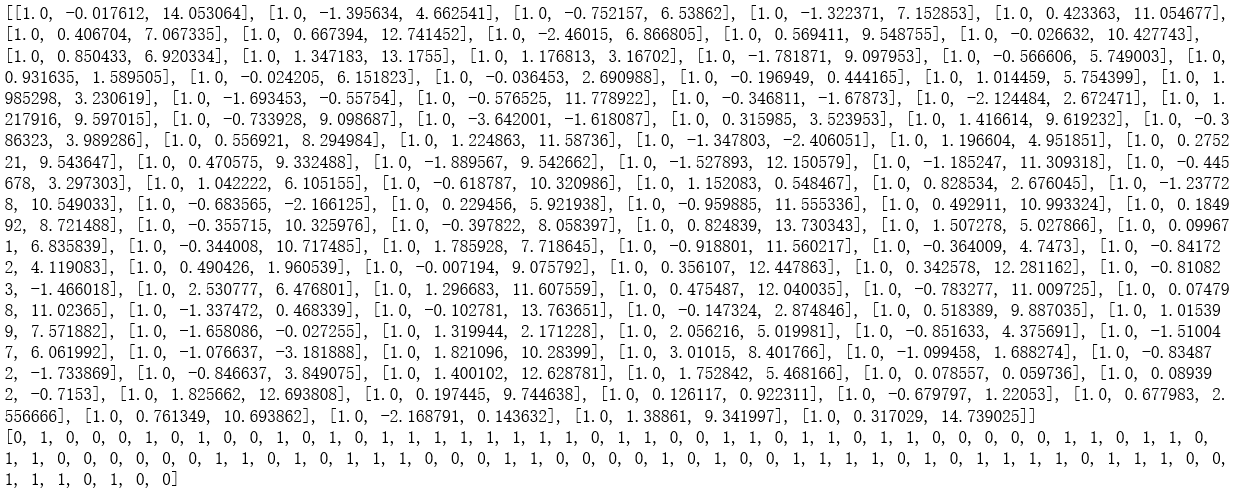
dataMat,labelMat = loadDataSet()

print(dataMat)

print(labelMat)
def sigmoid(z):

    sigmoid = 1.0/(1+np.exp(-z))

    return sigmoid

def gradAscent(dataMatIn, classLabels):

    dataMatrix = np.mat(dataMatIn)

    labelMat = np.mat(classLabels).transpose()

    m,n = np.shape(dataMatrix)

    alpha = 0.001

    maxCycles = 500

    weights = np.ones((n,1))

    for k in range(maxCycles):

        h = sigmoid(dataMatrix*weights)

        error = (labelMat - h)

        weights = weights + alpha * dataMatrix.transpose()* error

    return weights

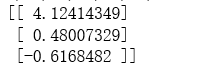
weights = gradAscent(dataMat,labelMat)

print(weights)
def stocGradAscent0(dataMatrix, classLabels):

    m,n = np.shape(dataMatrix)

    alpha = 0.01

    weights = np.ones(n)

    for i in range(m):

        h = sigmoid(sum(np.array(dataMatrix[i])*weights))

        error = classLabels[i] - h

        weights = weights + alpha * error * np.array(dataMatrix[i])

    return weights

weights = stocGradAscent0(dataMat,labelMat)

print(weights)

def stocGradAscent1(dataMatrix, classLabels, numIter=150):

    m,n = np.shape(dataMatrix)

    weights = np.ones(n)

    for j in range(numIter):

        dataIndex = list(range(m))

        for i in range(m):

            alpha = 4/(1.0+j+i)+0.0001

            randIndex = int(np.random.uniform(0,len(dataIndex)))

            h = sigmoid(sum(np.array(dataMatrix[randIndex])*weights))

            error = classLabels[randIndex] - h

            weights = weights + alpha * error * np.array(dataMatrix[randIndex])

            del(dataIndex[randIndex])

    return weights

weights = stocGradAscent1(dataMat,labelMat)

print(weights)

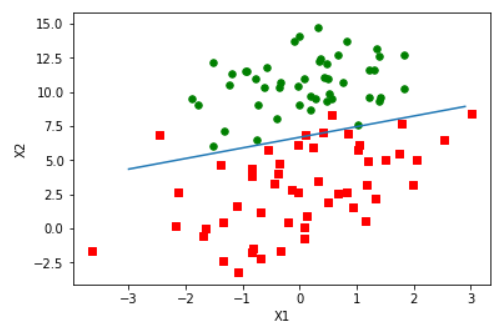
import matplotlib.pyplot as plt

def plotBestFit():

    dataMat,labelMat=loadDataSet()

    weights = gradAscent(dataMat,labelMat)

    dataArr = np.array(dataMat)

    n = np.shape(dataArr)[0]

    xcord1 = []

    ycord1 = []

    xcord2 = []

    ycord2 = []

    for i in range(n):

        if(int(labelMat[i])== 1):

            xcord1.append(dataArr[i,1])

            ycord1.append(dataArr[i,2])

        else:

            xcord2.append(dataArr[i,1])

            ycord2.append(dataArr[i,2])

    fig = plt.figure()

    ax = fig.add_subplot(111)

    ax.scatter(xcord1, ycord1, s=30, c='red', marker='s')

    ax.scatter(xcord2, ycord2, s=30, c='green')

    x = np.arange(-3.0, 3.0, 0.1)

    y = (-weights[0]-weights[1]*x)/weights[2]

    y = np.array(y).reshape(len(x))

    ax.plot(x, y)

    plt.xlabel('X1')

    plt.ylabel('X2');

    plt.show()

plotBestFit()
def classifyVector(z, weights):

    prob = sigmoid(sum(z*weights))

    if(prob > 0.5):

        return 1.0

    else:

        return 0.0

def colicTest():

    frTrain = open('D:\\LearningResource\\machinelearninginaction\\Ch05\\horseColicTraining.txt')

    frTest = open('D:\\LearningResource\\machinelearninginaction\\Ch05\\horseColicTest.txt')

    trainingSet = []

    trainingLabels = []

    for line in frTrain.readlines():

        currLine = line.strip().split('\t')

        lineArr =[]

        for i in range(21):

            lineArr.append(float(currLine[i]))

        trainingSet.append(lineArr)

        trainingLabels.append(float(currLine[21]))

    trainWeights = stocGradAscent1(np.array(trainingSet), trainingLabels, 1000)

    errorCount = 0

    numTestVec = 0.0

    for line in frTest.readlines():

        numTestVec += 1.0

        currLine = line.strip().split('\t')

        lineArr =[]

        for i in range(21):

            lineArr.append(float(currLine[i]))

        if(int(classifyVector(np.array(lineArr), trainWeights))!= int(currLine[21])):

            errorCount += 1

    errorRate = (float(errorCount)/numTestVec)

    print("the error rate of this test is: %f" % errorRate)

    return errorRate

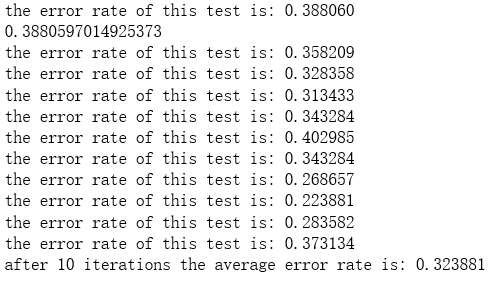
errorRate = colicTest()

print(errorRate)

def multiTest():

    numTests = 10

    errorSum=0.0

    for k in range(numTests):

        errorSum += colicTest()

    print("after %d iterations the average error rate is: %f" % (numTests, errorSum/float(numTests)))

multiTest()
吴裕雄 python 机器学习-Logistic(1)的更多相关文章
- 吴裕雄 python 机器学习——人工神经网络感知机学习算法的应用
import numpy as np from matplotlib import pyplot as plt from sklearn import neighbors, datasets from ...
- 吴裕雄 python 机器学习——分类决策树模型
import numpy as np import matplotlib.pyplot as plt from sklearn import datasets from sklearn.model_s ...
- 吴裕雄 python 机器学习——回归决策树模型
import numpy as np import matplotlib.pyplot as plt from sklearn import datasets from sklearn.model_s ...
- 吴裕雄 python 机器学习——线性判断分析LinearDiscriminantAnalysis
import numpy as np import matplotlib.pyplot as plt from matplotlib import cm from mpl_toolkits.mplot ...
- 吴裕雄 python 机器学习——逻辑回归
import numpy as np import matplotlib.pyplot as plt from matplotlib import cm from mpl_toolkits.mplot ...
- 吴裕雄 python 机器学习——ElasticNet回归
import numpy as np import matplotlib.pyplot as plt from matplotlib import cm from mpl_toolkits.mplot ...
- 吴裕雄 python 机器学习——Lasso回归
import numpy as np import matplotlib.pyplot as plt from sklearn import datasets, linear_model from s ...
- 吴裕雄 python 机器学习——岭回归
import numpy as np import matplotlib.pyplot as plt from sklearn import datasets, linear_model from s ...
- 吴裕雄 python 机器学习——线性回归模型
import numpy as np from sklearn import datasets,linear_model from sklearn.model_selection import tra ...
随机推荐
- HDFS分布式文件系统
hadoop致力于构建在廉价的商用服务器上 多副本存储策略(副本数存多少合适) 常见是数据访问方式:流式数据访问(更适合大数据的访问) 随机数据访问(更适合传统的关系型数据库的访问)
- MongoDB 的安装以及使用
MongoDB 是一个基于分布式文件存储的数据库.由 C++ 语言编写.旨在为 WEB 应用提供可扩展的高性能数据存储解决方案.MongoDB 是一个介于关系数据库和非关系数据库之间的产品,是非关系数 ...
- PHP unset()函数销毁变量
<?php // 销毁单个变量 unset ($var); // 销毁单个数组元素 unset ($arr['a']); // 销毁多个变量 unset ($var1, $var2, $var3 ...
- Java - 26 Java 数据结构
Java 数据结构 Java工具包提供了强大的数据结构.在Java中的数据结构主要包括以下几种接口和类: 枚举(Enumeration) 位集合(BitSet) 向量(Vector) 栈(Stack) ...
- The Kernel Boot Process.内核引导过程
原文标题:The Kernel Boot Process 原文地址:http://duartes.org/gustavo/blog/ [注:本人水平有限,只好挑一些国外高手的精彩文章翻译一下.一来自己 ...
- Linux netstat命令查看并发连接数
netstat -n | awk '/^tcp/ {++S[$NF]} END {for(a in S) print a, S[a]}' 解释: 返回结果示例: LAST_ACK 5 (正在等待处理的 ...
- 类似openDialog的弹窗
html <modal title="这里是标题" hidden="{{modalHidden}}" bindconfirm="modalCon ...
- android 相对布局例子代码
<?xml version="1.0" encoding="utf-8"?> <LinearLayout xmlns:android=&quo ...
- 重识linux-循环执行的例行性工作调度
重识linux-循环执行的例行性工作调度 1 用户的设置 1)/etc/cron.allow 可以使用的账号,在这个文件内 2)/etc/cron.deny 不可以的放在这个文件里面 allow的优 ...
- css:蓝环章鱼
许多海洋生物色彩艳丽,这次用css仿制一下蓝环章鱼的蓝环 <script type="text/javascript" src="http://cdn.bootcs ...