
springboot(五)Scheduling demo
在项目开发过程中,经常会使用到定时任务(跑批),springboot默认已经实现了,只需要添加相应的注解就可以实现
在启动类上加入注解,开启定时任务
@SpringBootApplication

@EnableScheduling

public class App {

    public static void main(String[] args){

        SpringApplication.run(App.class, args);

    }

}
创建跑批任务并注册到spring中管理,并在方法上加上跑批注解,配置core表达式
@Component

public class SchedulingTask1 {

    private int count = 0;

    @Scheduled(cron = "*/5 * * * * ?")//每5s执行一次

    public void process(){

        System.out.println("SchedulingTask1 is  "+ count+"times run");

        count++;

    }

}
@Component

public class SchedulingTask2 {

    SimpleDateFormat sdf = new SimpleDateFormat ("yyyyMMdd hh:mm:ss");

    @Scheduled(fixedRate = 5000)//每5s执行一次

    public void process(){

        System.out.println("process->This time  is  "+ sdf.format(new Date()) +"times run");

    }

    @Scheduled(fixedDelay = 10000)//上一次执行完毕时间点之后10秒再执行

    public void process2(){

        System.out.println("process2->This time  is  "+ sdf.format(new Date()) +"times run");

    }

    @Scheduled(initialDelay=10000, fixedRate=5000) //第一次延迟10秒后执行,之后按fixedRate的规则每5秒执行一次

    public void process3(){

        System.out.println("process3->This time  is  "+ sdf.format(new Date()) +"times run");

    }

}
启动项目即可运行,运行结果:
process->This time  is  20200510 11:43:37times run

process2->This time  is  20200510 11:43:37times run

SchedulingTask1 is  0times run

process->This time  is  20200510 11:43:42times run

SchedulingTask1 is  1times run

process->This time  is  20200510 11:43:47times run

process3->This time  is  20200510 11:43:47times run

process2->This time  is  20200510 11:43:47times run

SchedulingTask1 is  2times run

process->This time  is  20200510 11:43:52times run

process3->This time  is  20200510 11:43:52times run

SchedulingTask1 is  3times run

process->This time  is  20200510 11:43:57times run

process3->This time  is  20200510 11:43:57times run

process2->This time  is  20200510 11:43:57times run

SchedulingTask1 is  4times run

process->This time  is  20200510 11:44:02times run

process3->This time  is  20200510 11:44:02times run

SchedulingTask1 is  5times run

process->This time  is  20200510 11:44:07times run

process3->This time  is  20200510 11:44:07times run

process2->This time  is  20200510 11:44:07times run

SchedulingTask1 is  6times run

process->This time  is  20200510 11:44:12times run

process3->This time  is  20200510 11:44:12times run

SchedulingTask1 is  7times run

process->This time  is  20200510 11:44:17times run

process3->This time  is  20200510 11:44:17times run

process2->This time  is  20200510 11:44:17times run

SchedulingTask1 is  8times run
常用表达式如下:
0 * * * * ? 每1分钟执行一次

0 0 * * * ? 每天每1小时执行一次

0 0 10 * * ? 每天10点执行一次

0 * 14 * * ? 在每天下午14点到下午14:59期间的每1分钟执行一次

0 30 10 1 * ? 每月1号上午10点30执行一次

0 10 10 10 * ? 每月10日上午10:10执行一次

*/5 * * * * ? 每隔5秒执行一次

0 */1 * * * ? 每隔1分钟执行一次

0 0 12-15 * * ? 每天12-15点整点执行一次

0 0/5 * * * ? 每5分钟执行一次

0 0-5 15 * * ? 在每天下午15点到下午15:05期间的每1分钟执行一次

0 0/10 15 * * ? 在每天下午15点到下午15:50期间的每10分钟执行一次

0 0/10 15,18 * * ? 在每天下午15点到15:50期间和下午18点到18:50期间的每10分钟执行一次

0 0/30 10-15 * * ? 在每天上午10点到下午15:30每半小时执行一次

0 0 10,12,14 * * ? 每天上午10点,下午12点,14点执行一次
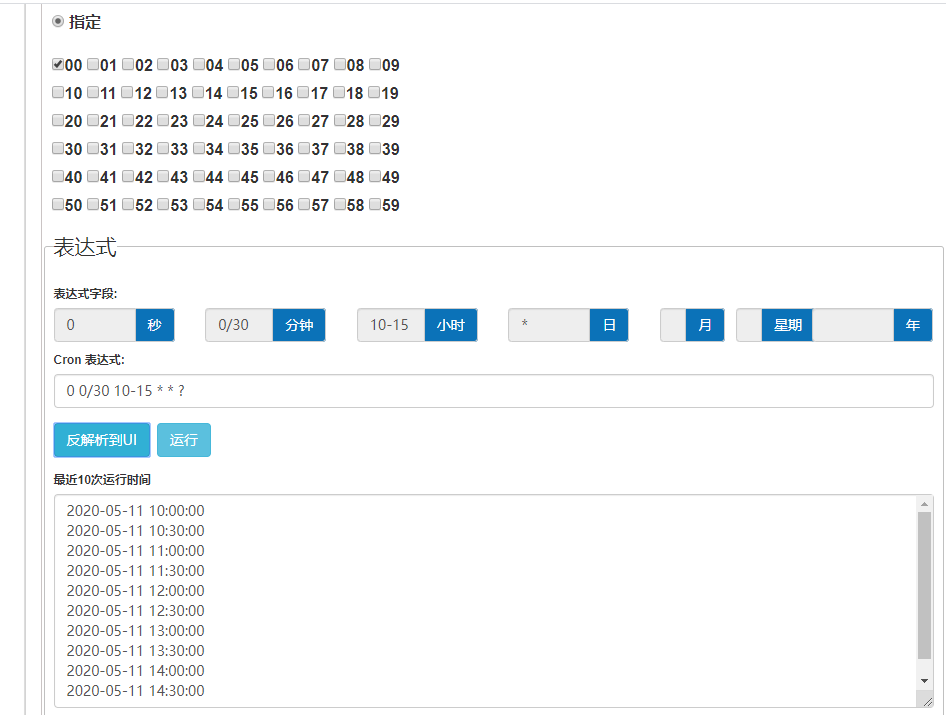
表达式生成、解析、反解析地址https://cron.qqe2.com/ https://qqe2.com/cron 示例如下
springboot(五)Scheduling demo的更多相关文章
- SpringBoot(五)_表单验证
SpringBoot(五)_表单验证 参数校验在我们日常开发中非常常见,最基本的校验有判断属性是否为空.长度是否符合要求等,在传统的开发模式中需要写一堆的 if else 来处理这些逻辑,很繁琐,效率 ...
- springboot(五)过滤器和拦截器
前言 过滤器和拦截器二者都是AOP编程思想的提现,都能实现诸如权限检查.日志记录等.二者有一定的相似之处,不同的地方在于: Filter是servlet规范,只能用在Web程序中,而拦截器是Sprin ...
- springBoot+mybatisPlus小demo
项目介绍:采用restful api进行接口规范 / 项目框架SpringBoot+mybatis Plus / 采用mysql进行数据存储 / 采用swaggerUI进行前后端业务分离式开发. 开发 ...
- Java学习之SpringBoot整合SSM Demo
背景:在Java Web中Spring家族有着很重要的地位,之前JAVA开发需要做很多的配置,一堆的配置文件和部署调试一直是JavaWeb开发中的一大诟病,但现在Spring推出了SpringBoot ...
- 第2章 构建springboot工程 2-1 构建SpringBoot第一个demo
以后的趋势肯定是以一个微服务为主导的, Spring-Boot的指导 Maven整个环境构建之前的整个项目其实是一个很普通的J2SE项目,它构建完之后会进行重构,重构为Maven的一个项目路径.可以看 ...
- SpringBoot整合Swagger2(Demo示例)
写在前面 由于公司项目采用前后端分离,维护接口文档基本上是必不可少的工作.一个理想的状态是设计好后,接口文档发给前端和后端,大伙按照既定的规则各自开发,开发好了对接上了就可以上线了.当然这是一种非常理 ...
- SpringBoot(五) -- SpringBootWeb登录示例
一.解决index.html访问 在SpringBoot中默认访问的首页是静态资源文件夹下的index.html,无法被Thymeleaf模板引擎解析,因此我们可以定义一个controller将默认请 ...
- SpringBoot(五):@ConfigurationProperties配置参数绑定
在springmvc或其他ssh框架中如果我们要实现一个配置参数的加载,需要使用代码实现读取properties文件等操作,或者需要使用其他属性@value(name="username&q ...
- spring-boot(五) RabbitMQ详解 定时任务
学习文章来自:springboot(八):RabbitMQ详解 springboot(九):定时任务 RabbitMQ 即一个消息队列,主要是用来实现应用程序的异步和解耦,同时也能起到消息缓冲,消息分 ...
随机推荐
- 安装jdk-windows系统
1. 明确需要安装的jdk版本,注意jdk存在小版本号,例如jdk1.7_51,如果不清楚小版本号的话建议安装最新版本的jdk: 2. 打开cmd命令窗口,输入java -version查看本机是否安 ...
- kubernetes备份恢复之velero
Velero备份.恢复.迁移Kubernetes集群 Velero简介 Velero 地址:https://github.com/vmware-tanzu/velero Velero属于VMWare开 ...
- ubuntu安装mysql5.6
安装mysql5.6在ubuntu上安装mysql5.6的版本 1.添加mysql5.6的源 sudo apt-get install software-properties-common sudo ...
- Python+Selenium+Unittest实现PO模式web自动化框架(3)
1.Outputs目录下的具体目录功能 2.logs目录 logs目录是用于存放log日志的一个目录. 2.reports目录 reports目录是用于存放测试报告的. 3.screenshots目录 ...
- Mac 禁用动画
# opening and closing windows and popovers defaults write -g NSAutomaticWindowAnimationsEnabled -boo ...
- JavaScript 实现排序算法
参考文章: 十大经典排序算法动画,看我就够了! 1. 冒泡排序 思路 比较所有相邻元素,如果第一个比第二个大,则交换它们 一轮下来,可以保证最后一个数是最大的 执行n-1轮,就可以完成排序 代码 Ar ...
- 一:整合shiro
整合shiro 1.原生的整个 1.1 创建项目 1.2 创建Realm 1.3 配置shiro 2.使用Shiro Starter 2.1 项目创建 2.2 创建Realm 2.3 配置Shiro ...
- Struts 2学习(二)
文章目录 @[toc] #动态结果 配置时不知道执行后的结果是哪一个,运行时才知道哪个结果作为视图显示给用户. #全局结果 全局就结果可满足一个包中多个Action共享一个结果. 全局结果位于pack ...
- isEmpty isBlank 区别
Sring test=" "; 这个 isblank 返回 true 但是 isEmpty 返回 false 所以: 一般用 isBlank 就可以了 ,是逐个字符检查 pu ...
- python--函数、参数、名称空间与作用域、匿名函数、内置函数、闭包
python函数 函数定义 def welcome(): print('hello world!!') welcome() #函数调用 ...运行结果 hello world!! 函数定义和编写原则: ...