
熔断监控面板(Hystrix Dashboard)
Hystrix Dashboard
Hystrix-dashboard是一款针对Hystrix进行实时监控的工具,通过Hystrix Dashboard我们可以在直观地看到各Hystrix Command的请求响应时间, 请求成功率等数据。
添加依赖
我们新建一个工程 spring-cloud-consul-monitor,修改 pom 文件,添加相关依赖。
pom.xml

    <dependencies>

        <dependency>

            <groupId>org.springframework.boot</groupId>

            <artifactId>spring-boot-starter-actuator</artifactId>

        </dependency>

        <dependency>

            <groupId>org.springframework.cloud</groupId>

            <artifactId>spring-cloud-starter-netflix-hystrix-dashboard</artifactId>

        </dependency>

    </dependencies>
启动类
在启动类中添加注解 @EnableHystrixDashboard 开启熔断监控支持。
ConsuleMonitorApplication.java
package com.louis.spring.cloud.consul.monitor;

import org.springframework.boot.SpringApplication;

import org.springframework.boot.autoconfigure.SpringBootApplication;

import org.springframework.cloud.netflix.hystrix.dashboard.EnableHystrixDashboard;

@EnableHystrixDashboard

@SpringBootApplication

public class ConsuleMonitorApplication {

    public static void main(String[] args) {

        SpringApplication.run(ConsuleMonitorApplication.class, args);

    }

}
修改配置
修改配置文件,配置启动端口和应用名称。
application.yml
server:

  port: 8531

spring:

  application:

    name: spring-cloud-consul-monitor
配置监控路径
注意,如果你使用的是2.x等比较新的版本,需要在 Hystrix 的消费端配置监控路径,我们这里消费端是 spring-cloud-consul-consumer, 所以修改它的启动类。
ConsuleConsumerApplication.java
    // 此配置是为了服务监控而配置,与服务容错本身无关,

    // ServletRegistrationBean因为springboot的默认路径不是"/hystrix.stream",

    // 只要在自己的项目里配置上下面的servlet就可以了

    @Bean

    public ServletRegistrationBean getServlet() {

        HystrixMetricsStreamServlet streamServlet = new HystrixMetricsStreamServlet();

        ServletRegistrationBean registrationBean = new ServletRegistrationBean(streamServlet);

        registrationBean.setLoadOnStartup(1);

        registrationBean.addUrlMappings("/hystrix.stream");

        registrationBean.setName("HystrixMetricsStreamServlet");

        return registrationBean;

    }
测试效果
先后启动 spring-cloud-consul-producer、 spring-cloud-consul-consumer、spring-cloud-consul-monitor 服务。
访问 http://localhost:8531/hystrix,会看到如下图所示界面。

此时没有任何具体的监控信息,需要输入要监控的消费者地址及监控信息的轮询时间和标题。
Hystrix Dashboard 共支持三种不同的监控方式:
单体Hystrix 消费者:通过URL http://hystrix-app:port/hystrix.stream 开启,实现对具体某个服务实例的监控。
默认集群监控:通过URL http://turbine-hostname:port/turbine.stream 开启,实现对默认集群的监控。
自定集群监控:通过URL http://turbine-hostname:port/turbine.stream?cluster=[clusterName] 开启,实现对clusterName集群的监控。
我们这里现在是对单体 Hystrix 消费者的监控,后面整合 Turbine 集群的时候再说明后两种的监控方式。
我们先访问 http://localhost:8521/feign/call, 查看要监控的服务是否可以正常访问。
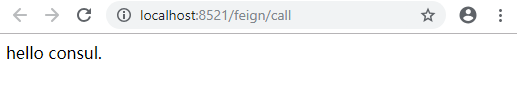
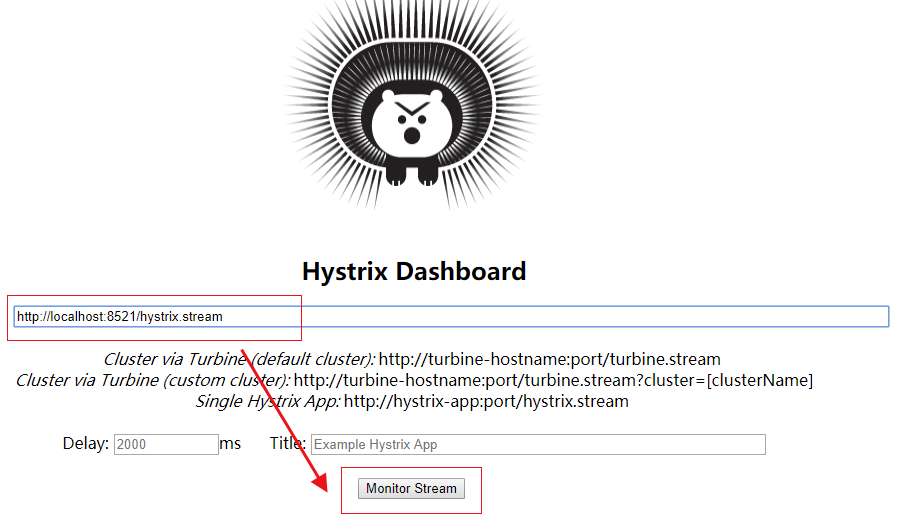
确认服务可以正常访问之后,在监控地址内输入 http://localhost:8521/hystrix.stream,然后点击 Monitor Stream 开始监控。
刚进去,页面先显示 loading... 信息, 多次访问 http://localhost:8521/feign/call 之后,统计图表信息如下图所示。
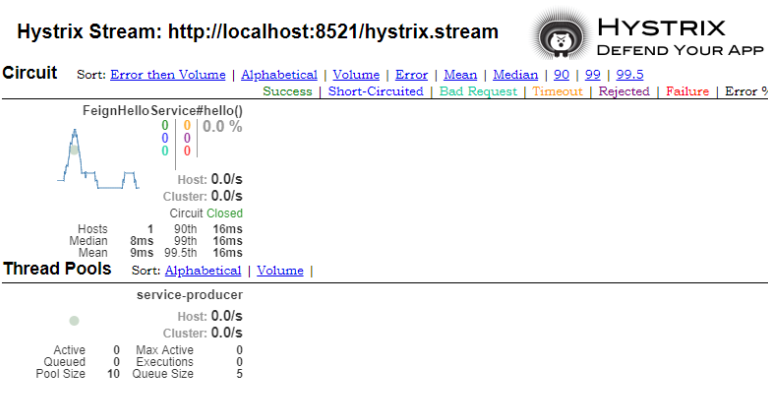
各个指标的含义参见下图。

熔断监控面板(Hystrix Dashboard)的更多相关文章
- spring cloud Hystrix监控面板Hystrix Dashboard和Turbine
我们提到断路器是根据一段时间窗内的请求情况来判断并操作断路器的打开和关闭状态的.而这些请求情况的指标信息都是HystrixCommand和HystrixObservableCommand实例在执行过程 ...
- SpringCloud断路器监控面板——Hystrix Dashboard
一.简介 Hystrix Dashboard是Hystrix的一个组件,Hystrix Dashboard提供一个断路器的监控面板,可以使我们更好的监控服务和集群的状态,仅仅使用Hystrix Das ...
- Spring Boot + Spring Cloud 构建微服务系统(五):熔断监控面板(Hystrix Dashboard)
Hystrix Dashboard Hystrix-dashboard是一款针对Hystrix进行实时监控的工具,通过Hystrix Dashboard我们可以在直观地看到各Hystrix Comma ...
- 006服务监控看板Hystrix Dashboard
1.POM配置 和普通Spring Boot工程相比,仅仅添加了Hystrix Dashboard和Spring Boot Starter Actuator依赖 <dependencies> ...
- 断路器监控(Hystrix Dashboard)
继上一篇http://www.cnblogs.com/EasonJim/p/7613595.html介绍了断路器之后,其实它还提供了一个管理页面来监控这些应用的调用数据. 首先,我是基于上一个例子Zo ...
- [Spring cloud 一步步实现广告系统] 19. 监控Hystrix Dashboard
在之前的18次文章中,我们实现了广告系统的广告投放,广告检索业务功能,中间使用到了 服务发现Eureka,服务调用Feign,网关路由Zuul以及错误熔断Hystrix等Spring Cloud组件. ...
- Spring Cloud学习笔记【五】Hystrix Dashboard监控面板
ystrix除了隔离依赖服务的调用以外,Hystrix 还提供了准实时的调用监控(Hystrix Dashboard),Hystrix 会持续地记录所有通过 Hystrix 发起的请求的执行信息,并以 ...
- spring cloud深入学习(六)-----熔断监控Hystrix Dashboard和Turbine
Hystrix-dashboard是一款针对Hystrix进行实时监控的工具,通过Hystrix Dashboard我们可以在直观地看到各Hystrix Command的请求响应时间, 请求成功率等数 ...
- 玩转Spring Cloud之熔断降级(Hystrix)与监控
本文内容导航目录: 前言:解释熔断降级一.搭建服务消费者项目,并集成 Hystrix环境 1.1.在POM XML中添加Hystrix依赖(spring-cloud-starter-netflix-h ...
随机推荐
- WebAPI使用Token进行验证
1.需要用到的包 可以先敲代码 发现没有包在添加 2.在项目根目录下Web层添加“Startup”类 这个是Token的配置 3.在WebAPI层添加WebApiConfig类 也是Tok ...
- Meta referrer标签的,可以防止CSRF的攻击
Meta referrer标签的简要介绍 在某些情况下,出于一些原因,网站想要控制页面发送给 server 的 referer 信息的情况下,可以使用这一 referer metadata 参数. 参 ...
- python 汉字编码问题
问题描述:我要判断的两个字符串是否相等(‘区站号’==‘区站号’),第一个值是我从txt文件导入的数据,第二个值是我自己定义的并使用decode('utf-8')得到的,如果你用print函数打印这两 ...
- office2016如何激活
office2016如何激活 一.总结 一句话总结:office2016没有激活成功,下了一个office2013破解版 office2013破解版 二.自己做法 三中的方法点赞蛮多的(100多个), ...
- boke练习: springboot整合springSecurity出现的问题,post,delete,put无法使用
springboot 与 SpringSecurity整合后,为了防御csrf攻击,只有GET|OPTIONS|HEAD|TRACE|CONNECTION可以通过. 其他方法请求时,需要有token ...
- blast | diamond 输出结果选择和解析 | 比对
之前的文章:构建NCBI本地BLAST数据库 (NR NT等) | blastx/diamond使用方法 | blast构建索引 | makeblastdb 本地运行blast时,需要指定out fo ...
- DRF之简介以及序列化操作
1. Web应用模式. 在开发Web应用中,有两种应用模式: 前后端不分离 2.前后端分离 2. api接口 为了在团队内部形成共识.防止个人习惯差异引起的混乱,我们需要找到一种大家都觉得很好的接口实 ...
- First Bad Version leetcode java
问题描述: You are a product manager and currently leading a team to develop a new product. Unfortunately ...
- Spring boot(四)thymeleaf使用介绍
在上篇文章springboot(二):web综合开发中简单介绍了一下thymeleaf,这篇文章将更加全面详细的介绍thymeleaf的使用.thymeleaf 是新一代的模板引擎,在spring4. ...
- Matlab:非线性热传导(抛物方程)问题
函数文件1:real_fun.m function f=real_fun(x0,t0) %精确解 f=4*x0*(1-x0)*sin(t0); 函数文件2:F.m function f=F(N,u,U ...