
是时候扔掉cmder, 换上Windows Terminal
作为一个Windows的长期用户,一直没有给款好用的终端,知道遇到了 cmder,它拯救一个习惯用Windows敲shell命令的人。

不用跟我安利macOS真香!公司上班一直用macOS,一方面确实更加习惯windows下面学习, 另一方面是上课需要Windows QQ共享桌面。
windows Terminal 1.0发布,那么是时候和 cmder 说再见了。
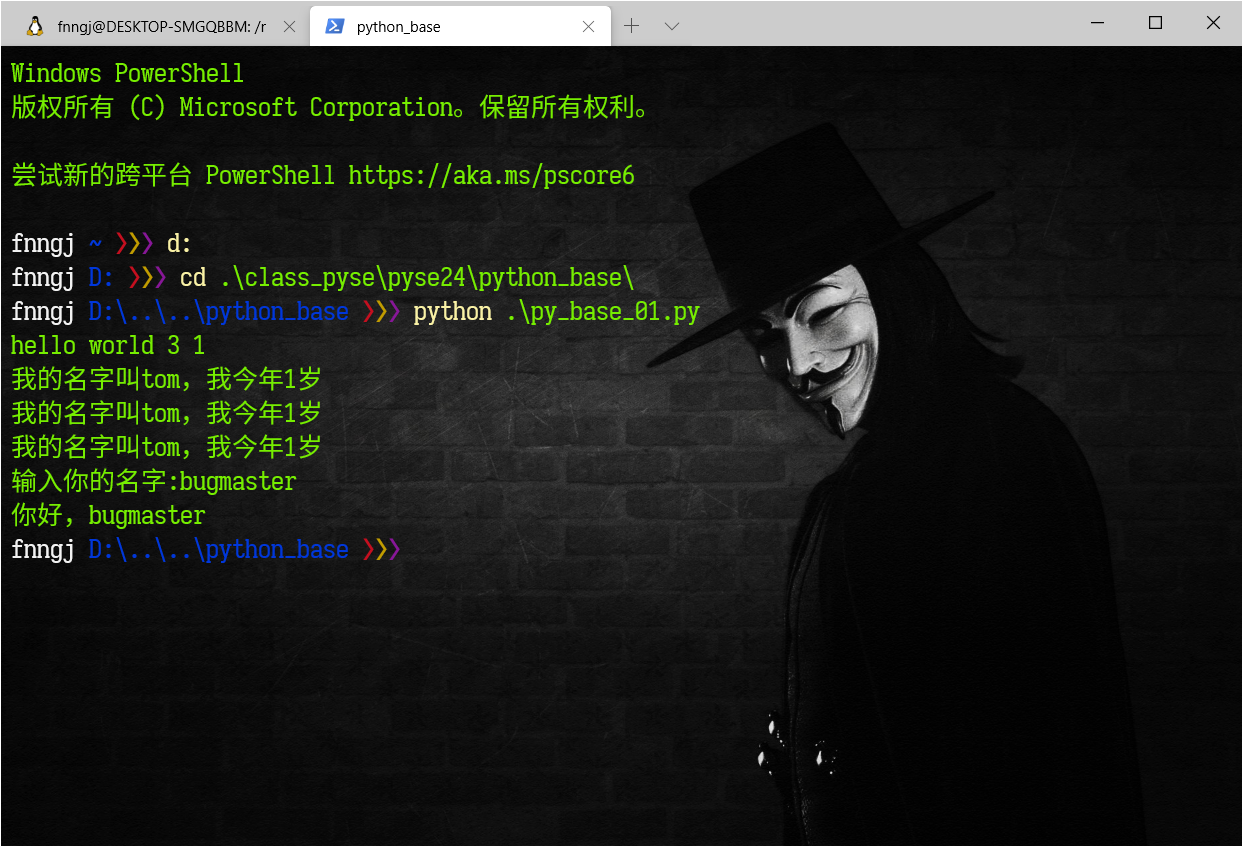
不过需要做一些配置和美化。
美化主题
- 安装posh-git和oh-my-posh
> Install-Module posh-git -Scope CurrentUser

> Install-Module oh-my-posh -Scope CurrentUser
- 启用默认设置
> Set-Prompt
- 设置主题:
> Set-Theme Sorin
oh-my-posh 支持十几种主题:
> Set-Theme

位于命令管道位置 1 的 cmdlet Set-Theme

请为以下参数提供值:

name: ?

警告: Theme ? not found. Available themes are:

Name                  Type     Location

----                  ----     --------

Agnoster              Defaults C:\Users\fnngj\Documents\WindowsPowerShell\Modules\oh-my-posh\2.0.412\Themes\Agnoster...

AgnosterPlus          Defaults C:\Users\fnngj\Documents\WindowsPowerShell\Modules\oh-my-posh\2.0.412\Themes\Agnoster...

Avit                  Defaults C:\Users\fnngj\Documents\WindowsPowerShell\Modules\oh-my-posh\2.0.412\Themes\Avit.psm1

Darkblood             Defaults C:\Users\fnngj\Documents\WindowsPowerShell\Modules\oh-my-posh\2.0.412\Themes\Darkbloo...

Fish                  Defaults C:\Users\fnngj\Documents\WindowsPowerShell\Modules\oh-my-posh\2.0.412\Themes\Fish.psm1

Honukai               Defaults C:\Users\fnngj\Documents\WindowsPowerShell\Modules\oh-my-posh\2.0.412\Themes\Honukai....

Paradox               Defaults C:\Users\fnngj\Documents\WindowsPowerShell\Modules\oh-my-posh\2.0.412\Themes\Paradox....

Powerlevel10k-Classic Defaults C:\Users\fnngj\Documents\WindowsPowerShell\Modules\oh-my-posh\2.0.412\Themes\Powerlev...

Powerlevel10k-Lean    Defaults C:\Users\fnngj\Documents\WindowsPowerShell\Modules\oh-my-posh\2.0.412\Themes\Powerlev...

PowerLine             Defaults C:\Users\fnngj\Documents\WindowsPowerShell\Modules\oh-my-posh\2.0.412\Themes\PowerLin...

pure                  Defaults C:\Users\fnngj\Documents\WindowsPowerShell\Modules\oh-my-posh\2.0.412\Themes\pure.psm1

robbyrussell          Defaults C:\Users\fnngj\Documents\WindowsPowerShell\Modules\oh-my-posh\2.0.412\Themes\robbyrus...

Sorin                 Defaults C:\Users\fnngj\Documents\WindowsPowerShell\Modules\oh-my-posh\2.0.412\Themes\Sorin.psm1

tehrob                Defaults C:\Users\fnngj\Documents\WindowsPowerShell\Modules\oh-my-posh\2.0.412\Themes\tehrob.psm1
- 使用记事本打开PS配置文件(如无则创建该文件)
> if (!(Test-Path -Path $PROFILE )) { New-Item -Type File -Path $PROFILE -Force } notepad $PROFILE
随后,在打开的记事本窗口里,在文末加入下面内容,以让Powershell在启动之时应用主题,然后保存。(仅对当前用户生效)
Import-Module posh-git

Import-Module oh-my-posh

Set-Theme Sorin
设置字体
如果你设置的主题出现乱码,可以安装SarasaGothic字体库。
> scoop bucket add nerd-fonts

> scoop install SarasaGothic
或者直接到github下载:
https://github.com/be5invis/Sarasa-Gothic/releases
然后,将字体库解压 复制到 C:\Windows\Font\ 目录。
Windows Terminal 设置
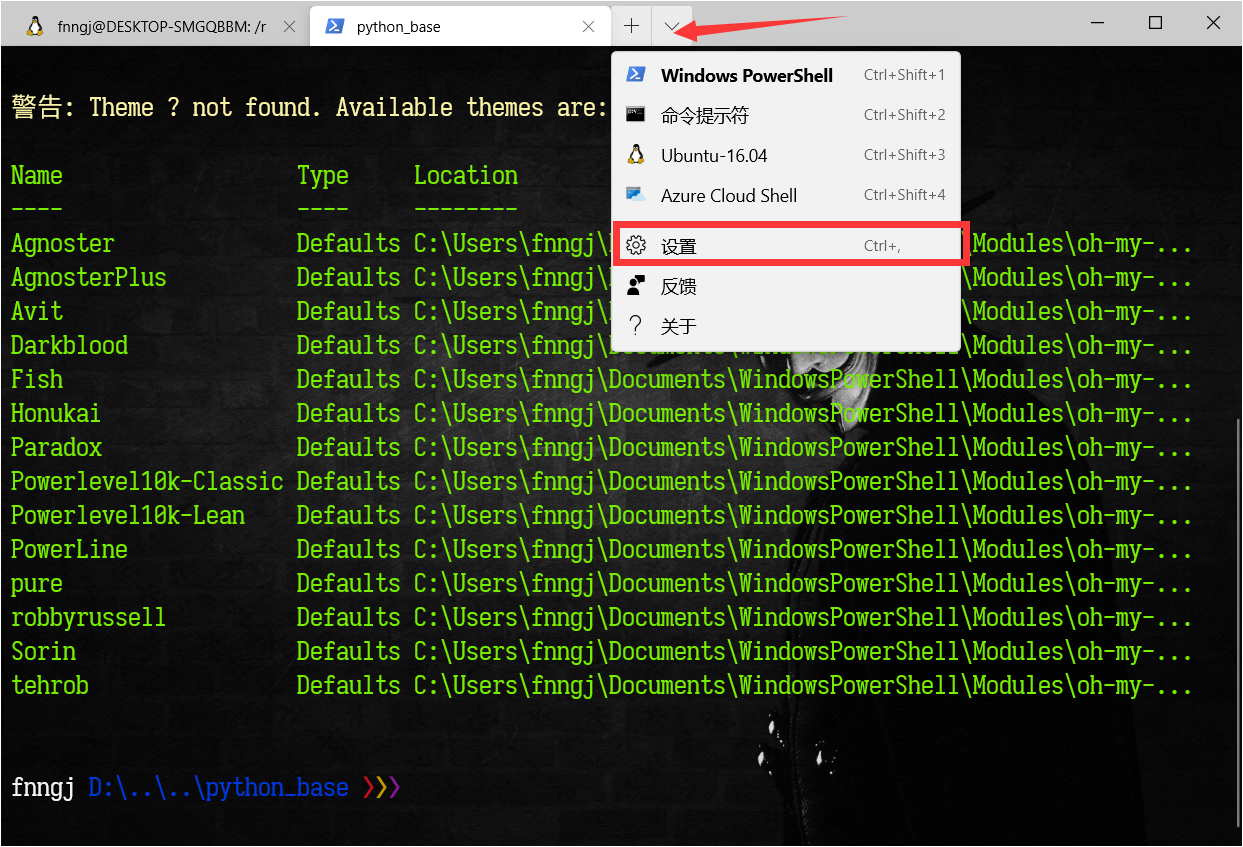
点击 Windows Terminal 向下箭头,选择设置,将会找打开一个配置文件。
// This file was initially generated by Windows Terminal 1.0.1401.0

// It should still be usable in newer versions, but newer versions might have additional

// settings, help text, or changes that you will not see unless you clear this file

// and let us generate a new one for you.

// To view the default settings, hold "alt" while clicking on the "Settings" button.

// For documentation on these settings, see: https://aka.ms/terminal-documentation

{

    "$schema": "https://aka.ms/terminal-profiles-schema",

    "defaultProfile": "{61c54bbd-c2c6-5271-96e7-009a87ff44bf}",

    // You can add more global application settings here.

    // To learn more about global settings, visit https://aka.ms/terminal-global-settings

    // If enabled, selections are automatically copied to your clipboard.

    "copyOnSelect": false,

    // If enabled, formatted data is also copied to your clipboard

    "copyFormatting": false,

    // A profile specifies a command to execute paired with information about how it should look and feel.

    // Each one of them will appear in the 'New Tab' dropdown,

    //   and can be invoked from the commandline with `wt.exe -p xxx`

    // To learn more about profiles, visit https://aka.ms/terminal-profile-settings

    "profiles": {

        "defaults": {

            // Put settings here that you want to apply to all profiles.

            "fontFace": "Sarasa Term Slab SC",  // 选择字体,前面安装的

            "backgroundImage" : "C:/Users/fnngj/Pictures/bg.jpg",  // 设置背景图片

            "backgroundImageOpacity" : 0.9, // 背景图片透明度

            "fontSize" : 16,  // 字体大小

            "foreground": "#76EE00"  //字体颜色

        },

       //...
当然,你也可以在继续安装vim 工具,来更加符合你的 shell习惯。
是时候扔掉cmder, 换上Windows Terminal的更多相关文章
- Windows Terminal 安装及美化
windows terminal 是今年微软Build大会上推出的一款的全新终端,用来代替cmder之类的第三方终端.具有亚克力透明.多标签.Unicode支持(中文,Emoji).自带等宽字体等这些 ...
- 黑科技抢先尝(续2) - Windows terminal中Powershell Tab的极简美化指南
目录 安装python 安装git 安装powerline字体 主题定制 安装oh-my-posh 查看策略组的执行权限 使用choco 安装终端模拟器 - ConEmu 优化 PowerShell ...
- 黑科技抢先尝(续) - Windows terminal中WSL Linux 终端的极简美化指南
目录 修改默认源,为apt-get安装提速 安装python 和 python pip 安装 zsh 安装powerline-font中的特定字体 安装powerline-shell 修改~目录下的配 ...
- 终于等到你!微软正式上线 Windows Terminal 预览版
前一段时间,一直在知乎.技术社区收到技术小伙伴们的终极拷问:微软Build 大会上提到的**6月中旬**要上Windows store 的 Windows Terminal 到底啥时候可以用到呀? 有 ...
- Windows Store可以下载安装Windows Terminal (Preview)
Windows Terminal (Preview)已经可以在Windows Store下载安装. Windows Terminal (Preview)运行要求为: Windows 10 版本 183 ...
- windows linux 子系统及windows terminal的使用。
windows linux 子系统及windows terminal的使用. windows linux (wsl) 其实windows早就为我们准备好了子系统,但是我们的应用商店经常挂掉.因此都用不 ...
- Windows Terminal (Preview)治好了cmd,powershell的癌症
前言 话说n年前,我想开发一款powershell麻将游戏,但是发现命令行下无法显示麻将牌这种特殊符号. 经过研究发现,这是4字节的utf16le字符串.而powershell依赖的渲染引擎,只能渲染 ...
- 提前体验让人"回归Windows怀抱"的Windows Terminal
前言 在一年一度的微软开发者大会Build 2019登场的Windows Terminal饱受好评,大家对其也是充满了兴趣和热情,程序员的朋友圈都被微软发布的最新终端 windows Terminal ...
- Windows Terminal Preview v0.7 Release
Windows Terminal Preview v0.7 Release The following key bindings are included by default within this ...
随机推荐
- ASP.NET Core 包管理工具(4)
之前忘记介绍ASP.NET Core静态文件wwwroot了.再来补充一下.步骤比较简单在项目上右击添加文件夹输入文件名称 wwwroot就搞定了.这个文件主要是放置一些静态文件的,比如css.js. ...
- 整理高度塌陷与BFC
当面试官问道你高度塌陷时,人们第一想到的方法一定是 .clearfix::after { content: ''; display: block; clear: both; visibility: h ...
- wmic 内网使用
先决条件: 1.远程服务器启动Windows Management Instrumentation服务,开放TCP135端口,防火墙放开对此端口的流量(默认放开): 2.远程服务器的本地安全策略的“网 ...
- 手把手教你进行Scrapy中item类的实例化操作
接下来我们将在爬虫主体文件中对Item的值进行填充. 1.首先在爬虫主体文件中将Item模块导入进来,如下图所示. 2.第一步的意思是说将items.py中的ArticleItem类导入到爬虫主体文件 ...
- Java常用关键字总结
1.abstract abstract修饰类,表示抽象的意思,抽象类可以含有非抽象变量和成员变量,也可以有普通方法和构造方法,但是不能被实例化(接口),但是可以被子类继承. public abstra ...
- matlab读取csv文件并显示
传统的方式可以通过读取文件,然后处理字符串的方式对csv文件进行解析,在matlab中可以通过csvread函数读取csv文件,然后通过plot对数据进行显示,也可以对里面的函数进行分析: csv文件 ...
- [C#] StringFormat详解之文本方向、对齐
在使用GDI方式处理文本时,往往会用到StringFormat.里面的某些点有点反直觉,不够直观,所以本篇就通过图文的方式去讲解一下. 本篇内容仅涉及到文本方向.对齐的相关内容. 如有错误.不妥之处, ...
- [codeforces-542-C]YY?
链接:http://codeforces.com/problemset/problem/542/C 题意:对一个函数f(x),定义域[1,n], 令f(k,x) = f(f(f(f...f(x)))) ...
- VMware Centos7 NAT 无法上网的解决方法
问题描述: VMware下CentOS7使用NAT上网方式无法连网 解决方案: 网络设置为DHCP自动获取IP 查看主机(不是虚拟机)的相关服务是否打开,主要是VMware DHCP 和VMware ...
- supersqli
0x01 堆叠注入 1.定义与说明 在sql中,分号(;)表示一条sql语句的结束.在;结束之后继续构造下一条语句,会一起执行,因此为堆叠注入. union联合查询是将两条语句合并之后进行查询,uni ...