
QtGui.QProgressBar
A progress bar is a widget that is used when we process lengthy tasks. It is animated so that the user knows that the task is progressing. The QtGui.QProgressBar widget provides a horizontal or vertical progress bar in PyQt4 toolkit. The programmer can set the minimum and maximum value for the progress bar. The default values are 0 and 99.
#!/usr/bin/python

# -*- coding: utf-8 -*-

"""

ZetCode PyQt4 tutorial

This example shows a QtGui.QProgressBar widget.

author: Jan Bodnar

website: zetcode.com

last edited: September 2011

"""

import sys

from PyQt4 import QtGui, QtCore

class Example(QtGui.QWidget):

    def __init__(self):

        super(Example, self).__init__()

        self.initUI()

    def initUI(self):

        self.pbar = QtGui.QProgressBar(self)

        self.pbar.setGeometry(30, 40, 200, 25)

        self.btn = QtGui.QPushButton('Start', self)

        self.btn.move(40, 80)

        self.btn.clicked.connect(self.doAction)

        self.timer = QtCore.QBasicTimer()

        self.step = 0

        self.setGeometry(300, 300, 280, 170)

        self.setWindowTitle('QtGui.QProgressBar')

        self.show()

    def timerEvent(self, e):

        if self.step >= 100:

            self.timer.stop()

            self.btn.setText('Finished')

            return

        self.step = self.step + 1

        self.pbar.setValue(self.step)

    def doAction(self):

        if self.timer.isActive():

            self.timer.stop()

            self.btn.setText('Start')

        else:

            self.timer.start(100, self)

            self.btn.setText('Stop')

def main():

    app = QtGui.QApplication(sys.argv)

    ex = Example()

    sys.exit(app.exec_())

if __name__ == '__main__':

    main()
In our example we have a horizontal progress bar and a push button. The push button starts and stops the progress bar.
self.pbar = QtGui.QProgressBar(self)
This is a QtGui.QProgressBar constructor.
self.timer = QtCore.QBasicTimer()
To activate the progress bar, we use a timer object.
self.timer.start(100, self)
To launch a timer event, we call its start() method. This method has two parameters: the timeout and the object which will receive the events.
def timerEvent(self, e):

    if self.step >= 100:

        self.timer.stop()

        self.btn.setText('Finished')

        return

    self.step = self.step + 1

    self.pbar.setValue(self.step)
Each QtCore.QObject and its descendants have a timerEvent() event handler. In order to react to timer events, we reimplement the event handler.
def doAction(self):

    if self.timer.isActive():

        self.timer.stop()

        self.btn.setText('Start')

    else:

        self.timer.start(100, self)

        self.btn.setText('Stop')
Inside the doAction() method, we start and stop the timer.
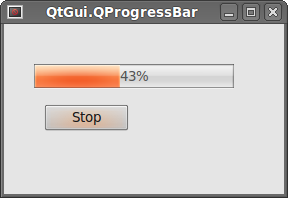 Figure: QtGui.QProgressBar
QtGui.QProgressBar的更多相关文章
- PyQt4进度条QProgressBar
当我们在处理一个好事较长的任务时,可能就会用到进度条部件.因为使用进度条可以形象告诉用户当前的人物正在进行中.PyQt4工具包提供了水平和垂直两种类型的进度条部件.我们可以设置进度条的最大和最小值,默 ...
- Pyqt Smtplib实现Qthread多线程发送邮件
一. smtplib 的介绍 smtplib.SMTP([host[, port[, local_hostname[, timeout]]]]) SMTP类构造函数,表示与SMTP服务器之间的连接 ...
- pyqt4_应用例子(计算器,对话框,进度条,日历等等)
sklearn实战-乳腺癌细胞数据挖掘(博客主亲自录制视频教程) https://study.163.com/course/introduction.htm?courseId=1005269003&a ...
- ZetCode PyQt4 tutorial widgets I
#!/usr/bin/python # -*- coding: utf-8 -*- """ ZetCode PyQt4 tutorial In this example, ...
- qt4.8转qt5.4
1.头文件包含 #include <QtGui/QProgressBar> #include <QtGui/QProgressDialog> #include ...
- PYQT4 Python GUI 编写与 打包.exe程序
工作中需要开发一个小工具,简单的UI界面可以很好的提高工具的实用性,由此开启了我的第一次GUI开发之旅,下面将自己学习的心得记录一下,也做为学习笔记吧!!! 参考:http://www.qaulau. ...
- PyQt4 进度条和日历 代码
# -*- coding: utf-8 -*- """ ------------------------------------------------- File Na ...
- 读Pyqt4教程,带你入门Pyqt4 _007
QSlider 滑块是由一个简单的滑柄的窗口组件.该滑柄可以前后拖动,通过这种方式我们可以为特定任务选择值.有时候使用滑块比简单提供数值或使用微调框(spin box)更自然. QLabel 显示文字 ...
- 【PyQt5-Qt Designer】QProgressBar() 进度条
QProgressBar() 进度条 QProgressBar简介 QProgressBar小部件提供了一个水平或垂直的进度条. 进度条用于向用户指示操作的进度,并向他们保证应用程序仍在运行. 进度条 ...
随机推荐
- [BZOJ3140][HNOI2013]消毒(二分图最小点覆盖)
3140: [Hnoi2013]消毒 Time Limit: 10 Sec Memory Limit: 128 MBSubmit: 1621 Solved: 676[Submit][Status] ...
- [转]php-fpm - 启动参数及重要配置详解
约定几个目录/usr/local/php/sbin/php-fpm/usr/local/php/etc/php-fpm.conf/usr/local/php/etc/php.ini 一,php-fpm ...
- 【8.15校内测试】【队列】【manacher】
dp??不能确定转移状态.考虑用优先队列储存最优决策点,可是发现当前选择最优不能保证最后最优,在后面可以将之前用过的替换过来. 比如数据: 3 5 4 6 只储存a[i]来决策不能延展到后面的状态,因 ...
- 3524: [Poi2014]Couriers -- 主席树
3524: [Poi2014]Couriers Time Limit: 20 Sec Memory Limit: 256 MB Description 给一个长度为n的序列a.1≤a[i]≤n.m组 ...
- 实用在线小工具 -- Google URL Shortener
实用在线小工具 -- Google URL Shortener 当你想分享一些你觉得有趣的东西,但是那个链接太长,以至于贴上去一大片.比如在微博上分享一张图片,然后贴上去图片的链接,url ...
- 2015 UESTC 搜索专题K题 秋实大哥の恋爱物语 kmp
秋实大哥の恋爱物语 Time Limit: 20 Sec Memory Limit: 256 MB 题目连接 http://acm.uestc.edu.cn/#/contest/show/61 De ...
- kali下更新软件时,总是报错,说下列签名无效 解决办法
解决办法就是重新获取下签名key wget -q -O - https://archive.kali.org/archive-key.asc | apt-key add
- h264 封装 RTMP中FLV数据的解析 rtmp协议简单解析以及用其发送h264的flv文件
一个完整的多媒体文件是由音频和视频2部分组成的.H264.Xvid等就是视频编码格式,MP3.AAC等就是音频编码格式.字幕文件只是其中附带部分. 把视频编码和音频编码打包成一个完整的多媒体文件,可以 ...
- U-Boot中的filesize环境变量
U-Boot中的环境命令可以使用$(filesize)来确定刚下载(传输)得到的文件大小. 因为使用类似tftp命令传输文件后,会自动更新filesize环境变量.如:setenv updateroo ...
- VC++ 6.0下OpengGL配置以及glut配置
转自:http://blog.sina.com.cn/s/blog_5f0cf7bd0100c9oa.html OpenGL官方网站(英文) http://www.opengl.org 下面我将对Wi ...