
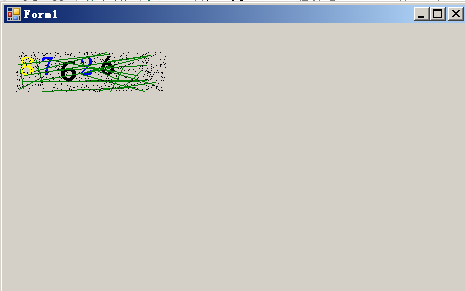
GDI+ 绘图教程 验证码
使用的 C# winform
using System;
using System.Collections.Generic;
using System.ComponentModel;
using System.Data;
using System.Drawing;
using System.Linq;
using System.Text;
using System.Threading.Tasks;
using System.Windows.Forms;

namespace GDI_
{
    public partial class Form1 : Form
    {
        public Form1()
        {
            InitializeComponent();
        }

        private void Form1_Load(object sender, EventArgs e)
        {
            // 一根笔 绘制直线的对象 pen 颜色 Brush Brushes SolidBrush color  一张纸(图面) Graphics  两点 Point

        }

        private void button1_Click(object sender, EventArgs e)
        {
            //创建GDI图面对象
            //Graphics g = new Graphics(); 没有定义构造函数
            //创对象
            // 1 在堆中开空间 2 在开辟的空间创对象 3 调用构造函数

            Graphics g = this.CreateGraphics();
            //创建画笔对象  画笔
            //1
            //Pen pen = new Pen(Brushes.Yellow);//Brush 点不出来 看复数
            //2 直接给笔上色
            Pen pen = new Pen(Color.Yellow);//
            //Pen pen = new Pen(new Brush(Color.Yellow));Brush 抽象类报错
            //创建两个点
            Point p1 = , );
            Point p2 = , );

            g.DrawLine(pen, p1, p2);
        }
        ;
        private void Form1_Paint(object sender, PaintEventArgs e)
        {
            i++;
            label1.Text = i.ToString();
            //创建GDI对象
            //Graphics g = new Graphics();
            //创对象
            // 1 在堆中开空间 2 在开辟的空间创对象 3 调用构造函数

            Graphics g = this.CreateGraphics();
            //创建画笔对象  画笔
            Pen pen = new Pen(Brushes.Yellow);// 复数形式 返回对象
            //创建两个点
            Point p1 = , );
            Point p2 = , );

            g.DrawLine(pen, p1, p2);

        }

        private void button2_Click(object sender, EventArgs e)
        {
            Graphics g = this.CreateGraphics();
            Pen pen = new Pen(Brushes.Yellow);
            Size si = , );
            Rectangle rec = , ), si); // 矩形对象
            g.DrawRectangle(pen, rec);
        }

        private void button3_Click(object sender, EventArgs e)
        {
            Graphics g = this.CreateGraphics();
            Pen pen = new Pen(Brushes.Blue);
            Size si = , );
            Rectangle rec = , ), si);
            g.DrawPie(pen, rec, , );//他要什么 我们就给什么
            //Draw 画  在图上绘制 Graphics

        }

        private void button4_Click(object sender, EventArgs e)
        {
            Graphics g = this.CreateGraphics();
            Font f = , FontStyle.Underline);
            g.DrawString(, ));
        }
    }
}

using System;
using System.Collections.Generic;
using System.ComponentModel;
using System.Data;
using System.Drawing;
using System.Linq;
using System.Text;
using System.Threading.Tasks;
using System.Windows.Forms;

namespace GDI_验证码
{
    public partial class Form1 : Form
    {
        public Form1()
        {
            InitializeComponent();
        }

        //点击更换验证码
        private void pictureBox1_Click(object sender, EventArgs e)
        {
            //1 产生随机数
            Random r = new Random();
            string str = null;
            ; i < ; i++)
            {
                , );
                str += rNumber;
            }
            //MessageBox.Show(str);
            // 画一个图片 把文本放到图片里面去
            //创建GDI对象
            Bitmap bmp = , );//创建位图
            //位图 操作系统中 默认的图片类型 其实就是位图(.bmp)
            Graphics g = Graphics.FromImage(bmp); //对象从图片来 就是在图片上绘制

            // 画数字
            ; i < ; i++)
            {
                Point p = , );
                string[] fonts = { "宋体", "微软雅黑", "黑体", "隶书", "仿宋" };
                Color[] colors = { Color.Yellow, Color.Blue, Color.Red, Color.Black, Color.Green };
                g.DrawString(str[i].ToString(), , )], , FontStyle.Bold), , )]), p);
            }

            //画线
            ; i < ; i++)
            {//线必须在验证码图片里面
                Point p1 = , bmp.Width), r.Next(, bmp.Height));
                Point p2 = , bmp.Width), r.Next(, bmp.Height));
                g.DrawLine(new Pen(Brushes.Green), p1, p2);
            }
            //画点
            ; i < ; i++)
            {
                //创建点
                Point p = , bmp.Width), r.Next(, bmp.Height));
                bmp.SetPixel(p.X, p.Y, Color.Black);//再在图上画点
            }

            //将图片镶嵌到picturebox中
            pictureBox1.Image = bmp;
        }
    }
}
GDI+ 绘图教程 验证码的更多相关文章
- VB6 GDI+ 入门教程[5] 基础绘图小结
http://vistaswx.com/blog/article/category/tutorial/page/2 VB6 GDI+ 入门教程[5] 基础绘图小结 2009 年 6 月 18 日 4条 ...
- VB6 GDI+ 入门教程[1] GDI+介绍
http://vistaswx.com/blog/article/category/tutorial/page/2 VB6 GDI+ 入门教程[1] GDI+介绍 2009 年 6 月 18 日 17 ...
- VB6 GDI+ 入门教程[2] GDI+初始化
http://vistaswx.com/blog/article/category/tutorial/page/2 VB6 GDI+ 入门教程[2] GDI+初始化 2009 年 6 月 18 日 7 ...
- VB6 GDI+ 入门教程[4] 文字绘制
http://vistaswx.com/blog/article/category/tutorial/page/2 VB6 GDI+ 入门教程[4] 文字绘制 2009 年 6 月 18 日 7条评论 ...
- VB6 GDI+ 入门教程[6] 图片
http://vistaswx.com/blog/article/category/tutorial/page/2 VB6 GDI+ 入门教程[6] 图片 2009 年 6 月 19 日 15条评论 ...
- 如何用GDI+画个验证码
如何使用GDI+来制作一个随机的验证码 绘制验证码之前先要引用 using System.Drawing; using System.Drawing.Drawing2D; 首先,先写一个方法来取得验证 ...
- MFC GDI绘图基础
一.关于GDI的基本概念 什么是GDI? Windows绘图的实质就是利用Windows提供的图形设备接口GDI(Graphics Device Interface)将图形绘制在显示器上. 在Wind ...
- VB6 GDI+ 入门教程[3] 笔、刷子、矩形、椭圆绘制
http://vistaswx.com/blog/article/category/tutorial/page/2 VB6 GDI+ 入门教程[3] 笔.刷子.矩形.椭圆绘制 2009 年 6 月 1 ...
- VB6 GDI+ 入门教程[7] Graphics 其他内容
http://vistaswx.com/blog/article/category/tutorial/page/2 VB6 GDI+ 入门教程[7] Graphics 其他内容 2009 年 9 月 ...
随机推荐
- 科大讯飞sdk语音合成工具类
注:主要是dll文件的配置 A:Java SDK 使用了 JNI 形式,在初始化 SDK 时,SDK 将加载共享库(Windows下为msc32.dll或msc64.dll文件,Linux下libms ...
- Scala API - 泛型
- IDEA的热部署设置方式
在这里只说一种简单的方式就是在idea中进行简单的设置就可以: 第一步:设置IDEA开启项目自动编译,进入设置找到Build,Execut, Deployment -> Compiler 勾选中 ...
- JAVA 基础编程练习题5 【程序 5 判断分数等级】
5 [程序 5 判断分数等级] 题目:利用条件运算符的嵌套来完成此题:学习成绩>=90 分的同学用 A 表示,60-89 分之间的用 B 表示, 60 分以下的用 C 表示. 程序分析:(a&g ...
- Spring MVC的多视图解析器配置及与Freemarker的集成
一.从freemarker谈起 Freemarker使用模板技术进行视图的渲染.自从看了Struts标签.Freemarker.JSTL的性能对比后,我毅然决定放弃Struts标签了!效率太差…… S ...
- TOMCAT web.xml 整理说明
JavaWeb项目中web.xml有关servlet的基本配置: 我们注意到,tomcat下的conf中也有一个web.xml文件,没错的,所有的JavaWeb项目中web.xml都继承自服务器下的w ...
- 【转】java获取当前年、月、日 、小时 、分钟、 秒、 毫秒
public class Test { /** * 英文简写(默认)如:2010-12-01 */ public static String FORMAT_SHORT = "yyyy-MM- ...
- node 笔记整理
node 合并多个请求的数据 function getList1(num) { var url= "netease/search?keyword=独孤天下&type=song& ...
- 《机器学习实战(基于scikit-learn和TensorFlow)》第七章内容学习心得
本章主要讲述了“集成学习”和“随机森林”两个方面. 重点关注:bagging/pasting.boosting.stacking三个方法. 首先,提出一个思想,如果想提升预测的准确率,一个很好的方法就 ...
- Android MVC MVP MVVM (一)
示例效果 一共三个控件,EditText,Button,TextView 成功显示账号信息,查询失败显示错误信息. <?xml version="1.0" encoding= ...