
python tkinter messagebox
 """messagebox消息框"""

 import tkinter as tk

 #导入messagebox

 import tkinter.messagebox as messagebox

 window = tk.Tk()

 window.title("My Window")

 window.geometry("400x400")

 var = tk.StringVar()

 var.set("Hello world")

 label = tk.Label(window,textvariable=var,font=("斜体",15),width=20,height=2,bg="black",fg="green")

 label.pack()

 def hit_me():

     global label #使用全局变量

     messagebox.showinfo(title="info",message="提示")

     messagebox.showwarning(title="warning",message="警告")

     messagebox.showerror(title="error",message="错误")

     """return yes or no"""

     question = messagebox.askquestion(title="question",message="问题")

     if question == "yes":

         var.set("you selection yes")

     else:

         var.set("you selection no")

     """return True or False"""

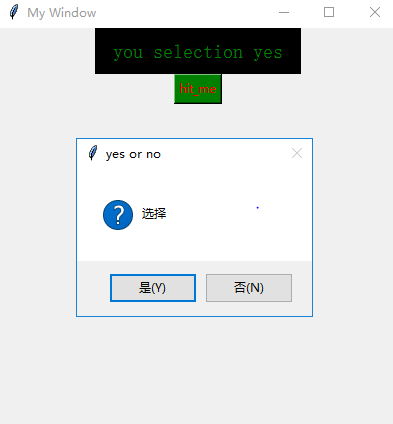
     askyesno = messagebox.askyesno(title="yes or no",message="选择")

     if askyesno == True:

         var.set("You selection True")

     else:

         var.set("You selection False")

     """return True or False"""

     askokcancel = messagebox.askokcancel(title="cancel",message="取消")

     if askokcancel == True:

         var.set("You selection cancel")

     else:

         var.set("You don't selection cancel")

     """return True False None"""

     result = messagebox.askyesnocancel(title="continue",message="Hello World")

     if result == True:

         var.set("You selection yes")

     elif result == False:

         var.set("You selection no")

     elif result == None:

         var.set("You selection cancel")

     """return True False"""

     try_cancel = messagebox.askretrycancel(title="try_cancel",message="Hello World")

     if try_cancel == True:

         var.set("You selection retry")

     else:

         var.set("You selection cancel")

 button = tk.Button(window,text="hit_me",command=hit_me,fg="red",bg="green")

 button.pack()

 window.mainloop()
python tkinter messagebox的更多相关文章
- Python的tkinter和tkinter.messagebox应用-鼠标和键盘命令绑定
__author__ = 'Administrator' from tkinter import * import tkinter.messagebox class MainWindow: def b ...
- Python之tkinter.messagebox弹窗
messagebox:tkinter的消息框.对话框 一.messagebox.showinfo(title='提示', message='错误') from tkinter import * fro ...
- Python基于tkinter.messagebox实现简易消息框、对话框
库导入: import tkinter import tkinter.messagebox 有关提示框: tkinter.messagebox.showinfo(title=None, message ...
- 关不掉的小姐姐程序python tkinter实现 学习---打包教程
首先,我们先准备两个.py文件,还要图片文件 代码//是我自己手写的,copy时记得删掉,不然有可能错误,比如中英文啥的 当然 一些语法的无问题就百度,都能给你答案 第一个.py ...
- Python Tkinter 学习成果:点歌软件music
笔者工作业余时间也没什么爱好,社交圈子也小,主要娱乐就是背着自己带电瓶的卖唱音响到住地附近找个人多的位置唱唱KtV. 硬件上点歌就用笔记本电脑,歌曲都是网上下载的mkv格式的含有两个音轨的视频.因此点 ...
- Python Tkinter 学习历程 一
一丶一个简单的程序 from tkinter import * #引入所有类#查看tk版本#tkinter._test() root = Tk(); #对这个类进行实例化 w1 = Label(roo ...
- python Tkinter之Button
Button小部件是一个标准的Tkinter的部件,用于实现各种按钮.按钮可以包含文本或图像,您可以调用Python函数或方法用于每个按钮. Tkinter的按钮被按下时,会自动调用该函数或方法. 该 ...
- python tkinter module的用法
tkinter windows下从python3.2版本之后是自动安装的. python3.3之后的引入方式: >>> import _tkinter>>> imp ...
- python gui tkinter快速入门教程 | python tkinter tutorial
本文首发于个人博客https://kezunlin.me/post/d5c57f56/,欢迎阅读最新内容! python tkinter tutorial Guide main ui messageb ...
随机推荐
- 在DIV中如何控制字的位置?
想到实现字体在div中处于上图(右下角)的位置的话,只需在字体样式上面加上这行代码就好了:style='margin-top:120px;height:20px;float:right;text-al ...
- MySQL批量更新字段url链接中的域名
1. 首先进行数据库备份 2. SQL语句 UPDATE 表名 SET 字段 = REPLACE(字段, '待更新的内容','替换值'); eg: UPDATE 98k_images SET url ...
- Java的家庭记账本程序(K)
日期:2019.3.10 博客期:043 星期日 呕吼~这里是编程菜鸟小Master,今天加油的把第二个模板套用了,更改了许多的设定,我想这一个程序的网页版也就到这里结束了,下面是一部分的展示图,想要 ...
- PDF怎样添加注释,PDF文件添加注释的方法
Word文件跟纸质文件想要添加注释相信大家都知道该怎么添加,那么现在也使用频率挺高的PDF格式的文件要怎么添加注释呢?添加注释的方法有什么呢?有许多的小伙伴们都想知道吧,今天小编就来跟大家分享一下,想 ...
- vue-cli 打包编译 -webkit-box-orient: vertical 被删除解决办法
前言 -webkit-box-orient: vertical在本地开发环境运行都没问题,一旦打包以后就会丢失 正文 原因: -webkit-box-orient: vertical 这个属性被 o ...
- HTML转义字符&npsp;表示non-breaking space,unicode编码为u'\xa0',超出gbk编码范围?
0.目录 1.参考2.问题定位不间断空格的unicode表示为 u\xa0',超出gbk编码范围?3.如何处理.extract_first().replace(u'\xa0', u' ').strip ...
- python基础篇_006_面向对象
面向对象 1.初识类: # 定义一个函数,我们使用关键字 def """ def 函数名(参数): '''函数说明''' 函数体 return 返回值 "&qu ...
- ISP PIPLINE (三) BPC
what is the Bad Pixel? 坏点为死点,也就是基本不随照度变化呈现光电线性转换的关系.表现为暗态常亮,亮态常暗. 坏点分类:静态坏点:亮坏点,暗坏点. ...
- Struts2深入
Struts2架构剖析 1.客户端向Servlet容器(如Tomcat)提交一个请求 2.请求经过一系列过滤器(如ActionContextCleanUp过滤器等) 3.核心控制器被调用,询问Acti ...
- 20181115 python-第一章学习小结part1
知识点回顾: 什么是编程: 写代码,让计算机执行任务 编程语言的分类与特性: 1.机器语言,即二进制语言,最帖近于机器底层,可以由计算机直接执行,故速度最快,但不适合开发. 2.汇编语言,直接将二进制 ...