
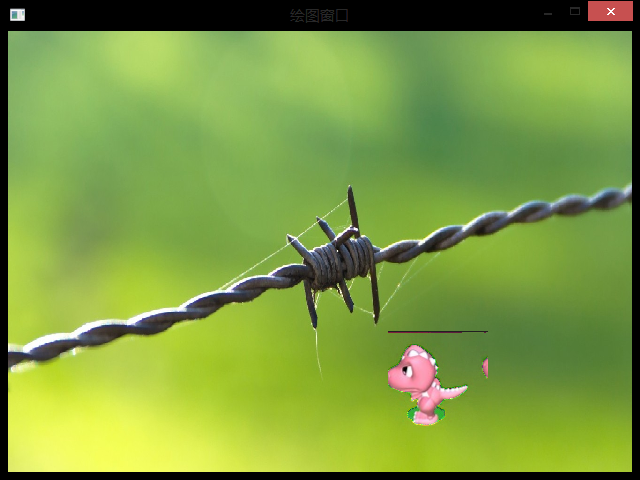
[游戏模版13] Win32 透明贴图 主角移动
>_<:just add previous two ways to achieve this new result

 // stdafx.h : include file for standard system include files,

 //  or project specific include files that are used frequently, but

 //      are changed infrequently

 //

 #if !defined(AFX_STDAFX_H__A9DB83DB_A9FD_11D0_BFD1_444553540000__INCLUDED_)

 #define AFX_STDAFX_H__A9DB83DB_A9FD_11D0_BFD1_444553540000__INCLUDED_

 #if _MSC_VER > 1000

 #pragma once

 #endif // _MSC_VER > 1000

 #define WIN32_LEAN_AND_MEAN        // Exclude rarely-used stuff from Windows headers

 // Windows Header Files:

 #include <windows.h>

 // C RunTime Header Files

 #include <stdlib.h>

 #include <malloc.h>

 #include <memory.h>

 #include <tchar.h>

 // Local Header Files

 // TODO: reference additional headers your program requires here

 //{{AFX_INSERT_LOCATION}}

 // Microsoft Visual C++ will insert additional declarations immediately before the previous line.

 #endif // !defined(AFX_STDAFX_H__A9DB83DB_A9FD_11D0_BFD1_444553540000__INCLUDED_)
StdAfx.h
 //{{NO_DEPENDENCIES}}

 // Microsoft Visual C++ generated include file.

 // Used by FE.RC

 //

 #define IDR_MAINFRAME                    128

 #define IDD_FE_DIALOG        102

 #define IDD_ABOUTBOX                    103

 #define IDS_APP_TITLE                    103

 #define IDM_ABOUT                        104

 #define IDM_EXIT                        105

 #define IDS_HELLO                        106

 #define IDI_FE                107

 #define IDI_SMALL                        108

 #define IDC_FE                109

 #define IDC_MYICON                        2

 #define IDC_STATIC                        -1

 // Next default values for new objects

 //

 #ifdef APSTUDIO_INVOKED

 #ifndef APSTUDIO_READONLY_SYMBOLS

 #define _APS_NEXT_RESOURCE_VALUE        129

 #define _APS_NEXT_COMMAND_VALUE         32771

 #define _APS_NEXT_CONTROL_VALUE         1000

 #define _APS_NEXT_SYMED_VALUE           110

 #endif

 #endif
resourse.h
#include "stdafx.h"

#include "resourse.h"

#define MAX_LOADSTRING 100

// Global Variables:

HINSTANCE hInst;                                // current instance

TCHAR szTitle[MAX_LOADSTRING];                                // The title bar text

TCHAR szWindowClass[MAX_LOADSTRING];                                // The title bar text

HBITMAP dra,bg;//背景和恐龙

HDC hdc,mdc,bufdc;//窗口DC.存储贴到窗口上的内容并透明处理.选取位图用的DC

HWND hWnd;

DWORD tPre,tNow,tCheck;

int x,y,num;//恐龙坐标

// Foward declarations of functions included in this code module:

ATOM                MyRegisterClass(HINSTANCE hInstance);

BOOL                InitInstance(HINSTANCE, int);

LRESULT CALLBACK    WndProc(HWND, UINT, WPARAM, LPARAM);

LRESULT CALLBACK    About(HWND, UINT, WPARAM, LPARAM);

void                MyPaint(HDC hdc);

//========================================================================================

int APIENTRY WinMain(HINSTANCE hInstance,

                     HINSTANCE hPrevInstance,

                     LPSTR     lpCmdLine,

                     int       nCmdShow)

{

     // TODO: Place code here.

    MSG msg;

    MyRegisterClass(hInstance);//调用函数向系统注册窗口类别,输入参数hInstance是目前运行程序的对象代码;

    // 调用InitInstance函数,进行初始化操作;

    if (!InitInstance (hInstance, nCmdShow))

    {

        return FALSE;

    }

    // 消息循环(通过消息循环来获取信息,

    //进行必要的键盘信息转换而后将控制权交给操作系统,

    //有操作系统决定哪个程序的消息处理函数处理消息

    while (msg.message!=WM_QUIT) //不是窗口结束消息WM_QUIT,则继续循环

    {

        if(PeekMessage(&msg,NULL,,,PM_REMOVE))//PeekMessage()函数来检测目前是否有消息处理(检测到0,否则1)

        {                                       //------------|不能用GetMassage()换,因为它只有取得WM_QUIT时才返回0,其他返回非0,错误返回-1

            TranslateMessage(&msg);//转换伪码及字符

            DispatchMessage(&msg);//将控制权交给系统,再有系统决定负责处理消息的程序;

        }

        else//当此次循环运行与上次绘图时间相差0.1秒时再进行重绘操作

        {

            tNow=GetTickCount();//取得从开始到现在运行的时间百万分之一秒

            if(tNow-tPre>=)MyPaint(hdc);    //tPre前次绘图的时间;计算上次绘图到这次循环之间的时间

        }                                   //------------|若相差100个单位进行一次绘图操作,通过这

    }                                       //------------|个操作可以调整运行快慢

    return msg.wParam;

}

//=====================================================================================

//=============================================================================================

//在建立程序窗口实体之前,必须先定义一个窗口类别,其中包含所要建立窗口的信息,

//并向系统注册,这里的MyRegisterClass函数就是进行定义及注册窗口类别的函数。

//==============================================================================================

ATOM MyRegisterClass(HINSTANCE hInstance)

{

    WNDCLASSEX wcex;            //申请一个窗口类别“WNDCLASSEX”和结构”wcex“

                                //--------------------------------------------------------------

                                //定义vcex结构的各项信息,其中设定信息处理函数(lpfnWndProc)

                                //为WNDPROC,类别名称为(lpszClassName)为”fe";

                                //--------------------------------------------------------------

    wcex.cbSize = sizeof(WNDCLASSEX);

    wcex.style            = CS_HREDRAW | CS_VREDRAW;

    wcex.lpfnWndProc    = (WNDPROC)WndProc;

    wcex.cbClsExtra        = ;

    wcex.cbWndExtra        = ;

    wcex.hInstance        = hInstance;

    wcex.hIcon            = NULL;

    wcex.hCursor        = NULL;

    wcex.hCursor        = LoadCursor(NULL,IDC_ARROW);

    wcex.hbrBackground    = (HBRUSH)(COLOR_WINDOW+);

    wcex.lpszMenuName    = NULL;

    wcex.lpszClassName    = "fe";

    wcex.hIconSm        = NULL;

    return RegisterClassEx(&wcex);//调用RegisterClassEx函数注册类别,返回一个“ATOM"形态的字符串

                                  //此字符串即为类别名称”fe";

}

//============================================================================================

//============================================================================================

//按照前面所定义的窗口类别来建立并显示实际的程序窗口

//============================================================================================

BOOL InitInstance(HINSTANCE hInstance, int nCmdShow)

{

   char filename[]="";

   HBITMAP bmp;

   hInst = hInstance; // 把instance handle 储存在全局变量中;

   hWnd = CreateWindow("fe","绘图窗口",WS_OVERLAPPEDWINDOW,

      CW_USEDEFAULT, , CW_USEDEFAULT, , NULL, NULL, hInstance, NULL);

                      //-----------------------------------------------

                      //调用CreateWindow函数来建立一个窗口对象

                      //第一个参数就是窗口建立依据的类别名称

                      //-----------------------------------------------

   if (!hWnd)

   {

      return FALSE;

   }

   //------------------------------------------------

   //设定窗口的位置及窗口的大小,然后绘制显示在设备上

   //-------------------------------------------------

   MoveWindow(hWnd,,,,,true);//位置及大小

   ShowWindow(hWnd, nCmdShow);//改定窗口显示时的状态

   UpdateWindow(hWnd);//将窗口绘制在显示设备上

   hdc=GetDC(hWnd);

   mdc=CreateCompatibleDC(hdc);

   bufdc=CreateCompatibleDC(hdc);

   bmp=CreateCompatibleBitmap(hdc,,);//后面的位图处理是在bmp中进行

   SelectObject(mdc,bmp);

   dra=(HBITMAP)LoadImage(NULL,"dra.bmp",IMAGE_BITMAP,,,LR_LOADFROMFILE);

   bg=(HBITMAP)LoadImage(NULL,"bg.bmp",IMAGE_BITMAP,,,LR_LOADFROMFILE);

   num=;

   x=;//起始坐标

   y=;

   SetTimer(hWnd,,,NULL);

   MyPaint(hdc);

   return TRUE;

}

//============================================================================================

//============================================================================================

//

//============================================================================================

void MyPaint(HDC hdc)

{

    if(num==)num=;

    if(tNow-tCheck>=)//判断此次绘图时间由前一秒算起是否已经达到1秒钟的时间间隔

    {

        tCheck=tNow;//并重设下一次起始时间

    }

    SelectObject(bufdc,bg);//在mdc上贴上背景图

    BitBlt(mdc,,,,,bufdc,,,SRCCOPY);

    SelectObject(bufdc,dra);//在mdc上透明处理

    BitBlt(mdc,x,y,,,bufdc,num*,,SRCAND);

    BitBlt(mdc,x,y,,,bufdc,num*,,SRCPAINT);

    BitBlt(hdc,,,,,mdc,,,SRCCOPY);//将最后的画面显示在窗口上

    tPre=GetTickCount();//记录此次绘图的时间

    num++;

    x-=;//记录下次贴图的坐标

    if(x<=-)x=;

}

//============================================================================================

//============================================================================================

//在前面定义类别的时候把WndProc定义为消息处理函数(当某些外部消息发生时,会按消息的类型

//来决定该如何进行处理。此外该函数也是一个回叫函数(CALLBACK)(windows系统函数)每一个

//程序都会接收信息,选择性接受、处理;

//============================================================================================

LRESULT CALLBACK WndProc(HWND hWnd, UINT message, WPARAM wParam, LPARAM lParam)

{

    int i;

    switch (message)                   //判断消息类型,不是WM_QUIT,则循环结束,否则则进行循环

    {

        case WM_TIMER:                //时间消息

            MyPaint(hdc);

            break;

        case WM_DESTROY:              //处理窗口结束消息

            DeleteDC(mdc);

            ReleaseDC(hWnd,hdc);

            DeleteObject(bg);

            DeleteObject(dra);

            KillTimer(hWnd,);

            PostQuitMessage();

            break;

        default:

            return DefWindowProc(hWnd, message, wParam, lParam);

   }

   return ;

}

//============================================================================================
[游戏模版13] Win32 透明贴图 主角移动的更多相关文章
- [游戏模版8] Win32 透明贴图
>_<:The same with previous introduction. In the InitInstance fanction make a little change: &g ...
- [游戏模版10] Win32 平面地图贴图 正
>_<:picture resource >_<:If you master the ways of mapping picture,then this problem is ...
- [游戏模版7] Win32 最简单贴图
>_<:this is the first using mapping. >_<:There will be introducing how to do: First load ...
- [游戏模版2] Win32最小框架
>_<:Just the minimum Win32 frame don't have any other special function. //{{NO_DEPENDENCIES}} ...
- [游戏模版12] Win32 稳定定时
>_<:The last time,we learned how to use timer to make the picture run and change show,but some ...
- [游戏模版14] Win32 键盘控制
>_<:compared with the previous article,this one only adds key-message listener. >_<:up d ...
- [游戏模版15] Win32 飞机射击
>_<:Only give you the code,try to understand it! >_<:picture resource #include <windo ...
- [游戏模版16] Win32 飞机射击 敌人追踪
>_<:AI introduction. >_<:According the plane position (nowX,nowY) relative to birds' pos ...
- [游戏模版17] Win32 推箱子 迷宫
>_<:Here introduce a simple game: >_<:resource >_<:only can push a box and finally ...
随机推荐
- ecshop的弊病和需要修改的地方,持续更新
ecshop的session机制是基于cookie的,用数据库进行缓存,当浏览器关闭cookie,sessions表会爆表,所以需要改进. 在cls_template.php中 $_echash值是固 ...
- 关于Eclipse项目中加入jquery.js文件报错(missing semicolon)问题
在使用Eclipse3.7及以后的版本的时候,加入jQuery文件会报错(missing semicolon),文件中会显示红色小X,虽然这个错误并不会影响项目的运行,但是这个却会大大的影响到开发人员 ...
- JAVA课程实验报告 实验三 敏捷开发与XP实践
北京电子科技学院(BESTI) 实 验 报 告 课程:Java程序设计 班级:1353 姓名:韩玉琪 学号:20135317 成绩: 指导教师:娄嘉 ...
- Linux编程下EAGAIN和EINTR宏的含义及处理
Linux中的EAGAIN含义 在Linux环境下开发经常会碰到很多错误(设置errno),其中EAGAIN是其中比较常见的一个错误(比如用在非阻塞操作中). linux下使用write\send ...
- C#控件根据窗体改变大小
using System;using System.Collections.Generic;using System.ComponentModel;using System.Data;using Sy ...
- (引用) unittest测试驱动之执行测试(三)
转载:http://www.wtoutiao.com/p/ydeoyY.html 在unittest的模块中,提供了TestRunner类来进行运行测试用例,在实际的应用中,经常使用的是TextTes ...
- DataTable以列分组
//DataTable以列分组 var result = from r in dt.AsEnumerable() group r by ), b = r.Field<) } into g sel ...
- iOS.OpenSource.AllInOne
Open Source Project for iOS 所有和iOS相关的Open Source Project的汇总. 功能点 开源项目 iOS Gallery RMGallery https: ...
- Python学习之正则表达式
引用类: import re 常用方法: re.compile(pattern) re.match() re.search() re.findall() group() groups() re.spl ...
- LVM基本概念、管理
一.传统磁盘管理的问题 当分区大小不够用时无法扩展其大小,只能通过添加磁盘.创建新的分区来扩充空间,但是新添加进来的硬盘是作为独立文件系统存在的,原有的文件系统并未得到扩充,上层应用很多时候只能访问一 ...