
[游戏模版7] Win32 最简单贴图
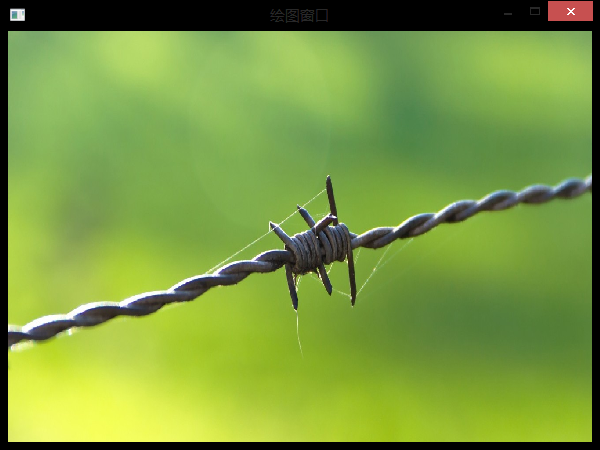
>_<:this is the first using mapping.
>_<:There will be introducing how to do:
- First load bitmap picture return handle give hbmp, as following:
- hbmp=(HBITMAP)LoadImage(NULL,"bg.bmp",IMAGE_BITMAP,600,450,LR_LOADFROMFILE);
- there "bg.bmp" must put in the project folder!
- Second if you want draw this picture in the window,I suggest you should create a CompatibleDC, maybe now you don't know why do this, the reason is also hard to explane. You just remember doing is better for showing many pictures reducing Flash.
- hdc=GetDC(hWnd);
- mdc=CreateCompatibleDC(hdc);
- Third when you finish upper two steps, you can use SelectObject(mdc,hbmp); give the picture to CompatibleDC mdc
- Finally just use BitBlt(hdc,0,0,600,450,mdc,0,0,SRCCOPY); copy mdc including to hdc to show in the window.
 //{{NO_DEPENDENCIES}}

 // Microsoft Visual C++ generated include file.

 // Used by FE.RC

 //

 #define IDR_MAINFRAME                    128

 #define IDD_FE_DIALOG        102

 #define IDD_ABOUTBOX                    103

 #define IDS_APP_TITLE                    103

 #define IDM_ABOUT                        104

 #define IDM_EXIT                        105

 #define IDS_HELLO                        106

 #define IDI_FE                107

 #define IDI_SMALL                        108

 #define IDC_FE                109

 #define IDC_MYICON                        2

 #define IDC_STATIC                        -1

 // Next default values for new objects

 //

 #ifdef APSTUDIO_INVOKED

 #ifndef APSTUDIO_READONLY_SYMBOLS

 #define _APS_NEXT_RESOURCE_VALUE        129

 #define _APS_NEXT_COMMAND_VALUE         32771

 #define _APS_NEXT_CONTROL_VALUE         1000

 #define _APS_NEXT_SYMED_VALUE           110

 #endif

 #endif
resourse.h
 // stdafx.h : include file for standard system include files,

 //  or project specific include files that are used frequently, but

 //      are changed infrequently

 //

 #if !defined(AFX_STDAFX_H__A9DB83DB_A9FD_11D0_BFD1_444553540000__INCLUDED_)

 #define AFX_STDAFX_H__A9DB83DB_A9FD_11D0_BFD1_444553540000__INCLUDED_

 #if _MSC_VER > 1000

 #pragma once

 #endif // _MSC_VER > 1000

 #define WIN32_LEAN_AND_MEAN        // Exclude rarely-used stuff from Windows headers

 // Windows Header Files:

 #include <windows.h>

 // C RunTime Header Files

 #include <stdlib.h>

 #include <malloc.h>

 #include <memory.h>

 #include <tchar.h>

 // Local Header Files

 // TODO: reference additional headers your program requires here

 //{{AFX_INSERT_LOCATION}}

 // Microsoft Visual C++ will insert additional declarations immediately before the previous line.

 #endif // !defined(AFX_STDAFX_H__A9DB83DB_A9FD_11D0_BFD1_444553540000__INCLUDED_)
StdAfx.h
main.cpp
 #include "stdafx.h"

 #include "resourse.h"

 #define MAX_LOADSTRING 100

 // Global Variables:

 HINSTANCE hInst;                                // current instance

 TCHAR szTitle[MAX_LOADSTRING];                                // The title bar text

 TCHAR szWindowClass[MAX_LOADSTRING];                                // The title bar text

 HBITMAP hbmp;

 HDC mdc;

 // Foward declarations of functions included in this code module:

 ATOM                MyRegisterClass(HINSTANCE hInstance);

 BOOL                InitInstance(HINSTANCE, int);

 LRESULT CALLBACK    WndProc(HWND, UINT, WPARAM, LPARAM);

 LRESULT CALLBACK    About(HWND, UINT, WPARAM, LPARAM);

 void                MyPaint(HDC hdc);

 //========================================================================================

 int APIENTRY WinMain(HINSTANCE hInstance,

                      HINSTANCE hPrevInstance,

                      LPSTR     lpCmdLine,

                      int       nCmdShow)

 {

      // TODO: Place code here.

     MSG msg;

     MyRegisterClass(hInstance);//调用函数向系统注册窗口类别,输入参数hInstance是目前运行程序的对象代码;

     // 调用InitInstance函数,进行初始化操作;

     if (!InitInstance (hInstance, nCmdShow))

     {

         return FALSE;

     }

     // 消息循环(通过消息循环来获取信息,

     //进行必要的键盘信息转换而后将控制权交给操作系统,

     //有操作系统决定哪个程序的消息处理函数处理消息

     while (GetMessage(&msg, NULL, , )) //获取程序消息

     {

             TranslateMessage(&msg);//转换伪码及字符

             DispatchMessage(&msg);//将控制权交给系统,再有系统决定负责处理消息的程序;

     }

     return msg.wParam;

 }

 //=====================================================================================

 //=============================================================================================

 //在建立程序窗口实体之前,必须先定义一个窗口类别,其中包含所要建立窗口的信息,

 //并向系统注册,这里的MyRegisterClass函数就是进行定义及注册窗口类别的函数。

 //==============================================================================================

 ATOM MyRegisterClass(HINSTANCE hInstance)

 {

     WNDCLASSEX wcex;            //申请一个窗口类别“WNDCLASSEX”和结构”wcex“

                                 //--------------------------------------------------------------

                                 //定义vcex结构的各项信息,其中设定信息处理函数(lpfnWndProc)

                                 //为WNDPROC,类别名称为(lpszClassName)为”fe";

                                 //--------------------------------------------------------------

     wcex.cbSize = sizeof(WNDCLASSEX);

     wcex.style            = CS_HREDRAW | CS_VREDRAW;

     wcex.lpfnWndProc    = (WNDPROC)WndProc;

     wcex.cbClsExtra        = ;

     wcex.cbWndExtra        = ;

     wcex.hInstance        = hInstance;

     wcex.hIcon            = NULL;

     wcex.hCursor        = NULL;

     wcex.hCursor        = LoadCursor(NULL,IDC_ARROW);

     wcex.hbrBackground    = (HBRUSH)(COLOR_WINDOW+);

     wcex.lpszMenuName    = NULL;

     wcex.lpszClassName    = "fe";

     wcex.hIconSm        = NULL;

     return RegisterClassEx(&wcex);//调用RegisterClassEx函数注册类别,返回一个“ATOM"形态的字符串

                                   //此字符串即为类别名称”fe";

 }

 //============================================================================================

 //============================================================================================

 //按照前面所定义的窗口类别来建立并显示实际的程序窗口

 //============================================================================================

 BOOL InitInstance(HINSTANCE hInstance, int nCmdShow)

 {

    HWND hWnd;

    HDC hdc;

    hInst = hInstance; // 把instance handle 储存在全局变量中;

    hWnd = CreateWindow("fe","绘图窗口",WS_OVERLAPPEDWINDOW,

       CW_USEDEFAULT, , CW_USEDEFAULT, , NULL, NULL, hInstance, NULL);

                       //-----------------------------------------------

                       //调用CreateWindow函数来建立一个窗口对象

                       //第一个参数就是窗口建立依据的类别名称

                       //-----------------------------------------------

    if (!hWnd)

    {

       return FALSE;

    }

    //------------------------------------------------

    //设定窗口的位置及窗口的大小,然后绘制显示在设备上

    //-------------------------------------------------

    MoveWindow(hWnd,,,,,true);//位置及大小

    ShowWindow(hWnd, nCmdShow);//改定窗口显示时的状态

    UpdateWindow(hWnd);//将窗口绘制在显示设备上

    hdc=GetDC(hWnd);

    mdc=CreateCompatibleDC(hdc);

    hbmp=(HBITMAP)LoadImage(NULL,"bg.bmp",IMAGE_BITMAP,,,LR_LOADFROMFILE);

    //名、类型、大小、加载方式;

    SelectObject(mdc,hbmp);

    MyPaint(hdc);

    ReleaseDC(hWnd,hdc);

    return TRUE;

 }

 //============================================================================================

 //============================================================================================

 //绘图函数,初始化函数中将图片已经放在mdc中了,现在将mdc再贴在窗口DC上

 //============================================================================================

 void MyPaint(HDC hdc)

 {

     BitBlt(hdc,,,,,mdc,,,SRCCOPY);//在窗口位置、大小、原图剪切位

 }

 //============================================================================================

 //============================================================================================

 //在前面定义类别的时候把WndProc定义为消息处理函数(当某些外部消息发生时,会按消息的类型

 //来决定该如何进行处理。此外该函数也是一个回叫函数(CALLBACK)(windows系统函数)每一个

 //程序都会接收信息,选择性接受、处理;

 //============================================================================================

 LRESULT CALLBACK WndProc(HWND hWnd, UINT message, WPARAM wParam, LPARAM lParam)

 {

     PAINTSTRUCT ps;

     HDC hdc;

     switch (message)                   //判断消息类型

     {

         case WM_PAINT:                //窗口重绘制

             hdc = BeginPaint(hWnd, &ps);

             MyPaint(hdc);

             EndPaint(hWnd, &ps);

             break;

         case WM_DESTROY:              //处理窗口结束消息

             DeleteDC(mdc);

             DeleteObject(hbmp);

             PostQuitMessage();

             break;

         default:

             return DefWindowProc(hWnd, message, wParam, lParam);

    }

    return ;

 }

 //============================================================================================
[游戏模版7] Win32 最简单贴图的更多相关文章
- [游戏模版10] Win32 平面地图贴图 正
>_<:picture resource >_<:If you master the ways of mapping picture,then this problem is ...
- [游戏模版13] Win32 透明贴图 主角移动
>_<:just add previous two ways to achieve this new result // stdafx.h : include file for stand ...
- [游戏模版8] Win32 透明贴图
>_<:The same with previous introduction. In the InitInstance fanction make a little change: &g ...
- [游戏模版2] Win32最小框架
>_<:Just the minimum Win32 frame don't have any other special function. //{{NO_DEPENDENCIES}} ...
- [游戏模版12] Win32 稳定定时
>_<:The last time,we learned how to use timer to make the picture run and change show,but some ...
- [游戏模版14] Win32 键盘控制
>_<:compared with the previous article,this one only adds key-message listener. >_<:up d ...
- [游戏模版15] Win32 飞机射击
>_<:Only give you the code,try to understand it! >_<:picture resource #include <windo ...
- [游戏模版16] Win32 飞机射击 敌人追踪
>_<:AI introduction. >_<:According the plane position (nowX,nowY) relative to birds' pos ...
- [游戏模版17] Win32 推箱子 迷宫
>_<:Here introduce a simple game: >_<:resource >_<:only can push a box and finally ...
随机推荐
- make file
CPPUTEST_USE_EXTENSIONS = Y如果没有这一句定义,CppUTestExt/MockSupport.h和CppUTestExt/MockSupport_c.h文件中的定义就不能用 ...
- phpstorm
9XVKERIY9F-eyJsaWNlbnNlSWQiOiI5WFZLRVJJWTlGIiwibGljZW5zZWVOYW1lIjoiYXNoZXIgY2hlbiIsImFzc2lnbmVlTmFtZ ...
- CSS-页面布局
介绍 几个实现多栏布局的方法.主要介绍使用内部div来创建浮动的栏. 多栏布局有三种基本的实现方案:固定宽度.流动.弹性. 固定宽度布局的大小是随用户调整浏览器窗口大小而变化,一般是900至1100像 ...
- 上传文件(单文件)(FormData)(前端代码+.NET服务器端)
由于样式需要不能直接用file,只能用文本框+按钮 <form class="form-horizontal form-bordered form-row-strippe" ...
- buildroot 使用小记 - 2 源文件目录结构
官方下载下来的buildroot源码包在解压后,是一个名为buildroot的文件夹,它下面的目录/文件结构如下: Makefile - 顶级makefile,编译总入口 Config.in - 顶级 ...
- 介绍开源的.net通信框架NetworkComms框架 源码分析(十三)ThreadSafeStream
原文网址: http://www.cnblogs.com/csdev Networkcomms 是一款C# 语言编写的TCP/UDP通信框架 作者是英国人 以前是收费的 目前作者已经开源 许可是 ...
- nwe
SELECT SUBSTR('20150601', 1, 6) AS CALC_MONTH, CHN.EMPLOYEE_CODE, CHN.CHANNEL_TYPE, ...
- 技术英文单词贴--G
G generator 发电机,发生器,生产者
- 第三章 深入 ZAB 协议
上一节介绍了ZAB协议的内容,本节将从系统模型.问题描述.算法描述和运行分析四方面来深入了解 ZAB 协议. 系统模型 在一个由一组进程 n ={P1,P2,...Pn}组成的分布式系统中,每一个进程 ...
- C# WebClient 实现上传下载网络资源
下载数据 WebClient wc = new WebClient();1 string str= wc.DownloadString("地址")://直接下载字符串 2 wc.D ...