
Android:res之shape制作圆角、虚线、渐变
xml控件配置属性
android:background="@drawable/shape"
标签
corners ----------圆角
gradient ----------渐变
padding ----------内容离边界距离
size ------------大小
solid ----------填充颜色
stroke ----------描边
注意的是corners的属性bottomLeftRadius为右下角、bottomRightRadius为左下角
shape制作圆角
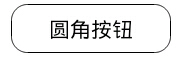
<Button

    android:layout_width="160dp"

    android:layout_height="wrap_content"

    android:background="@drawable/button_shape"

    android:text="圆角按钮"

    />

<?xml version="1.0" encoding="utf-8"?>

<shape xmlns:android="http://schemas.android.com/apk/res/android" >

    <solid android:color="#fff"/>

    <padding android:top="10px" android:bottom="10px"/>

    <corners android:radius="16px"/>

    <stroke android:width="1px" android:color="#000"/>

</shape>
shape制作虚线

没有dashGap属性则为实线
<View

    android:layout_width="match_parent"

    android:layout_height="5px"

    android:layout_marginTop="10dp"

    android:background="@drawable/line_shape"

    />
<?xml version="1.0" encoding="utf-8"?>

<shape xmlns:android="http://schemas.android.com/apk/res/android"

    android:shape="line" >

    <stroke

        android:dashGap="3dp"

        android:dashWidth="8dp"

        android:width="1dp"

        android:color="#63a219" />

    <size android:height="1dp" />

</shape>
shape制作渐变
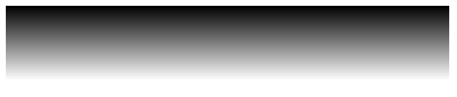
<View

    android:layout_width="match_parent"

    android:layout_height="50dp"

    android:layout_marginTop="10dp"

    android:background="@drawable/gra_shape"

    />
<?xml version="1.0" encoding="utf-8"?>

<shape xmlns:android="http://schemas.android.com/apk/res/android" >

    <gradient

        android:angle="270.0"

        android:endColor="#ffffff"

        android:startColor="#000000" />

</shape>
相关文章:
http://blog.csdn.net/huiwolf2008/article/details/8028615

Android:res之shape制作圆角、虚线、渐变的更多相关文章
- Android shape制作圆角、虚线、渐变
xml控件配置属性 android:background="@drawable/shape" 标签 corners ----------圆角 gradient ---------- ...
- Android res之shape
xml控件配置属性 android:background="@drawable/shape" 标签 corners ----------圆角gradient ----------渐 ...
- Android系列:res之shape制作
大家好,pls call me francis. nice to me you. 本文将介绍使用在Android中使用shape标签绘制drawable资源图片. 下面的代码是shap标签的基本使用情 ...
- Android中使用shape制作一个旋转的progressbar
public class ZNtestResActivity extends Activity { @Override public void onCreate(Bundle savedInstanc ...
- 44.Android之Shape设置虚线、圆角和渐变学习
Shape在Android中设定各种形状,今天记录下,由于比较简单直接贴代码. Shape子属性简单说明一下: gradient -- 对应颜色渐变. startcolor.endcolor就不多说 ...
- Android GradientDrawable(shape标签定义) 静态使用和动态使用(圆角,渐变实现)
Android GradientDrawable使用优势: 1. 快速实现一些基本图形(线,矩形,圆,椭圆,圆环) 2. 快速实现一些圆角,渐变,阴影等效果 3. 代替图片设置为View的背景 4. ...
- 【转】Android设置虚线、圆角、渐变
Android虚线圆角渐变 有图又真相,先上图再说. 点击效果: 设置虚线: <?xml version="1.0" encoding="utf-8" ...
- Android设置虚线、圆角、渐变
有图又真相,先上图再说. 点击效果: 设置虚线: <?xml version="1.0" encoding="utf-8"?> <shape ...
- Android代码绘制虚线、圆角、渐变效果图
drawable文件夹放置动画/形状/选择器等属性文件,唯一的drawable文件名,不允许写错和拼错,否则运行报错.drawable文件夹底下的xml文件可以包括的标签共18个:animation- ...
随机推荐
- (Win7 x64)NetBeans 8.0.2 使用Tomcat 8作为服务器
1.下载Apache Tomcat,解压至本地硬盘的根目录. 2.运行CMD,输入: 解压盘符:\apache-tomcat-8.0.xx\bin\service.bat install 3.安装完成 ...
- js的json转换
静态页面是: data:[{ value:2.5, itemStyle:{ normal:{color:'#4a90e2'} } },{ value:2.5, itemStyle:{ normal:{ ...
- 为Kindeditor控件添加图片自动上传功能
Kindeditor是一款功能强大的开源在线HTML编辑器,支持所见即所得的编辑效果.它使用JavaScript编写,可以无缝地与多个不同的语言环境进行集成,如.NET.PHP.ASP.Java等.官 ...
- php中文转换编码函数
$filename= $list->filename; // 获取文件名字 if(preg_match("/[\x80-\xff]/",$filename)){ // 如果是 ...
- MyEclipse/Eclipse中修改包的显示结构
操作如下:
- js控制表格单双行颜色交替显示
<script language="JavaScript"> window.onload = function() { var Table=document.getEl ...
- sqlserver 数据库中时间函数的建立
create function [dbo].[HtoSec](@lvalue as int)RETURNS intBEGINDECLARE @temp intSet @temp = @lvalue * ...
- ASP.NET 下载文件并继续执行JS解决方法
需求说明:当用户点击按钮时使当前按钮为不可用,并打开新页面,关闭新页面时,按钮变为可用.并且如果不关闭新页面,当前按钮过10秒钟自动变为可用. 包含3个页面: 一.按钮页 前台代码:当刷新后采用js进 ...
- Mysql 死锁的详细分析方法
用数据库的时候,偶尔会出现死锁,针对我们的业务系统,出现死锁的直接结果就是系统卡顿.客户找事儿,所以我们也在想尽全力的消除掉数据库的死锁.出现死锁的时候,如果只是想解锁,用show full proc ...
- 关于HTML5在动画制作工具Animatron的一些问题
Animatron是国外一款在线HTML5动画制作工具,网址:www.animatron.com 当然,想使用的话,是需要FQ的. 用animatron制作好的动画是可以下载为代码和GIF的,这时候付 ...