
聚类K-Means
import numpy as np

x=np.random.randint(0,52,52)

x
k=3

y=np.zeros(20)

y
array([ 0.,  0.,  0.,  0.,  0.,  0.,  0.,  0.,  0.,  0.,  0.,  0.,  0.,

        0.,  0.,  0.,  0.,  0.,  0.,  0.])
def intcent(x,k):

    return x[0:k].reshape(k)

kc=intcent(x,k)

kc

array([21,  8, 45])
d=abs(2-kc)

np.where(d==np.min(d))[0][0]

1
def nearest(kc,i):

    d=(abs(kc-i))

    w=np.where(d==np.min(d))

    return w[0][0]
def xclassfy(x,y,kc):

    for i in range(x.shape[0]):

        y[i]=nearst(kc,x[i])

    return y
from sklearn.datasets import load_iris

iris=load_iris()

iris

x=iris.data

x
Out[1]:

array([[5.1, 3.5, 1.4, 0.2],

       [4.9, 3. , 1.4, 0.2],

       [4.7, 3.2, 1.3, 0.2],

       [4.6, 3.1, 1.5, 0.2],

       [5. , 3.6, 1.4, 0.2],

       [5.4, 3.9, 1.7, 0.4],

       [4.6, 3.4, 1.4, 0.3],

       [5. , 3.4, 1.5, 0.2],

       [4.4, 2.9, 1.4, 0.2],

       [4.9, 3.1, 1.5, 0.1],

       [5.4, 3.7, 1.5, 0.2],

       [4.8, 3.4, 1.6, 0.2],

       [4.8, 3. , 1.4, 0.1],

       [4.3, 3. , 1.1, 0.1],

       [5.8, 4. , 1.2, 0.2],

       [5.7, 4.4, 1.5, 0.4],

       [5.4, 3.9, 1.3, 0.4],

       [5.1, 3.5, 1.4, 0.3],

       [5.7, 3.8, 1.7, 0.3],

       [5.1, 3.8, 1.5, 0.3],

       [5.4, 3.4, 1.7, 0.2],

       [5.1, 3.7, 1.5, 0.4],

       [4.6, 3.6, 1. , 0.2],

       [5.1, 3.3, 1.7, 0.5],

       [4.8, 3.4, 1.9, 0.2],

       [5. , 3. , 1.6, 0.2],

       [5. , 3.4, 1.6, 0.4],

       [5.2, 3.5, 1.5, 0.2],

       [5.2, 3.4, 1.4, 0.2],

       [4.7, 3.2, 1.6, 0.2],

       [4.8, 3.1, 1.6, 0.2],

       [5.4, 3.4, 1.5, 0.4],

       [5.2, 4.1, 1.5, 0.1],

       [5.5, 4.2, 1.4, 0.2],

       [4.9, 3.1, 1.5, 0.1],

       [5. , 3.2, 1.2, 0.2],

       [5.5, 3.5, 1.3, 0.2],

       [4.9, 3.1, 1.5, 0.1],

       [4.4, 3. , 1.3, 0.2],

       [5.1, 3.4, 1.5, 0.2],

       [5. , 3.5, 1.3, 0.3],

       [4.5, 2.3, 1.3, 0.3],

       [4.4, 3.2, 1.3, 0.2],

       [5. , 3.5, 1.6, 0.6],

       [5.1, 3.8, 1.9, 0.4],

       [4.8, 3. , 1.4, 0.3],

       [5.1, 3.8, 1.6, 0.2],

       [4.6, 3.2, 1.4, 0.2],

       [5.3, 3.7, 1.5, 0.2],

       [5. , 3.3, 1.4, 0.2],

       [7. , 3.2, 4.7, 1.4],

       [6.4, 3.2, 4.5, 1.5],

       [6.9, 3.1, 4.9, 1.5],

       [5.5, 2.3, 4. , 1.3],

       [6.5, 2.8, 4.6, 1.5],

       [5.7, 2.8, 4.5, 1.3],

       [6.3, 3.3, 4.7, 1.6],

       [4.9, 2.4, 3.3, 1. ],

       [6.6, 2.9, 4.6, 1.3],

       [5.2, 2.7, 3.9, 1.4],

       [5. , 2. , 3.5, 1. ],

       [5.9, 3. , 4.2, 1.5],

       [6. , 2.2, 4. , 1. ],

       [6.1, 2.9, 4.7, 1.4],

       [5.6, 2.9, 3.6, 1.3],

       [6.7, 3.1, 4.4, 1.4],

       [5.6, 3. , 4.5, 1.5],

       [5.8, 2.7, 4.1, 1. ],

       [6.2, 2.2, 4.5, 1.5],

       [5.6, 2.5, 3.9, 1.1],

       [5.9, 3.2, 4.8, 1.8],

       [6.1, 2.8, 4. , 1.3],

       [6.3, 2.5, 4.9, 1.5],

       [6.1, 2.8, 4.7, 1.2],

       [6.4, 2.9, 4.3, 1.3],

       [6.6, 3. , 4.4, 1.4],

       [6.8, 2.8, 4.8, 1.4],

       [6.7, 3. , 5. , 1.7],

       [6. , 2.9, 4.5, 1.5],

       [5.7, 2.6, 3.5, 1. ],

       [5.5, 2.4, 3.8, 1.1],

       [5.5, 2.4, 3.7, 1. ],

       [5.8, 2.7, 3.9, 1.2],

       [6. , 2.7, 5.1, 1.6],

       [5.4, 3. , 4.5, 1.5],

       [6. , 3.4, 4.5, 1.6],

       [6.7, 3.1, 4.7, 1.5],

       [6.3, 2.3, 4.4, 1.3],

       [5.6, 3. , 4.1, 1.3],

       [5.5, 2.5, 4. , 1.3],

       [5.5, 2.6, 4.4, 1.2],

       [6.1, 3. , 4.6, 1.4],

       [5.8, 2.6, 4. , 1.2],

       [5. , 2.3, 3.3, 1. ],

       [5.6, 2.7, 4.2, 1.3],

       [5.7, 3. , 4.2, 1.2],

       [5.7, 2.9, 4.2, 1.3],

       [6.2, 2.9, 4.3, 1.3],

       [5.1, 2.5, 3. , 1.1],

       [5.7, 2.8, 4.1, 1.3],

       [6.3, 3.3, 6. , 2.5],

       [5.8, 2.7, 5.1, 1.9],

       [7.1, 3. , 5.9, 2.1],

       [6.3, 2.9, 5.6, 1.8],

       [6.5, 3. , 5.8, 2.2],

       [7.6, 3. , 6.6, 2.1],

       [4.9, 2.5, 4.5, 1.7],

       [7.3, 2.9, 6.3, 1.8],

       [6.7, 2.5, 5.8, 1.8],

       [7.2, 3.6, 6.1, 2.5],

       [6.5, 3.2, 5.1, 2. ],

       [6.4, 2.7, 5.3, 1.9],

       [6.8, 3. , 5.5, 2.1],

       [5.7, 2.5, 5. , 2. ],

       [5.8, 2.8, 5.1, 2.4],

       [6.4, 3.2, 5.3, 2.3],

       [6.5, 3. , 5.5, 1.8],

       [7.7, 3.8, 6.7, 2.2],

       [7.7, 2.6, 6.9, 2.3],

       [6. , 2.2, 5. , 1.5],

       [6.9, 3.2, 5.7, 2.3],

       [5.6, 2.8, 4.9, 2. ],

       [7.7, 2.8, 6.7, 2. ],

       [6.3, 2.7, 4.9, 1.8],

       [6.7, 3.3, 5.7, 2.1],

       [7.2, 3.2, 6. , 1.8],

       [6.2, 2.8, 4.8, 1.8],

       [6.1, 3. , 4.9, 1.8],

       [6.4, 2.8, 5.6, 2.1],

       [7.2, 3. , 5.8, 1.6],

       [7.4, 2.8, 6.1, 1.9],

       [7.9, 3.8, 6.4, 2. ],

       [6.4, 2.8, 5.6, 2.2],

       [6.3, 2.8, 5.1, 1.5],

       [6.1, 2.6, 5.6, 1.4],

       [7.7, 3. , 6.1, 2.3],

       [6.3, 3.4, 5.6, 2.4],

       [6.4, 3.1, 5.5, 1.8],

       [6. , 3. , 4.8, 1.8],

       [6.9, 3.1, 5.4, 2.1],

       [6.7, 3.1, 5.6, 2.4],

       [6.9, 3.1, 5.1, 2.3],

       [5.8, 2.7, 5.1, 1.9],

       [6.8, 3.2, 5.9, 2.3],

       [6.7, 3.3, 5.7, 2.5],

       [6.7, 3. , 5.2, 2.3],

       [6.3, 2.5, 5. , 1.9],

       [6.5, 3. , 5.2, 2. ],

       [6.2, 3.4, 5.4, 2.3],

       [5.9, 3. , 5.1, 1.8]])
x1=x[:,0]

x1

array([5.1, 4.9, 4.7, 4.6, 5. , 5.4, 4.6, 5. , 4.4, 4.9, 5.4, 4.8, 4.8,

       4.3, 5.8, 5.7, 5.4, 5.1, 5.7, 5.1, 5.4, 5.1, 4.6, 5.1, 4.8, 5. ,

       5. , 5.2, 5.2, 4.7, 4.8, 5.4, 5.2, 5.5, 4.9, 5. , 5.5, 4.9, 4.4,

       5.1, 5. , 4.5, 4.4, 5. , 5.1, 4.8, 5.1, 4.6, 5.3, 5. , 7. , 6.4,

       6.9, 5.5, 6.5, 5.7, 6.3, 4.9, 6.6, 5.2, 5. , 5.9, 6. , 6.1, 5.6,

       6.7, 5.6, 5.8, 6.2, 5.6, 5.9, 6.1, 6.3, 6.1, 6.4, 6.6, 6.8, 6.7,

       6. , 5.7, 5.5, 5.5, 5.8, 6. , 5.4, 6. , 6.7, 6.3, 5.6, 5.5, 5.5,

       6.1, 5.8, 5. , 5.6, 5.7, 5.7, 6.2, 5.1, 5.7, 6.3, 5.8, 7.1, 6.3,

       6.5, 7.6, 4.9, 7.3, 6.7, 7.2, 6.5, 6.4, 6.8, 5.7, 5.8, 6.4, 6.5,

       7.7, 7.7, 6. , 6.9, 5.6, 7.7, 6.3, 6.7, 7.2, 6.2, 6.1, 6.4, 7.2,

       7.4, 7.9, 6.4, 6.3, 6.1, 7.7, 6.3, 6.4, 6. , 6.9, 6.7, 6.9, 5.8,

       6.8, 6.7, 6.7, 6.3, 6.5, 6.2, 5.9])
from sklearn.cluster import KMeans

est=KMeans(n_clusters=3)

est.fit(x)

est.cluster_centers_

y=est.predict(x)

y

array([0, 0, 0, 0, 0, 0, 0, 0, 0, 0, 0, 0, 0, 0, 0, 0, 0, 0, 0, 0, 0, 0,

       0, 0, 0, 0, 0, 0, 0, 0, 0, 0, 0, 0, 0, 0, 0, 0, 0, 0, 0, 0, 0, 0,

       0, 0, 0, 0, 0, 0, 1, 1, 2, 1, 1, 1, 1, 1, 1, 1, 1, 1, 1, 1, 1, 1,

       1, 1, 1, 1, 1, 1, 1, 1, 1, 1, 1, 2, 1, 1, 1, 1, 1, 1, 1, 1, 1, 1,

       1, 1, 1, 1, 1, 1, 1, 1, 1, 1, 1, 1, 2, 1, 2, 2, 2, 2, 1, 2, 2, 2,

       2, 2, 2, 1, 1, 2, 2, 2, 2, 1, 2, 1, 2, 1, 2, 2, 1, 1, 2, 2, 2, 2,

       2, 1, 2, 2, 2, 2, 1, 2, 2, 2, 1, 2, 2, 2, 1, 2, 2, 1])
import matplotlib.pyplot as plt

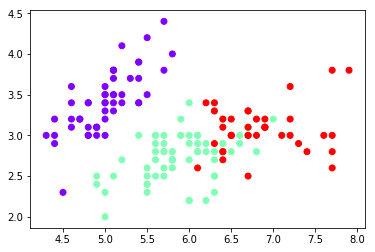
plt.scatter(x[:,0],x[:,1],c=y,cmap='rainbow')

plt.show()
est1=KMeans(n_clusters=4)

x1=x[:,0].reshape(-1,1)

est1.fit(x1)

y=est1.labels_

plt.scatter(x1,x1)

plt.show()
est1=KMeans(n_clusters=4)

x1=x[:,0]

est=KMeans(n_clusters=4)

est.fit(x)

KMeans(algorithm='auto', copy_x=True, init='k-means++', max_iter=300,

    n_clusters=4, n_init=10, n_jobs=1, precompute_distances='auto',

    random_state=None, tol=0.0001, verbose=0)
est1=KMeans(n_clusters=4)

x1=x[:,0].reshape(-1,1)

x1

array([[5.1],

       [4.9],

       [4.7],

       [4.6],

       [5. ],

       [5.4],

       [4.6],

       [5. ],

       [4.4],

       [4.9],

       [5.4],

       [4.8],

       [4.8],

       [4.3],

       [5.8],

       [5.7],

       [5.4],

       [5.1],

       [5.7],

       [5.1],

       [5.4],

       [5.1],

       [4.6],

       [5.1],

       [4.8],

       [5. ],

       [5. ],

       [5.2],

       [5.2],

       [4.7],

       [4.8],

       [5.4],

       [5.2],

       [5.5],

       [4.9],

       [5. ],

       [5.5],

       [4.9],

       [4.4],

       [5.1],

       [5. ],

       [4.5],

       [4.4],

       [5. ],

       [5.1],

       [4.8],

       [5.1],

       [4.6],

       [5.3],

       [5. ],

       [7. ],

       [6.4],

       [6.9],

       [5.5],

       [6.5],

       [5.7],

       [6.3],

       [4.9],

       [6.6],

       [5.2],

       [5. ],

       [5.9],

       [6. ],

       [6.1],

       [5.6],

       [6.7],

       [5.6],

       [5.8],

       [6.2],

       [5.6],

       [5.9],

       [6.1],

       [6.3],

       [6.1],

       [6.4],

       [6.6],

       [6.8],

       [6.7],

       [6. ],

       [5.7],

       [5.5],

       [5.5],

       [5.8],

       [6. ],

       [5.4],

       [6. ],

       [6.7],

       [6.3],

       [5.6],

       [5.5],

       [5.5],

       [6.1],

       [5.8],

       [5. ],

       [5.6],

       [5.7],

       [5.7],

       [6.2],

       [5.1],

       [5.7],

       [6.3],

       [5.8],

       [7.1],

       [6.3],

       [6.5],

       [7.6],

       [4.9],

       [7.3],

       [6.7],

       [7.2],

       [6.5],

       [6.4],

       [6.8],

       [5.7],

       [5.8],

       [6.4],

       [6.5],

       [7.7],

       [7.7],

       [6. ],

       [6.9],

       [5.6],

       [7.7],

       [6.3],

       [6.7],

       [7.2],

       [6.2],

       [6.1],

       [6.4],

       [7.2],

       [7.4],

       [7.9],

       [6.4],

       [6.3],

       [6.1],

       [7.7],

       [6.3],

       [6.4],

       [6. ],

       [6.9],

       [6.7],

       [6.9],

       [5.8],

       [6.8],

       [6.7],

       [6.7],

       [6.3],

       [6.5],

       [6.2],

       [5.9]])
est1=KMeans(n_clusters=4)

x1=x[:,0].reshape(-1,1)

est1=KMeans(n_clusters=4)

est1.fit(x1)

est1.labels_

array([1, 1, 1, 1, 1, 0, 1, 1, 1, 1, 0, 1, 1, 1, 0, 0, 0, 1, 0, 1, 0, 1,

       1, 1, 1, 1, 1, 1, 1, 1, 1, 0, 1, 0, 1, 1, 0, 1, 1, 1, 1, 1, 1, 1,

       1, 1, 1, 1, 1, 1, 2, 3, 3, 0, 3, 0, 3, 1, 3, 1, 1, 0, 0, 0, 0, 3,

       0, 0, 3, 0, 0, 0, 3, 0, 3, 3, 3, 3, 0, 0, 0, 0, 0, 0, 0, 0, 3, 3,

       0, 0, 0, 0, 0, 1, 0, 0, 0, 3, 1, 0, 3, 0, 2, 3, 3, 2, 1, 2, 3, 2,

       3, 3, 3, 0, 0, 3, 3, 2, 2, 0, 3, 0, 2, 3, 3, 2, 3, 0, 3, 2, 2, 2,

       3, 3, 0, 2, 3, 3, 0, 3, 3, 3, 0, 3, 3, 3, 3, 3, 3, 0])
1)设定好K的大小,随机选取K个点作为初始中心点;

  (2)计算每个点到这K个中心点的距离大小,选取最近的中心点,划分到以该中心点为中心的集群中去;

  (3)重新计算K个新集群的中心点;

  (4)如果中心点保持不变,则结束K-Means过程。否则,重复进行(2)、(3)步;
复制代码

import numpy as np

x = np.random.randint(1,50,[20,1])

y = np.zeros(20)

k = 3

#1) 选取数据空间中的K个对象作为初始中心,每个对象代表一个聚类中心;

def initcen(x,k):

    return x[:k]

#2) 对于样本中的数据对象,根据它们与这些聚类中心的欧氏距离,按距离最近的准则将它们分到距离它们最近的聚类中心(最相似)所对应的类;

def nearest(kc,i):

    d = abs(kc-i)

    w = np.where(d == np.min(d))

    return w[0][0]

def xclassify(x,y,kc):

    for i in range(x.shape[0]):

        y[i] = nearest(kc,x[i])

        return y

#3) 更新聚类中心:将每个类别中所有对象所对应的均值作为该类别的聚类中心,计算目标函数的值;

def kcmean(x,y,kc,k):

    l = list(kc)

    flag = False

    for c in range(k):

        m = np.where(y ==0)

        n = np.mean(x[m])

        if l[c] != n:

            l[c] = n

            flag = True

            print(l,flag)

    return (np.array(l),flag)

#4) 判断聚类中心和目标函数的值是否发生改变,若不变,则输出结果,若改变,则返回2)

kc = initcen(x,k)

flag = True

print(x,y,kc,flag)

while flag:

    y = xclassify(x,y,kc)

    kc,flag = kcmean(x,y,kc,k)

print(y,kc)

复制代码
聚类K-Means的更多相关文章
- 软件——机器学习与Python,聚类,K——means
K-means是一种聚类算法: 这里运用k-means进行31个城市的分类 城市的数据保存在city.txt文件中,内容如下: BJ,2959.19,730.79,749.41,513.34,467. ...
- KMeans聚类 K值以及初始类簇中心点的选取 转
本文主要基于Anand Rajaraman和Jeffrey David Ullman合著,王斌翻译的<大数据-互联网大规模数据挖掘与分布式处理>一书. KMeans算法是最常用的聚类算法, ...
- 聚类-K均值
数据来源:http://archive.ics.uci.edu/ml/datasets/seeds 15.26 14.84 0.871 5.763 3.312 2.221 5.22 Kama 14.8 ...
- 【机器学习笔记五】聚类 - k均值聚类
参考资料: [1]Spark Mlib 机器学习实践 [2]机器学习 [3]深入浅出K-means算法 http://www.csdn.net/article/2012-07-03/2807073- ...
- 聚类--K均值算法
import numpy as np from sklearn.datasets import load_iris iris = load_iris() x = iris.data[:,1] y = ...
- 第八次作业:聚类--K均值算法:自主实现与sklearn.cluster.KMeans调用
import numpy as np x = np.random.randint(1,100,[20,1]) y = np.zeros(20) k = 3 def initcenter(x,k): r ...
- 聚类--K均值算法:自主实现与sklearn.cluster.KMeans调用
1.用python实现K均值算法 import numpy as np x = np.random.randint(1,100,20)#产生的20个一到一百的随机整数 y = np.zeros(20) ...
- KNN 与 K - Means 算法比较
KNN K-Means 1.分类算法 聚类算法 2.监督学习 非监督学习 3.数据类型:喂给它的数据集是带label的数据,已经是完全正确的数据 喂给它的数据集是无label的数据,是杂乱无章的,经过 ...
- 机器学习方法(七):Kmeans聚类K值如何选,以及数据重抽样方法Bootstrapping
欢迎转载,转载请注明:本文出自Bin的专栏blog.csdn.net/xbinworld. 技术交流QQ群:433250724,欢迎对算法.技术感兴趣的同学加入.我的博客写一些自己用得到东西,并分享给 ...
- kmeans 聚类 k 值优化
kmeans 中k值一直是个令人头疼的问题,这里提出几种优化策略. 手肘法 核心思想 1. 肉眼评价聚类好坏是看每类样本是否紧凑,称之为聚合程度: 2. 类别数越大,样本划分越精细,聚合程度越高,当类 ...
随机推荐
- python_14 静态属性、类方法、静态方法;组合;继承
静态属性 在类中函数前加@property,在实例调用函数时无需加(),将函数属性封装,调用时看起来与数据属性类似 将函数封装成数据属性的形式,外部调用时看不到逻辑,静态属性可以访问实例属性也可以访问 ...
- 什么是P2P流标
1.被动流标:在规定的投标时间内,一般是7天,没有凑齐这笔借款,就流标了: 2.主动流标:借款人或平台原因,将为投满的标下架,做流标处理 介绍: 对于投资者来说,在投资P2P理财的时候,可能会遇到过流 ...
- java mybatis后台判断表是否存在mysql
<select id="isTableExist" parameterType="string" resultType="int"&g ...
- Maven中聚合与集成的区别
如test-parent是一个聚合工程,打包方式为pom.xml test-a是test-parent的一个moudle模块,打包方式为jar,并且继承自test-parent: test-b是tes ...
- LR基本知识学习
性能测试基础 本质:基于 协议 模拟用户发请求,对服务器形成一定的负载,来测试服务器的性能指标是否满足要求,与界面无关 * 时间 * 空间 分类: 性能(狭义):特定条件下,验证 系统是否有宣称具有 ...
- SpringCloud-day05-服务调用Ribbon
6.服务调用Ribbon 6.1Ribbon简介 前面讲了eureka服务注册与发现,但是结合eureka集群的服务调用并没有谈到.这里就要用到Ribbon,结合eureka,来实现服务的调用: Ri ...
- 一段自适应的CSS代码
一段自适应HTML5的CSS代码,该代码在陕西特产使用过,手机端效果还好,就是PC端看起来没那么大气,比较窄屏 * { transition-property: all; -ms-transition ...
- mysql学习笔记--数据库索引
一.索引的优点:查询速度快 二.索引的缺点: 1. 增.删.改(数据操作语句)效率低了 2. 索引占用空间 三.索引类型: 1. 普通索引 2. 唯一索引(唯一键) 3. 主键索引:只要主键就自动创建 ...
- vue使用qrcode插件生成二维码
参考:https://www.jianshu.com/p/d3883e020d99 步骤: 第一步:vue-cli下载插件 cnpm install --save qrcodejs2 第二步:组件中引 ...
- MacbookPro下载word文件显示dms怎么办
方法:直接改扩展名!!!!!!!!!! 如果你下载的是word的话,把最后的扩展名.dms改成.doc就可以了. 同理,如果你下载的是rar的话,改成rar就好了.