
自然语言27_Converting words to Features with NLTK
sklearn实战-乳腺癌细胞数据挖掘(博客主亲自录制视频教程)
https://study.163.com/course/introduction.htm?courseId=1005269003&utm_campaign=commission&utm_source=cp-400000000398149&utm_medium=share
https://www.pythonprogramming.net/words-as-features-nltk-tutorial/
Converting words to Features with NLTK
In this tutorial, we're going to be building off the previous
video and compiling feature lists of words from positive reviews and
words from the negative reviews to hopefully see trends in specific
types of words in positive or negative reviews.
To start, our code:
import nltk

import random

from nltk.corpus import movie_reviews

documents = [(list(movie_reviews.words(fileid)), category)

             for category in movie_reviews.categories()

             for fileid in movie_reviews.fileids(category)]

random.shuffle(documents)

all_words = []

for w in movie_reviews.words():

    all_words.append(w.lower())

all_words = nltk.FreqDist(all_words)

word_features = list(all_words.keys())[:3000]
Mostly the same as before, only with now a new variable, word_features, which contains the top 3,000 most common words. Next, we're going to build a quick function that will find these top 3,000 words in our positive and negative documents, marking their presence as either positive or negative:
def find_features(document):

    words = set(document)

    features = {}

    for w in word_features:

        features[w] = (w in words)

    return features
Next, we can print one feature set like:
print((find_features(movie_reviews.words('neg/cv000_29416.txt'))))
Then we can do this for all of our documents, saving the feature existence booleans and their respective positive or negative categories by doing:
featuresets = [(find_features(rev), category) for (rev, category) in documents]
Awesome, now that we have our features and labels, what is next? Typically the next step is to go ahead and train an algorithm, then test it. So, let's go ahead and do that, starting with the Naive Bayes classifier in the next tutorial!
# -*- coding: utf-8 -*-

"""

Created on Sun Dec  4 09:27:48 2016

@author: daxiong

"""

import nltk

import random

from nltk.corpus import movie_reviews

documents = [(list(movie_reviews.words(fileid)), category)

             for category in movie_reviews.categories()

             for fileid in movie_reviews.fileids(category)]

random.shuffle(documents)

all_words = []

for w in movie_reviews.words():

    all_words.append(w.lower())

#dict_allWords是一个字典,存储所有文字的频率分布

dict_allWords = nltk.FreqDist(all_words)

#字典keys()列出所有单词,[:3000]表示列出前三千文字

word_features = list(dict_allWords.keys())[:3000]

'''

 'combating',

 'mouthing',

 'markings',

 'directon',

 'ppk',

 'vanishing',

 'victories',

 'huddleston',

 ...]

'''

def find_features(document):

    words = set(document)

    features = {}

    for w in word_features:

        features[w] = (w in words)

    return features

words=movie_reviews.words('neg/cv000_29416.txt')

'''

Out[78]: ['plot', ':', 'two', 'teen', 'couples', 'go', 'to', ...]

type(words)

Out[65]: nltk.corpus.reader.util.StreamBackedCorpusView

'''

#去重,words1为集合形式

words1 = set(words)

'''

words1

{'!',

 '"',

 '&',

 "'",

 '(',

 ')',.......

 'witch',

 'with',

 'world',

 'would',

 'wrapped',

 'write',

 'world',

 'would',

 'wrapped',

 'write',

 'years',

 'you',

 'your'}

'''

features = {}

#victories单词不在words1,输出false

('victories' in words1)

'''

Out[73]: False

'''

features['victories'] = ('victories' in words1)

'''

features

Out[75]: {'victories': False}

'''

print((find_features(movie_reviews.words('neg/cv000_29416.txt'))))

'''

'schwarz': False,

 'supervisors': False,

 'geyser': False,

 'site': False,

 'fevered': False,

 'acknowledged': False,

 'ronald': False,

 'wroth': False,

 'degredation': False,

 ...}

'''

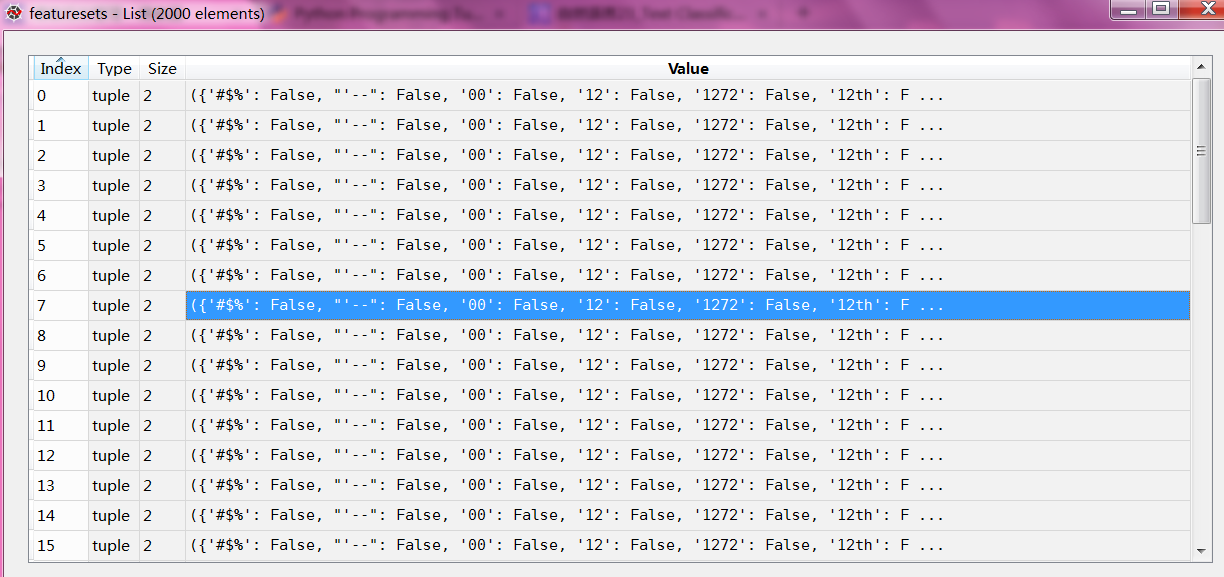
featuresets = [(find_features(rev), category) for (rev, category) in documents]
featuresets 特征集合一共有2000个文件,每个文件是一个元组,元组包含字典(“glory”:False)和neg/pos分类

python风控评分卡建模和风控常识(博客主亲自录制视频教程)
自然语言27_Converting words to Features with NLTK的更多相关文章
- 自然语言18.1_Named Entity Recognition with NLTK
QQ:231469242 欢迎nltk爱好者交流 https://www.pythonprogramming.net/named-entity-recognition-nltk-tutorial/?c ...
- 自然语言15_Part of Speech Tagging with NLTK
https://www.pythonprogramming.net/part-of-speech-tagging-nltk-tutorial/?completed=/stemming-nltk-tut ...
- 自然语言12_Tokenizing Words and Sentences with NLTK
https://www.pythonprogramming.net/tokenizing-words-sentences-nltk-tutorial/ # -*- coding: utf-8 -*- ...
- 自然语言处理NLP程序包(NLTK/spaCy)使用总结
NLTK和SpaCy是NLP的Python应用,提供了一些现成的处理工具和数据接口.下面介绍它们的一些常用功能和特性,便于对NLP研究的组成形式有一个基本的了解. NLTK Natural Langu ...
- Python 自然语言处理(1) 计数词汇
Python有一个自然语言处理的工具包,叫做NLTK(Natural Language ToolKit),可以帮助你实现自然语言挖掘,语言建模等等工作.但是没有NLTK,也一样可以实现简单的词类统计. ...
- 【Python自然语言处理】第一章学习笔记——搜索文本、计数统计和字符串链表
这本书主要是基于Python和一个自然语言工具包(Natural Language Toolkit, NLTK)的开源库进行讲解 NLTK 介绍:NLTK是一个构建Python程序以处理人类语言数据的 ...
- python笔记10-----便捷网络数据NLTK语料库
1.NLTK的概念 NLTK:Natural language toolkit,是一套基于python的自然语言处理工具. 2.NLTK中集成了语料与模型等的包管理器,通过在python编辑器中执行. ...
- 【JulyEdu-Python基础】第 1 课:入门基础
一些学习资源的收集: 可汗学院 视频 公开课 Grossin 编程教室: 一个非常简单,对初学者非常友好的教程和在线联系 廖雪峰教程 书籍: Python核心编程: 这本书应该是最清楚.最深入全面的书 ...
- python文件打开模式&time&python第三方库
r:以只读方式打开文件.文件的指针将会放在文件的开头.这是默认模式. w:打开一个文件只用于写入.如果该文件已存在则将其覆盖.如果该文件不存在,创建新文件. a:打开一个文件用于追加.如果该文件已存在 ...
随机推荐
- 解决Android Graphical Layout 界面效果不显示
解决Android Graphical Layout 界面效果不显示 qq463431476
- WPF系列 Style
参考 WPF: Customize your Application with Styles and Control Templates (Part 2 of 2)
- [WPF系列-高级TemplateBinding vs RelativeSource TemplatedParent]
What is the difference between these 2 bindings: <ControlTemplate TargetType="{x:Type Button ...
- 《InsideUE4》-10-GamePlay架构(九)GameInstance
一人之下,万人之上 引言 上篇我们讲到了UE在World之上,继续抽象出了Player的概念,包含了本地的ULocalPlayer和网络的UNetConnection,并以此创建出了World中的Pl ...
- Libevent的IO复用技术和定时事件原理
Libevent 是一个用C语言编写的.轻量级的开源高性能网络库,主要有以下几个亮点:事件驱动( event-driven),高性能;轻量级,专注于网络,不如 ACE 那么臃肿庞大:源代码相当精炼.易 ...
- STL"源码"剖析-重点知识总结
STL是C++重要的组件之一,大学时看过<STL源码剖析>这本书,这几天复习了一下,总结出以下LZ认为比较重要的知识点,内容有点略多 :) 1.STL概述 STL提供六大组件,彼此可以组合 ...
- 轻松搞懂WebService工作原理
用更简单的方式给大家谈谈WebService,让你更快更容易理解,希望对初学者有所帮助. WebService是基于网络的.分布式的模块化组件. 我们直接来看WebService的一个简易工作流程: ...
- NOIP模拟赛20161022
NOIP模拟赛2016-10-22 题目名 东风谷早苗 西行寺幽幽子 琪露诺 上白泽慧音 源文件 robot.cpp/c/pas spring.cpp/c/pas iceroad.cpp/c/pas ...
- Win10 VC++6 无法启动此程序,因为计算机中丢失mfc42d.dll 需要提升
亲测可用 1.无法启动此程序,因为计算机中丢失mfc42d.dll 我也遇到了这个问题,并且顺利解决了!按一下流程搞定的: “工程-设置-常规-microsoft基础类,(选择使用MFC作为静态链接库 ...
- 豪斯课堂K先生全套教程淘宝设计美工第一期+第四期教程(无水印)
第一期课程包括 <配色如此简单> <配色的流程><对称之美>第二期课程包括 <字体的气质及组合><平衡及构图形式><信息的筛选与图片的 ...