
自然语言27_Converting words to Features with NLTK
sklearn实战-乳腺癌细胞数据挖掘(博客主亲自录制视频教程)
https://study.163.com/course/introduction.htm?courseId=1005269003&utm_campaign=commission&utm_source=cp-400000000398149&utm_medium=share

https://www.pythonprogramming.net/words-as-features-nltk-tutorial/
Converting words to Features with NLTK
In this tutorial, we're going to be building off the previous
video and compiling feature lists of words from positive reviews and
words from the negative reviews to hopefully see trends in specific
types of words in positive or negative reviews.
To start, our code:
import nltk

import random

from nltk.corpus import movie_reviews

documents = [(list(movie_reviews.words(fileid)), category)

             for category in movie_reviews.categories()

             for fileid in movie_reviews.fileids(category)]

random.shuffle(documents)

all_words = []

for w in movie_reviews.words():

    all_words.append(w.lower())

all_words = nltk.FreqDist(all_words)

word_features = list(all_words.keys())[:3000]
Mostly the same as before, only with now a new variable, word_features, which contains the top 3,000 most common words. Next, we're going to build a quick function that will find these top 3,000 words in our positive and negative documents, marking their presence as either positive or negative:
def find_features(document):

    words = set(document)

    features = {}

    for w in word_features:

        features[w] = (w in words)

    return features
Next, we can print one feature set like:
print((find_features(movie_reviews.words('neg/cv000_29416.txt'))))
Then we can do this for all of our documents, saving the feature existence booleans and their respective positive or negative categories by doing:
featuresets = [(find_features(rev), category) for (rev, category) in documents]
Awesome, now that we have our features and labels, what is next? Typically the next step is to go ahead and train an algorithm, then test it. So, let's go ahead and do that, starting with the Naive Bayes classifier in the next tutorial!
# -*- coding: utf-8 -*-

"""

Created on Sun Dec  4 09:27:48 2016

@author: daxiong

"""

import nltk

import random

from nltk.corpus import movie_reviews

documents = [(list(movie_reviews.words(fileid)), category)

             for category in movie_reviews.categories()

             for fileid in movie_reviews.fileids(category)]

random.shuffle(documents)

all_words = []

for w in movie_reviews.words():

    all_words.append(w.lower())

#dict_allWords是一个字典,存储所有文字的频率分布

dict_allWords = nltk.FreqDist(all_words)

#字典keys()列出所有单词,[:3000]表示列出前三千文字

word_features = list(dict_allWords.keys())[:3000]

'''

 'combating',

 'mouthing',

 'markings',

 'directon',

 'ppk',

 'vanishing',

 'victories',

 'huddleston',

 ...]

'''

def find_features(document):

    words = set(document)

    features = {}

    for w in word_features:

        features[w] = (w in words)

    return features

words=movie_reviews.words('neg/cv000_29416.txt')

'''

Out[78]: ['plot', ':', 'two', 'teen', 'couples', 'go', 'to', ...]

type(words)

Out[65]: nltk.corpus.reader.util.StreamBackedCorpusView

'''

#去重,words1为集合形式

words1 = set(words)

'''

words1

{'!',

 '"',

 '&',

 "'",

 '(',

 ')',.......

 'witch',

 'with',

 'world',

 'would',

 'wrapped',

 'write',

 'world',

 'would',

 'wrapped',

 'write',

 'years',

 'you',

 'your'}

'''

features = {}

#victories单词不在words1,输出false

('victories' in words1)

'''

Out[73]: False

'''

features['victories'] = ('victories' in words1)

'''

features

Out[75]: {'victories': False}

'''

print((find_features(movie_reviews.words('neg/cv000_29416.txt'))))

'''

'schwarz': False,

 'supervisors': False,

 'geyser': False,

 'site': False,

 'fevered': False,

 'acknowledged': False,

 'ronald': False,

 'wroth': False,

 'degredation': False,

 ...}

'''

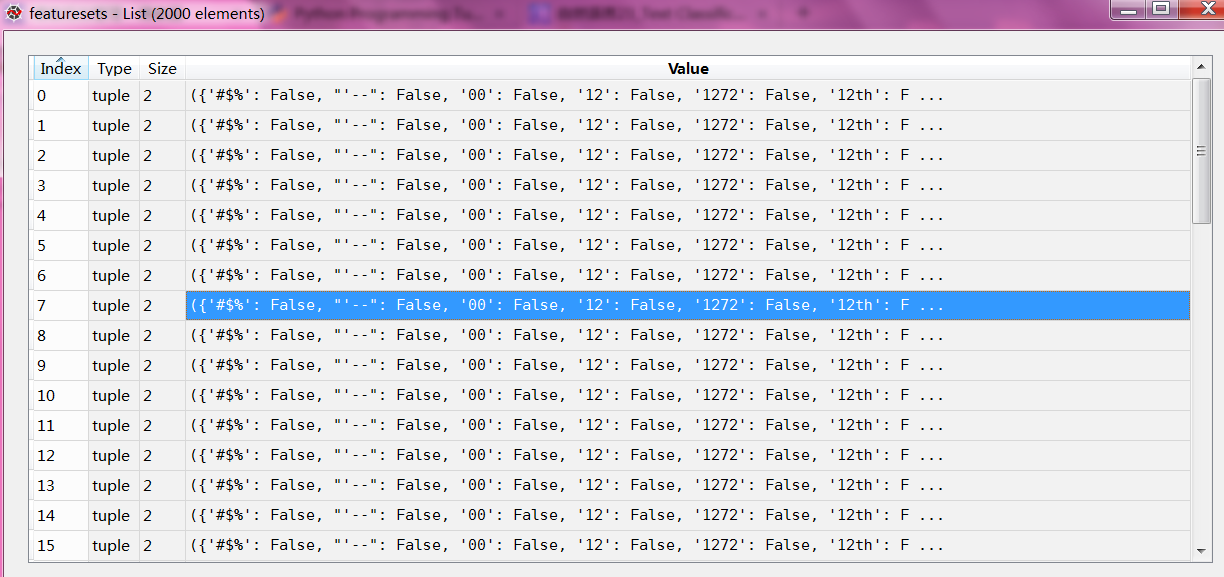
featuresets = [(find_features(rev), category) for (rev, category) in documents]
featuresets 特征集合一共有2000个文件,每个文件是一个元组,元组包含字典(“glory”:False)和neg/pos分类

python风控评分卡建模和风控常识(博客主亲自录制视频教程)

自然语言27_Converting words to Features with NLTK的更多相关文章
- 自然语言18.1_Named Entity Recognition with NLTK
QQ:231469242 欢迎nltk爱好者交流 https://www.pythonprogramming.net/named-entity-recognition-nltk-tutorial/?c ...
- 自然语言15_Part of Speech Tagging with NLTK
https://www.pythonprogramming.net/part-of-speech-tagging-nltk-tutorial/?completed=/stemming-nltk-tut ...
- 自然语言12_Tokenizing Words and Sentences with NLTK
https://www.pythonprogramming.net/tokenizing-words-sentences-nltk-tutorial/ # -*- coding: utf-8 -*- ...
- 自然语言处理NLP程序包(NLTK/spaCy)使用总结
NLTK和SpaCy是NLP的Python应用,提供了一些现成的处理工具和数据接口.下面介绍它们的一些常用功能和特性,便于对NLP研究的组成形式有一个基本的了解. NLTK Natural Langu ...
- Python 自然语言处理(1) 计数词汇
Python有一个自然语言处理的工具包,叫做NLTK(Natural Language ToolKit),可以帮助你实现自然语言挖掘,语言建模等等工作.但是没有NLTK,也一样可以实现简单的词类统计. ...
- 【Python自然语言处理】第一章学习笔记——搜索文本、计数统计和字符串链表
这本书主要是基于Python和一个自然语言工具包(Natural Language Toolkit, NLTK)的开源库进行讲解 NLTK 介绍:NLTK是一个构建Python程序以处理人类语言数据的 ...
- python笔记10-----便捷网络数据NLTK语料库
1.NLTK的概念 NLTK:Natural language toolkit,是一套基于python的自然语言处理工具. 2.NLTK中集成了语料与模型等的包管理器,通过在python编辑器中执行. ...
- 【JulyEdu-Python基础】第 1 课:入门基础
一些学习资源的收集: 可汗学院 视频 公开课 Grossin 编程教室: 一个非常简单,对初学者非常友好的教程和在线联系 廖雪峰教程 书籍: Python核心编程: 这本书应该是最清楚.最深入全面的书 ...
- python文件打开模式&time&python第三方库
r:以只读方式打开文件.文件的指针将会放在文件的开头.这是默认模式. w:打开一个文件只用于写入.如果该文件已存在则将其覆盖.如果该文件不存在,创建新文件. a:打开一个文件用于追加.如果该文件已存在 ...
随机推荐
- mysql数据库乱码解决方法之一
在前端页面向数据库中插入带中文字符的数据,到数据库时中文都变成了"?",其中jsp页面已经是设为utf-8编码的,建数据库时选择的编码也是utf-8; 1.解决的办法是在连接数据库 ...
- 【hive】——Hive初始了解
1.没有接触,不知道这个事物是什么,所以不会产生任何问题.2.接触了,但是不知道他是什么,反正我每天都在用.3.有一定的了解,不够透彻.那么hive,1.我们对它了解多少?2.它到底是什么?3.hiv ...
- SQL2005/2008 无法连接错误
SQL2005/2008 .或者是localhost可以访问,但是127.0.0.1或者IP无法访问 打开[SQL Server 配置管理器](如果是MSSQL2005,在运行中输入SQLServer ...
- win10磁盘100%解决办法
控制面板-管理工具-服务 找到“HomeGroupListener”服务,双击打开或右键单击“属性”命令. 在弹出属性界面窗口,在常规选项卡单击启动类型的下拉框,出来的列表选择“禁用”.然后在服务状态 ...
- ubuntu16.04连接android手机蓝牙共享网络热点
最近的想要用android手机蓝牙共享wifi网络给ubuntu16.04系统用,查了好多资料,发现网上很少有有用的.自己实践后分享如下. 第一步:手机与电脑配对: 该步骤比较简单,网 ...
- 某墙尼妹,用个Response.Filter来解决StackExchange.Exceptional中google cdn的问题
某墙墙了古古路,一些开源的东东里用了古古路CDN,比如Exceptional,Opserver ,导致服务要么慢要么用不了 必须要替换之 Exceptional就只要用Response.Filter替 ...
- 详解Linux命令行下常用svn命令
1.Linux命令行下将文件checkout到本地目录 svn checkout path(path是服务器上的目录) 例如:svn checkout svn://192.168.1.1/pro/do ...
- Struts2文件上传和文件下载
一.单个文件上传 文件上传需要两个jar包: 首先制作一个简单的页面,用于实现文件上传 <h1>单个文件上传</h1> <s:form action="uplo ...
- 细说 C# 中的 IEnumerable和IEnumerator接口
我们先思考几个问题: 为什么在foreach中不能修改item的值? 要实现foreach需要满足什么条件? 为什么Linq to Object中要返回IEnumerable? 接下来,先开始我们的正 ...
- Zip加密
http://www.cnblogs.com/kgdxpr/archive/2013/08/01/3230174.html