
iOS学习之Table View的简单使用
Table View简单描述:
在iPhone和其他iOS的很多程序中都会看到Table View的出现,除了一般的表格资料展示之外,设置的属性资料往往也用到Table View,Table View主要分为以下两种:

- Plain:这是普通的列表风格
- Grouped :这是分块风格。
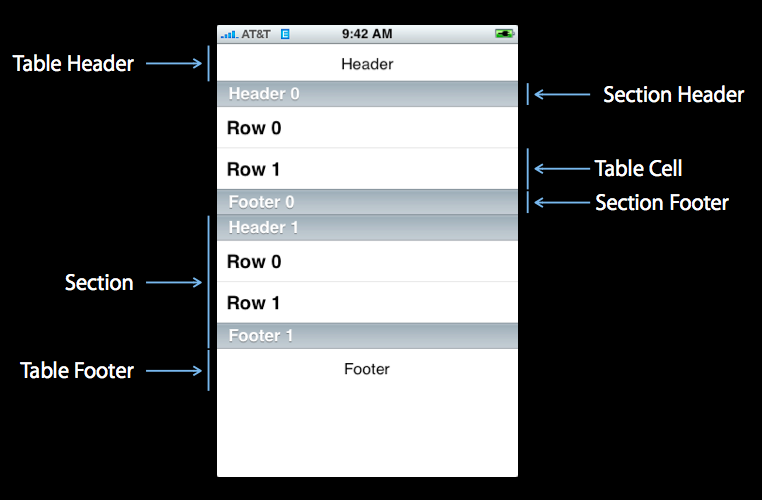 :
:
1、新建项目
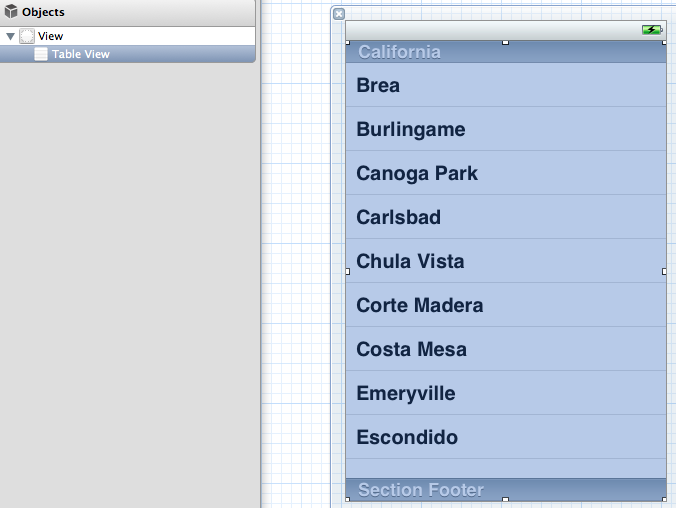
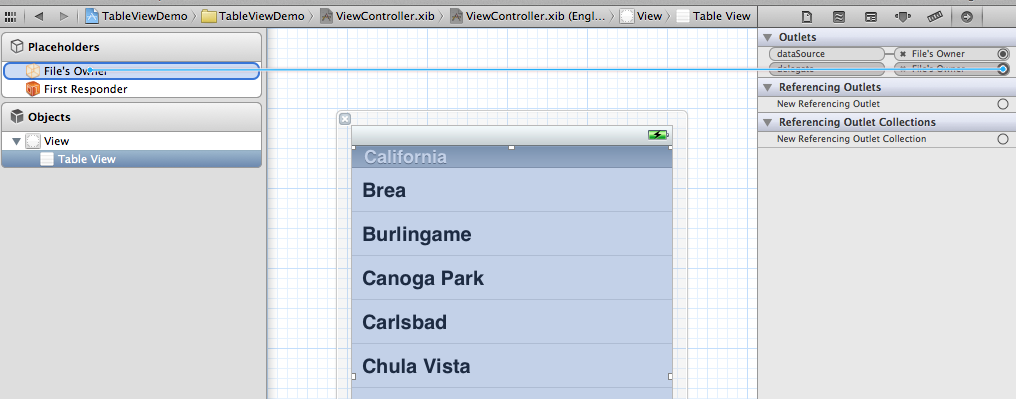
- #import <UIKit/UIKit.h>
- @interface ViewController : UIViewController<UITableViewDelegate, UITableViewDataSource>
- @property (strong, nonatomic) NSArray *list;
- @end
5、打开.m文件,添加:
- @synthesize list = _list;

这是发现有两个警告,提示未完成的实现,这提示的是UITableViewDelegate, UITableViewDataSource这个两个头文件里的协议的方法未实现。待会我们去实现它。
- - (void)viewDidLoad
- {
- [super viewDidLoad];
- // Do any additional setup after loading the view, typically from a nib.
- NSArray *array = [[NSArray alloc] initWithObjects:@"美国", @"菲律宾",
- @"黄岩岛", @"中国", @"泰国", @"越南", @"老挝",
- @"日本" , nil];
- self.list = array;
- }
- - (void)viewDidUnload
- {
- [super viewDidUnload];
- // Release any retained subviews of the main view.
- self.list = nil;
- }
7、生成row
- - (UITableViewCell *)tableView:(UITableView *)tableView
- cellForRowAtIndexPath:(NSIndexPath *)indexPath {
- static NSString *TableSampleIdentifier = @"TableSampleIdentifier";
- UITableViewCell *cell = [tableView dequeueReusableCellWithIdentifier:
- TableSampleIdentifier];
- if (cell == nil) {
- cell = [[UITableViewCell alloc]
- initWithStyle:UITableViewCellStyleDefault
- reuseIdentifier:TableSampleIdentifier];
- }
- NSUInteger row = [indexPath row];
- cell.textLabel.text = [self.list objectAtIndex:row];
- return cell;
- }
UITableViewCell *cell = [tableView dequeueReusableCellWithIdentifier: TableSampleIdentifier];
这个语句根据标识符TableSampleIdentifier寻找当前可以重用的UITableViewCell。当某行滑出当前可见区域后,我们重用它所对应的UITableViewCell对象,那么就可以节省内存和资源。
注意参数(NSIndexPath *)indexPath,它将行号row和部分号section合并了,通过[indexPath row];获取行号。之后给cell设置其文本:
cell.textLabel.text = [self.list objectAtIndex: row];
8、现在一个简单的TableView就弄好看,运行下看效果
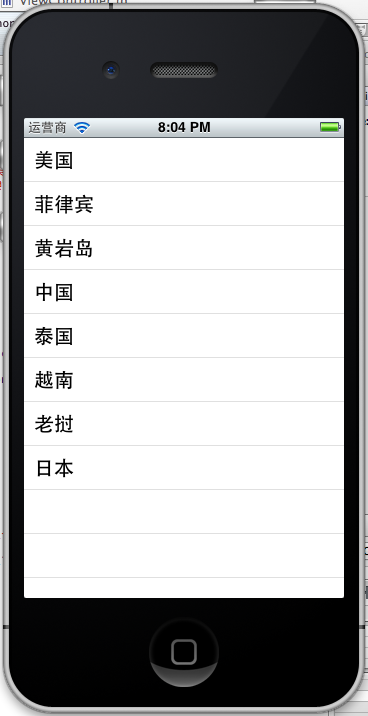 、、
、、- NSUInteger row = [indexPath row];
- cell.textLabel.text = [self.list objectAtIndex:row];
- UIImage *image = [UIImage imageNamed:@"qq"];
- cell.imageView.image = image;
- UIImage *highLighedImage = [UIImage imageNamed:@"youdao"];
- cell.imageView.highlightedImage = highLighedImage;
- return cell;
效果如下:
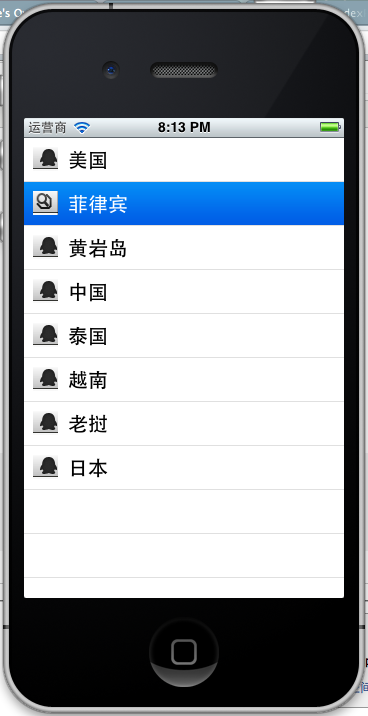
UITableViewCellStyleDefault
UITableViewCellStyleSubtle
UITableViewCellStyleValue1
UITableViewCellStyleValue2
cell.detailTextLabel.text =@"打打打打";
return cell;

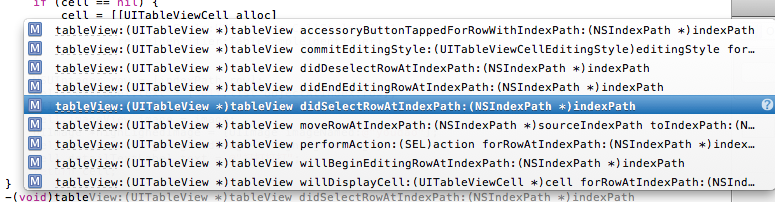
-(void)tableView:(UITableView *)tableView didSelectRowAtIndexPath:(NSIndexPath *)indexPath
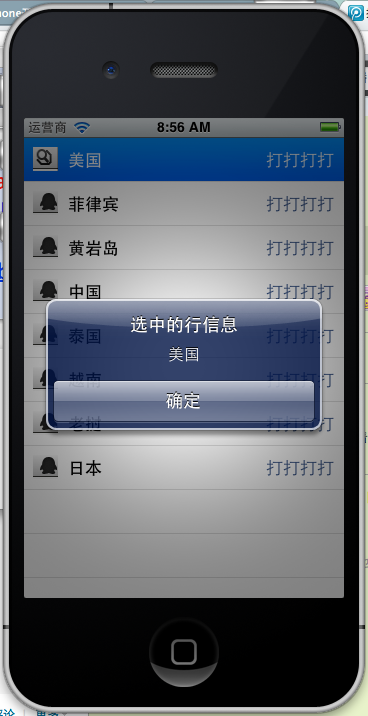
选中是做个提示,提示选中了那个信息,代码实现如下:
- -(void)tableView:(UITableView *)tableView didSelectRowAtIndexPath:(NSIndexPath *)indexPath{
- NSString *rowString = [self.list objectAtIndex:[indexPath row]];
- UIAlertView * alter = [[UIAlertView alloc] initWithTitle:@"选中的行信息" message:rowString delegate:self cancelButtonTitle:@"确定" otherButtonTitles:nil, nil];
- [alter show];
- }
效果:
iOS学习之Table View的简单使用的更多相关文章
- ***iOS学习之Table View的简单使用和DEMO示例(共Plain普通+Grouped分组两种)
Table View简单描述: 在iPhone和其他iOS的很多程序中都会看到Table View的出现,除了一般的表格资料展示之外,设置的属性资料往往也用到Table View,Table View ...
- IOS学习笔记3—Objective C—简单的内存管理
今天简述一下简单的内存管理,在IOS5.0以后Apple增加了ARC机制(Automatic Reference Counting),给开发人员带来了不少的方便,但是为了能更好的理解IOS内存管理机制 ...
- iOS学习之UITableView中Cell的操作
接着iOS学习之Table View的简单使用 这篇,这里主要讲UITableView 中的Cell的操作,包括标记.移动.删除.插入. 为了简单快捷,直接从原来那篇的代码开始,代码下载地址:http ...
- Table View Programming Guide for iOS---(一)---About Table Views in iOS Apps
About Table Views in iOS Apps Table views are versatile user interface objects frequently found in i ...
- 在iOS中怎样创建可展开的Table View?(上)
原文地址 本文作者:gabriel theodoropoulos 原文:How To Create an Expandable Table View in iOS 原文链接 几乎所有的app都有一个共 ...
- iOS 利用长按手势移动 Table View Cells
本文译自:Cookbook: Moving Table View Cells with a Long Press Gesture 目录: 你需要什么? 如何做? 如何将其利用至UICollection ...
- 在iOS中怎样创建可展开的Table View?(下)
接上篇:在iOS中怎样创建可展开的Table View?(上) 展开和合拢 我猜这部分可能是你最期望的了,因为本次教程的目标将会在在部分实现.第一次我们设法让顶层的cell,在它们点击的时候展开或者合 ...
- iOS学习笔记(5)——显示简单的TableView
1. 创建工程 创建一个新的Xcode工程命名为SimpleTableTest. 删除main.storyboard文件和info.plist中有关storyboard的相关属性. 按command+ ...
- iOS学习之第二个View使用UITabBarViewController
前面有一篇博文iOS学习之Tab Bar的使用和视图切换 这是在AppDelegate里使用Tabbar,这样的程序打开就是TabbarView了,有时候我们需要给程序做一些帮助页面,或者登录页面,之 ...
随机推荐
- 使用Proj.Net创建空间参考
在RGEOS项目中,投影变换是通过Proj.Net来实现的. 支持的投影主要包括AlbersProjection.TransverseMercator.Mercator.Krovak.Lambert ...
- Oracle表名、列名、约束名的长度限制
Oracle数据库版本11.2.0.1.0 Oracle表名.列名.约束名的长度限制 1.查询用户所有的表 select * from USER_TABLES; 2.查询用户所有表的列 select ...
- (Factory method)工厂方法设计模式
定义: 1.) 工厂方法模式是用来封装对象的创建,通过让子类来决定创建的对象是什么,来达到将对象创建的过程封装的目的: 2.) 定义了一个创建对象的接口,但由子类决定要实例的泪是哪一个.工厂方法让类把 ...
- 从gitlab下载好cocoapods中遇到的问题
如果遇到 [!] Unable to satisfy the following requirements: - `Mantle (~> 2.0.3)` required by `Podfile ...
- MySQL编码问题
client 下的default_character_set=utf8; 它是需要的,可是它的作用是干吗的? 它的作用等同执行以下3个命令 SET character_set_client = utf ...
- hduoj 4712 Hamming Distance 2013 ACM/ICPC Asia Regional Online —— Warmup
http://acm.hdu.edu.cn/showproblem.php?pid=4712 Hamming Distance Time Limit: 6000/3000 MS (Java/Other ...
- C++之路进阶——bzoj3262(陌上花开)
F.A.Qs Home Discuss ProblemSet Status Ranklist Contest ModifyUser gryz2016 Logout 捐赠本站 Notice:由于本OJ ...
- java中hashCode()方法的作用
hashcode方法返回该对象的哈希码值. hashCode()方法可以用来来提高Map里面的搜索效率的,Map会根据不同的hashCode()来放在不同的位置,Map在搜索一个对象的时候先 ...
- 关于内存 GetMemory( ) 笔试分析
1. #include<stdio.h>#include<string.h>void GetMemory(char *p){ p=(char *)malloc(100); }i ...
- 比较二个文件的最后修改时间FileListener
import java.io.File; import java.text.SimpleDateFormat; import java.util.Timer; import java.util.Tim ...