
SpringBoot整合ip2region实现使用ip监控用户访问地域来源
举个栗子
最*,多*台都上线了展示*期发帖所在地功能,比如抖音、微博、百度,像下面那样:

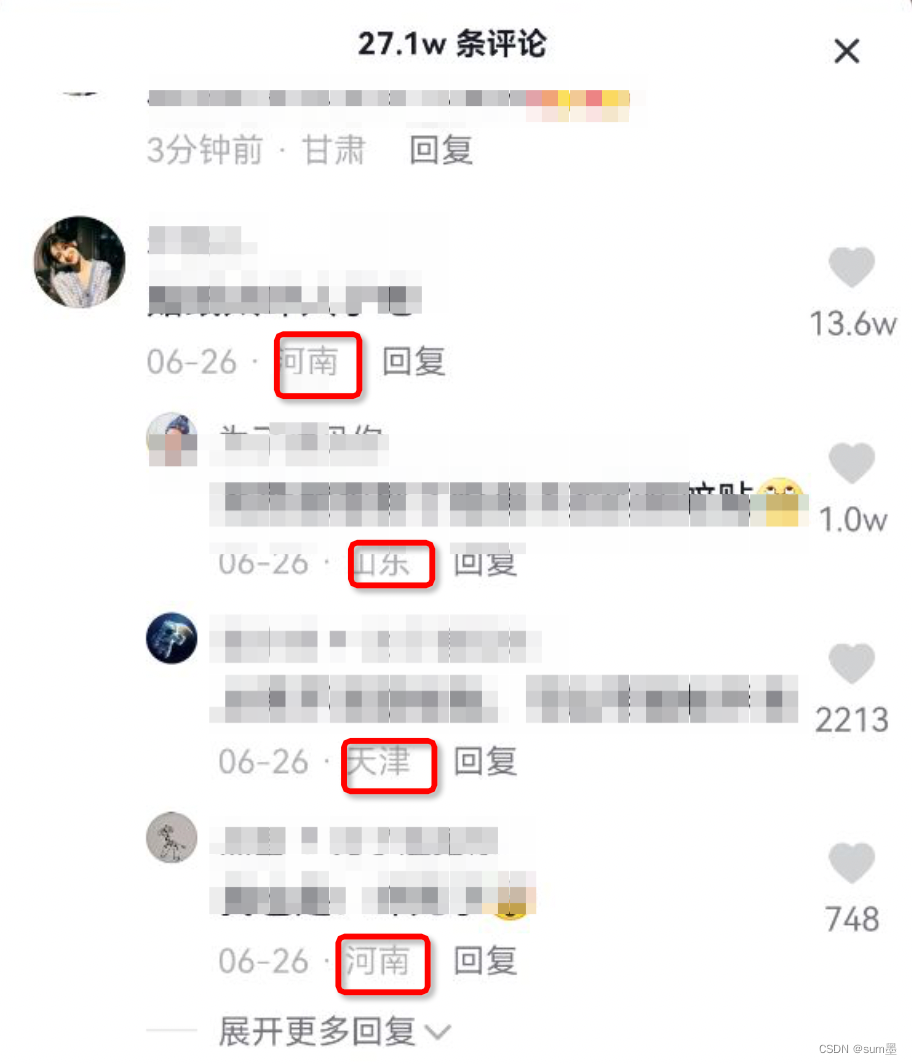
那么这个功能都是如何实现的呢?
一般有两个方法:GPS 定位的信息和用户 IP 地址。
由于每个手机都不一定会打开 GPS,而且有时并不太需要太精确的位置(到城市这个级别即可),所以根据 IP 地址入手来分析用户位置是个不错的选择。
所以ip2region框架应运而生,GitHub上️已经10.6K,值得一用。
GitHub地址:https://github.com/lionsoul2014/ip2region
快速上手
第一步,将整个项目down下来,找到data目录,进入
这里有三份ip地址库,我们将ip2region.xdb复制出来,等下我们的java项目中需要使用到。
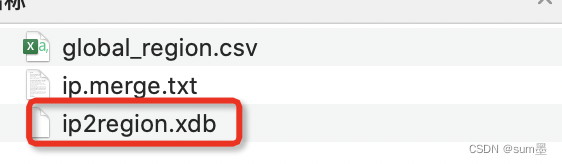
第二步,创建maven项目,引入依赖
pom.xml依赖如下:
<!-- ip2region  -->

<dependency>

	<groupId>org.lionsoul</groupId>

	<artifactId>ip2region</artifactId>

    <version>2.6.3</version>

</dependency>

<!-- 用于读取ip2region.xdb文件使用 -->

<dependency>

	<groupId>commons-io</groupId>

	<artifactId>commons-io</artifactId>

	<version>2.6</version>

</dependency>
加好依赖后,在resources目录下创建ip2region文件夹,把上面的ip2region.xdb文件放进去。
第三步,编写测试类
package com.example.springbootip.util;

import org.apache.commons.io.FileUtils;

import org.lionsoul.ip2region.xdb.Searcher;

import java.io.File;

import java.text.MessageFormat;

import java.util.Objects;

public class AddressUtil {

    /**

     * 当前记录地址的本地DB

     */

    private static final String TEMP_FILE_DIR = "/home/admin/app/";

    /**

     * 根据IP地址查询登录来源

     *

     * @param ip

     * @return

     */

    public static String getCityInfo(String ip) {

        try {

            // 获取当前记录地址位置的文件

            String dbPath = Objects.requireNonNull(AddressUtil.class.getResource("/ip2region/ip2region.xdb")).getPath();

            File file = new File(dbPath);

            //如果当前文件不存在,则从缓存中复制一份

            if (!file.exists()) {

                dbPath =    TEMP_FILE_DIR + "ip.db";

                System.out.println(MessageFormat.format("当前目录为:[{0}]", dbPath));

                file = new File(dbPath);

                FileUtils.copyInputStreamToFile(Objects.requireNonNull(AddressUtil.class.getClassLoader().getResourceAsStream("classpath:ip2region/ip2region.xdb")), file);

            }

            //创建查询对象

            Searcher searcher = Searcher.newWithFileOnly(dbPath);

            //开始查询

            return searcher.searchByStr(ip);

        } catch (Exception e) {

            e.printStackTrace();

        }

        //默认返回空字符串

        return "";

    }

    public static void main(String[] args) {

        System.out.println(getCityInfo("1.2.3.4"));

    }

}
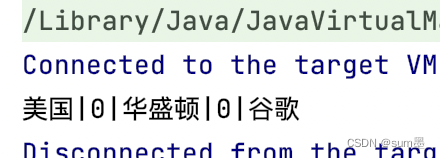
输出结果如下:
项目实现
1、思路分析
通过上面简单的例子我们已经可以通过ip获取地域了,那么接下来将实现如何监控Controller接口的访问地址。
首先,在一个项目中肯定有很多接口,所以我们不能直接在接口中写代码的方式去实现,这样代码复杂度、耦合度太高。所以我打算在这里使用注解切面的方式实现,只需要在接口方法上加上 @Ip 注解就可以实现。不知道切面是什么的同学可以参考这篇文章:SpringBoot整合aspectj实现面向切面编程(即AOP)
其次,有些项目中会使用Nginx等反向代理软件,则不能通过 request.getRemoteAddr()获取 IP地址,如果使用了多级反向代理的话,X-Forwarded-For的值并不止一个,而是一串IP地址,X-Forwarded-For中第一个非 unknown的有效IP字符串,则为真实IP地址。
最后,让我们来实现这个功能吧!
2、配置文件
SpringBoot项目pom.xml文件
<?xml version="1.0" encoding="UTF-8"?>

<project xmlns="http://maven.apache.org/POM/4.0.0" xmlns:xsi="http://www.w3.org/2001/XMLSchema-instance"

         xsi:schemaLocation="http://maven.apache.org/POM/4.0.0 https://maven.apache.org/xsd/maven-4.0.0.xsd">

    <modelVersion>4.0.0</modelVersion>

    <parent>

        <groupId>org.springframework.boot</groupId>

        <artifactId>spring-boot-starter-parent</artifactId>

        <version>2.7.1</version>

        <relativePath/> <!-- lookup parent from repository -->

    </parent>

    <groupId>com.example</groupId>

    <artifactId>springboot-ip</artifactId>

    <version>0.0.1-SNAPSHOT</version>

    <name>springboot-ip</name>

    <description>Demo project for Spring Boot</description>

    <properties>

        <java.version>1.8</java.version>

    </properties>

    <dependencies>

        <dependency>

            <groupId>org.springframework.boot</groupId>

            <artifactId>spring-boot-starter-web</artifactId>

        </dependency>

        <dependency>

            <groupId>org.springframework.boot</groupId>

            <artifactId>spring-boot-starter-test</artifactId>

            <scope>test</scope>

        </dependency>

        <!-- ip2region -->

        <dependency>

            <groupId>org.lionsoul</groupId>

            <artifactId>ip2region</artifactId>

            <version>2.6.3</version>

        </dependency>

        <!-- aop切面 -->

        <dependency>

            <groupId>org.aspectj</groupId>

            <artifactId>aspectjweaver</artifactId>

            <version>1.9.5</version>

        </dependency>

        <dependency>

            <groupId>commons-io</groupId>

            <artifactId>commons-io</artifactId>

            <version>2.6</version>

        </dependency>

    </dependencies>

    <build>

        <plugins>

            <plugin>

                <groupId>org.springframework.boot</groupId>

                <artifactId>spring-boot-maven-plugin</artifactId>

            </plugin>

        </plugins>

    </build>

</project>
3、项目代码
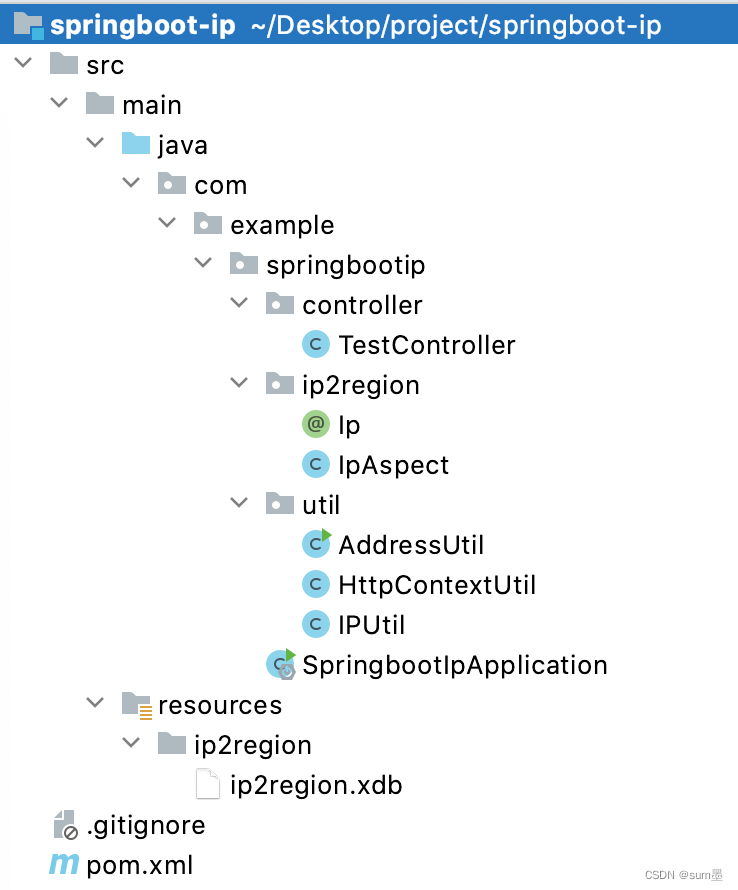
项目结构
SpringbootIpApplication.java
package com.example.springbootip;

import org.springframework.boot.SpringApplication;

import org.springframework.boot.autoconfigure.SpringBootApplication;

@SpringBootApplication

public class SpringbootIpApplication {

    public static void main(String[] args) {

        SpringApplication.run(SpringbootIpApplication.class, args);

    }

}
TestController.java
package com.example.springbootip.controller;

import com.example.springbootip.ip2region.Ip;

import org.springframework.web.bind.annotation.GetMapping;

import org.springframework.web.bind.annotation.RequestMapping;

import org.springframework.web.bind.annotation.RestController;

@RestController

@RequestMapping("/test")

public class TestController {

    @GetMapping("/hello")

    @Ip

    public String hello() {

        return "hello";

    }

}
Ip.java
package com.example.springbootip.ip2region;

import java.lang.annotation.ElementType;

import java.lang.annotation.Retention;

import java.lang.annotation.RetentionPolicy;

import java.lang.annotation.Target;

@Target(ElementType.METHOD)

@Retention(RetentionPolicy.RUNTIME)

public @interface Ip {

}
IpAspect.java
package com.example.springbootip.ip2region;

import com.example.springbootip.util.AddressUtil;

import com.example.springbootip.util.HttpContextUtil;

import com.example.springbootip.util.IPUtil;

import org.aspectj.lang.ProceedingJoinPoint;

import org.aspectj.lang.annotation.Around;

import org.aspectj.lang.annotation.Aspect;

import org.aspectj.lang.annotation.Pointcut;

import org.springframework.stereotype.Component;

import javax.servlet.http.HttpServletRequest;

import java.text.MessageFormat;

@Aspect

@Component

public class IpAspect {

    @Pointcut("@annotation(com.example.springbootip.ip2region.Ip)")

    public void pointcut() {

        // do nothing

    }

    @Around("pointcut()")

    public Object doAround(ProceedingJoinPoint point) throws Throwable {

        HttpServletRequest request = HttpContextUtil.getHttpServletRequest();

        String ip = IPUtil.getIpAddr(request);

        System.out.println(MessageFormat.format("当前IP为:[{0}];当前IP地址解析出来的地址为:[{1}]", ip, AddressUtil.getCityInfo(ip)));

        return point.proceed();

    }

}
AddressUtil.java
package com.example.springbootip.util;

import org.apache.commons.io.FileUtils;

import org.lionsoul.ip2region.xdb.Searcher;

import java.io.File;

import java.text.MessageFormat;

import java.util.Objects;

public class AddressUtil {

    /**

     * 当前记录地址的本地DB

     */

    private static final String TEMP_FILE_DIR = "/home/admin/app/";

    /**

     * 根据IP地址查询登录来源

     *

     * @param ip

     * @return

     */

    public static String getCityInfo(String ip) {

        try {

            // 获取当前记录地址位置的文件

            String dbPath = Objects.requireNonNull(AddressUtil.class.getResource("/ip2region/ip2region.xdb")).getPath();

            File file = new File(dbPath);

            //如果当前文件不存在,则从缓存中复制一份

            if (!file.exists()) {

                dbPath =    TEMP_FILE_DIR + "ip.db";

                System.out.println(MessageFormat.format("当前目录为:[{0}]", dbPath));

                file = new File(dbPath);

                FileUtils.copyInputStreamToFile(Objects.requireNonNull(AddressUtil.class.getClassLoader().getResourceAsStream("classpath:ip2region/ip2region.xdb")), file);

            }

            //创建查询对象

            Searcher searcher = Searcher.newWithFileOnly(dbPath);

            //开始查询

            return searcher.searchByStr(ip);

        } catch (Exception e) {

            e.printStackTrace();

        }

        //默认返回空字符串

        return "";

    }

    public static void main(String[] args) {

        System.out.println(getCityInfo("1.2.3.4"));

    }

}
HttpContextUtil.java
package com.example.springbootip.util;

import org.springframework.web.context.request.RequestContextHolder;

import org.springframework.web.context.request.ServletRequestAttributes;

import javax.servlet.http.HttpServletRequest;

import javax.servlet.http.HttpServletResponse;

import java.util.Objects;

/**

 * @desc 全局获取HttpServletRequest、HttpServletResponse

 */

public class HttpContextUtil {

    private HttpContextUtil() {

    }

    public static HttpServletRequest getHttpServletRequest() {

        return ((ServletRequestAttributes) Objects.requireNonNull(RequestContextHolder.getRequestAttributes())).getRequest();

    }

    public static HttpServletResponse getHttpServletResponse() {

        return ((ServletRequestAttributes) Objects.requireNonNull(RequestContextHolder.getRequestAttributes())).getResponse();

    }

}
IPUtil.java
package com.example.springbootip.util;

import javax.servlet.http.HttpServletRequest;

/**

 * @desc 查询当前访问的IP地址

 */

public class IPUtil {

    private static final String UNKNOWN = "unknown";

    protected IPUtil() {

    }

    /**

     * 获取 IP地址

     * 使用 Nginx等反向代理软件, 则不能通过 request.getRemoteAddr()获取 IP地址

     * 如果使用了多级反向代理的话,X-Forwarded-For的值并不止一个,而是一串IP地址,

     * X-Forwarded-For中第一个非 unknown的有效IP字符串,则为真实IP地址

     */

    public static String getIpAddr(HttpServletRequest request) {

        String ip = request.getHeader("x-forwarded-for");

        if (ip == null || ip.length() == 0 || UNKNOWN.equalsIgnoreCase(ip)) {

            ip = request.getHeader("Proxy-Client-IP");

        }

        if (ip == null || ip.length() == 0 || UNKNOWN.equalsIgnoreCase(ip)) {

            ip = request.getHeader("WL-Proxy-Client-IP");

        }

        if (ip == null || ip.length() == 0 || UNKNOWN.equalsIgnoreCase(ip)) {

            ip = request.getRemoteAddr();

        }

        return "0:0:0:0:0:0:0:1".equals(ip) ? "127.0.0.1" : ip;

    }

}
打印结果
由于访问路径是:http://127.0.0.1:8080/test/hello,所以本地解析出来的是内网

SpringBoot整合ip2region实现使用ip监控用户访问地域来源的更多相关文章
- 使用Userlock监控用户访问 增强学校网络安全
随着网络技术的不断进步,一方面,拥有广泛教学资源的各大大中院校纷纷升级校园网络技术,保护学校的网络安全.另一方面,网络安全面临的威胁也层出不穷.面对来自网络内外的安全威胁,负责中小学.大学院校网络安全 ...
- springboot整合druid和配置资源监控
1.添加依赖,在maven repository中搜索 <dependency> <groupId>com.alibaba</groupId> <artifa ...
- springboot整合actuator,进行运维监控
首先引入依赖: <?xml version="1.0" encoding="UTF-8"?> <project xmlns="htt ...
- SpringBoot系列七:SpringBoot 整合 MyBatis(配置 druid 数据源、配置 MyBatis、事务控制、druid 监控)
1.概念:SpringBoot 整合 MyBatis 2.背景 SpringBoot 得到最终效果是一个简化到极致的 WEB 开发,但是只要牵扯到 WEB 开发,就绝对不可能缺少数据层操作,所有的开发 ...
- Springboot:整合Mybaits和Druid【监控】(十一)
MyBatis默认提供了一个数据库连接池PooledDataSource,在此我们使用阿里提供的Druid数据库连接池 项目下载:https://files.cnblogs.com/files/app ...
- SpringBoot整合Actuator进行健康监控
一.Actuator介绍 SpringBoot自带监控功能Actuator,通过 restful api 请求来监管.审计.收集应用的运行情况,可以帮助实现对程序内部运行情况监控,比如监控状况.Bea ...
- SpringBoot整合SpringAdmin搭建监控平台
在SpringBoot整合Actuator进行健康监控中,胜金讲述了通过Actuator进行健康监控,但是学习API并根据API开发前端需要花费相当大的精力,本次胜金就写一下通过SpringAdmin ...
- Springboot整合Jwt实现用户认证
前言 相信大家在进行用户认证中或多或少都要对用户进行认证,当前进行认证的方式有基于session.token等主流方式,但是目前使用最广泛的还是基于JWT的用户认证,特别适用于前后端分离的项目. 本篇 ...
- 【java框架】SpringBoot(5)--SpringBoot整合分布式Dubbo+Zookeeper
1.理论概述 1.1.分布式 分布式系统是若干独立计算机的集合,这些计算机对于用户来讲就像单个系统. 由多个系统集成成一个整体,提供多个功能,组合成一个板块,用户在使用上看起来是一个服务.(比如淘宝网 ...
- Redis-基本概念、java操作redis、springboot整合redis,分布式缓存,分布式session管理等
NoSQL的引言 Redis数据库相关指令 Redis持久化相关机制 SpringBoot操作Redis Redis分布式缓存实现 Resis中主从复制架构和哨兵机制 Redis集群搭建 Redis实 ...
随机推荐
- [转帖]max_allowed_packet 与 SQL 长度的关系
https://www.oceanbase.com/knowledge-base/oceanbase-database-1000000000210013 适用版本:V2.1.x.V2.2.x.V3.1 ...
- [粘贴]Introducing Exadata X9M: Dramatically Faster, More Cost Effective, and Easier to Use
https://blogs.oracle.com/exadata/post/exadata-x9m The Exadata Product Management and Development t ...
- [转帖]K8S 挂载 minio csi 的方式.
对象存储 前置条件 安装Minio(在102主机上操作) 安装csi-s3插件(在103主机上操作) 使用 参考 本文介绍kubernetes如何基于对象存储(minio)创建PV与PVC 前置条 ...
- [转帖]Redash -- Redash部署安装docker版
向导 官网 1.环境准备 1.1 安装docker和docker-compose 1.2 安装nodejs和npm 2.安装Redash 官网 主页 Developer Guide github 讨论 ...
- 【转帖】TCP内核参数
https://www.cnblogs.com/chia/p/7799231.html tcp_syn_retries :INTEGER默认值是5对于一个新建连接,内核要发送多少个 SYN 连接请求才 ...
- [转帖]Linux系统语言设置和locale命令详解
简介 Linux系统可以用locale命令查看语言设置,查看中英文环境,具体操作如下. 操作 1.查看当前安装有那些语言: [root@localhost /]# locale -a 2.当前语言相关 ...
- [转帖]使用 Shell 运算进行进制转换 16进制转10进制
使用 Shell 运算进行进制转换 工作时候常常遇到一些问题,拿到的数字是16进制的,但是运算的时候是10进制的,shell可以很方便的处理这类的进制转换问题,一种情况是使用 Shell 运算把一个数 ...
- Docker镜像的基本操作总结
摘要 容器化是上个十年比较火的技术. 现在看起来在进行总计有点晚了. 不过linux是三十年前的,我依旧没有总结好 道理是一样的. 技术不在于新旧, 重要的是学习到原理. Docker的重要概念 Re ...
- 手把手带你开发starter,点对点带你讲解原理
京东物流 孔祥东 _____ _ ____ _ / ____| (_) | _ \ | | | (___ _ __ _ __ _ _ __ __ _| |_) | ___ ___ | |_ \___ ...
- 原生js判断某个区域的滚动条滚动到了底部
原生js判断某个区域的滚动条滚动到了底部### 讲解==> 关系公式:element.scrollHeight - element.scrollTop === element.clientHei ...