
[转]Android:布局实例之模仿QQ登录界面
Android:布局实例之模仿QQ登录界面
预览图:
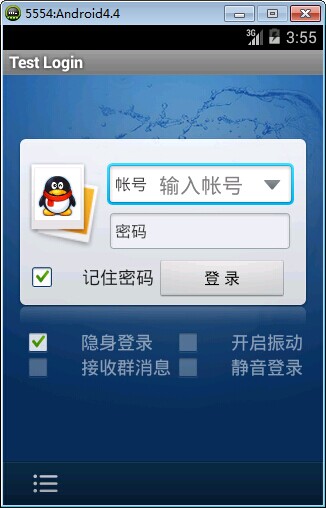
准备:
1、找到模仿对象 QQ登陆界面UI下载>>>>>
2、导入工程
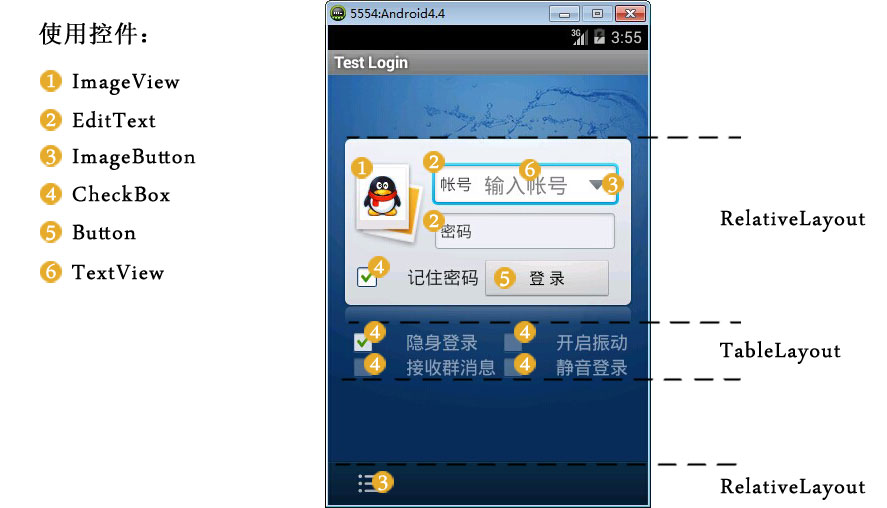
3、查看布局结构和使用控件

其对应效果图分布为
4、分析样式选择器
下拉箭头2种样式:点击和默认状态
文本框2种样式:聚焦和默认状态
复选框3种样式:选择、不选择和鼠标点着不放
左下角按钮2种样式:点击和默认
登录按钮2样式:点击和默认
============================================帖代码===========================
布局:

  1 <?xml version="1.0" encoding="utf-8"?>

  2 <LinearLayout xmlns:android="http://schemas.android.com/apk/res/android"

  3     android:layout_width="match_parent"

  4     android:layout_height="match_parent"

  5     android:orientation="vertical" >

  6

  7     <include layout="@layout/head" />

  8

  9     <LinearLayout

 10         android:layout_width="match_parent"

 11         android:layout_height="wrap_content"

 12         android:layout_weight="1.0"

 13         android:background="@drawable/default_bg"

 14         android:orientation="vertical" >

 15

 16         <RelativeLayout

 17             android:layout_width="match_parent"

 18             android:layout_height="wrap_content"

 19             android:layout_marginLeft="15px"

 20             android:layout_marginRight="15px"

 21             android:layout_marginTop="63px"

 22             android:background="@drawable/login_back"

 23             android:paddingBottom="10px"

 24             android:paddingTop="21px" >

 25

 26             <!-- QQ左栏logo -->

 27

 28             <ImageView

 29                 android:id="@+id/faceImg"

 30                 android:layout_width="wrap_content"

 31                 android:layout_height="wrap_content"

 32                 android:background="@drawable/qqfaceleft" />

 33

 34             <!-- 帐号文本框 -->

 35

 36             <EditText

 37                 android:id="@+id/login_edit_account"

 38                 android:layout_width="match_parent"

 39                 android:layout_height="wrap_content"

 40                 android:layout_alignParentTop="true"

 41                 android:layout_marginBottom="5px"

 42                 android:layout_marginLeft="5dp"

 43                 android:layout_marginRight="5dp"

 44                 android:layout_marginTop="5dp"

 45                 android:layout_toRightOf="@+id/faceImg"

 46                 android:background="@drawable/qq_edit_login"

 47                 android:paddingLeft="45sp"

 48                 android:text="输入帐号"

 49                 android:textColor="#ddd" />

 50

 51             <!-- 文本框左边帐号提示 -->

 52

 53             <TextView

 54                 android:layout_width="wrap_content"

 55                 android:layout_height="wrap_content"

 56                 android:layout_alignBottom="@+id/login_edit_account"

 57                 android:layout_alignLeft="@+id/login_edit_account"

 58                 android:layout_alignTop="@+id/login_edit_account"

 59                 android:layout_marginRight="15.0sp"

 60                 android:gravity="center_vertical"

 61                 android:paddingLeft="7sp"

 62                 android:text="帐号"

 63                 android:textSize="16dp" />

 64

 65             <!-- 下拉菜单按钮 -->

 66

 67             <ImageButton

 68                 android:layout_width="wrap_content"

 69                 android:layout_height="wrap_content"

 70                 android:layout_alignBottom="@+id/login_edit_account"

 71                 android:layout_alignRight="@+id/login_edit_account"

 72                 android:layout_alignTop="@+id/login_edit_account"

 73                 android:layout_marginRight="1dp"

 74                 android:background="@drawable/more_select" />

 75

 76             <!-- 密码文本框 -->

 77

 78             <EditText

 79                 android:id="@+id/login_edit_pwd"

 80                 android:layout_width="wrap_content"

 81                 android:layout_height="wrap_content"

 82                 android:layout_alignLeft="@+id/login_edit_account"

 83                 android:layout_alignRight="@+id/login_edit_account"

 84                 android:layout_below="@+id/login_edit_account"

 85                 android:background="@drawable/qq_edit_login"

 86                 android:paddingLeft="45sp"

 87                 android:text="输入帐号"

 88                 android:textColor="#ddd" />

 89

 90             <TextView

 91                 android:layout_width="wrap_content"

 92                 android:layout_height="wrap_content"

 93                 android:layout_alignBottom="@+id/login_edit_pwd"

 94                 android:layout_alignLeft="@+id/login_edit_pwd"

 95                 android:layout_alignTop="@+id/login_edit_pwd"

 96                 android:layout_marginRight="15.0sp"

 97                 android:gravity="center_vertical"

 98                 android:paddingLeft="7sp"

 99                 android:text="密码"

100                 android:textSize="16dp" />

101

102             <!-- 记住密码选项 -->

103

104             <CheckBox

105                 android:layout_width="wrap_content"

106                 android:layout_height="wrap_content"

107                 android:layout_alignBaseline="@+id/login_btn_login"

108                 android:button="@drawable/qq_btn_check"

109                 android:text="记住密码" />

110

111             <!-- 登录按钮 -->

112

113             <Button

114                 android:id="@+id/login_btn_login"

115                 android:layout_width="130px"

116                 android:layout_height="42px"

117                 android:layout_alignParentRight="true"

118                 android:layout_below="@+id/login_edit_pwd"

119                 android:layout_marginRight="7px"

120                 android:layout_marginTop="12px"

121                 android:text="登录" />

122         </RelativeLayout>

123         <!-- 复选框层 -->

124

125         <TableLayout

126             android:layout_width="match_parent"

127             android:layout_height="wrap_content"

128             android:layout_marginLeft="20px"

129             android:layout_marginRight="20px"

130             android:stretchColumns="1" >

131

132             <TableRow>

133

134                 <CheckBox

135                     style="@style/MyCheckBox"

136                     android:layout_width="wrap_content"

137                     android:layout_height="wrap_content"

138                     android:text="隐身登录" />

139

140                 <CheckBox

141                     style="@style/MyCheckBox"

142                     android:layout_width="wrap_content"

143                     android:layout_height="wrap_content"

144                     android:layout_gravity="right"

145                     android:text="开启震动" />

146             </TableRow>

147

148             <TableRow>

149

150                 <CheckBox

151                     style="@style/MyCheckBox"

152                     android:layout_width="wrap_content"

153                     android:layout_height="wrap_content"

154                     android:text="接收群消息" />

155

156                 <CheckBox

157                     style="@style/MyCheckBox"

158                     android:layout_width="wrap_content"

159                     android:layout_height="wrap_content"

160                     android:layout_gravity="right"

161                     android:text="静音登录" />

162             </TableRow>

163         </TableLayout>

164     </LinearLayout>

165     <!-- 底部 -->

166

167     <RelativeLayout

168         android:layout_width="match_parent"

169         android:layout_height="44dp"

170         android:background="@drawable/bottom"

171         android:gravity="center_vertical" >

172

173         <ImageButton

174             android:layout_width="wrap_content"

175             android:layout_height="wrap_content"

176             android:background="@drawable/option" />

177     </RelativeLayout>

178

179 </LinearLayout>
样式:
    <style name="MyCheckBox" parent="@android:style/Widget.CompoundButton.CheckBox">

        <item name="android:textSize">16sp</item>

        <item name="android:textColor">#7fffffff</item>

        <item name="android:paddingLeft">28px</item>

        <item name="android:button">@drawable/qq_btn_check</item>

    </style>
样式选择器:
<?xml version="1.0" encoding="UTF-8"?>

<selector

  xmlns:android="http://schemas.android.com/apk/res/android">

    <item android:state_window_focused="false" android:state_enabled="true" android:state_checked="true" android:drawable="@drawable/btn_check_on" />

    <item android:state_window_focused="false" android:state_enabled="true" android:state_checked="false" android:drawable="@drawable/btn_check_off" />

    <item android:state_enabled="true" android:state_checked="true" android:state_pressed="true" android:drawable="@drawable/btn_check_on_pressed" />

    <item android:state_enabled="true" android:state_checked="false" android:state_pressed="true" android:drawable="@drawable/btn_check_off_pressed" />

    <item android:state_focused="true" android:state_enabled="true" android:state_checked="true" android:drawable="@drawable/btn_check_on_selected" />

    <item android:state_focused="true" android:state_enabled="true" android:state_checked="false" android:drawable="@drawable/btn_check_off_selected" />

    <item android:state_enabled="true" android:state_checked="false" android:drawable="@drawable/btn_check_off" />

    <item android:state_enabled="true" android:state_checked="true" android:drawable="@drawable/btn_check_on" />

</selector>
<?xml version="1.0" encoding="utf-8"?>

<selector xmlns:android="http://schemas.android.com/apk/res/android" >

    <item android:state_enabled="false" android:drawable="@drawable/login_input"></item>

    <item android:state_pressed="true" android:drawable="@drawable/login_input"></item>

    <item android:state_focused="true" android:drawable="@drawable/input_over"></item>

</selector>
<?xml version="1.0" encoding="UTF-8"?>

<selector

  xmlns:android="http://schemas.android.com/apk/res/android">

    <item android:state_pressed="true" android:drawable="@drawable/option_selected" />

    <item android:state_focused="true" android:state_enabled="true" android:drawable="@drawable/option_selected" />

    <item android:state_enabled="true" android:drawable="@drawable/option_normal" />

</selector>
<?xml version="1.0" encoding="UTF-8"?>

<selector

  xmlns:android="http://schemas.android.com/apk/res/android">

    <item android:state_pressed="true" android:drawable="@drawable/button2_down" />

    <item android:state_focused="true" android:state_enabled="true" android:drawable="@drawable/button2_over" />

    <item android:state_enabled="true" android:drawable="@drawable/button2" />

</selector>
相关文章:
[转]Android:布局实例之模仿QQ登录界面的更多相关文章
- Android:布局实例之模仿QQ登录界面
预览图: 准备: 1.找到模仿对象 QQ登陆界面UI下载>>>>> 2.导入工程 3.查看布局结构和使用控件 其对应效果图分布为 4.分析样式选择器 下拉箭头2种样式:点 ...
- Android:布局实例之模仿京东登录界面
预览图及布局结构参考: 布局: <?xml version="1.0" encoding="utf-8"?> <RelativeLayout ...
- java代码完全手写模仿qq登录界面
这是我模仿QQ2015版界面,实现的基本功能有登陆验证,重置等,当然直接复制代码运行是不一样的,还要注意自己插入自己的图片. 结果截图如下所示: import java.awt.BorderLayou ...
- 界面编程模仿篇(QQ登录界面逼真篇)
写了好多天的爬虫,偷空前前后后用了两天的时间(排除吃饭睡觉)写完了这个QQ登录界面,看起来还凑和着吧,如果是的大神的,莫见笑,纯属业余作品,废话先不多说,截图如下,其中第二幅图片中的红色方框部份有待完 ...
- Android菜鸟的成长笔记(3)——给QQ登录界面说So Easy
原文:Android菜鸟的成长笔记(3)--给QQ登录界面说So Easy 上一篇:Android菜鸟的成长笔记(2)--第一个Android应用 我们前面已经做了第一个Android应用程序,虽然有 ...
- QQ登录界面布局
简单的qq登录界面布局 <?xml version="1.0" encoding="utf-8"?> <RelativeLayout xmln ...
- WPF开发实例——仿QQ登录界面
原文:WPF开发实例--仿QQ登录界面 版权声明:本文为博主原创文章,如需转载请标明转载地址 http://blog.csdn.net/u013981858 https://blog.csdn.net ...
- WPF模仿QQ登录按钮
原文:WPF模仿QQ登录按钮 如下图,第一张是未点击时按钮样式,第二张是鼠标划过时按钮样式. 样式代码: <Style TargetType="{x:Type Button}" ...
- swing实现QQ登录界面1.0( 实现了同一张图片只加载一次)、(以及实现简单的布局面板添加背景图片控件的标签控件和添加一个关闭按钮控件)
swing实现QQ登录界面1.0( 实现了同一张图片只加载一次).(以及实现简单的布局面板添加背景图片控件的标签控件和添加一个关闭按钮控件) 代码思路分析: 1.(同一张图片仅仅需要加载一次就够了,下 ...
随机推荐
- 深入理解Spring系列之十二:@Transactional是如何工作的
转载 https://mp.weixin.qq.com/s/ZwhkUQF1Nun9pNrFI-3a6w 首先从说起.配置了,就必定有对应的标签解析器类,查看NamespaceHandler接口的实现 ...
- python设计模式之内置装饰器使用(四)
前言 python内部有许多内建装饰器,它们都有特别的功能,下面对其归纳一下. 系列文章 python设计模式之单例模式(一) python设计模式之常用创建模式总结(二) python设计模式之装饰 ...
- 不老的神器:安全扫描器Nmap渗透使用指南【转】
介绍 nmap是用来探测计算机网络上的主机和服务的一种安全扫描器.为了绘制网络拓扑图Nmap的发送特制的数据包到目标主机然后对返回数据包进行分析.Nmap是一款枚举和测试网络的强大工具. 特点 主机探 ...
- python操作adb代码
adb命令的练习 #!/usr/bin/env python # encoding: utf-8 import os import re nameplt=re.compile("packag ...
- Freemaker 自定义指令和函数
自定义函数和指令都可以在前台或者后台进行指定. 个人理解:指令的作用,主要是进行页面调整之后进行输出:函数的作用,主要是为了进行运算,返回运算结果供前台展示. (一) 自定义指令 使用以下格式调用自定 ...
- GPS位置模拟-安卓
测试定位功能时都需要位置模拟,一般有如下3种方式: a)手机上安装第三方模拟软件:需要Root: b)PC模拟其中运行app并模拟位置:不能在真机上运行,手机兼容性不能测试到: b)在app中让开发增 ...
- HDU 2181 哈密顿绕行世界问题 (DFS)
题目链接:https://vjudge.net/contest/185350#problem/C 题目大意:一个规则的实心十二面体,它的 20个顶点标出世界著名的20个城市,你从一个城市出发经过每个城 ...
- MariaDB配置远程访问权限
首先配置允许访问的用户,采用授权的方式给用户权限 1 GRANT ALL PRIVILEGES ON *.* TO 'root'@'%'IDENTIFIED BY '123456' WITH GRAN ...
- 【转】【delphi】ClientDataSet详细解读
原文:http://www.cnblogs.com/lcw/p/3496764.html TClientDataSet的基本属性和方法 TClientDataSet控件继承自TDataSet,其数据存 ...
- merc_timer_handle_t函数的使用
merc_timer_handle_t,是定义一个时间类型,这个时间类型可以用来接收2个函数之间的wasted time 但是在项目中出现这个情况: 因为在脚本中添加了该函数: