
Vue-Router路由 Vue-CLI脚手架和模块化开发 之 使用路由对象获取参数
使用路由对象$route获取参数:
1、params:
参数获取:使用$route.params获取参数;
参数传递: URL传参:例 <route-linke to : "/foods/bjc/北京烤鸭/68"> 注:在对应路由path上使用 /:+属性名称接收参数
实例:
需要在子组件的路由中定义所需的属性名;
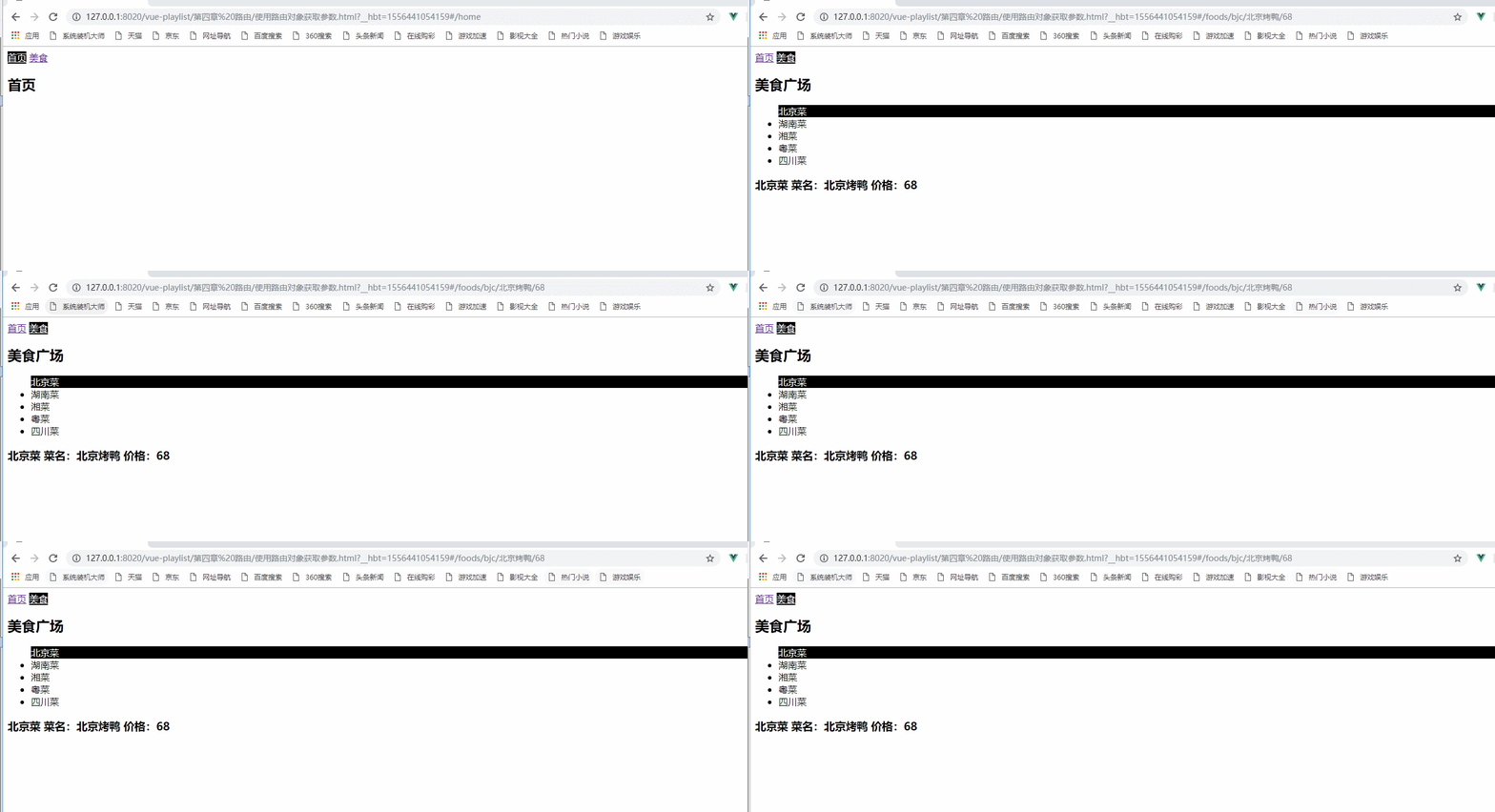
代码:
<template id="foods">

        <div>

            <h2>美食广场</h2>

            <ul>

                <router-link to="/foods/bjc/北京烤鸭/68" tag="li"> 北京菜</router-link>

                <router-link to="/foods/hnc" tag="li"> 湖南菜</router-link>

                <router-link to="/foods/xc" tag="li"> 湘菜</router-link>

                <router-link to="/foods/yc" tag="li"> 粤菜</router-link>

                <router-link to="/foods/scc" tag="li"> 四川菜</router-link>

            </ul>

            <router-view></router-view>

        </div>

    </template>
//定义foods中的子组件

        let Bjc={

            template : "<h3>北京菜 菜名:{{$route.params.name}} 价格:{{$route.params.price}}</h3>"

        }
//2 配置路由 路由可能有多个

        const myRoutes = [

            {

                path : "/home",

                component : Home

            },

            {

                path : "/foods",

                component : Foods,

                children:[

                {

                    path:"bjc/:name/:price",//定义其属性

                    component:Bjc

                },
对象传参:例 <route-linke :to : "xxObj"> 注:对象格式{String name, Objce param} name是路由名称,param是传递参数的对象
对象需要通过v-bind进行绑定
<router-link :to="sccParam" tag="li"> 四川菜</router-link>
使用对象:
let Foods = {

            template : "#foods",

            data(){

                return{

                    sccParam:{

                        name:'sccRouter',

                        params:{

                            name:"麻婆豆腐",

                            price:

                        }

                    }

                }

            }

        }
let Scc={

            template : "<h3>四川菜  菜名:{{$route.params.name}} 价格:{{$route.params.price}}</h3>"

        }
效果:
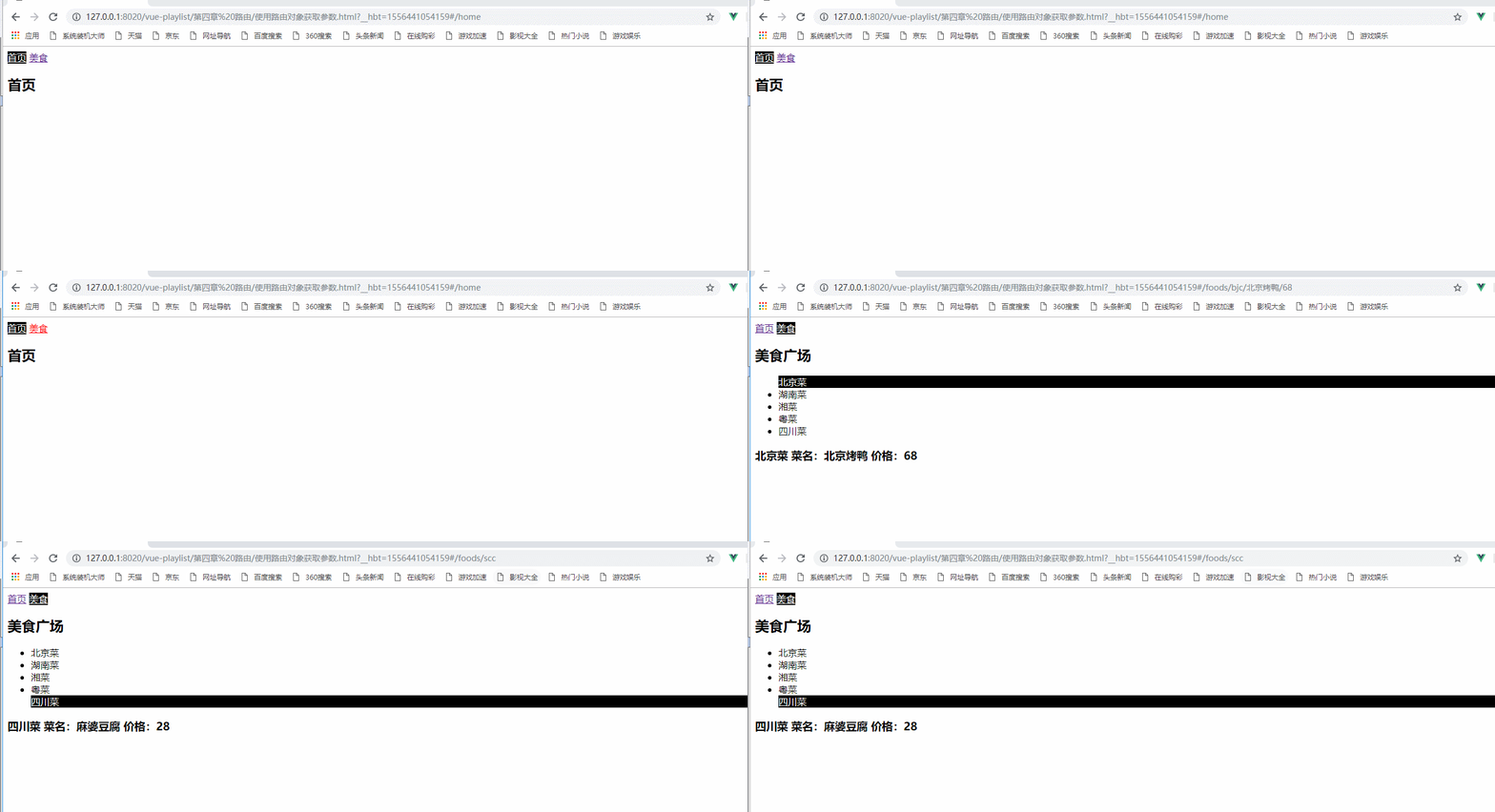
注意:对象的名称必须和路由的名称保持一致,在路由中起的名称可以称作为命名路由
2、query:
参数获取:使用$route.query获取参数;
参数传递: URL传参:例 <route-linke to : "/foods/bjc?name=北京烤鸭&price=68">

代码:
<router-link to="/foods/xc?name=剁椒鱼头&price=128" tag="li"> 湘菜</router-link>
let Xc={

            template : "<h3 >湘菜  菜名:{{$route.query.name}} 价格:{{$route.query.price}}</h3>"

        }
对象传参:例 <route-linke :to : "xxObj"> 注:对象格式{String path, Objce query} path是路由url,query是传递参数的对象

<router-link :to="ycParam" tag="li"> 粤菜</router-link>
let Foods = {

            template : "#foods",

            data(){

                return{

                    sccParam:{

                        name:'sccRouter',

                        params:{

                            name:"麻婆豆腐",

                            price:

                        }

                    },

                    ycParam:{

                        path:'/foods/yc',

                        query:{

                            name:"蜜汁叉烧",

                            price:

                        }

                    }

                }

            }

        }
let Yc={

            template : "<h3>粤菜  菜名:{{$route.query.name}} 价格:{{$route.query.price}}</h3>"

        }
以上实例的所有代码:
 <!DOCTYPE html>

 <html>

     <head>

         <meta charset="UTF-8">

         <title>使用路由对象获取参数</title>

 </head>

     <body>

         <div id="one">

             <router-link to="/home">首页</router-link>

             <router-link to="/foods">美食</router-link>

             <div>

                 <!--将数据显示在这里-->

                 <router-view></router-view>

             </div>

         </div>

     </body>

     <template id="foods">

         <div>

             <h2>美食广场</h2>

             <ul>

                 <router-link to="/foods/bjc/北京烤鸭/68" tag="li"> 北京菜</router-link>

                 <router-link to="/foods/hnc" tag="li"> 湖南菜</router-link>

                 <router-link to="/foods/xc?name=剁椒鱼头&price=128" tag="li"> 湘菜</router-link>

                 <router-link :to="ycParam" tag="li"> 粤菜</router-link>

                 <router-link :to="sccParam" tag="li"> 四川菜</router-link>

             </ul>

             <router-view></router-view>

         </div>

     </template>

     <script type="text/javascript" src="../js/vue.js" ></script>

     <script type="text/javascript" src="../js/vue-router.js" ></script>

     <script>

         //1 定义组件

         let Home = {

             template : "<h2>首页</h2>"

         }

         let Foods = {

             template : "#foods",

             data(){

                 return{

                     sccParam:{

                         name:'sccRouter',

                         params:{

                             name:"麻婆豆腐",

                             price:

                         }

                     },

                     ycParam:{

                         path:'/foods/yc',

                         query:{

                             name:"蜜汁叉烧",

                             price:

                         }

                     }

                 }

             }

         }

         //定义foods中的子组件

         let Bjc={

             template : "<h3>北京菜 菜名:{{$route.params.name}} 价格:{{$route.params.price}}</h3>"

         }

         let Hnc={

             template : "<h3>湖南菜  </h3>"

         }

         let Xc={

             template : "<h3 >湘菜  菜名:{{$route.query.name}} 价格:{{$route.query.price}}</h3>"

         }

         let Yc={

             template : "<h3>粤菜  菜名:{{$route.query.name}} 价格:{{$route.query.price}}</h3>"

         }

         let Scc={

             template : "<h3>四川菜  菜名:{{$route.params.name}} 价格:{{$route.params.price}}</h3>"

         }

         //2 配置路由 路由可能有多个

         const myRoutes = [

             {

                 path : "/home",

                 component : Home

             },

             {

                 path : "/foods",

                 component : Foods,

                 children:[

                 {

                     path:"bjc/:name/:price",//定义其属性

                     component:Bjc

                 },

                 {

                     path:"hnc",

                     component:Hnc

                 },

                 {

                     path:"xc",

                     component:Xc

                 },

                 {

                     path:"yc",

                     component:Yc

                 },

                 {

                     name:'sccRouter',

                     path:"scc",

                     component:Scc

                 }

                 ]

             },

         {

             path:"*",

                 redirect:"/home"

             }

         ]

         // 3 创建路由对象

         const myRouter = new VueRouter({

             //routes : routes

             routes : myRoutes,

             //mode:'history'

              linkActiveClass : "active"

         });

         new Vue({

             //router : router

             router : myRouter //4 注入路由 简写

         }).$mount("#one");

     </script>

     <style>

         .active{

             color: white;

             background-color: black;

         }

     </style>

 </html>
使用路由对象获取参数
最后从上面的效果图中我们可以看到四川菜刷新后价格与菜名都消失了,所以使用params的对象传参的时候刷新的时候数据是获取不了的。
Vue-Router路由 Vue-CLI脚手架和模块化开发 之 使用路由对象获取参数的更多相关文章
- Vue-Router路由Vue-CLI脚手架和模块化开发 之 vue-router路由
vue-router路由:Vue.js官网推出的路由管理器,方便的构建单页应用: 单页应用(SPA)只有一个web页面的应用,用户与应用交互时,动态更新该页面的内容:简单来说,根据不同的url与数据, ...
- [Vue 牛刀小试]:第十二章 - 使用 Vue Router 实现 Vue 中的前端路由控制
一.前言 前端路由是什么?如果你之前从事的是后端的工作,或者虽然有接触前端,但是并没有使用到单页面应用的话,这个概念对你来说还是会很陌生的.那么,为什么会在单页面应用中存在这么一个概念,以及,前端路由 ...
- Vue-Router路由 Vue-CLI脚手架和模块化开发 之 路由常用配置与路由嵌套
vue-router路由常用配置 1.mode:配置路由模式,默认为hash,由于URL很丑,可以修改为history,但是需要服务端的支持: 以上一篇的博文为实例: 初始时url的显示: 使用mod ...
- Vue-Router路由Vue-CLI脚手架和模块化开发 之 使用props替代路由对象的方式获取参数
在上一章博文中使用路由对象$route获取参数时,组件和路由对象耦合,在这篇博文中就可以使用props来进行解耦: 1.在组件中使用props选项定义数据,接收参数: 2.在路由中,使用props选项 ...
- Vue-Router路由Vue-CLI脚手架和模块化开发 之 路由的动态跳转
在上一篇的博文中,实现的跳转是在页面中进行实现的 利用vue-router实例方法,使用js对路由进行动态跳转: 1.router.push:参数为路由对象,跳转到指定路由,跳转后会产生历史记录: & ...
- vue router 中,children 中 path 为空字符串的路由,是默认打开的路由(包括在 el-tabs 中嵌套路由的情况)
详见该页面的最后一个代码块:https://router.vuejs.org/zh/guide/essentials/nested-routes.html#%E5%B5%8C%E5%A5%97%E8% ...
- Vue.js 2.x笔记:路由Vue Router(6)
1. Vue Router简介与安装 1.1 Vue Router简介 Vue Router 是 Vue.js 官方的路由管理器.它和 Vue.js 的核心深度集成,构建单页面应用. Vue Rout ...
- Vue系列:Vue Router 路由梳理
Vue Router 是 Vue.js 官方的路由管理器.它和 Vue.js 的核心深度集成,让构建单页面应用变得易如反掌.包含的功能有: 嵌套的路由/视图表 模块化的.基于组件的路由配置 路由参数. ...
- Vue Router路由管理器介绍
参考博客:https://www.cnblogs.com/avon/p/5943008.html 安装介绍:Vue Router 版本说明 对于 TypeScript 用户来说,vue-router@ ...
随机推荐
- Selenium 3----鼠标、键盘操作常用方法
[鼠标] 在 WebDriver 中, 关于鼠标操作的方法封装在 ActionChains 类中. ActionChains 类提供了鼠标操作的常用方法: perform(): 执行所有 Action ...
- PageAdmin Cms V2.0 getshell 0day
黑小子在土司公布了“PageAdmin cms getshell Oday”,并给出了一个漏 洞的利用EXP.经过危险漫步在虚拟机里测试,存在漏洞的是PageAdmin Cms的次最薪版本PageAd ...
- java.util中,util是什么意思
Util是utiliy的缩写,是一个多功能.基于工具的包. java.util是包含集合框架.遗留的 collection 类.事件模型.日期和时间设施.国际化和各种实用工具类(字符串标记生成器.随机 ...
- 一个RDBMS左连接SQL执行计划解析
1.测试数据如下: SQL> select * from t1; a | b | c ---+----+--- 1 | 10 | 1 2 | 20 | 2 3 | 30 | 3 4 ...
- 技术Leader相关文章和思考
参考文章: 你与优秀的技术Leader之间只差这一个“图谱” 如何成为优秀的技术主管?你要做到这三点
- 创建一个vue单页面应用
最最开始是要安装cli3 1.npm install -g @vue/cli 2.npm install -g @vue/cli-service-global 然后是创建单页面应用si ...
- volatile有什么用?能否用一句话描述volatile的应用场景
volatile保证内存可见性和禁止指令重排.volatile用于多线程环境下的单次操作(单次读或者单次写).volatile关键字不能提供原子性. volatile关键字为实例域的同步访问提 ...
- ElasticSearch - 信息聚合系列之聚合过滤
摘要 聚合范围限定还有一个自然的扩展就是过滤.因为聚合是在查询结果范围内操作的,任何可以适用于查询的过滤器也可以应用在聚合上. 版本 elasticsearch版本: elasticsearch-2. ...
- Redis的数据结构之Set
存储Set 和List类型不同的是,Set集合中不允许出现重复的元素 Set可包含的最大元素数量是4294967295 存储set常用命令: 添加/删除元素 获取集合中的元素 集合中的差集运算 集合中 ...
- [js]展开运算符
function f(...args){ console.log(args); } f(1,2,3,4,5) [...args] = [1,2,3,4] function f(...args){ co ...