
Vue-Router路由Vue-CLI脚手架和模块化开发 之 路由的动态跳转
在上一篇的博文中,实现的跳转是在页面中进行实现的
利用vue-router实例方法,使用js对路由进行动态跳转;
1、router.push:参数为路由对象,跳转到指定路由,跳转后会产生历史记录;
<!--动态跳转的按钮-->

            <div>

                <button @click="push">push返回首页</button>

                </div>
new Vue({

            //router : router

            router : myRouter, //4 注入路由 简写

            methods:{

                push(){

                    myRouter.push({

                        path:'/home'

                    })

                }

            }

        }).$mount("#one");

2、router.replace:参数为路由对象,跳转到指定路由,跳转后不产生历史记录;

由效果图可以发现点击replace前往美食广场按扭得时候并不会产生任何的历史记录
<!--动态跳转的按钮-->

            <div>

                <button @click="push">push返回首页</button>

                <button @click="replace">replace前往美食广场</button>

                </div>
    methods:{

                push(){

                    myRouter.push({

                        path:'/home'

                    })

                },

                replace(){

                    myRouter.replace({

                        path:'/foods'

                    })

                }

            }
3、router.go:参数为number,number为正向前跳转,为负向后跳转,根据number的值跳转到对应页面,前提是必须有历史记录可供跳转;
4、router.back:无参,后退一个页面,需要有历史记录;
router.forward:无参,前进一个页面,需要有历史记录;
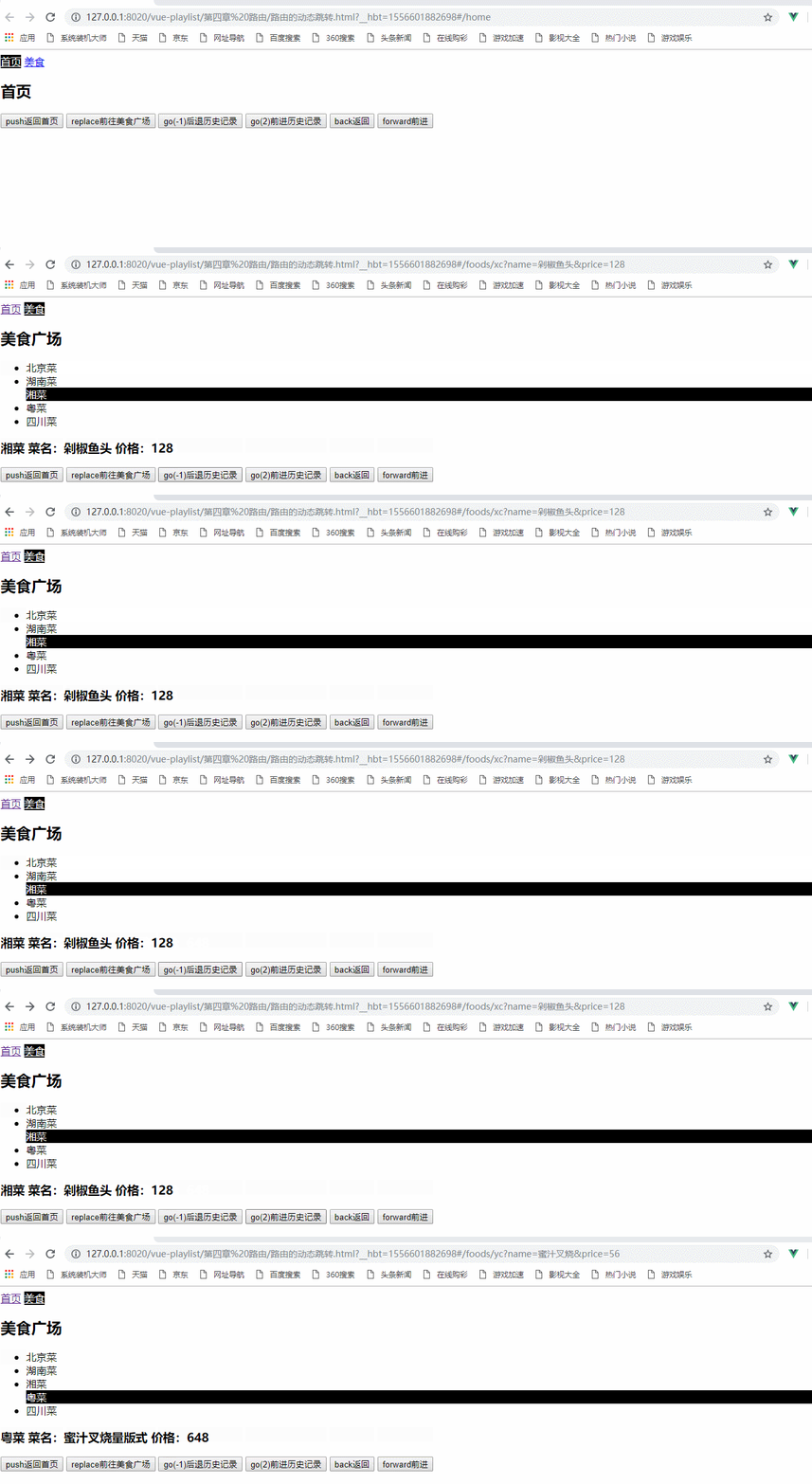
使用的代码:
<!--动态跳转的按钮-->

            <div>

                <button @click="push">push返回首页</button>

                <button @click="replace">replace前往美食广场</button>

                <button @click="go(-1)">go(-)后退历史记录</button>

                <button @click="go(2)">go()前进历史记录</button>

                <button @click="back">back返回</button>

                <button @click="forward">forward前进</button>

                </div>
    methods:{

                push(){

                    myRouter.push({

                        path:'/home'

                    })

                },

                replace(){

                    myRouter.replace({

                        path:'/foods'

                    })

                },

                go(n){

                    myRouter.go(n);

                },

                back(){

                    myRouter.back();

                },

                forward(){

                    myRouter.forward();

                }

            }
以上就是通过js实现动态的跳转
 <!DOCTYPE html>

 <html>

     <head>

         <meta charset="UTF-8">

         <title> 路由的动态跳转</title>

 </head>

     <body>

         <div id="one">

             <router-link to="/home">首页</router-link>

             <router-link to="/foods">美食</router-link>

             <div>

                 <!--将数据显示在这里-->

                 <router-view></router-view>

             </div>

             <!--动态跳转的按钮-->

             <div>

                 <button @click="push">push返回首页</button>

                 <button @click="replace">replace前往美食广场</button>

                 <button @click="go(-1)">go(-)后退历史记录</button>

                 <button @click="go(2)">go()前进历史记录</button>

                 <button @click="back">back返回</button>

                 <button @click="forward">forward前进</button>

                 </div>

         </div>

     </body>

     <template id="foods">

         <div>

             <h2>美食广场</h2>

             <ul>

                 <router-link to="/foods/bjc/北京烤鸭/68" tag="li"> 北京菜</router-link>

                 <router-link to="/foods/hnc" tag="li"> 湖南菜</router-link>

                 <router-link to="/foods/xc?name=剁椒鱼头&price=128" tag="li"> 湘菜</router-link>

                 <router-link :to="ycParam" tag="li"> 粤菜</router-link>

                 <router-link :to="sccParam" tag="li"> 四川菜</router-link>

             </ul>

             <router-view></router-view>

         </div>

     </template>

     <script type="text/javascript" src="../js/vue.js" ></script>

     <script type="text/javascript" src="../js/vue-router.js" ></script>

     <script>

         //1 定义组件

         let Home = {

             template : "<h2>首页</h2>"

         }

         let Foods = {

             template : "#foods",

             data(){

                 return{

                     sccParam:{

                         name:'sccRouter',

                         params:{

                             name:"麻婆豆腐",

                             price:

                         }

                     },

                     ycParam:{

                         path:'/foods/yc',

                         query:{

                             name:"蜜汁叉烧",

                             price:

                         }

                     }

                 }

             }

         }

         //定义foods中的子组件

         let Bjc={

             props:['name','price'],

             template : "<h3>北京菜 菜名:{{name}} 价格:{{price}}</h3>"

         }

         let Hnc={

             template : "<h3>湖南菜  </h3>"

         }

         let Xc={

             props:['name','price'],

             template : "<h3 >湘菜  菜名:{{name}} 价格:{{price}}</h3>"

         }

         let Yc={

             props:['name','price'],

             template : "<h3>粤菜  菜名:{{name}} 价格:{{price}}</h3>"

         }

         let Scc={

             props:['name','price'],

             template : "<h3>四川菜  菜名:{{name}} 价格:{{price}}</h3>"

         }

         //2 配置路由 路由可能有多个

         const myRoutes = [

             {

                 path : "/home",

                 component : Home

             },

             {

                 path : "/foods",

                 component : Foods,

                 children:[

                 {

                     path:"bjc/:name/:price",//定义其属性

                     component:Bjc,

                     props:true

                 },

                 {

                     path:"hnc",

                     component:Hnc

                 },

                 {

                     path:"xc",

                     component:Xc,

                     props : (route) => ({

                             name : route.query.name,

                             price : route.query.price

                     })

                 },

                 {

                     path:"yc",

                     component:Yc,

                     props:{

                         name:'蜜汁叉烧量版式',

                         price:

                     }

                 },

                 {

                     name:'sccRouter',

                     path:"scc",

                     component:Scc,

                     props:true

                 }

                 ]

             },

         {

             path:"*",

                 redirect:"/home"

             }

         ]

         // 3 创建路由对象

         const myRouter = new VueRouter({

             //routes : routes

             routes : myRoutes,

             //mode:'history'

              linkActiveClass : "active"

         });

         new Vue({

             //router : router

             router : myRouter, //4 注入路由 简写

             methods:{

                 push(){

                     myRouter.push({

                         path:'/home'

                     })

                 },

                 replace(){

                     myRouter.replace({

                         path:'/foods'

                     })

                 },

                 go(n){

                     myRouter.go(n);

                 },

                 back(){

                     myRouter.back();

                 },

                 forward(){

                     myRouter.forward();

                 }

             }

         }).$mount("#one");

     </script>

     <style>

         .active{

             color: white;

             background-color: black;

         }

     </style>

 </html>
路由的动态跳转的总demo
Vue-Router路由Vue-CLI脚手架和模块化开发 之 路由的动态跳转的更多相关文章
- Vue-Router路由 Vue-CLI脚手架和模块化开发 之 路由常用配置与路由嵌套
vue-router路由常用配置 1.mode:配置路由模式,默认为hash,由于URL很丑,可以修改为history,但是需要服务端的支持: 以上一篇的博文为实例: 初始时url的显示: 使用mod ...
- [Vue 牛刀小试]:第十二章 - 使用 Vue Router 实现 Vue 中的前端路由控制
一.前言 前端路由是什么?如果你之前从事的是后端的工作,或者虽然有接触前端,但是并没有使用到单页面应用的话,这个概念对你来说还是会很陌生的.那么,为什么会在单页面应用中存在这么一个概念,以及,前端路由 ...
- Vue Router 常见问题(push报错、push重复路由刷新)
Vue Router 常见问题 用于记录工作遇到的Vue Router bug及常用方案 router.push报错,Avoided redundant navigation to current l ...
- Vue-Router路由 Vue-CLI脚手架和模块化开发 之 使用路由对象获取参数
使用路由对象$route获取参数: 1.params: 参数获取:使用$route.params获取参数: 参数传递: URL传参:例 <route-linke to : "/food ...
- Vue-Router路由Vue-CLI脚手架和模块化开发 之 vue-router路由
vue-router路由:Vue.js官网推出的路由管理器,方便的构建单页应用: 单页应用(SPA)只有一个web页面的应用,用户与应用交互时,动态更新该页面的内容:简单来说,根据不同的url与数据, ...
- Vue-Router路由Vue-CLI脚手架和模块化开发 之 使用props替代路由对象的方式获取参数
在上一章博文中使用路由对象$route获取参数时,组件和路由对象耦合,在这篇博文中就可以使用props来进行解耦: 1.在组件中使用props选项定义数据,接收参数: 2.在路由中,使用props选项 ...
- Vue.js 2.x笔记:路由Vue Router(6)
1. Vue Router简介与安装 1.1 Vue Router简介 Vue Router 是 Vue.js 官方的路由管理器.它和 Vue.js 的核心深度集成,构建单页面应用. Vue Rout ...
- Vue系列:Vue Router 路由梳理
Vue Router 是 Vue.js 官方的路由管理器.它和 Vue.js 的核心深度集成,让构建单页面应用变得易如反掌.包含的功能有: 嵌套的路由/视图表 模块化的.基于组件的路由配置 路由参数. ...
- Vue Router路由管理器介绍
参考博客:https://www.cnblogs.com/avon/p/5943008.html 安装介绍:Vue Router 版本说明 对于 TypeScript 用户来说,vue-router@ ...
随机推荐
- C++深度解析教程学习笔记(2)C++中的引用
1.C++中的引用 (1)变量名的回顾 ①变量是一段实际连续存储空间的别名,程序中通过变量来申请并命名存储空间 ②通过变量的名字可以使用存储空间.(变量的名字就是变量的值,&变量名是取地址操作 ...
- C语言学习笔记--函数
1. C 语言中的函数 (1)函数的由来: 程序 = 数据 + 算法→C 程序 = 数据 + 函数 (2)模块化程序设计 (3)C 语言中的模块 2. 面向过程的程序设计 (1)面向过程是一种以过程为 ...
- 剑指offer 38_统计数组中k出现的个数
思路: 二分法,分别找出第一个和最后一个k出现的位置.相减 加一 #include <stdio.h> //获取第一个K的位置 int getFirstK (int k,int *numb ...
- 在用mvn编译java文件时遇到问题
问题一:找不到加载主类 为什么会出现这类加载失败的问题那??? 一看这个问题就是环境变量配置有问题,找到问题解决就ok了!!! 问题二:无法用mvn编译java文件 这个问题是由于pom.xml文件出 ...
- android官方手册学习笔记
数据存储 在提交sharedpreference 修改的时候,用apply代替commit 避免UI线程阻塞 设备兼容 系统会自动根据当前屏幕的大小等,在相应的文件夹里去找资源,如large等等 ...
- 关于web.xml中的<welcome-file-list>中的默认首页文件
先看我的配置文件: <welcome-file-list> <welcome-file>index.html</welcome-file> </welcome ...
- day17-jdbc 2.jdbc介绍
SQL是一种非过程性语言,只能写一条嘛,你写多条不行嘛.每个数据库都有自己的存储过程.你可以做编程,你可以写多条SQL语句把它放到一起.这就是存储过程.然后用的时候一调它就执行这个逻辑结构了.因为多条 ...
- 华为JAVA机试流程
1.JAVA机试流程:①打开IE浏览器,输入机试系统IP地址(以当天告知的地址为准):②输入姓名.手机,选择“C/C++”或“JAVA”,登录:③登录后显示题目,阅读题目并点击页面最下方的“下载框架文 ...
- rpush()
批量插入多个value,并为消息队列模式 $pipe->rpush($key,$vlaues);//$values是多个value组成的一个数组
- Person.post请求------详细过程
首先,在PersonRepository的父类中查找save方法,如下: @Override @TransactionalMethod public <S extends D> S sav ...