
Overview of MIDI
东拼西凑的介绍
MIDI which means Musical Instrument Digital Interface, introduced in 1980's provided a interface for digital music tool to comunicate with each other.The information carried by midi data is some signal like "note on", "note off", "note\pitch ", "pitch bend",etc.A midi instrument may be a piece of hardware(electronic keyboard, synthesizer) or software enviroment like ableton, garageband, digital performer, logic.The advantages are:
compact -an entire song can be stored within a few hundred MIDI messages (compared to audio data which is sampled thousands of times a second)
easy to modify/manipulate notes -change pitch, duration, and other parameters without having to rerecord
change instruments
-remember, MIDI only describes which notes to play, you can send these
notes to any instrument to change the overall sound of the composition.
MIDI keyboard is the most common instrument to create MIDI(or use your keyboard instead of it).When a key in the board is starting to press ,the message "note on" is send with attributes which key is pressed(note,between the value 0~127,like value 60 means the middel c,c4) and how fast this happens(velocity,value beween 0~127,the higer value means the louder voice).Unfortunately,computer keyboard has no ability to send velocity information,the value of this attribute will be a constant igore your strength of speed of pressing.When a pressed key is released,the message "note off " is created also contains the velocity information. "Aftertouch" is created when a key is in the state of "note on",and you may change the power of pressing.Most times you may use "Pichbend" slider(or other tools) to modify the tone in a distance of a semitone(half-step), this mesage is applied to all the notes played.And all the notes can be send to different "Channel" to compose a multi-track song.
The most easy way to manage MIDI through python is using the open-source library python-midi,address :https://github.com/vishnubob/python-midi#Installation
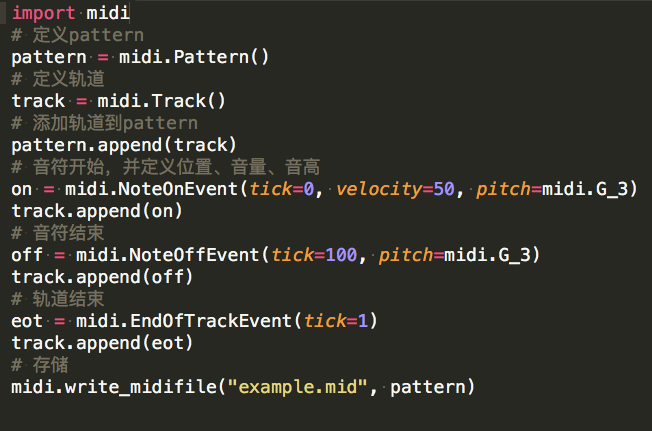
python-midi格式解析:
首先是head_chunk中
- format-- midi文件类型,有效值0(所有音符都在1个track中,单轨文件) 1(多轨 同步并行 常用) 2(多轨 独立)
- resolution -- ticks per quarter note 一个四分音符的ticks,tick是midi中计算时间长短的最小单位。在cakewalk中,默认是1个四分音符等于120tick,根据需要在工程选项里可以将设置改为48、72、96、120、144、168、192、216、240、360、384或480个tick。这里有个例子,可以计算出1个ticks的具体时间:在每个四分音符等于120tick的情况下,拍速120,4/4拍的曲子
1)4/4拍的曲子是以四分音符为一拍,那么一拍就是120tick;
2)拍速120也就是说每分钟120拍,即一拍为0.5秒,也就是30毫秒。
根据1)和2)可知,一拍=120tick=30毫秒,所以1tick=1/4毫秒
当format为1时,Track0比较特殊,记录了一些meta-events,如 :NameEvent(记录歌名),TextMetaEvent(如歌曲信息 作者),版权,还有:
SetTempoEvent(重要)----格式为tt tt tt,一分钟多少拍
TimeSignatureEvent(重要)-----格式为nn dd cc bb nn和dd合起来代表了歌曲拍号nn/dd拍 ,注意dd是记录的是2的指数,如2,代表$2^2$ = 4。cc表示一个四分音符的midi clock数(一般固定为24),bb表示一个四分音符相当于多少个32分音符(这不是傻?),如果没有拍号记录的话,默认为4/4拍
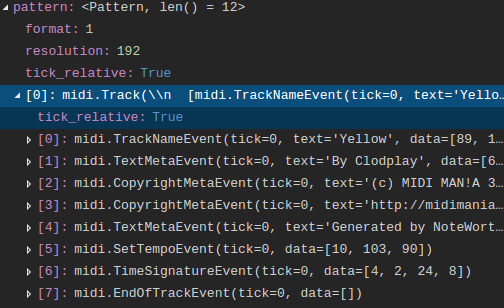
除开Track0外,其他Track中记录的为<delta_time> <event>的pair对,delta_time记录了上次事件到本次事件发生的时间间隔。event分为midi event,sysex event和meta event。
Midi Event:
- Channel voice message
主要的就是note on和note off事件了 ,两者成对出现
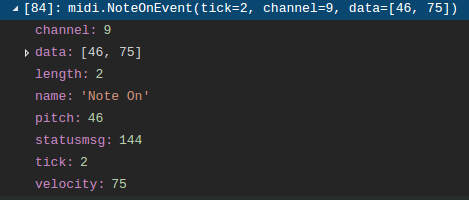
channel :midi channel
data:貌似时pitch和velocity的组合数列
length:?
pitch:midi音符值
statusmsg:?
tick:delta_ticks
velocity:音符力度,为0的话 不发声
其他事件还包括AfterTouch(已经on的note的按键力度发生变化)、Controller Change(设备发生变化,如脚踩效果器等)、Program Change(?)、Pitch Bend(从名字猜测是音调变调,推弦?)
- Channel Mode message
包括了一些All Sound Off,Reset All Controllers,Local Control,All Notes Off,Omni Mode Off,Omni Mode On,Mono Mode On,Poly Mode On等控制信息
Sysex Events:
保留字段用于后续扩展或交由合成器厂商自己实现
Meta Events:
track-names, lyrics and cue-points(提示 如演员上场 幕帘拉开之类的),还有上面提到的Track0中的SetTempo event,TimeSignature等都是元事件
midi文件自行编写参考:http://blog.sina.com.cn/s/blog_622bd1660101aggj.html
http://www.360doc.com/content/17/0205/08/11411827_626609322.shtml
Overview of MIDI的更多相关文章
- [原] KVM 虚拟化原理探究(1)— overview
KVM 虚拟化原理探究- overview 标签(空格分隔): KVM 写在前面的话 本文不介绍kvm和qemu的基本安装操作,希望读者具有一定的KVM实践经验.同时希望借此系列博客,能够对KVM底层 ...
- Activity之概览屏幕(Overview Screen)
概览屏幕 概览屏幕(也称为最新动态屏幕.最近任务列表或最近使用的应用)是一个系统级别 UI,其中列出了最近访问过的 Activity 和任务. 用户可以浏览该列表并选择要恢复的任务,也可以通过滑动清除 ...
- Atitit.自然语言处理--摘要算法---圣经章节旧约39卷概览bible overview v2 qa1.docx
Atitit.自然语言处理--摘要算法---圣经章节旧约39卷概览bible overview v2 qa1.docx 1. 摘要算法的大概流程2 2. 旧约圣经 (39卷)2 2.1. 与古兰经的对 ...
- Overview of OpenCascade Library
Overview of OpenCascade Library eryar@163.com 摘要Abstract:对OpenCascade库的功能及其实现做简要介绍. 关键字Key Words:Ope ...
- Apache Sqoop - Overview——Sqoop 概述
Apache Sqoop - Overview Apache Sqoop 概述 使用Hadoop来分析和处理数据需要将数据加载到集群中并且将它和企业生产数据库中的其他数据进行结合处理.从生产系统加载大 ...
- Windows 10 的音频和 MIDI API将统一
微软一统 Windows 10 的音频和 MIDI API 微软在夏季NAMM上的A3E大会上做了主题演讲,他们对Windows 10的音频和MIDI API都做了新的规划,开发者针对Windows ...
- BOOST.Asio——Overview
=================================版权声明================================= 版权声明:原创文章 谢绝转载 啥说的,鄙视那些无视版权随 ...
- MIDI信息为什么不能通过FL Studio输出
讲解这个问题之前,小编先给大家科普一下什么是MIDI.所谓的MIDI其实只是数字信号,和我们熟知的乐谱有点像.它的作用就是能很好的传达什么时间演奏什么音,这个音要演奏多久等信息,就如同我们演唱会中指挥 ...
- [转]MIDI常识20条
原文链接:http://www.midifan.com/modulearticle-detailview-488.htm Keyboard杂志老资格编辑Jim Aikin在纪念MIDI诞生20的时候发 ...
随机推荐
- POJ3621 Sightseeing Cows【最短路】
题目大意:在一个无向图里找一个环,是的点权和除以边权和最大 思路:UVA11090姊妹题 事实上当这题点权和都为1时就是上一题TUT #include <stdio.h> #include ...
- 细胞分裂(洛谷 P1069)
题目描述 Hanks 博士是 BT (Bio-Tech,生物技术) 领域的知名专家.现在,他正在为一个细胞实 验做准备工作:培养细胞样本. Hanks 博士手里现在有 N 种细胞,编号从 1~N,一个 ...
- 51nod1184 第N个质数
如题.$n \leq 1e9$. 方法零:二分,然后洲阁筛.要魔改一下的洲阁筛.跑得慢.卡卡能过.没意思. //#include<iostream> #include<cstring ...
- JS中的call()和apply()方法区别
如 果没接触过动态语言,以编译型语言的思维方式去理解javaScript将会有种神奇而怪异的感觉,因为意识上往往不可能的事偏偏就发生了,甚至觉得不可 理喻.如果在学JavaScript这自由而变幻无穷 ...
- Help him--hdu5059(模拟 大坑)
http://acm.hdu.edu.cn/showproblem.php?pid=5059 直接说可能出现的情况 #include <iostream> #include <cst ...
- IDEA下使用protobuf2(java)
目录 一.介绍 二.特点 三.结构 四.选择版本 五.Intellij IDEA中使用Protobuf 1.下载个protoc.exe 2.编辑个.proto文件 3.将.proto文件转成Java类 ...
- centOS 安装mysql5.6
删除原先的mysql5.1#数据库服务器的安装 , 请自行在mysql官方找最新的rpm rpm -Uvh http://dev.mysql.com/get/mysql-community-relea ...
- Spring MVC异常处理实例
以下内容引用自http://wiki.jikexueyuan.com/project/spring/mvc-framework/spring-exception-handling-example.ht ...
- eclipse设置每次提交代码忽略target、.settings、.svn、.project文件
- 分布式RPC框架性能大比拼
https://github.com/grpc/grpc http://colobu.com/2016/09/05/benchmarks-of-popular-rpc-frameworks/ http ...