
【angular5项目积累总结】列表多选样式框(2)
view
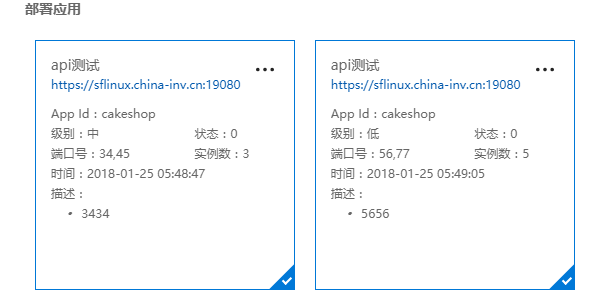
code
list.css
:host {

    display: flex;

    width: 100%;

    border-left: 1px solid #ccc;

    font: normal 12px/20px \5B8B\4F53, Arial, Verdana, Lucida, Helvetica, simsun, sans-serif;

}

ul {

    margin:;

    padding:;

}

.version-container {

    width: 100%;

    overflow-x: hidden;

    overflow-y: auto;

    padding-bottom: 20px;

    font-family: "Microsoft YaHei",Avenir,Helvetica,Verdana,Hiragino Sans GB,STHeiti,WenQuanYi Micro Hei,Droid Sans Fallback,SimSun,sans-serif;

    position: relative;

    color: #666666;

    padding: 12px 0 0 25px;

}

.version-container .title {

    font-size: 20px;

    line-height: 36px;

    text-shadow: 0 0 3px #DFDFDF;

}

.version-container .sub_title {

    margin-top: 11px;

    font-size: 14px;

}

.version-container .sub_title,

.version-container .title {

    font-weight: bold;

    color: #666666;

}

.fxc-monitorchart-container .list {

    list-style: none;

    margin:;

    padding:;

}

.fxc-monitorchart-container li {

    line-height: 20px;

    width: 90%;

    font-size: 10px;

    white-space: nowrap;

    overflow: hidden;

    text-overflow: ellipsis;

}

.fxc-monitorchart-container .description {

    width: 100%;

    text-overflow: ellipsis;

    white-space: normal;

    word-wrap: break-word;

}

.fxc-monitorchart-container li > span.app-sec-item {

    width: 30%;

    display: inline-block;

    float: right;

    text-align: left;

}

.fxc-monitorchart-container li > span.app-fir-item {

    width: 45%;

    overflow: hidden;

    text-overflow: ellipsis;

    white-space: nowrap;

}

.version-desc {

    padding-left: 15px;

    overflow: hidden;

    text-overflow: ellipsis;

    height: 80px;

}

.version-desc li {

    list-style: disc;

    width: 100%;

    white-space: normal;

    overflow: hidden;

    text-overflow: ellipsis;

}

.version-dot {

    font-weight: bold;

    float: left;

    margin-right: 10px;

}

.fxc-monitorchart-clickable {

    cursor: pointer;

}

.fxc-monitorchart-chart-multiple {

    height: 270px;

    max-width: 48%;

    min-width: 48%;

    float:left;

}

.fxc-monitorchart-chart-wrapper {

    padding: 10px;

    position: relative;

    box-sizing: border-box;

}

.fxc-monitorchart-chart-multiple .fxc-monitorchart-chart {

    padding: 15px;

    border: 1px solid #d6d6d6;

    box-sizing: border-box;

}

.fxc-monitorchart-chart {

    height: 100%;

    width: 100%;

}

.fxc-monitorchart-header {

    display: flex;

    display: -webkit-flex;

    -webkit-flex-flow: row nowrap;

    flex-flow: row nowrap;

    height: 47px;

    flex: none;

}

.fxc-monitorchart-title-container {

    -webkit-flex: 1 1 0%;

    flex: 1 1 0%;

}

.fxc-monitorchart-title {

    font-size: 14px;

    line-height: 17px;

    padding-bottom: 1px;

}

.fxc-monitorchart-subtitle, .fxc-monitorchart-title {

    margin:;

    white-space: nowrap;

    overflow: hidden;

    text-overflow: ellipsis;

}

.fxc-monitorchart-subtitle {

    font-family: az_ea_font,wf_segoe-ui_semibold,"Segoe UI Semibold","Segoe WP Semibold","Segoe UI","Segoe WP",Tahoma,Arial,sans-serif;

    font-size: 10px;

    line-height: 10px;

    margin-top: 3px;

}

.fxs-mode-light .azc-fill-text {

    fill: #252525;

}

.fxc-monitorchart-toolbar-item {

    height: 18px;

    width: 18px;

    padding: 5px;

    float: right;

    display: block;

}

.fxc-monitorchart-container {

    height:100%;

}

.fxs-contextMenu-small {

    width:100px;

}

.ext-hubs-browse-empty {

    text-align:center;

    margin-top:30px;

}

.ext-hubs-browse-emptytitle {

    font-size: 15px;

    line-height: 20px

}

.ext-hubs-browse-emptytext {

    margin-bottom: 15px;

}

.selected-blue-box {

    border: 1px solid #0078d7 !important;

}

.arrow {

    width:;

    height:;

    border-top: 18px solid transparent;

    border-bottom: 18px solid transparent;

    border-left: 18px solid #0078d7;

    transform-origin: center;

    transform: rotate(45deg);

    -webkit-transform: rotate(45deg);

    position:absolute;

    bottom:-1px;

    right:8px;

}

.arrow::before {

    content: '';

    display: block;

    width: 5px;

    height: 10px;

    border: solid #fff;

    border-width: 0 3px 3px 0;

    transform-origin: center;

    transform: translate(-16px, -8px) scale(.7);

    -webkit-transform: translate(-16px, -8px) scale(.7);

    -ms-transform: translate(-16px, -8px) scale(.7);

    -moz-transform: translate(-16px, -8px) scale(.7);

    -o-transform: translate(-16px, -8px) scale(.7);

}
list.html
<panel-component [menuItems]="menuItems" headerTitle="{{currApp.displayName}}/{{currPkg.version}}" initWidth="600px" (closeEvent)="onClose()">

    <div class="version-container" (click)="activeContextMenu(null,false,null)" (scroll)="activeContextMenu(null,false,null)">

        <div class="main">

            <h1 class="title">{{currPkg.version}}</h1>

            <p>时间:{{currPkg.createdAt | date: 'yyyy-MM-dd hh:mm:ss'}}</p>

            <p>端口:{{currPkg.ports}}</p>

            <div class="description">

                描述:{{currPkg.description}}

            </div>

        </div>

        <h2 class="sub_title">部署应用</h2>

        <!--列表信息-->

        <div class="fxc-monitorchart-chart-wrapper fxc-monitorchart-chart-multiple" *ngFor="let app of lstApp;let i = index;">

            <div class="fxc-monitorchart-chart" [ngClass]="{'selected-blue-box':app.isChecked}" (click)="onCheck(i)">

                <div class="fxc-monitorchart-header">

                    <div class="fxc-monitorchart-title-container">

                        <h3 class="fxc-monitorchart-title msportalfx-tooltip-overflow">{{app.displayName}}</h3>

                        <a href="https://sflinux.china-inv.cn:19080" target="_blank" class="fxc-monitorchart-subtitle msportalfx-tooltip-overflow">https://sflinux.china-inv.cn:19080</a>

                    </div>

                    <div class="fxc-monitorchart-toolbar-container">

                        <div (click)="activeContextMenu($event,true,app.id)" class="fxc-monitorchart-toolbar-item azc-fill-text fxs-portal-hover fxc-monitorchart-toolbar-pin" role="button" title="单击以打开上下文菜单">

                            <svg height="100%" width="100%" aria-hidden="true" role="presentation" focusable="false"><use xmlns:xlink="http://www.w3.org/1999/xlink" xlink:href="#FxSymbol0-013"></use></svg>

                        </div>

                    </div>

                </div>

                <div class="fxc-monitorchart-container">

                    <ul>

                        <li>App Id:{{app.name}}</li>

                        <li>级别:{{getDictLabel(lstLevel,app.level)}}<span class="app-sec-item">状态:{{app.status}}</span></li>

                        <li>端口号:<span class="app-fir-item">{{getJsonValues(app.ports)}}</span><span class="app-sec-item">实例数:{{app.instanceCount}}</span></li>

                        <li>时间:{{app.createdAt | date: 'yyyy-MM-dd hh:mm:ss'}}</li>

                        <li>

                            描述:

                            <ul class="version-desc" *ngIf="app.description">

                                <li *ngFor="let desc of app.description.split(';')"><i class="version-dot">·</i>{{desc}}</li>

                            </ul>

                        </li>

                    </ul>

                </div>

                <div *ngIf="app.isChecked" class="arrow"></div>

            </div>

        </div>

        <div class="fxs-commands-contextMenu fxs-contextMenu fxs-popup fxs-portal-bg-txt-br fxs-contextMenu-small" [ngClass]="{'fxs-contextMenu-active' : isActiveMenu}" [ngStyle]="{'top.px': menuTop,'left.px': menuLeft}">

            <ul role="menu" class="fxs-contextMenu-itemList" aria-label="上下文菜单">

                <li role="menuitem" class="fxs-contextMenu-item fxs-portal-hover" tabindex="0" aria-posinset="1" aria-setsize="1" (click)="removeCurApp()">

                    <div class="fxs-contextMenu-text fxs-portal-text msportalfx-text-ellipsis">删除</div>

                </li>

                <li role="menuitem" class="fxs-contextMenu-item fxs-portal-hover" tabindex="0" aria-posinset="1" aria-setsize="1">

                    <a class="fxs-contextMenu-text fxs-portal-text msportalfx-text-ellipsis" target="_blank" href="https://sflinux.china-inv.cn:19080">管理</a>

                </li>

            </ul>

        </div>

        <div *ngIf="lstApp.length<=0" class="ext-hubs-browse-empty msportalfx-font-semilight">

            <div class="ext-hubs-browse-emptyicon msportalfx-svg-disabled">

                <svg aria-hidden="true" focusable="false" height="100%" width="100%">

                    <use xlink:href="#FxSymbol0-016" xmlns:xlink="http://www.w3.org/1999/xlink"></use>

                </svg>

            </div>

            <h2 class="ext-hubs-browse-emptytitle">没有可显示的部署应用程序</h2>

            <div class="ext-hubs-browse-emptytext"><span>如果看不到任何内容信息,请尝试刷新操作。</span></div>

            <div class="fxc-base fxc-simplebutton" (click)="onOpenDpy()">

                <div class="fxs-button fxt-button fxs-portal-button-primary fxs-inner-dotted-border" role="button" tabindex="0" title="创建新的应用部署">

                    <span class="fxs-button-text" data-bind="text: data.text">创建新的应用部署</span>

                </div>

            </div>

        </div>

    </div>

</panel-component>

<router-outlet></router-outlet>
list.ts
import { Component} from '@angular/core';

import { Router, ActivatedRoute, Params } from '@angular/router';

import { AppStoreService } from '../service/appStoreService';

import { CommonService } from '../../providers/commonService';

@Component({

    selector: 'version-page',

    templateUrl: './version.html',

    styleUrls: ['./version.css']

})

export class VersionPage {

    constructor(

        private router: Router,

        private actRouter: ActivatedRoute,

        private appStoreService: AppStoreService,

        private comService: CommonService) {

        this.subscribeUpdate(comService);

    }

    id: string;

    pkgId: any;

    lstLevel: {} = [

        {

            "key": 0,

            "value": "高"

        },

        {

            "key": 1,

            "value": "中"

        },

        {

            "key": 2,

            "value": "低"

        }

    ];

    currApp: any = {

        displayName:''

    };

    currPkg: any = {

        description: '',

        appId: '',

        version: '',

        status: '',

        ports: '',

        createdAt:''

    };

    currId: string;

    lstApp:any[] = [];

    isActiveMenu: boolean = false;

    menuTop: any;

    menuLeft: any;

    parentUrl: string;

    menuItems: any = [

        { title: "创建新部署", icon: "#FxSymbol0-010", event: this.onOpenDpy.bind(this) },

        { title: "审核", icon: "#FxSymbol0-077", event: this.auditWebDpy.bind(this) },

        { title: "刷新部署应用", icon: "#FxSymbol0-0c4", event: this.loanDpyApp.bind(this, this.pkgId) }

    ]

    ngOnInit(): void {

        this.actRouter.params.subscribe((params: Params) => {

            this.id = params["id"] || this.id;

            this.pkgId = params["pkgId"] || this.pkgId;

            this.appStoreService.GetPkgOne(this.pkgId, (rtv) => {

                this.currPkg = rtv;

            });

            this.appStoreService.GetAppOne(this.id, (rtv) => {

                this.currApp = rtv;

            });

            this.parentUrl = "/webAppStore/" + this.id;

            this.loanDpyApp(this.pkgId);

        });

    }

    onClose() {

        this.router.navigate([this.parentUrl]);

    }

    onOpenDpy() {

        this.router.navigate([this.parentUrl + '/version/deploy', { id: this.id, pkgId: this.pkgId }]);

    }

    activeContextMenu(event: any, isActive: boolean, id: string) {

        this.isActiveMenu = isActive;

        if (event) {

            this.menuLeft = event.pageX - 20;

            this.menuTop = event.pageY - 10;

            event.stopPropagation();

        }

        this.currId = id;

    }

    loanDpyApp(id: string) {

        this.appStoreService.GetAppDpyList(id || this.pkgId,(rtv) => {

            this.lstApp = rtv;

        });

    }

    subscribeUpdate(comService: CommonService) {

        this.comService.notifyObservable$.subscribe(data => {

            if (data && data.action == 'refreshWebDpy') {

                this.loanDpyApp(data.pkgId);

            }

        }, error => {

            console.log(`subscribe error:${error}`)

        })

    }

    removeCurApp() {

        let _this = this;

        this.currId && this.appStoreService.DeleteDpy(this.currId, (result) => {

            _this.loanDpyApp(_this.pkgId)

        })

    }

    getDictLabel(dict: any, key: any) {

        if (dict && dict.length > 0) {

            let curItem = dict.filter(item => { return item.key == key });

            return curItem.length > 0 ? curItem[0].value : '';

        }

    }

    getJsonValues(dict: any) {

        let jsonObject: any = dict && JSON.parse(dict) || {};

        return jsonObject.map(obj => { return obj.app }).join(',');

    }

    auditWebDpy() {

        this.router.navigate([this.parentUrl + '/version/dpyAudit', { id: this.id }]);

    }

    onCheck(index: any) {

        this.lstApp[index].isChecked = !this.lstApp[index].isChecked;

    }

}
【angular5项目积累总结】列表多选样式框(2)的更多相关文章
- 【angular5项目积累总结】列表多选样式框(1)
憋不住想说一下:angular坑太多,各种教程各种不完整,官网还只是简单的画饼充饥,没办法只有自己研究自己总结,便于以后提高工作效率. 第一种: view code list.css :ho ...
- 【angular5 项目积累总结】项目公共样式
main.css @font-face { font-family: 'wf_segoe-ui_normal'; src: local('Segoe UI'),url('../fonts/segoe- ...
- 【angular5项目积累总结】遇到的一些问题以及解决办法
1.项目中字符串特别是\r\n,替换成br之后,在页面换行无法生效? 答:绑定元素 innerHTML. <div class="panel-body" [innerHTML ...
- 【angular5项目积累总结】消息订阅服务
code import { Injectable } from '@angular/core'; import { Subject } from 'rxjs/Subject'; @Injectable ...
- 【angular5项目积累总结】优秀组件以及应用实例
1.手机端 图片预览组件 组件:sideshow 效果图:(预览图全屏 且可以左右移动) code: <div class="row ui-app-s ...
- 【angular5项目积累总结】表单复杂校验
view code form.css :host { display: flex; width: 100%; height:100%; border-left:1px solid #ccc; } .i ...
- 【angular5项目积累总结】侧栏菜单 navmenu
View Code import { Component, OnInit } from '@angular/core'; import { HttpClient } from '@angular/co ...
- 【angular5项目积累总结】avatar组件
View Code import { Component, HostListener, ElementRef } from '@angular/core'; import { Adal4Service ...
- 【angular5项目积累总结】breadcrumb面包屑组件
view code <div class="fxs-breadcrumb-wrapper" aria-label="Navigation history" ...
随机推荐
- 限制html文本框input只能输入数字和小数点
代码: <input type="text" class="txt" name="qty" value="" on ...
- Delphi XE2 编译ralease版本,无法添加UAC解决方法
我今天把一个原来是Delphi2007的工程升级到了Delphi XE2,在编译ralease版本时候,发现无法添加UAC,我觉得可能是升级的原因,随后我用XE2新建了一个工程,但是在编译raleas ...
- 有效单词词广场——算法面试刷题5(for google),考察数学
给定一个单词序列,检查它是否构成一个有效单词广场.一个有效的单词广场应满足以下条件:对于满足0≤k<max(numRows numColumns)的k,第k行和第k列对应的字符串应该相同,. 给 ...
- jquery屏蔽掉键盘enter提交 onkeydown
屏蔽掉enter提交onkeydown onkeydown="if(event.keyCode==13){return false;}"
- CTF之信息泄漏
web源码泄漏 .hg源码泄漏: 漏洞成因:hg init的时候会生成.hg,http://www.xx.com/.hg/, 工具:dvcs-ripper,(rip-hg.pl -v -u http ...
- 【文文殿下】洛谷P2408 不同子串个数
题目链接https://www.luogu.org/problemnew/show/P2408 SAM裸题,大力求就行了 #include<cstdio> #include<cstr ...
- JavaScript创建对象的4种方法
我们有很多种方式去构造一个对象.可以构造一个对象字面量,也可以和new前缀连用去调用一个构造器函数,或者可以使用Object.create方法去构造一个已经存在的对象的新实例,还可以调用任意一个会返回 ...
- 11种绕过CDN查找真实IP方法
0x01 验证是否存在CDN 方法1: 很简单,使用各种多地 ping 的服务,查看对应 IP 地址是否唯一,如果不唯一多半是使用了CDN, 多地 Ping 网站有: http://ping.chin ...
- 校验 CentOS 7 镜像文件
验证镜像文件的原因 CentOS Vault(http://vault.centos.org/)页脚的镜像站链接上有段英文,指出页脚的镜像站链接不受 CentOS 团队的监控,除此之外还有一个原因就是 ...
- [转] 2018年最新桌面CPU性能排行天梯图(含至强处理器)
[FROM] http://www.idn100.com/zuzhuangdiannaopeizhi-pc2849/ 排名 处理器 图例 分数 1 Intel Xeon Platinum 8173M ...