
(三)SpringBoot2.0基础篇- 持久层,jdbcTemplate和JpaRespository
一、介绍
SpringBoot框架为使用SQL数据库提供了广泛的支持,从使用JdbcTemplate的直接JDBC访问到完整的“对象关系映射”技术(如Hibernate)。Spring-data-jpa提供了额外的功能级别:直接从接口创建存储库实现,并使用约定方法名生成查询。
建表:
CREATE TABLE `user` (

  `id` int(11) NOT NULL AUTO_INCREMENT,

  `name` varchar(255) DEFAULT NULL,

  `age` int(11) DEFAULT NULL,

  `address` varchar(255) DEFAULT NULL,

  PRIMARY KEY (`id`)

);

INSERT INTO `user` VALUES ('3', 'andy', '6', 'month');

INSERT INTO `user` VALUES ('4', 'andy', '7', 'month');

INSERT INTO `user` VALUES ('5', 'andy', '8', 'month');

INSERT INTO `user` VALUES ('6', 'jack', '3', 'aaa');

CREATE TABLE `student` (

  `id` int(11) NOT NULL,

  `age` int(11) NOT NULL,

  `grade` int(11) NOT NULL,

  `name` varchar(255) DEFAULT NULL,

  PRIMARY KEY (`id`)

);

INSERT INTO `student` VALUES ('1', '2', '3', 'jack');

INSERT INTO `student` VALUES ('2', '4', '2', 'andy');
二、JdbcTemplate
在需要使用持久层的类中直接注入JdbcTemplate,在基本的SpringBoot配置(SpringBoot-HelloWorld)下增加配置数据库连接驱动器:
<dependency>

     <groupId>mysql</groupId>

     <artifactId>mysql-connector-java</artifactId>

     <version>5.1.21</version>

</dependency>
配置jdbc的依赖库:
<!-- jdbcTemplate -->

<dependency>

    <groupId>org.springframework.boot</groupId>

    <artifactId>spring-boot-starter-jdbc</artifactId>

</dependency>
在application.properties默认属性文件中增加数据库连接信息:
spring.datasource.url=jdbc:mysql://192.168.1.121:3306/test

spring.datasource.username=root

spring.datasource.password=admincss

spring.datasource.driver-class-name=com.mysql.jdbc.Driver
创建实体类user:
package com.cn.entity;

import java.io.Serializable;

/**

 * @program: spring-boot-example

 * @description: 用户类

 * @author:

 * @create: 2018-05-02 09:59

 **/

public class User implements Serializable{

    private int id;

    private String name;

    private int age;

    private String address;

    @Override

    public String toString() {

        return "User{" +

            "id=" + id +

            ", name='" + name + '\'' +

            ", age=" + age +

            ", address='" + address + '\'' +

            '}';

    }

    public int getId() {

        return id;

    }

    public void setId(int id) {

        this.id = id;

    }

    public String getName() {

        return name;

    }

    public void setName(String name) {

        this.name = name;

    }

    public int getAge() {

        return age;

    }

    public void setAge(int age) {

        this.age = age;

    }

    public String getAddress() {

        return address;

    }

    public void setAddress(String address) {

        this.address = address;

    }

}
User.java
创建UserService接口,UserServiceImpl(内有User映射内部类)服务实现类:
package com.cn.service;

import com.cn.entity.User;

import java.util.List;

/**

 * @program: spring-boot-example

 * @description:

 * @author:

 * @create: 2018-05-02 10:02

 **/

public interface UserService {

    User getUserById(int id);

    List<User> getUsers();

    int deleteUserById(int id);

    int updateUserById(User user);

    int insertUser(User user);

}
UserService.java
package com.cn.service;

import com.cn.entity.User;

import java.sql.Connection;

import java.sql.PreparedStatement;

import java.sql.ResultSet;

import java.sql.SQLException;

import java.util.List;

import org.springframework.beans.factory.annotation.Autowired;

import org.springframework.jdbc.core.JdbcTemplate;

import org.springframework.jdbc.core.PreparedStatementCreator;

import org.springframework.jdbc.core.PreparedStatementSetter;

import org.springframework.jdbc.core.RowMapper;

import org.springframework.jdbc.support.GeneratedKeyHolder;

import org.springframework.jdbc.support.KeyHolder;

import org.springframework.stereotype.Service;

/**

 * @program: spring-boot-example

 * @description:

 * @author:

 * @create: 2018-05-02 10:07

 **/

@Service

public class UserServiceImpl implements UserService{

    @Autowired

    private JdbcTemplate jdbcTemplate;

    @Override

    public User getUserById(int id) {

        User user = jdbcTemplate.queryForObject("select * from user where id=?", new Object[]{id},new UserRowMapper());

        return user;

    }

    @Override

    public List<User> getUsers() {

        return jdbcTemplate.query("select * from user",new UserRowMapper());

    }

    @Override

    public int deleteUserById(int id) {

        return jdbcTemplate.update("delete from user where id=?", new PreparedStatementSetter() {

            @Override

            public void setValues(PreparedStatement preparedStatement) throws SQLException {

                preparedStatement.setInt(1,id);

            }

        });

    }

    @Override

    public int updateUserById(User user) {

        return jdbcTemplate.update("update user SET name=?,age=?,address=? where id=?", new PreparedStatementSetter() {

            @Override

            public void setValues(PreparedStatement preparedStatement) throws SQLException {

                preparedStatement.setString(1,user.getName());

                preparedStatement.setInt(2,user.getAge());

                preparedStatement.setString(3,user.getAddress());

                preparedStatement.setInt(4,user.getId());

            }

        });

    }

    @Override

    public int insertUser(User user) {

        String sql = "insert into user(name,age,address) VALUES (?,?,?)";

        KeyHolder keyHolder = new GeneratedKeyHolder();

        jdbcTemplate.update(new PreparedStatementCreator() {

            @Override

            public PreparedStatement createPreparedStatement(Connection connection) throws SQLException {

                PreparedStatement preparedStatement = connection.prepareStatement(sql,new String[]{"id"});

                preparedStatement.setString(1,user.getName());

                preparedStatement.setInt(2,user.getAge());

                preparedStatement.setString(3,user.getAddress());

                return preparedStatement;

            }

        },keyHolder);

        return Integer.parseInt(keyHolder.getKey().toString());

    }

}

class UserRowMapper implements RowMapper<User> {

    @Override

    public User mapRow(ResultSet resultSet, int i) throws SQLException {

        User user=new User();

        user.setId(resultSet.getInt("id"));

        user.setName(resultSet.getString("name"));

        user.setAge(resultSet.getInt("age"));

        user.setAddress(resultSet.getString("address"));

        return user;

    }

}
UserServiceImpl.java
创建UserController:
package com.cn.controller;

import com.cn.entity.User;

import com.cn.service.UserService;

import java.util.List;

import org.springframework.beans.factory.annotation.Autowired;

import org.springframework.web.bind.annotation.PathVariable;

import org.springframework.web.bind.annotation.RequestBody;

import org.springframework.web.bind.annotation.RequestMapping;

import org.springframework.web.bind.annotation.RequestMethod;

import org.springframework.web.bind.annotation.RestController;

/**

 * @program: spring-boot-example

 * @description:

 * @author:

 * @create: 2018-05-02 09:58

 **/

@RestController

public class UserController {

    @Autowired

    private UserService userService;

    @RequestMapping(value = "getUserById/{id}",method = RequestMethod.GET)

    public User getUserById(@PathVariable int id) {

        return userService.getUserById(id);

    }

    @RequestMapping("getUsers")

    public List<User> getUsers() {

        return userService.getUsers();

    }

    @RequestMapping(value = "updateUserById",method = RequestMethod.POST)

    public int updateUserByUd(User user) {

        return userService.updateUserById(user);

    }

    @RequestMapping(value = "insertUser",method = RequestMethod.POST)

    public int insertUser(User user) {

        return userService.insertUser(user);

    }

    @RequestMapping(value = "deleteUserById/{id}",method = RequestMethod.DELETE)

    public int deleteUserById(@PathVariable int id) {

        return userService.deleteUserById(id);

    }

}
UserController.java
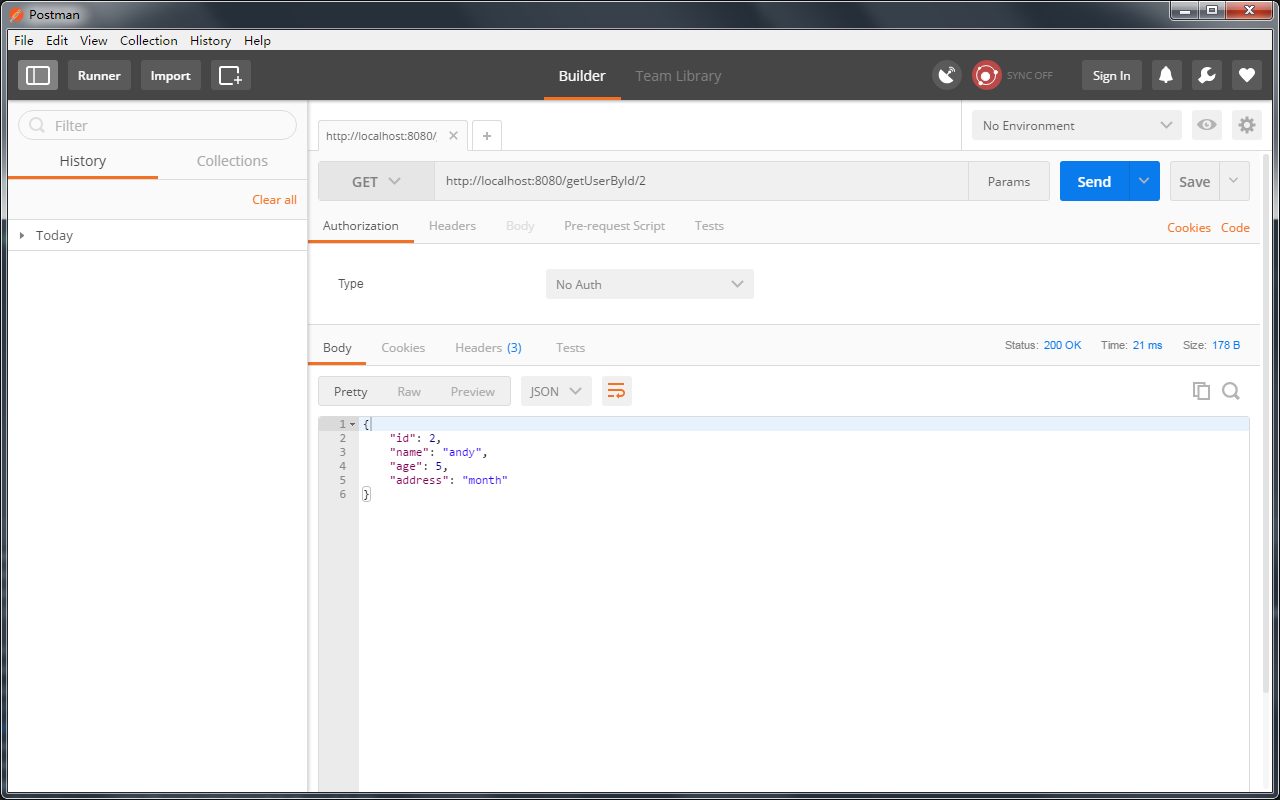
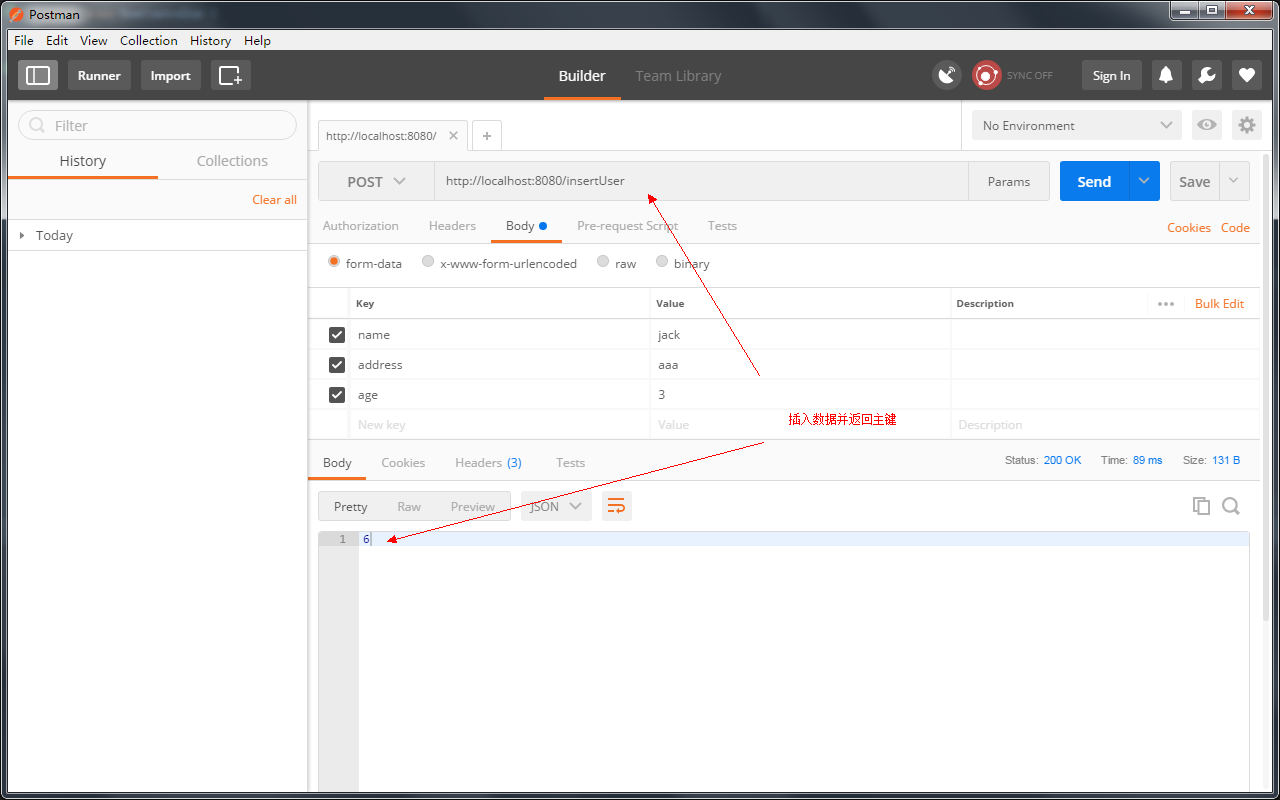
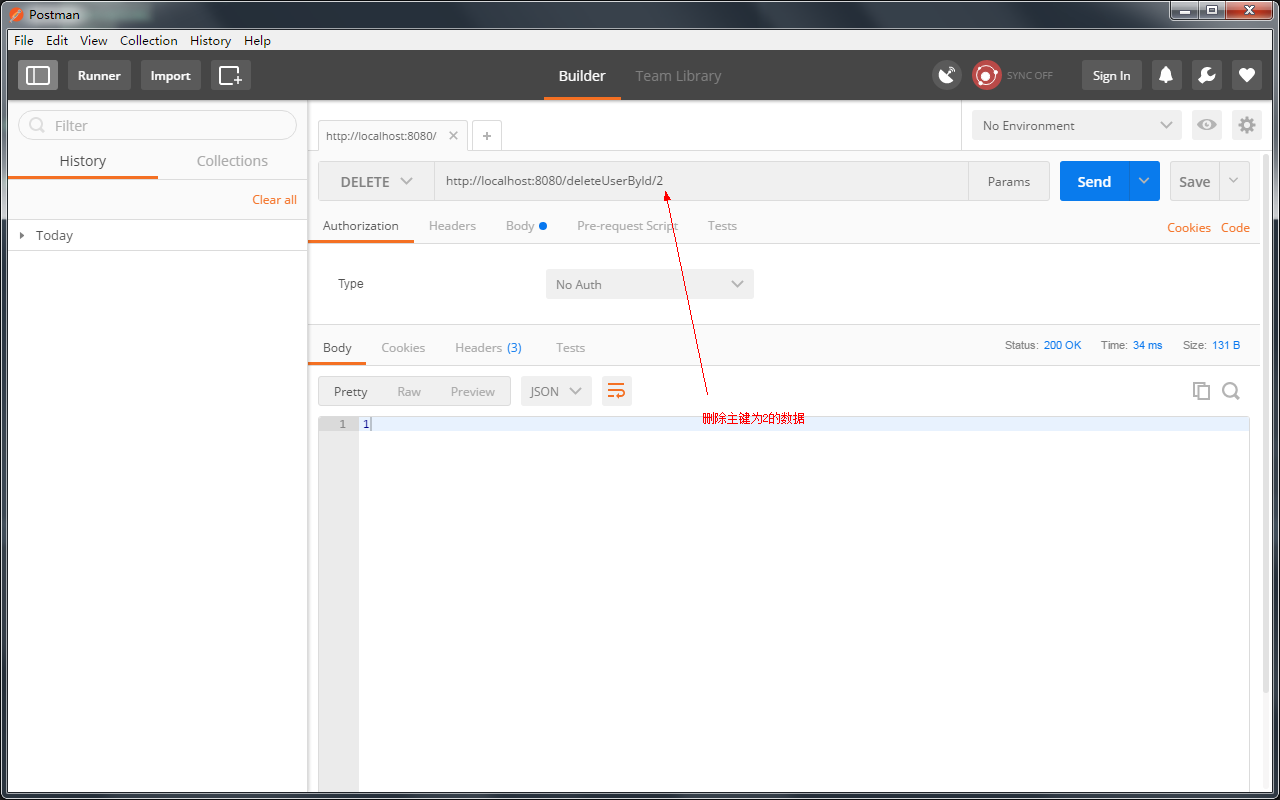
使用Postman工具测试(有两种:浏览器插件版,安装版,我用的是安装版),这里简单列举几个测试结果:
三、JpaRepository
Java Persistence API是一种标准技术,可以将对象“映射”到关系数据库。spring-boot-starter-data-jpa POM提供了一种快速入门的方法。它提供了以下关键依赖项:
- Hibernate: One of the most popular JPA implementations.
- Spring Data JPA: Makes it easy to implement JPA-based repositories.
- Spring ORMs: Core ORM support from the Spring Framework.
使用方法:创建持久层实现接口,并用接口实现JpaRepository<%Bean%,%PrimaryKey%>(Bean为实体类,PrimaryKey为实体类的主键,在JpaRepository中已经有部分接口方法,视情况自加);
增加pom库的依赖:
<!-- spring-data-jpa -->

<dependency>

    <groupId>org.springframework.boot</groupId>

    <artifactId>spring-boot-starter-data-jpa</artifactId>

</dependency>
创建实体类Student(注意要声明实体类的注解,@Entity、@Id):
package com.cn.entity;

import javax.persistence.Entity;

import javax.persistence.GeneratedValue;

import javax.persistence.Id;

/**

 * @program: spring-boot-example

 * @description: 学生实体类

 * @author:

 * @create: 2018-05-02 10:47

 **/

@Entity

public class Student {

    @Id

    @GeneratedValue

    private int id;

    private String name;

    private int age;

    private int grade;

    @Override

    public String toString() {

        return "Student{" +

            "id=" + id +

            ", name='" + name + '\'' +

            ", age=" + age +

            ", grade=" + grade +

            '}';

    }

    public int getId() {

        return id;

    }

    public void setId(int id) {

        this.id = id;

    }

    public String getName() {

        return name;

    }

    public void setName(String name) {

        this.name = name;

    }

    public int getAge() {

        return age;

    }

    public void setAge(int age) {

        this.age = age;

    }

    public int getGrade() {

        return grade;

    }

    public void setGrade(int grade) {

        this.grade = grade;

    }

}
Student.java
创建StudentService接口,StudentServiceImpl实现类:
package com.cn.service;

import com.cn.entity.Student;

/**

 * @program: spring-boot-example

 * @description:

 * @author:

 * @create: 2018-05-02 11:12

 **/

public interface StudentService {

    Student findByName(String name);

    Student findByNameAndAge(String name, Integer age);

    Student findUser(String name);

}
StudentService.java
package com.cn.service;

import com.cn.dao.StudentDao;

import com.cn.entity.Student;

import org.springframework.beans.factory.annotation.Autowired;

import org.springframework.stereotype.Service;

/**

 * @program: spring-boot-example

 * @description:

 * @author:

 * @create: 2018-05-02 11:13

 **/

@Service

public class StudentServiceImpl implements StudentService{

    @Autowired

    private StudentDao studentDao;

    @Override

    public Student findByName(String name) {

        return studentDao.findByName(name);

    }

    @Override

    public Student findByNameAndAge(String name, Integer age) {

        return studentDao.findByNameAndAge(name,age);

    }

    @Override

    public Student findUser(String name) {

        return studentDao.findUser(name);

    }

}
StudentServiceImpl.java
创建StudentController:
package com.cn.controller;

import com.cn.entity.Student;

import com.cn.service.StudentService;

import org.springframework.beans.factory.annotation.Autowired;

import org.springframework.web.bind.annotation.PathVariable;

import org.springframework.web.bind.annotation.RequestMapping;

import org.springframework.web.bind.annotation.RequestParam;

import org.springframework.web.bind.annotation.RestController;

/**

 * @program: spring-boot-example

 * @description:

 * @author:

 * @create: 2018-05-02 11:15

 **/

@RestController

public class StudentController {

    @Autowired

    private StudentService studentService;

    @RequestMapping("findByName/{name}")

    public Student findByName(@PathVariable String name) {

        return studentService.findByName(name);

    }

    @RequestMapping("findByNameAndAge")

    public Student findByNameAndAge(@RequestParam("name") String name,@RequestParam("age") Integer age) {

        return studentService.findByNameAndAge(name,age);

    }

    @RequestMapping("findUser/{name}")

    public Student findUser(@PathVariable String name) {

        return studentService.findUser(name);

    }

}
StudentController.java
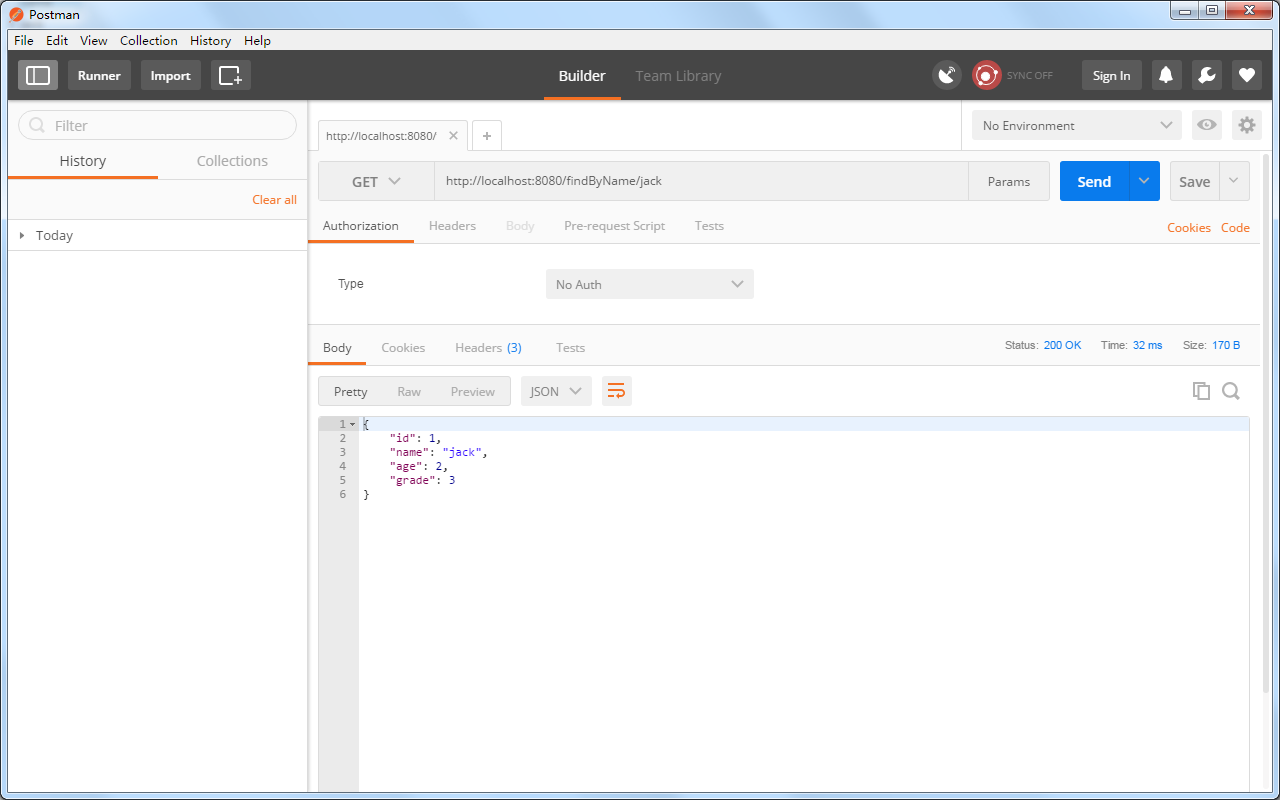
同样适用Postman测试,结果如下:

完整示例:https://gitee.com/lfalex/spring-boot-example
参考官方文档:https://docs.spring.io/spring-boot/docs/current-SNAPSHOT/reference/htmlsingle/#boot-documentation
(三)SpringBoot2.0基础篇- 持久层,jdbcTemplate和JpaRespository的更多相关文章
- (三)SpringBoot基础篇- 持久层,jdbcTemplate和JpaRespository
一.介绍 SpringBoot框架为使用SQL数据库提供了广泛的支持,从使用JdbcTemplate的直接JDBC访问到完整的"对象关系映射"技术(如Hibernate).Spri ...
- (六)SpringBoot2.0基础篇- Redis整合(JedisCluster集群连接)
一.环境 Redis:4.0.9 SpringBoot:2.0.1 Redis安装:Linux(Redhat)安装Redis 二.SpringBoot整合Redis 1.项目基本搭建: 我们基于(五) ...
- (二)SpringBoot2.0基础篇- 静态资源的访问及Thymeleaf模板引擎的使用
一.描述 在应用系统开发的过程中,不可避免的需要使用静态资源(浏览器看的懂,他可以有变量,例:HTML页面,css样式文件,文本,属性文件,图片等): 并且SpringBoot内置了Thymeleaf ...
- (四)SpringBoot2.0基础篇- 多数据源,JdbcTemplate和JpaRepository
在日常开发中,经常会遇到多个数据源的问题,而SpringBoot也有相关API:Configure Two DataSources:https://docs.spring.io/spring-boot ...
- (一)SpringBoot2.0基础篇- 介绍及HelloWorld初体验
1.SpringBoot介绍: 根据官方SpringBoot文档描述,BUILD ANYTHING WITH SPRING BOOT (用SPRING BOOT构建任何东西,很牛X呀!),下面是官方文 ...
- (五)SpringBoot2.0基础篇- Mybatis与插件生成代码
SpringBoot与Mybatis合并 一.创建SpringBoot项目,引入相关依赖包: <?xml version="1.0" encoding="UTF-8 ...
- (七)SpringBoot2.0基础篇- application.properties属性文件的解析及获取
默认访问的属性文件为application.properties文件,可在启动项目参数中指定spring.config.location的参数: java -jar myproject.jar --s ...
- 【转】WF4.0 (基础篇)
转自:http://www.cnblogs.com/foundation/category/215023.html 作者:WXWinter —— 兰竹菊梅★春夏秋冬☆ —— wxwinter@16 ...
- SpringBoot2.0 基础案例(12):基于转账案例,演示事务管理操作
本文源码 GitHub地址:知了一笑 https://github.com/cicadasmile/spring-boot-base 一.事务管理简介 1.事务基本概念 一组业务操作ABCD,要么全部 ...
随机推荐
- .net中使用mysql回滚和sqlserver回滚的区别
关于sqlserver事务和mysql事务 首先这是一种方法 public static int GetExecteQuery() { SqlConnection ...
- HTTP 错误 401.0 - Unauthorized 的解决方案
1.安装vs2015后,以前做的项目中Forms身份验证,竟然不能使用了 2.打开当前项目属性,将windows身份验证属性改为启用 3.vs2015生成的mvc项目中,webconfig缺失auth ...
- array和matrix
array:数组 matrix:矩阵 list:列表 a = [[1,2,3],[4,5,6]] 两种array的定义方式,第一种方式可以看出list不是array,但却有很大的联系 a = np.a ...
- wireMock快速伪造restful服务
官网地址:http://wiremock.org/ Jar下载:http://repo1.maven.org/maven2/com/github/tomakehurst/wiremock/1.57/w ...
- 自定义组件---图片和文字实现ImageButton效果
1.效果图 2.自定义代码: <span style="font-family:Comic Sans MS;font-size:14px;">public class ...
- 如何求出数组中最小(或者最大)的k个数(least k问题)
输入n个整数,如何求出其中最小的k个数? 解法1. 当然最直观的思路是将数组排序,然后就可以找出其中最小的k个数了,时间复杂度以快速排序为例,是O(nlogn): 解法2. 借助划分(Partitio ...
- 安装maven提示ERROR: JAVA_HOME is set to an invalid directory.
查询网上资料发现多种解决办法:有的是多写了分号,有的路径错误. 需要注意的是maven配置前需要配置好jdk的路径. 我的java_home 之前的配置为:C:\Program Files\Java\ ...
- 分享cropper剪切单张图片demo
<!DOCTYPE html> <html lang="zh-cn"> <head> <meta charset="UTF-8& ...
- Oracle 12.2 设置LOCAL_TEMP_TABLESPACE
12.2 设置LOCAL_TEMP_TABLESPACE SQL> select username,DEFAULT_TABLESPACE,TEMPORARY_TABLESPACE,LOCAL_ ...
- 【整理】MySQL查询优化
优化建议 对查询进行优化,应尽量避免全表扫描,首先应考虑在 where 及 order by 涉及的列上建立索引. 应尽量避免在 where 子句中对字段进行 null 值判断,否则将导致引擎放弃使用 ...