
GJM: Unity3D基于Socket通讯例子 [转载]
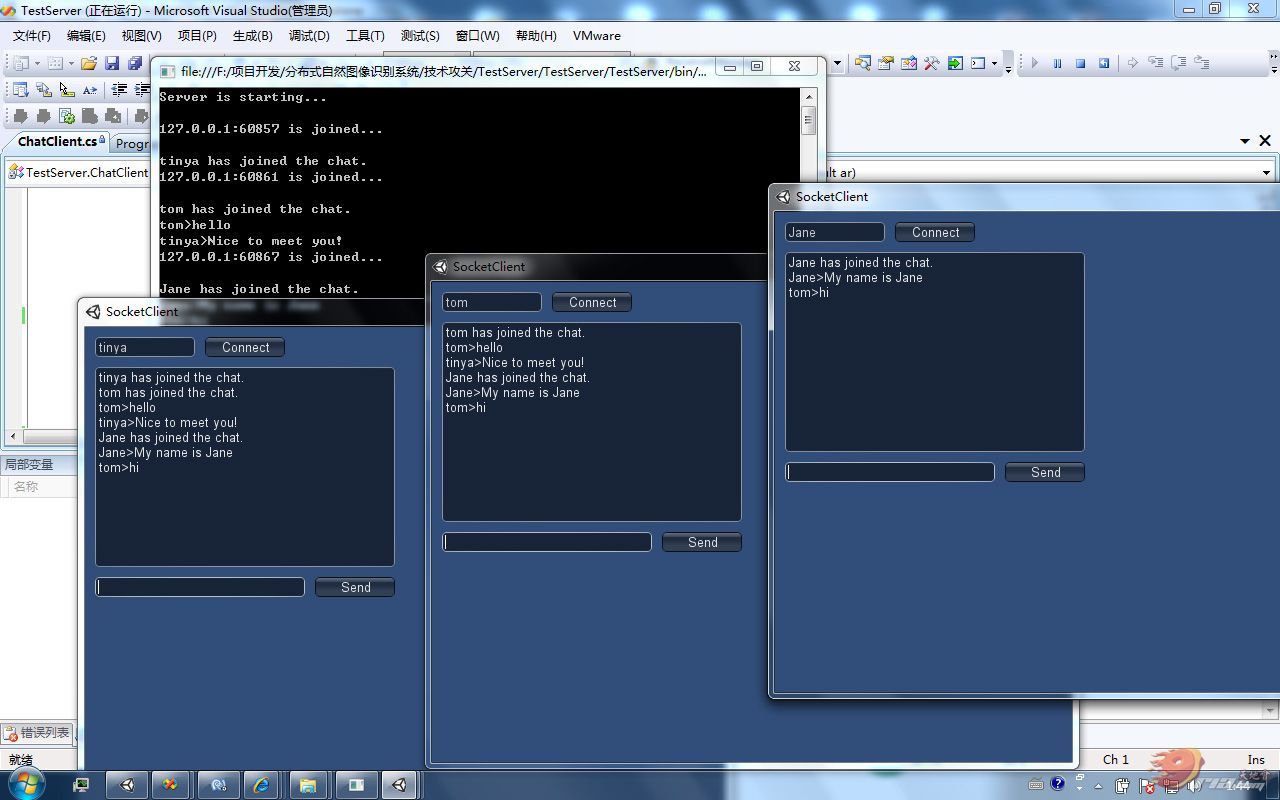
首先创建一个C# 控制台应用程序, 直接服务器端代码丢进去,然后再到Unity 里面建立一个工程,把客户端代码挂到相机上,运行服务端,再运行客户端。 高手勿喷!~!
完全源码已经奉上,大家开始研究吧!! 嘎嘎嘎!
服务端代码:Program.cs
- using System;
- using System.Collections.Generic;
- using System.Linq;
- using System.Text;
- using System.Net.Sockets;
- namespace SoketDemo
- {
- class Program
- {
- // 设置连接端口
- const int portNo = 500;
- static void Main(string[] args)
- {
- // 初始化服务器IP
- System.Net.IPAddress localAdd = System.Net.IPAddress.Parse("127.0.0.1");
- // 创建TCP侦听器
- TcpListener listener = new TcpListener(localAdd, portNo);
- listener.Start();
- // 显示服务器启动信息
- Console.WriteLine("Server is starting...n");
- // 循环接受客户端的连接请求
- while (true)
- {
- ChatClient user = new ChatClient(listener.AcceptTcpClient());
- // 显示连接客户端的IP与端口
- Console.WriteLine(user._clientIP + " is joined...n");
- }
- }
- }
- }
复制代码
服务端代码:ChatClient.cs
- using System;
- using System.Collections.Generic;
- using System.Linq;
- using System.Text;
- using System.Collections;
- using System.Net.Sockets;
- namespace SoketDemo
- {
- class ChatClient
- {
- public static Hashtable ALLClients = new Hashtable(); // 客户列表
- private TcpClient _client; // 客户端实体
- public string _clientIP; // 客户端IP
- private string _clientNick; // 客户端昵称
- private byte[] data; // 消息数据
- private bool ReceiveNick = true;
- public ChatClient(TcpClient client)
- {
- this._client = client;
- this._clientIP = client.Client.RemoteEndPoint.ToString();
- // 把当前客户端实例添加到客户列表当中
- ALLClients.Add(this._clientIP, this);
- data = new byte[this._client.ReceiveBufferSize];
- // 从服务端获取消息
- client.GetStream().BeginRead(data, 0, System.Convert.ToInt32(this._client.ReceiveBufferSize), ReceiveMessage, null);
- }
- // 从客戶端获取消息
- public void ReceiveMessage(IAsyncResult ar)
- {
- int bytesRead;
- try
- {
- lock (this._client.GetStream())
- {
- bytesRead = this._client.GetStream().EndRead(ar);
- }
- if (bytesRead < 1)
- {
- ALLClients.Remove(this._clientIP);
- Broadcast(this._clientNick + " has left the chat");
- return;
- }
- else
- {
- string messageReceived = System.Text.Encoding.ASCII.GetString(data, 0, bytesRead);
- if (ReceiveNick)
- {
- this._clientNick = messageReceived;
- Broadcast(this._clientNick + " has joined the chat.");
- //this.sendMessage("hello");
- ReceiveNick = false;
- }
- else
- {
- Broadcast(this._clientNick + ">" + messageReceived);
- }
- }
- lock (this._client.GetStream())
- {
- this._client.GetStream().BeginRead(data, 0, System.Convert.ToInt32(this._client.ReceiveBufferSize), ReceiveMessage, null);
- }
- }
- catch (Exception ex)
- {
- ALLClients.Remove(this._clientIP);
- Broadcast(this._clientNick + " has left the chat.");
- }
- }
- // 向客戶端发送消息
- public void sendMessage(string message)
- {
- try
- {
- System.Net.Sockets.NetworkStream ns;
- lock (this._client.GetStream())
- {
- ns = this._client.GetStream();
- }
- // 对信息进行编码
- byte[] bytesToSend = System.Text.Encoding.ASCII.GetBytes(message);
- ns.Write(bytesToSend, 0, bytesToSend.Length);
- ns.Flush();
- }
- catch (Exception ex)
- {
- }
- }
- // 向客户端广播消息
- public void Broadcast(string message)
- {
- Console.WriteLine(message);
- foreach (DictionaryEntry c in ALLClients)
- {
- ((ChatClient)(c.Value)).sendMessage(message + Environment.NewLine);
- }
- }
- }
- }
复制代码
客户端代码 :ClientHandler
- using UnityEngine;
- using System.Collections;
- using System;
- using System.Collections.Generic;
- using System.ComponentModel;
- using System.Text;
- using System.Net.Sockets;
- public class ClientHandler : MonoBehaviour
- {
- const int portNo = 500;
- private TcpClient _client;
- byte[] data;
- public string nickName = "";
- public string message = "";
- public string sendMsg = "";
- void OnGUI()
- {
- nickName = GUI.TextField(new Rect(10, 10, 100, 20), nickName);
- message = GUI.TextArea(new Rect(10, 40, 300, 200), message);
- sendMsg = GUI.TextField(new Rect(10, 250, 210, 20), sendMsg);
- if (GUI.Button(new Rect(120, 10, 80, 20), "Connect"))
- {
- //Debug.Log("hello");
- this._client = new TcpClient();
- this._client.Connect("127.0.0.1", portNo);
- data = new byte[this._client.ReceiveBufferSize];
- //SendMessage(txtNick.Text);
- SendMessage(nickName);
- this._client.GetStream().BeginRead(data, 0, System.Convert.ToInt32(this._client.ReceiveBufferSize), ReceiveMessage, null);
- };
- if (GUI.Button(new Rect(230, 250, 80, 20), "Send"))
- {
- SendMessage(sendMsg);
- sendMsg = "";
- };
- }
- public void SendMessage(string message)
- {
- try
- {
- NetworkStream ns = this._client.GetStream();
- byte[] data = System.Text.Encoding.ASCII.GetBytes(message);
- ns.Write(data, 0, data.Length);
- ns.Flush();
- }
- catch (Exception ex)
- {
- //MessageBox.Show(ex.ToString());
- }
- }
- public void ReceiveMessage(IAsyncResult ar)
- {
- try
- {
- int bytesRead;
- bytesRead = this._client.GetStream().EndRead(ar);
- if (bytesRead < 1)
- {
- return;
- }
- else
- {
- Debug.Log(System.Text.Encoding.ASCII.GetString(data, 0, bytesRead));
- message += System.Text.Encoding.ASCII.GetString(data, 0, bytesRead);
- }
- this._client.GetStream().BeginRead(data, 0, System.Convert.ToInt32(this._client.ReceiveBufferSize), ReceiveMessage, null);
- }
- catch (Exception ex)
- {
- }
- }
- }
原 帖 地址 http://www.u3dchina.com/forum.php?mod=viewthread&tid=4741&extra=page%3D1%26filter%3Dsortid%26sortid%3D14%26sortid%3D14
如有版权问题 请联系我:993056011@qq.com
GJM: Unity3D基于Socket通讯例子 [转载]的更多相关文章
- Unity3d基于Socket通讯例子(转)
按语:按照下文,服务端利用网络测试工具,把下面客户端代码放到U3D中摄像机上,运行结果正确. http://www.manew.com/thread-102109-1-1.html 在一个网站上看到有 ...
- 基于Socket通讯(C#)和WebSocket协议(net)编写的两种聊天功能(文末附源码下载地址)
今天我们来盘一盘Socket通讯和WebSocket协议在即时通讯的小应用——聊天. 理论大家估计都知道得差不多了,小编也通过查阅各种资料对理论知识进行了充电,发现好多demo似懂非懂,拷贝回来又运行 ...
- 用Robot Framework+python来测试基于socket通讯的C/S系统(网络游戏)
项目终于换了方案,改用socket来实现而不是之前的http了,所以测试工具就不能用以前的了,因为测试人手少,逼不得已的必须要挖掘更多的自动化方案来弥补.于是先研究了下python的socket解决方 ...
- Unity3d网络游戏Socket通讯
http://blog.csdn.net/wu5101608/article/details/37999409
- php和c++socket通讯(基于字节流,二进制)
研究了一下PHP和C++socket通讯,用C++作为服务器端,php作为客户端进行. socket通讯是基于协议的,因此,只要双方协议一致就行. 关于协议的选择:我看过网上大部分协议都是在应用层的协 ...
- C#基于Socket的CS模式的完整例子
基于Socket服务器端实现本例主要是建立多客户端与服务器之间的数据传输,首先设计服务器.打开VS2008,在D:\C#\ch17目录下建立名为SocketServer的Windows应用程序.打开工 ...
- 闲来无事,写个基于TCP协议的Socket通讯Demo
.Net Socket通讯可以使用Socket类,也可以使用 TcpClient. TcpListener 和 UdpClient类.我这里使用的是Socket类,Tcp协议. 程序很简单,一个命令行 ...
- Android 基于Socket的聊天应用(二)
很久没写BLOG了,之前在写Android聊天室的时候答应过要写一个客户(好友)之间的聊天demo,Android 基于Socket的聊天室已经实现了通过Socket广播形式的通信功能. 以下是我写的 ...
- 高性能、高可用性Socket通讯库介绍 - 采用完成端口、历时多年调优!(附文件传输程序)
前言 本人从事编程开发十余年,因为工作关系,很早就接触socket通讯编程.常言道:人在压力下,才可能出非凡的成果.我从事的几个项目都涉及到通讯,为我研究通讯提供了平台,也带来了动力.处理socket ...
随机推荐
- angular利用ui-router登录检查
angular利用ui-router登录检查 SAP都会有这个问题,session过期或者页面被刷新的情况下应该进入登录页. 监听ui-router的satte事件可以实现当state切换的时候检查登 ...
- echart饼状图使用,打发时间。
新公司,刚来几天,闲着没事,领导让我做些无关痛痒的活,优化报表统计!!!之前是用flash做的,现在要改成echart实现.好吧,之前没用过,抱着学习态度,研究了下.写点东西打发下时间,能帮到需要帮助 ...
- Javascript快速入门(上篇)
Javascript的熟练之路,小弟来了. JavaScript简介:JavaScript一种直译式脚本语言,是一种动态类型.弱类型.基于原型的语言,内置支持类型.它的解释器被称为JavaScript ...
- AngularJs ui-router 路由的简单介绍
之前有写过一篇关于Angular自带的路由:ngRoute.今天来说说Angular的第三方路由:ui-router.那么有人就会问:为什么Angular有了自带的路由,我们还需要用ui-router ...
- [OpenCV] Samples 03: cout_mat
操作Mat元素时:I.at<double>(1,1) = CV_PI; /* * * cvout_sample just demonstrates the serial out capab ...
- 在<a></a>标签中调用javascript脚本
有时候,我们点击了<a></a>标签(除了跳转到指定链接外)想要它调用某个方法,及调用javascript脚本,该如何做: 方法1:<a href="javas ...
- Testing - 测试基础 - 方法
选择和使用测试方法和工具 按照测试需求用途(或测试技巧)选择 在软件开发生命周期和软件测试流程中适当地选择 按照测试人员实际技能选择 选择可提供的和可执行的 测试方法 类别及技巧 目标 使用方法 举例 ...
- 一个java页游服务器框架
一.前言 此游戏服务器架构是一个单服的形式,也就是说所有游戏逻辑在一个工程里,没有区分登陆服务器.战斗服务器.世界服务器等.此架构已成功应用在了多款页游服务器 .在此框架中没有实现相关业务逻辑,只有简 ...
- 第2/24周 页_SQL Server 中数据存储的基本单位
上周通过探讨SQL Server如何执行一个查询奠定了基础.我也在那里提到页是8kb的缓存.今天我们对页进行进一步集中探讨,从性能调优角度挖掘出更多的细节. 页是SQL Server的基础,在SQL ...
- javascript设计模式之单体模式
一入前端深似海,刚入前端,以为前端只是div+css布局外加jquery操作DOM树辣么简单.伴随着对前端学习的深入,发现前端也是博大精深,而且懂得越多,才发现自己越无知,所以一定不能停下脚步的学习. ...