
simmon effect(psychology experiment) : this time, we add file_function who can creat a file in the window which contains our result
#the real experiment for simon effect

#load the library which is our need

import pygame

import sys

import random

from pygame.locals import *

#creat the subject information function

def sub_info():

    sub_ID = input("please input your number: ")

    sub_name = input("please input your name: ")

    sub_male = input("please input your male: ")

    sub_age = input("please input your age: ")

    return sub_ID, sub_name,sub_male,sub_age

#the variable result will be a tuple

result = sub_info()

#turn the tuple to a list

result = list(result)

pygame.init()

win = pygame.display.set_mode((800,600),DOUBLEBUF|HWSURFACE)

left = (200,300)

right = (600,300)

red  =(255,0,0)

blue = (0,0,255)

black = (0,0,0)

#wait for the pressed key

def wait4key(duration,key_list):

    """the function is to wait for subject to press the right key , and the experient will continue untill the\

subject press the key

duration : the time which is the subject wait to press the key ,if the time is too long ,the experiment will\

continue automaticly.

key_list: the key which the subject need to press to continue the experiment, and the key_list must \

be a list such as [K_A,K_/]"""

    fake_bool =False

    time_out = False

    #empty the event before

    pygame.event.clear()

    #use for count the time

    start_time = pygame.time.get_ticks()

    #if the subject does not press the right key, he will in the while loop all the time untill the duration is exhausted

    while  not (fake_bool or time_out):

        end_time = pygame.time.get_ticks()

        #if the duration is too long , the experiment will continue

        if end_time - start_time > duration:

            time_out = True

        #if subject press the right key ,the experimet will continue

        for i in pygame.event.get():

            if i.type ==KEYDOWN:

                if i.key in key_list:

                    #prepare for the result of the function

                    response_time = pygame.time.get_ticks()

                    key_name = pygame.key.name(i.key)

                    #if has the right key ,the loop will quit

                    fake_bool = True

    #in the end, if subject press the key ,we will collect the time , and the name of the key

    if fake_bool:

        return start_time, response_time, key_name

    #the purpose of the next line is stay the same with the result

    else:

        return start_time, None, None

#experiment for 10 times

#creat the list

#L mean left ,R mean right , RE mean the color red, BL mean the color blue

lis = [ ["L","RE","Z"],

        ["L","BL","/"],

        ["R","RE","Z"],

        ["R","BL","/"]]

#creat a function to ran one trial

#the list for store our result

lis2 = []

def one_trial_list(pars):

#the parameters must be a list which contains the location, color ,right response of the stimuli and the the sequence of the element of parameters should not change"""

    global left

    global right

    global red

    global blue

    global black

    global result

    loc,col,ress=pars

    if loc =="L":

        pos = left

    if loc =="R":

        pos = right

    if col =="BL":

        color = red

    if col == "RE":

        color = blue

    win.fill(black)

    pygame.draw.circle(win,color,pos,20,0)

    pygame.display.flip()

    result1 = wait4key(2000,[K_z,K_SLASH])

    #turn the result1 which is the result of the wait4key function to a list

    result1 = list(result1)

    #join two list and then give it to a new variable

    result2 = result + result1

    #turn the list to a string and add a space to the end

    #we need to turn the element of result2 to string type, because some element are int

    resul_map = map(str,result2)

    result2 = ",".join(resul_map) + "\n"

    print(result2)2

    return result2

#random our lis which contains four trails

lis1 = lis*2

random.shuffle(lis1)

#run four trials and write our  result to a new file

#open a file

with open("C:/Users/mike1/Desktop/simmon_result.txt","w",encoding = "utf-8") as f1:

    for i in lis1:

        result4 = one_trial_list(i)

        #write every result to the file

        f1.write(result4)

        #when one trail end ,fill the window black again

        win.fill(black)

        pygame.display.flip()

        pygame.time.delay(500)

    pygame.quit()

sys.exit()
the result
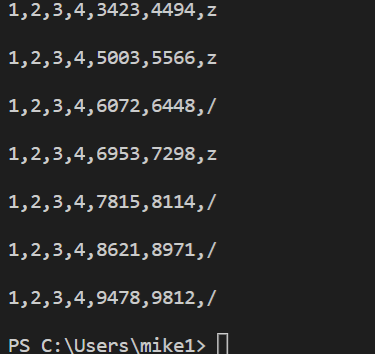
we also creat a file in the window

simmon effect(psychology experiment) : this time, we add file_function who can creat a file in the window which contains our result的更多相关文章
- simon effect (psychology experiment ) : build the function of wait4key()
## #the real experiment for simon effect #load the library which is our need import pygame import sy ...
- the simmon effect(in psychology) :build the function of subject_information(modify the experiment programme),before we begin the experiment
#the real experiment for simon effect #load the library which is our need import pygame import sys i ...
- simmon effect : build the funcion of trail list
#the real experiment for simon effect #load the library which is our need import pygame import sys i ...
- How can I add a new user as sudoer using the command line?
Two ways to use sudo command for a standard user account: First, If you want to use sudo command for ...
- FreeHttp (a fiddler add in to temper the http)
introduction FreeHttp is a Fiddler plugin. With FreeHttp you can modify the request or response mess ...
- 2 Add Two Numbers
// Java public ListNode addTwoNumbers(ListNode l1, ListNode l2) { return add(l1, l2, false); } priva ...
- How to add alias on Mac(It's common for most system)
Since these files are hidden you will have to do an ls -a to list them. If you don't have one you ca ...
- Your project is not referencing the ".NETPortable,Version=v4.5,Profile=Profile259" framework. Add a reference to ".NETPortable,Version=v4.5,Profile=Profile259" in the "frameworks" section of your proj
i want to add nuget packages to my portable class library project , then i add a project.json to my ...
- git add详解
git add . :他会监控工作区的状态树,使用它会把工作时的所有变化提交到暂存区,包括文件内容修改(modified)以及新文件(new),但不包括被删除的文件. git add -u :他仅监控 ...
随机推荐
- Yandex Big Data Essentials Week1 Unix Command Line Interface File Content exploration
cat displays the contents of a file at the command line copies or apppend text file into a document ...
- SpringBoot配置文件的加载优先级顺序
application.properties加载 Spring Boot启动会扫描以下位置的application.properties或者application.yml文件作为Spring Boot ...
- windows本地安装以及使用Jenkins
首先保证本地已安装JDK,Jenkins是需要Java开发的,需要JDK运行环境,此处不提供,网上一大把. 一.Jenkin安装: 下载Jekins,到官网下载,https://jenkins.io/ ...
- day14 jQuery
day13-14 jQueryjQuery是对js和dom的封装,相当于一个类库使用jQuery的目的: 1:获取标签 2:修改jQuery提供的方法:http://www.php100.com/ma ...
- python制作ico图标
import PythonMagick img = PythonMagick.Image('image.png') img.sample('64x64') img.write('image_64x64 ...
- WinBox软路由的自定义IP设定
软路由ros(MIKRTIK)安装简单步骤 由于本主也是刚刚接触软路由这个硬件方面的知识.所以也是略知皮毛而已,今天通过网上的学习,然后自己总结了一下怎么在软路由中设定一个自定义IP ...
- dotnetcore3.1 WPF 实现多语言
dotnetcore3.1 WPF 实现多语言 Intro 最近把 DbTool 从 WinForm 迁移到了 WPF,并更新到了 dotnet core 3.1,并实现了基于 Microsoft.E ...
- visual studio 2019:error c2760
笔者在敲书上的练习题时(完全按照书上代码,没有语法错误),报"error c2760"错误. 代码出错位置(代码并没有问题): 在网上查找了一下,发现"c2760&quo ...
- JS DOM用不同方法获取节点及对节点插入、复制和移除
操作节点的方法 appendChild() insertBefore() replaceChild() cloneNode() normalize() splitText() sppendChild( ...
- postgresql开篇
postgresql 作为官方号称的最先进的开源数据库,从今天(2020-1-19)起开始系统的学习一下,记录自己学习的点点滴滴.