
BottomNavigationView 的使用
转载请注明出处:http://blog.csdn.net/wl9739/article/details/52875710
BottomNavigationView 很早之前就在 Material Design 中出现了,但是直到 Android Support Library 25 中才增加了 BottomNavigationView 控件。
该控件使用方法如下:
- 在 build.gradle 文件中增加依赖:
compile 'com.android.support:design:25.0.0'
- 1
- 1
- 在 res/menu/ 目录下创建一个 xml 文件(没有该目录则手动创建一个),我将其命名为 navigation.xml
<?xml version="1.0" encoding="utf-8"?>

<menu xmlns:android="http://schemas.android.com/apk/res/android">

    <item

        android:id="@+id/add"

        android:icon="@drawable/ic_call_white_24dp"

        android:title="call" />

    <item

        android:id="@+id/delete"

        android:icon="@drawable/ic_announcement_white_24dp"

        android:title="message" />

    <item

        android:id="@+id/setting"

        android:icon="@drawable/ic_settings_white_24dp"

        android:title="setting" />

    <item

        android:id="@+id/me"

        android:icon="@drawable/ic_account_circle_white_24dp"

        android:title="me"/>

</menu>
在布局文件中添加如下代码即可:
<android.support.design.widget.BottomNavigationView

        android:layout_width="match_parent"

        android:layout_height="wrap_content"

        android:layout_alignParentBottom="true"

        app:menu="@menu/navigation"/>
注意这里的 app:menu="@menu/navigation" 引用了刚才创建的菜单文件。
最后,在代码中添加 BottomNavigationView 的事件监听:
navigationView.setOnNavigationItemSelectedListener(

            new BottomNavigationView.OnNavigationItemSelectedListener() {

                @Override

                public boolean onNavigationItemSelected(@NonNull MenuItem item) {

                    ......

                    return true;

                }

            });
这样就完成了一个简单的 BottomNavigationView 控件。该控件有几个地方需要注意的:
- 底部导航栏高度默认是 56dp。
- 菜单元素只能是 3~5 个。如果个数少于3个或者多于5个,则会报错。
- icon 的选中颜色默认是
@color/colorPrimary。当然你也可以使用app:itemIconTint="@android:color/white"来自定义,这样定以后,所有的 icon 颜色都是这个了。 - 菜单元素文字的默认颜色是
@color/colorPrimary。你可以使用app:itemTextColor="@android:color/white"自定义。 - 底部导航栏背景颜色默认是当前样式的背景色(白色/黑色),你可以使用
app:itemBackground="@android:color/black"来更改。
写个具体的例子吧。比如新建一个项目,activity_main.xml 布局如下:
<?xml version="1.0" encoding="utf-8"?>

<RelativeLayout

    xmlns:android="http://schemas.android.com/apk/res/android"

    xmlns:app="http://schemas.android.com/apk/res-auto"

    xmlns:tools="http://schemas.android.com/tools"

    android:id="@+id/activity_main"

    android:layout_width="match_parent"

    android:layout_height="match_parent"

    tools:context="me.qiushui.buttomnavigationdemo.MainActivity">

    <TextView

        android:id="@+id/text"

        android:layout_width="wrap_content"

        android:layout_height="wrap_content"

        android:layout_centerInParent="true"

        android:text="Hello World!"

        android:textSize="36sp"/>

    <android.support.design.widget.BottomNavigationView

        android:id="@+id/navigation"

        android:layout_width="match_parent"

        android:layout_height="wrap_content"

        android:layout_alignParentBottom="true"

        app:itemBackground="@android:color/black"

        app:itemIconTint="@android:color/white"

        app:itemTextColor="@android:color/white"

        app:menu="@menu/navigation"/>

</RelativeLayout>
菜单文件还是沿用开始创建的那个文件(图片资源自己添加)。MainActivity.Java 代码如下:
public class MainActivity extends AppCompatActivity {

    TextView mTextView;

    private BottomNavigationView mNavigationView;

    @Override

    protected void onCreate(Bundle savedInstanceState) {

        super.onCreate(savedInstanceState);

        setContentView(R.layout.activity_main);

        mTextView = (TextView) findViewById(R.id.text);

        mNavigationView = (BottomNavigationView) findViewById(R.id.navigation);

        mNavigationView.setOnNavigationItemSelectedListener(

                new BottomNavigationView.OnNavigationItemSelectedListener() {

                    @Override

                    public boolean onNavigationItemSelected(@NonNull MenuItem item) {

                        mTextView.setText(item.getTitle().toString().toUpperCase());

                        return true;

                    }

                });

    }

}
运行效果如下图:
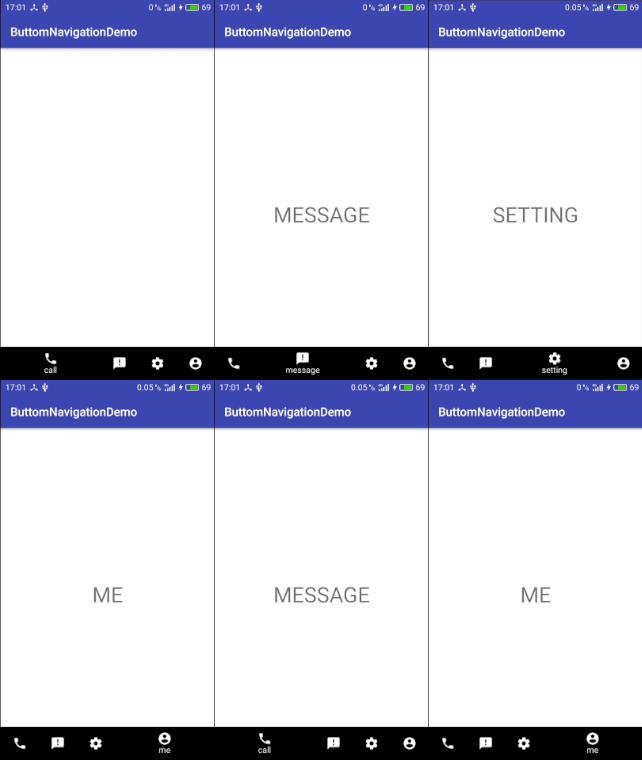
BottomNavigationView 的使用的更多相关文章
- 关于Android中使用BottomNavigationView切换横屏导致返回主页的问题
问题: 如图,"发现"页即为主页,然后我们切换到"我"页,一切正常. 那么问题来了,如果切换到"我"页后把手机横屏,则会出现下面的情况. 嗯 ...
- 第三十七篇-BottomNavigationVIew底部导航的使用
效果图: 添加底部导航和viewpaper 设置底部导航在底部 app:layout_constraintBottom_toBottomOf="parent" 新建四个fragme ...
- BottomNavigationView 使用
<?xml version="1.0" encoding="utf-8"?> <android.support.constraint.Cons ...
- Android 底部按钮BottomNavigationView + Fragment 的使用(二)
这里来试验BottomNavigationView + Fragment 底部按钮通过点击底部选项,实现中间的Fragment进行页面的切换. 使用BottomNavigationView 控件,实现 ...
- Android 底部按钮BottomNavigationView + Fragment + viewPager 的使用(一)
实现的效果,左右滑动,底部栏跟着滑动,中间加的是分帧的页面 上代码:主页面activity_main.xml <?xml version="1.0" encod ...
- BottomNavigationView结合ViewPager
BottomNavigationView是Google推出的底部导航栏组件,在没有这些底部导航组件之前,Android开发者多使用的是RadioGroup,在上一个项目开发中我们使用了Google的B ...
- BottomNavigationView的使用
BottomNavigationView的使用 废话少说, 先看东西 依赖 implementation 'com.android.support:design:26.1.0' 布局 //用这个控件需 ...
- 014 Android BottomNavigationView 底部导航组件使用
1.导入BottomNavigationView组件(点击下载按钮,安装组件) 2.新建菜单 (1)app--->src-->main--->res ,选中res目录右击new--- ...
- android BottomNavigationView 底部显示3个以上的item
你现在可以用app:labelVisibilityMode="[labeled, unlabeled, selected, auto] labeled 所有的标签都是可见的. unlabel ...
随机推荐
- 【原创】(十一)Linux内存管理slub分配器
背景 Read the fucking source code! --By 鲁迅 A picture is worth a thousand words. --By 高尔基 说明: Kernel版本: ...
- windows系统与SQL SERVER 2008数据库服务性能监控分析简要
软件系统性能测试体系流程介绍之windows系统与SQL SERVER 2008数据库服务性能监控分析简要 目前大部分测试人员对操作系统资源.中间件.数据库等性能监控分析都是各自分析各自的监控指标方式 ...
- Vue 幸运大转盘
转盘抽奖主要有两种,指针转动和转盘转动,个人觉得转盘转动比较好看点,指针转动看着头晕,转盘转动时指针是在转盘的中间位置,这里要用到css的transform属性和transition属性,这两个因为不 ...
- 【论文阅读】Learning Dual Convolutional Neural Networks for Low-Level Vision
论文阅读([CVPR2018]Jinshan Pan - Learning Dual Convolutional Neural Networks for Low-Level Vision) 本文针对低 ...
- 2019-9-23:渗透测试,基础学习,http协议数据包的认识,html css的认识,笔记
Burp suite功能模块Dashboard:扫描Proxy:拦截包,代理 drop:放弃Intruder:爆破Decoder:编码,解码repeater:重放comparer:比较 BP,prox ...
- Slickflow.Graph 开源工作流引擎快速入门之四: 图形编码建模工具使用手册
前言: 业务人员绘制流程时,通常使用图形GUI界面交互操作来完成,然而对于需要频繁操作或者管理较多流程的系统管理用户,就需要一款辅助工具,来帮助他们快速完成流程的创建和编辑更新.Slickflow.G ...
- Spring IOC初始化深度解析
1.前言 本文是基于JAVA配置方法对Spring IOC进行分析,掌握Spring IOC初始化流程对于我们更好的使用Spring.学习Spring还是很有帮助的,本文所使用的的Spring版本为5 ...
- 针对可变类型的for遍历
针对可变类型的for遍历 举个例子 lis = [1,6,1, 2, 3,3, 4, 5] for i in lis: lis.remove(i) print(lis) [6, 1, 2, 3, 3, ...
- expect脚本同步文件、expect脚本指定host和要同步的文件、构建文件分发系统、批量远程执行命令
7月20日任务 20.31 expect脚本同步文件20.32 expect脚本指定host和要同步的文件20.33 构建文件分发系统20.34 批量远程执行命令扩展:shell多线程 http:// ...
- windows虚拟机中DNS服务配置
在linux虚拟机中进行DNS服务配置并进行正向解析反向解析我博客中已经写过,下面 我来介绍一下在windows虚拟机中DNS服务的配置使用. 1.打开一台windows虚拟机中服务器管理器——角色— ...